Python service boundaries for AI features in your app
Python service boundaries for AI features: learn when to keep model code in a sidecar, how to split responsibilities, and what to avoid.
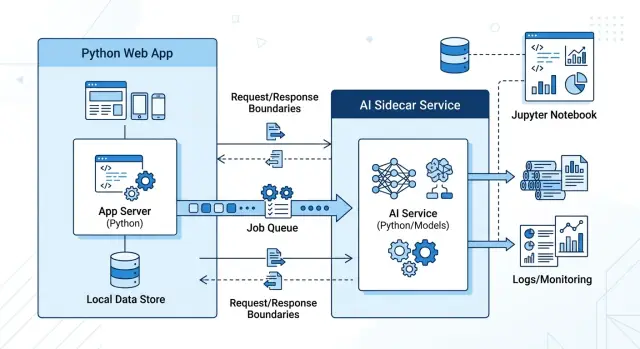
Table of Contents
Why notebook code causes trouble in a product
A notebook is great for testing an idea. It is bad at drawing clear lines. One file often holds sample data cleanup, prompt edits, model calls, and product rules in the same place. That feels fast for a few days, then the app starts to depend on work that was never shaped for production.
The first problem is hidden state. A notebook can work because cells ran in a certain order on one person’s machine. Your app does not get that luxury. It needs code that starts clean every time, handles errors the same way, and gives the same result for the same input.
When teams pull notebook code into the main app, small edits start to carry odd risks. A change meant to improve an AI answer can touch shared helpers, settings, or dependencies. Then a release that looked harmless breaks a signup flow, slows a billing job, or fills logs with errors that nobody expected.
Debugging also gets messy fast. If prompt logic, retry rules, and product checks live in the same function, nobody can tell where the failure started. Did the model return bad text? Did the app pass the wrong customer data? Did a cleanup step remove something important? You spend more time tracing side effects than fixing the actual bug.
A few notebook habits cause most of this pain:
- code depends on cell order instead of explicit setup
- test data sits next to real business rules
- temporary parsing steps turn into permanent behavior
- scripts solve one case, then quietly spread to other flows
The worst part is cultural, not technical. Once a team gets used to copying notebook snippets into the app, they stop building repeatable code. They ship quick scripts, patch them when they fail, and call that progress. Six weeks later, nobody wants to touch the feature because every change feels risky.
If an AI feature still needs prompt experiments, custom parsing, or model-specific cleanup, keep that mess away from login, billing, and the rest of the product until the behavior settles down.
What belongs in the main app
The main app should keep the parts that define your product. User accounts, billing, permissions, approval rules, pricing logic, and workflow states belong there because they need one clear source of truth.
AI can help around those rules, but it should not own them. A model can draft a reply or suggest a tag. Your app should still decide who can access the ticket, whether the action is allowed, and what gets saved.
A small AI feature often fits well inside app code. If one user action creates one model request and returns one useful result, you usually do not need a separate service yet. Think of a support agent clicking "draft reply" and getting back a short draft in a few seconds.
That setup is often enough when traffic is low and mistakes are easy to catch. Adding another service too early means more deployments, more logs, more auth work, and more places for requests to fail.
Keep the stored data tight. Save the result the product actually needs, such as the final draft, confidence flag, model name, or prompt version if you need to trace problems later. Skip raw experiment output, long debug payloads, and every alternate completion if nobody will use them.
Notebook habits cause trouble here. Teams often start saving full prompts, scratch outputs, and one-off fields because they were useful during testing. A month later, the app has messy tables and unclear rules about what matters.
A feature usually belongs in the main app when these are true:
- The app already has the user, context, and permission checks it needs.
- One request leads to one response, with no long background workflow.
- The result is small and easy to store in an existing table.
- Traffic is modest, and a bad response is annoying, not dangerous.
This is the boring option, and that is usually a good sign. If the feature feels like a normal product action with one model call attached, keep it close to the rest of the code until real complexity shows up.
When a sidecar is the safer choice
A sidecar is the safer option when the AI part of a feature behaves nothing like the rest of your app. It may take 20 seconds instead of 200 milliseconds. It may fail for reasons your team does not control. It may also change every week because prompts, model settings, and output rules still need tuning.
That is a bad fit for code that also handles login, billing, orders, or other core product actions. If an AI call slows down or breaks, users should still be able to finish the main job. Put the unstable parts in a separate service and keep the main app boring.
In practice, the sidecar should own model routing, retries, prompt templates, fallback rules, and output cleanup. Those pieces change often, and they usually depend on the model vendor more than on your product logic. Your main app can send a clear request, store the result, and move on.
A split usually pays off in a few common cases:
- The feature needs a queue because work can take a while or run in the background.
- Data prep changes often, such as chunking text, masking fields, or reformatting output.
- You expect to test different models or switch vendors soon.
- A failed AI response must not block checkout, ticket creation, or another core user action.
A simple example: a user asks your app to summarize a large file. The main app should accept the upload, save the request, and return control fast. The sidecar can pick up the job, call the model, retry on rate limits, and write the summary back when it is ready. If the model times out, the user still keeps working.
This split also makes day-to-day development easier. Product engineers can change business rules without touching prompt code. The AI team can tune prompts, parsing, and vendor logic without risking the rest of the app. That separation matters even more on small teams, where one messy module can slow everyone down.
If you think you may swap models in the next few months, split early. Replacing one API call is easy. Pulling notebook-style logic out of your main app after it spreads through controllers, jobs, and templates is not.
What a clean boundary looks like
An AI feature should feel like calling a small external tool, not like opening a hidden second app inside your codebase. The main product asks for one job. The AI service does that job and sends back a result in a format the rest of the app can handle without guesswork.
Keep the input narrow. Send a record ID, a few settings, and the exact text the model needs. Do not pass full ORM objects, session state, or half the request context just because it is easy. That makes the boundary blurry, and blurry boundaries break when your schema changes.
A good request often includes:
- a resource ID
- plain text or a cleaned summary
- a small set of options, such as tone or language
- a trace ID for logs
The response should be just as tight. Return structured fields the app can trust, such as status, draft_text, labels, score, and a short error code. Free-form paragraphs are fine for humans. They are a poor contract between services.
If the model can fail in more than one way, name those cases up front. A timeout is different from "unsafe content" and different from "model returned invalid JSON." Your app should not need to guess what happened.
Observability belongs at the boundary, not buried inside notebook-style helper code. Log how long each call took, how much it cost, which model ran, and whether the response passed validation. Teams that skip this usually hear about slowdowns from customers first.
Set limits before launch. Give the AI call a timeout. Decide what the app does if the model is slow, down, or too expensive for the request. Sometimes the fallback is cached output. Sometimes it is a simple rules path. Sometimes it is "show nothing and let the user continue." Pick one on purpose.
When teams keep the boundary this small, the core app stays calm. You can change prompts, swap models, or move the AI work to another service later without touching auth, billing, or the rest of the product. That is usually where a clean split earns its keep.
How to split an AI feature step by step
Pick one narrow job first. A good first cut is something like text classification, short summaries, or draft generation for an internal screen. If you try to move a whole workflow at once, the boundary gets messy and the app ends up depending on model behavior in too many places.
Write the contract before you write the prompt. Decide what the app sends, what the sidecar returns, and what happens when the model times out, refuses, or sends output you cannot use. A plain JSON shape is enough, but it needs clear rules.
A simple split often looks like this:
- The app sends business data that the user already has permission to access.
- The sidecar builds the prompt, picks model settings, calls the model, and cleans the output.
- The sidecar returns a strict response shape such as status, result, confidence, and error code.
- The app decides what the user can see, what gets saved, and what action needs a human click.
- Tests run against saved examples before any real traffic goes through the new path.
That separation matters more than it seems. Prompt text changes often. Model settings change often too. Post-processing rules change when you find odd output in real use. If all of that lives inside the main app, every small AI tweak turns into an app change.
Keep product rules in the app. Permissions, billing limits, audit logs, and final write actions belong there because they are product behavior, not model behavior. The sidecar should not decide who can update a record or send a message to a customer.
Saved examples make this safer. Collect a small set of real inputs, expected outputs, and ugly edge cases before launch. Then run them every time you change the prompt, model, or parser. Oleg uses this kind of boundary in AI-first product work because it keeps the core code calm while the AI layer keeps changing.
If the first version feels boring, that is usually a good sign. Boring boundaries survive growth.
A simple example: support ticket drafts
A support draft feature should save agents time without putting the whole ticket screen at risk. The safest setup keeps the web app in charge of the workflow and gives model work to a small sidecar service.
When a new ticket comes in, the main app sends only the fields the model needs. That might be the ticket text, customer tier, product area, and language. It should not send the whole user session, database objects, or screen logic. A small request is easier to test, log, and change later.
The sidecar does the messy part. It cleans the ticket text, strips signatures, removes repeated email quotes, and cuts obvious junk. Then it picks a model based on the job. A short refund request can go to a cheaper model. A long technical issue may need a stronger one. After that, the sidecar returns a draft reply and a confidence score.
The main app stays simple. It shows the draft to the support agent, lets the agent edit it, and stores the final reply that the human actually sends. That matters more than many teams expect. If you save only the raw draft, you miss the edits that show where the model helps and where it falls short.
A response from the sidecar can be as small as this:
{
  "draft": "Thanks for reporting this. I can see why that is frustrating. We are checking your billing history now.",
  "confidence": 0.82,
  "reason": "billing_refund_request"
}
If the sidecar times out, the ticket screen should still work. Agents still need search, customer history, internal notes, and the reply box. The app can show a short message like "Draft unavailable" and let the agent write the response by hand.
That is the practical line between product code and AI code. The app owns the ticket, permissions, and saved reply. The sidecar owns text cleanup, model choice, and draft generation. This kind of split is a good example of Python service boundaries for AI features because one failure does not take down the whole support flow.
Mistakes that create rework
Rework usually starts when a team treats a notebook like a production service. The fastest way to make a mess is to let notebook code call the production database directly. It feels convenient during a demo, but the notebook now depends on live tables, live credentials, and live data rules. One schema change can break the experiment, and one bad query can damage real records.
Another common mistake is asking the model for a nice paragraph when the app needs named fields. A human can read, "This looks urgent and should go to billing," but product code needs something like department=billing and priority=high. If you return free form text, someone will add string parsing later. That code usually breaks on edge cases, and then the team rewrites it under pressure.
Prompt versioning often fails in small, boring ways. One prompt lives in a notebook cell, another in a local text file, and a third in a copied script with "final_v2" in the name. A week later, nobody knows which prompt produced the good output. Keep prompts, model settings, and output schemas in tracked files with clear names. If the result changes, the team should know why.
Teams also create trouble when they pack feature flags, retries, model calls, and product rules into one function. That function grows fast. Soon it decides who can use the feature, how often to retry, what the prompt says, and how the result should appear in the UI. Testing gets painful because every change touches everything else.
The same problems show up again and again:
- experiment code reads and writes live product data
- the model returns prose when the app needs fixed fields
- prompt changes live in random files or notebook copies
- one function handles retries, flags, prompts, and business rules
- spend limits and rate limits appear only after bills spike
The last mistake is psychological. A single successful demo proves almost nothing. A support ticket draft that works five times in a row can still fail on long inputs, empty fields, slow model responses, or higher traffic. A real service needs limits, logs, retries with rules, and outputs the rest of the app can trust.
A quick boundary checklist
With Python service boundaries for AI features, the main app should still feel boring. Users sign in, billing runs, data saves, and pages load even if the model call is slow, wrong, or offline.
A clean split usually passes these checks:
- If the model call fails, the main app still completes the normal user action or falls back in a clear way. A support form should still submit. A draft can fail without blocking the whole ticket.
- You can swap the model or provider without touching billing, auth, or account logic. Those belong to the product, not the AI sidecar.
- A non-AI engineer can read the request and response contract and understand it fast. If the contract needs a notebook, prompt archaeology, or tribal knowledge, it is too messy.
- Your logs show who called the sidecar, how long it took, whether it failed, and what it cost. If usage grows, you need this data before finance or support asks for it.
- You know which outputs need human review before users act on them. Drafts, summaries, and suggestions often need review. Password resets, refunds, and legal text usually need much stricter rules.
One simple test helps. Ask a backend engineer who has never touched the feature to trace one request from the app to the sidecar and back. If they can follow the payload, the timeout, and the fallback path in a few minutes, the boundary is probably clear.
Teams often skip the logging and review rules because the demo works without them. That is a mistake. Once real users depend on the feature, missing cost data and vague approval rules create more pain than the model itself.
If two or more answers are "no," the split is not finished. You do not need a bigger system yet. You need a cleaner one.
Practical next steps for your team
Start with one AI feature that already feels messy. Pick something small but annoying: prompt text copied across handlers, notebook code pasted into a route, or model settings hidden in random files. That kind of feature gives you a clean test case for Python service boundaries for AI features because the pain is already visible.
Before anyone adds more glue code, draw the split on one page. Write down the request shape, the response shape, timeout limits, retry rules, and what the app should do when the model call fails. Keep product rules, permissions, and user state in the main app. Put prompt building, model calls, response cleanup, and model-specific logic in the sidecar.
Clear ownership matters more than most teams expect. If nobody owns the boundary, it drifts within a sprint.
- One person owns the app contract and makes sure the main app sends clean inputs
- One person owns the sidecar behavior, prompt changes, and model versions
- One person owns monitoring, logs, error review, and cost tracking
This split sounds boring. It saves rework. When the contract is stable, the product team can ship normal app changes without touching AI code, and the AI work can change without breaking the rest of the product.
Keep the first rollout narrow. Give the sidecar one job, add basic tracing, and review a small batch of real outputs every week. If the feature works, expand from there. If it keeps breaking, you learned that early, before notebook to production shortcuts spread through the codebase.
Some teams benefit from an outside review at this stage, especially when the boundary affects infra, deployment, or team structure. Oleg Sotnikov offers Fractional CTO advice on AI-first product architecture, lean infrastructure, and safer service splits. A short review can catch a bad boundary before it hardens into months of cleanup.


