Push notification token bugs that break re-engagement
Push notification token bugs can stop alerts from reaching signed-out users, switched accounts, and second devices. Learn the checks teams miss.
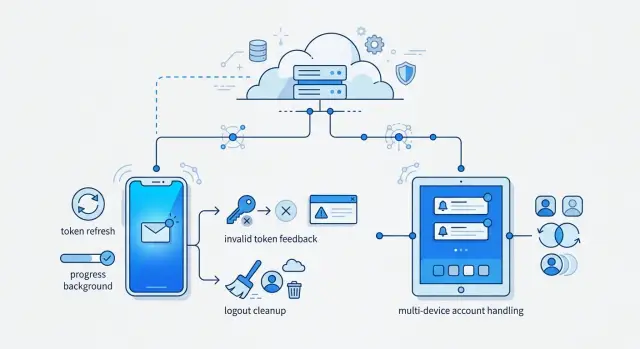
Table of Contents
Why this problem stays hidden
Push notification token bugs rarely fail in a loud way. The campaign goes out, the provider accepts most messages, and the send log looks clean. A team sees "sent" or "accepted" and assumes users saw the alert, even when a chunk of them got nothing.
That gap fools people for a long time. Push providers usually tell you whether they accepted a message for a token, not whether a person actually saw it. If your database still holds old tokens from an app reinstall, a phone upgrade, or a stale session, the numbers can still look normal on the surface.
This gets worse because bad tokens often rot slowly. One broken token does not tank a whole campaign. Ten do not either. The damage spreads across weeks, then blends into normal drops in open rate, retention, or return visits. A product team may see a small dip and blame weak copy, bad timing, or audience fatigue before anyone checks whether the token refresh flow still works.
Logout makes the problem even harder to spot. If a user signs out and another user signs in on the same phone, the old token can stay tied to the wrong account. Messages still leave your system. They may even reach a real device. They just reach the wrong person, or they stop reaching anyone after the app rotates the token and your backend never updates it.
Multi-device push notifications hide bugs in another way. A user may still receive alerts on one phone, so support never hears a complaint. The second phone stays silent because its token expired or got detached from the account. From the user's point of view, notifications feel unreliable. From the team's point of view, everything looks mostly fine.
That is why push notification token bugs linger. They hide inside decent dashboards, mixed user behavior, and small losses that add up. If token state is wrong, no copy change or send-time test will fix the real problem.
Where token data breaks
Many push notification token bugs start with a false assumption: one phone, one token, one user. Real devices do not behave that neatly. Tokens change, users switch accounts, and old records hang around longer than teams expect.
An app reinstall often creates a new token. If your backend keeps the old token and never replaces it, your next campaign may go to a dead address. Nothing looks wrong in the app, but re-engagement drops because you still trust a token that no longer belongs to that install.
The operating system can also refresh a token after an update, a restore, or a provider-side change. That means a token is not a permanent device ID. Treat it like a session detail that can change at any time. When the app gets a new token, it should send it to your backend right away and mark the old one as outdated.
Logout causes a different kind of break. The device still exists, but the user-to-device link should not. If someone logs out and your backend keeps that link, you can send private alerts to the wrong person later. This gets worse on shared tablets and test phones, where people sign in and out all day.
Two accounts on one device create another quiet failure. A user signs into account A, then account B, on the same phone. If your server stores only one row per token and blindly rewrites the user ID, you may lose account history or leave stale links behind. The token belongs to the app install on that device, not to a person forever.
A safer model is simple. Store the token, device info, app version, platform, user ID, and status. Update that record whenever the app reports a change. Remove or disable the user link on logout. Keep enough history to see when one device moved from one account to another.
Most teams do not have a sending problem. They have a mapping problem. Once token changes and account changes share the same table and the same rules, delivery gets much easier to trust.
How to handle token refresh step by step
Most push notification token bugs start with a small delay. The app gets a new token, but waits too long to send it, or sends it without enough context to replace the old one cleanly.
A refresh needs one path every time. As soon as the device receives a new token, the app should send it to your backend right away. Do not batch it for later, and do not assume the old token still works for a few more days. That gap is where re-engagement starts to break.
Keep one device record per actual device. When the new token arrives, save the token itself along with the platform, app version, and a last seen timestamp. That extra data helps later when support tries to answer a simple question: did this user stop getting notifications because they logged out, changed phones, or just never opened the updated app?
The write matters as much as the fields. If the same phone already has a device record, replace the old token on that record instead of creating another row and hoping your send logic picks the right one. Teams often leave both tokens in place, and then one user turns into two or three targets by accident.
Do the account update in that same write. If Maria signs into a shared family tablet after Alex used it, the refreshed token must point to Maria's account immediately. If you update the token first and the account link later, even a short delay can send the next campaign to the wrong person.
A simple refresh flow looks like this:
- The app gets a new token.
- It sends token, platform, app version, device ID, and current user ID at once.
- The backend finds the matching device record and replaces the old token.
- The backend updates the account link and last seen time in the same operation.
- The system logs a refresh event with enough detail for QA and support.
That last log entry saves time. When someone says, "I stopped getting notifications after I reinstalled the app," your team can check one event trail instead of guessing.
Logout and account switching rules
Most logout notification issues start with one bad assumption: the push token belongs to the user. It does not. The token belongs to an app install on a specific device, and your backend only links that device to a user for some period of time.
When a user logs out, cut that link on the server right away. Do not delete the device record unless the app is gone. Keep the device, its token, app version, and last seen time. Remove only the account association, topic subscriptions tied to that user, and any marketing or product segments that depend on identity.
That separation matters when the same phone changes hands. A family tablet, a shared test phone, or a work device can move between accounts in a day. If your app keeps the old user ID in local storage, queued jobs may send the token back with stale identity data. That is one of the most common push notification token bugs, and it stays quiet until somebody gets another person's alerts.
A safe logout flow is usually simple:
- tell the backend the user logged out
- unlink the device token from that user record
- clear local user data, cached profile info, and pending sync state
- keep the raw device token locally so the app can reuse it later if it is still valid
The next login needs the same care. Do not bind the token to the new account while login is still in progress. Wait until auth finishes, the app has the final user ID, and any account switch cleanup is done. Then send one fresh registration call with the current token, current user, and current device info.
A small race can cause a big mess. Say Anna logs out, then Ben signs in on the same phone. If the app sends Ben's login request before it clears Anna's local state, the backend may keep Anna's token link or create two links for one device. Ben misses his alerts, or Anna gets his shipping updates.
Teams that handle multi-device push notifications well treat logout as an identity change, not just a screen change. That one habit prevents a lot of bad sends.
Multi-device accounts without guesswork
Users rarely stay on one phone. They reinstall the app, add a tablet, or keep a work device beside a personal one. If your data model assumes one user equals one token, multi-device push notifications fail in quiet ways.
One user, one token is the shortcut that causes most of the mess. A user should own many active device records, and each app install should have its own entry. That means one phone with two installs can still behave differently from another phone on the same account.
A good device record usually keeps:
- the user ID tied to that install
- an install or device ID
- the current push token
- a simple label like "iPhone 15" or "Pixel 8 work"
- the last check-in time and active status
That label helps more than teams expect. When someone says, "My old tablet still gets alerts," support can check the exact record instead of guessing which token belongs to which device.
Stale records need an expiry rule. If a device stops checking in for a while, mark it inactive and remove it from campaign sends. Keep the record for history if you want, but do not treat silence as proof that the device still belongs in the active set.
Send logic should stay simple. Unless the user changed settings on a specific device, send to all active devices on the account. Most people want the alert wherever they are signed in. If they only want one device, store that as a real preference instead of making the delivery system guess.
Logout needs its own rule. When a user logs out, deactivate that install for that account right away. If the same phone signs into another account later, attach the install to the new account with its current token. A lot of push notification token bugs start when teams reuse an old device link and hope the next login will sort it out.
This model is a little more work up front. It saves a lot of support time later.
What provider feedback should trigger
Push providers tell you more than "sent" or "failed." If a provider says a token is invalid, expired, or no longer registered, treat that as a state change in your own data. Do not leave the token active and hope the next campaign works.
That one habit prevents a lot of push notification token bugs. Teams often log the error, move on, and keep the same token in the queue for days or weeks. The campaign report looks busy, but re-engagement quietly drops.
A rejected token should trigger an immediate update in your device table. Mark the device as inactive, store the provider error code, and save when it happened. If the user opens the app later and registers a fresh token, you can reactivate that device with clean data instead of guessing.
Temporary failures need different handling. A timeout, rate limit, or provider outage does not mean the token is dead. Keep the device active, record the failure, and retry with backoff. If the provider already told you the token is gone, stop retrying it. Repeated retries only waste money, skew delivery stats, and hide the real problem.
A simple rule set helps:
- Invalid or unregistered token: disable that device record right away.
- Temporary provider error: keep the record active and retry later.
- Unknown error that repeats: flag it for review after a small number of attempts.
- New token from the same device: replace the old token and keep the device history.
- Large spike in rejections: check recent app, auth, or backend changes the same day.
Write every bounce event back to the device table, not just to campaign logs. Your sending system needs device-level truth. A marketer may care that 8,000 pushes failed. Your app needs to know which exact phone stopped accepting messages and why.
Spikes matter even more than single failures. If invalid-token errors jump right after an app release, SDK update, or auth change, something likely broke in the token refresh flow. If logout changes went out last week and "unregistered" responses suddenly climb, your app may still send old tokens after users switch accounts.
Provider feedback should change behavior fast. Dead tokens should leave the send pool. Temporary failures should retry carefully. Repeated bounce data should send your team to the code path that handles refresh, login, logout, and device updates. That is how you catch quiet delivery loss before the next campaign misses half its audience.
A simple example with one user and two phones
Sara signs in on her old phone on Monday. That same evening, she signs in on her new phone too. Your app now has one user with two active device records, and that is normal.
The clean setup is simple. Each app install gets its own row, and each row keeps the current token for that install. Sara still has one account, but your system tracks two separate places where notifications can go.
A good device table usually keeps:
- the user ID
- a stable device or install ID
- the current push token
- the last time the app checked in
- a logout flag or logout time
Overnight, the new phone installs an app update. The push service refreshes its token. If the app sends that new token with the same install ID, your backend should update the existing row for the new phone, not create a second active row for the same install.
That small detail is where many push notification token bugs start. If your backend keeps both the old token and the new one as active, Sara may get duplicate alerts on the new phone. If your system overwrites the wrong row, you may stop sending to the new phone and keep sending to a dead token instead.
The next day, Sara logs out on the old phone but stays signed in on the new one. Your backend should mark only the old phone as logged out. It should not remove every token tied to Sara's account.
At send time, the clean table gives you one clear answer: send the alert to the new phone only. The old phone is out because Sara logged out there, and the new phone stays in because its token is current and its session is still active.
A messy token list breaks this fast. One bad query can send to both phones, even though one is logged out. Another bad query can delete every row for Sara and miss both phones on the next campaign.
If the push provider later rejects Sara's old token, mark that single device record as invalid. Do not punish the other phone for it. One user can collect a surprising number of stale tokens in a week if you keep appending rows and never cleaning them up.
Mistakes teams keep shipping
A lot of push notification token bugs start with one bad shortcut: the app stores a single token on the user record and calls it done. That works in a demo. It fails the moment one person signs in on a second phone, reinstalls the app, or uses both a tablet and a laptop.
Then the newest token overwrites the older one, and nobody notices. One device stops getting alerts, support hears "notifications are random," and the team blames the provider instead of the data model.
Another quiet problem is missing timestamps. If you do not store when the app last confirmed a token, you cannot tell the difference between "still active" and "probably dead." Old records stay in the database for months, campaigns look bigger than they are, and delivery numbers start to lie.
Logout causes trouble too. Many teams clear local app data but leave the server-side token attached to the old account. That is how logout notification issues happen. A shared family tablet, a test device, or an employee phone can keep receiving messages for the wrong user long after sign-out.
Retries make this worse. If your worker keeps retrying sends to dead tokens without marking them as failed, the system creates fake comfort. The queue keeps moving, but re-engagement slips week by week because nobody closes the loop with push provider feedback.
QA often misses all of this because the test path is too clean. One tester, one phone, one account, one fresh install. Real users do messier things:
- log in on two devices
- switch accounts on the same phone
- uninstall and reinstall after an update
- stay inactive for weeks, then return
- keep an old token record after logout
If you want a simple rule, treat tokens as device-level records, not user-level flags. Keep a last seen time. Detach tokens on logout. Mark provider failures fast. Test with two phones and one account, then one phone and two accounts. That small change catches bugs that quietly drain campaign results.
Quick checks before each campaign
A push campaign can look fine in the dashboard and still miss a lot of real users. Most push notification token bugs show up as small gaps: accepted sends that never reach a phone, old tokens tied to dead sessions, or one person whose second device stopped getting alerts weeks ago.
Run a short pre-send review every time you plan a broad campaign. Fifteen minutes is usually enough.
- Compare your queued send count with the number your push provider accepts. If you planned 50,000 sends and only 46,000 were accepted, stop and find out why before you judge delivery or open rates.
- Sample a few accounts that use two devices. Make sure both phones still have active tokens and both tokens still belong to the same user.
- Test login, logout, and login again on both iOS and Android. Watch where the token ends up after each step. Logout notification issues often start when the app keeps the old account-to-token link.
- Review tokens older than a normal visit cycle. If active users open the app every week or two, a token untouched for months should not sit in the same bucket as a fresh one.
- Search for duplicate tokens linked to different accounts. That usually means your backend merged records badly, your logout flow is incomplete, or the app reused local state.
One extra check helps a lot: send a real test message to a tiny set of internal users before the full campaign. Pick one person with two phones, one person who recently logged out, and one person who has not opened the app in a while. Confirm the right account gets the message on the right device.
If any of these checks fail, pause the campaign. Bad token data does more than lower delivery. It can send the wrong alert to the wrong account, and users notice that fast.
What to fix next
Most teams do not need a full rebuild. They need a cleaner record of which device belongs to which user, when that record changed, and why. If you still see push notification token bugs after a campaign, start with the data model and the event trail, not the campaign copy.
A good first pass is boring on purpose. Make every token record answer a few plain questions: which app install created it, which device it belongs to, which user is signed in now, when the token last changed, and whether the provider has already rejected it. If your schema cannot answer those points fast, bugs hide in the gaps.
Then test the flows that usually break production data:
- token refresh after an app update or OS change
- user logout on one device and login with another account
- app reinstall that creates a new token for the same phone
- account switching on shared devices
- the same user signed in on two phones at once
Do not stop at manual tests. Log each event in order so your team can see the full chain: token created, token refreshed, token attached to user, token detached on logout, token marked invalid by the provider. When an alert fires, that timeline saves hours.
Set up one simple monitor for provider feedback. A sudden spike in invalid or unregistered tokens often means a broken token refresh flow, a bad release, or a logout bug that left stale device records behind. Catching that the same day is much cheaper than wondering why re-engagement dropped for two weeks.
A monthly cleanup also helps. Review dormant tokens that have not opened the app, refreshed, or accepted a notification in a long time. Do not delete blindly, but move them out of active campaign sends until they prove they still belong there. This keeps your audience cleaner and your delivery stats more honest.
If your team has already patched the same issue twice, get a second pair of eyes on the pipeline. Oleg at oleg.is reviews notification systems with the account, device, and auth edge cases that teams often miss, especially when one user has several devices and old tokens keep hanging around.
Fix the record keeping first. The campaigns usually recover after that.


