Push notification policy users do not mute or ignore
A simple push notification policy uses real triggers, quiet hours, and rate caps so alerts stay useful instead of turning into noise.
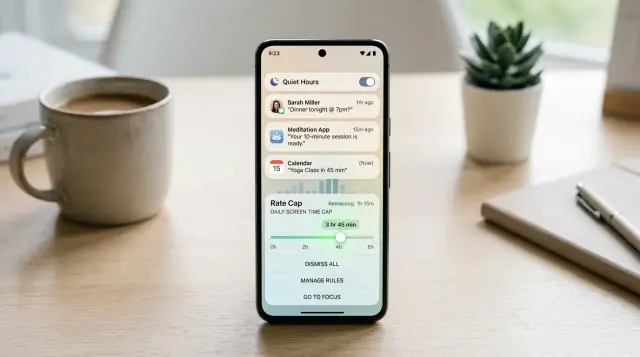
Table of Contents
Why users mute notifications
People do not mute alerts because they hate notifications. They mute them because the app trained them to expect interruptions that are not worth their attention.
Once that happens, every new ping starts at a disadvantage. Users stop checking right away, swipe messages away without reading, or turn alerts off for good.
A big part of the problem is sameness. If a shipping update, a weekend promo, and a weak reminder all sound equally urgent, none of them feel urgent. The phone buzzes, the user looks, and it is another message that could have waited. After that happens a few times, trust drops.
Timing makes it worse. A useful alert at 2 p.m. can feel rude at 11:30 p.m. A message during work, school pickup, or dinner asks for attention at the wrong moment. Users rarely separate the message from the app. They remember the interruption.
Volume creates a second problem. When teams send too often, they bury the alerts that matter. A person who gets five low-stakes pushes in a day may miss the one message about a failed payment or a driver arriving outside. More sends do not create more engagement. They train people to ignore the whole channel.
This usually starts with good intentions. Marketing wants people to come back. Product wants more usage. Support wants fewer missed actions. Each team adds one more notification, and nobody steps back to ask a simple question: does the user need this right now?
That is where a push notification policy helps. It sets a harder standard. Send when something changed, when the user asked for updates, or when waiting would cause a real problem.
Users are generous at first. Most will give an app a few chances. If those chances turn into noise, they mute alerts without much thought. Earning that trust back is much harder than keeping it.
What should trigger a notification
A phone alert should happen because the user has a reason to care now. If nothing changed, the app should stay quiet.
The safest trigger is a user action or a clear request for updates. Someone placed an order, started a delivery, asked for back-in-stock alerts, joined a waitlist, or posted a message and expects a reply. In each case, the notification answers a real question the user already has.
Good triggers usually happen at moments with clear value. An order changed status. A driver is arriving. A payment failed and needs attention. Someone replied to a comment. A login happened from a new device. These alerts save time or help prevent a problem.
Weak triggers do the opposite. They repeat what the user will see the next time they open the app. "New deals are waiting" is often just home screen content pushed onto the lock screen. If the app already shows the same update in a visible place and nothing needs action, the alert is probably noise.
A quick check helps before any new send goes live:
- Did the user do something that started this?
- Did the user ask to hear about this?
- Did something actually change since the last alert?
- Can the user do something useful after opening it?
Teams should also write the reason for every notification in one plain sentence. Keep it boring and specific. "Send when a customer order moves from packed to out for delivery so they know when to be available" is clear. "Increase engagement with shipping updates" is not.
That one sentence exposes bad ideas fast. If the reason sounds vague, self-serving, or easy to ignore, the trigger is probably wrong. If it names a real moment, a real change, and a real benefit for the user, the notification earned its place.
How quiet hours keep alerts welcome
Quiet hours protect the part of the day when a phone feels most private. A routine alert at 6:15 a.m. or 11:40 p.m. does not feel useful, even if the message matters. It feels rude, and users remember that.
A good policy starts with local time, not your team's office time. If your company works in New York and your customer lives in Berlin, "morning send" means two different things. Store the user's time zone and schedule delivery from that.
For most products, late night and early morning should stay off limits. A simple default like 9 p.m. to 8 a.m. works for many apps, and you can adjust after you see real behavior. Order updates, weekly summaries, offers, and gentle reminders can wait. Very few routine messages are worth waking someone up for.
Security and emergency alerts need separate rules. A login from a new device, a code the user just requested, or a fraud warning may need immediate delivery. Marketing messages, product tips, and regular updates do not. If every alert claims urgency, people stop trusting all of them.
When the product allows it, let users change quiet hours for notifications. Some people work nights. Some want non-urgent alerts paused on weekends. A small setting can prevent a mute or even an uninstall.
Useful controls are usually simple: start and end times for non-urgent alerts, a separate switch for security alerts, and a weekend pause for routine messages.
A grocery app makes the difference easy to see. If a shopper usually orders after work, a discount sent at 2 a.m. is pointless. Send it at 5:30 p.m. local time instead. But if the store needs to report a payment issue on an active order, that alert can bypass quiet hours because the shopper needs it right away.
Quiet hours for notifications are really about respect. When alerts arrive at decent times, users read more of them, mute fewer, and keep notifications turned on.
How rate caps stop message fatigue
Most teams do not mean to annoy people. The problem is that each alert looks fine on its own, while the user feels the total volume. Without notification rate caps, even helpful messages start to feel like spam.
A sensible policy sets limits by message type. Order updates, security alerts, reminders, and promotions should not share the same cap. A promo might deserve one send per day. A delivery update can allow a bit more because the user is waiting for it.
A daily cap is the first layer. It stops the slow drip that turns into constant noise by evening. It also gives your team a rule they can explain in plain language when someone asks why they got a message.
A short-window cap matters just as much. Daily limits do not help if four alerts land in ten minutes because of retries, overlapping campaigns, or a noisy trigger. Set a smaller limit for bursts, such as one promo every six hours or no more than two reminders in 12 hours.
Many apps can start with rules like these:
- Promotions: 1 per day
- Reminders: 2 per day, spaced apart
- Status updates: only when the status actually changes
- Security alerts: send when there is real account risk
Repeated reminders should count toward the same cap. Users do not care whether the system labels a message as a "follow-up" or a "nudge." If they see it again, it is another interruption. Teams miss this all the time and end up slipping around their own limit with three versions of the same reminder.
Reset schedules should be easy to explain. Midnight in the user's local time is simple and predictable. A rolling 24-hour window is stricter, but many teams find it harder to debug and harder to explain in support replies. Pick one rule, document it, and use it everywhere.
When users can tell that your app knows when to stop, they stay open to the alerts that matter. That is one of the simplest ways to reduce notification opt-outs.
Build the policy step by step
A good push notification policy starts with a full count, not a guess. Most teams remember the big alerts and forget the small ones: promo blasts, reminder nudges, failed payment warnings, abandoned cart messages, and system notices that went live months ago.
Put every notification in one sheet. Include what triggers it, who gets it, when it sends, and why the user would care at that moment.
Start with a simple audit
Once you can see the full list, sort each alert into three buckets: urgent, useful, or optional.
If a message warns about fraud, a delivery arriving now, or a security login, it is urgent. If it helps someone finish a task they already started, it is useful. If it mainly promotes a feature or a sale, it is optional.
This step clears out a lot of noise fast. If you cannot point to a clear user action or a real need, cut the message or move it to email.
A short audit usually covers five things:
- list every live notification
- mark the trigger and audience
- classify the urgency
- remove weak or stale sends
- decide which channel fits best
Then add rules to each bucket. Urgent alerts can break through more often, but even they need limits. Useful alerts should respect quiet hours for notifications and avoid overnight sends unless the user asked for them. Optional alerts need the strictest caps because they are the first ones people mute.
A grocery app is a simple example. "Your order is out for delivery" can send at 8:10 p.m. because the user is waiting for it. "Try this week's fruit deals" can wait until late morning and should not go out three times in two days.
Test before full rollout
Do not turn the new rules on for everyone at once. Start with a small group of users and watch a few plain signals: open rate, opt-outs, uninstalls, and whether people still finish the task the alert was meant to support.
If a useful alert gets ignored, timing is often the problem. If opt-outs rise after one campaign, the cap is too loose or the message is too self-serving. Adjust the rules, test again, and only then roll the policy out to the full audience.
The best policies are boring on paper and respectful in practice. Users keep notifications on when each alert earns its place.
A simple example from a grocery app
A grocery app shows what a good policy looks like because the user's goal is so clear. People open the app because they want their food to arrive without surprises. The alerts should follow the order, not the marketing calendar.
Say a shopper opens the app at 6:15 p.m., fills the cart, and checks out. The app can send one alert when the store actually starts the order. That message matters because it confirms the order is live and moving.
After that, the app should stay quiet unless something changes that needs attention. Many teams get this wrong. They send a ping for "order received," then "picker assigned," then "packing now," then "driver preparing," then "driver on the way." Most of those updates add little value. One alert near arrival often does more work than five tiny status pings.
A cleaner flow looks like this:
- "We started shopping your order"
- "One item changed, tap to review"
- "Your order is arriving in 10 minutes"
Price changes are a good stress test. If the store swaps brands and the total moves three times in ten minutes, the app should not fire three separate notifications. It should bundle those changes into one update so the shopper checks once, not over and over.
Timing matters just as much. Promo messages after 9 p.m. local time feel rude in almost any retail app, and grocery is no different. If the app wants to offer "free delivery tomorrow," it can wait until the next morning. Order updates can still go through when they are tied to an active purchase, but sales pushes should respect quiet hours for notifications.
This setup is not fancy. That is the point. Notifications based on user actions, plus quiet hours and notification rate caps, make the app feel calm. Users keep alerts on when the messages help them finish the job they came to do.
Mistakes that make people turn alerts off
Most people do not mute alerts after one bad message. They mute them after a pattern. Notification policy fails when a team treats attention like an unlimited resource.
One common mistake is sending a promo right after someone turned off a similar campaign. That tells the user your system recorded the click but ignored the meaning. If a person says no to sale alerts, do not try again with a slightly different label an hour later.
Another fast way to lose trust is using the same sound, tone, and urgency for every message. A discount, a delivery update, and a security alert should not all feel like emergencies. When everything sounds urgent, nothing does. Save stronger sounds and sharper wording for messages that truly need fast action.
Teams also create problems when they send alerts by their own rules. Marketing wants clicks. Product wants return visits. Operations wants delivery updates. Support wants feedback. Users see one thing: too many interruptions. One shared rule matters more than separate team goals.
A weak setup often looks like this:
- one team can send a promo even after another team recorded an opt-out
- every alert uses the default sound and push priority
- send times follow server time instead of the user's local time
- copy says almost nothing until the user taps
Time zones trip up many apps. A message sent at 9 a.m. in your office can land at 3 a.m. for the user. Travelers, shift workers, and global customers make this messier. Good systems use local time, quiet hours, and user preferences instead of one fixed schedule.
Vague copy hurts too. "You have an update" gives the user no reason to care. People do not like mystery alerts. Say what happened and why it matters now. "Your order is at the door" works. "Price dropped on the item you saved" works. Empty phrasing gets ignored.
If users keep muting alerts, check respect first. Did you honor their choices, their time, and their context? That usually explains the problem faster than any dashboard.
Quick checks before you ship a new alert
A good push notification policy gets easier to follow when every new alert passes the same short review. Teams often approve messages because the wording sounds fine, then miss the bigger problem: the alert did not need to exist in the first place.
Start with one practical test. If a user sees the message and asks, "Why did I get this?", the answer should be obvious from something they just did. Maybe they placed an order, changed a setting, or left an item in checkout. If the cause is fuzzy, the alert will feel random.
The next test is timing. Ask whether the message would still help if it arrived tomorrow morning. If the answer is yes, it probably does not need to interrupt someone tonight. Most alerts are less urgent than teams think.
A fast review can be as short as this:
- The user can connect the message to a recent action.
- The alert would still make sense if delayed until normal waking hours.
- The app, inbox, or another message does not already cover the same update.
- The send stays inside that user's daily limit.
- A support agent can explain the rule in one plain sentence.
That third point saves more pain than most teams expect. Duplicate updates are one of the fastest ways to train users to ignore you. If the same shipping update already appears on the order screen and in email, a push may add noise instead of help.
Rate caps matter too, but only at the user level. A campaign might look small in a dashboard while one person gets hit three times in a day because they also triggered product alerts. Check the full count before you send.
The support test is especially useful because it exposes weak logic fast. If your team needs a long internal document to explain when a push fires, the rule is probably too messy. Good alert rules fit into plain language: "We send this only after payment fails, and only once per day until it is fixed."
If a message fails even one of these checks, pause it. Reword it, delay it, merge it with another update, or do not send it at all.
What to do next
Start small. Pick one part of the product where people already complain about alert noise, or where opt-outs climb after a new campaign. That gives you a clear place to test a better policy without changing everything at once.
A grocery app is a good example. Order updates usually deserve alerts. Daily promos at 7 a.m. usually do not. If users mute one noisy category, that is often the best place to fix first.
Write the policy in plain language before anyone touches code. If a product manager, designer, and support lead can all read it and agree, the build usually goes faster and the result is better.
Keep the first draft simple:
- send alerts only for real user actions or time-sensitive updates
- pause non-urgent messages during quiet hours for notifications
- set notification rate caps so one user does not get hit all day
- name the person who approves new alert types
That short draft catches a lot of bad ideas early. It also helps your team spot edge cases, like two systems sending the same alert or a promo message going out right after a failed delivery notice.
After launch, watch behavior for a few weeks. Open rates matter, but they do not tell the whole story. If open rates rise while support tickets about spam also rise, the policy still needs work.
Look at three signals together: fewer notification opt-outs, steady or better open rates, and fewer support complaints about noisy or irrelevant alerts.
If one number moves in the wrong direction, adjust the rules. Tighten triggers, shorten the send window, or lower the cap. Small changes often fix more than a full rewrite.
Some teams get stuck between product rules and the systems that actually send the messages. If that is your problem, Oleg Sotnikov at oleg.is can review the policy as part of Fractional CTO advisory and help turn simple rules into something your team can run without constant cleanup.
Frequently Asked Questions
Why do users mute notifications so fast?
Because the app taught them that most pings waste their attention. After a few low-value interruptions, people stop trusting the channel and mute everything, including alerts that matter.
What should actually trigger a push notification?
Start with user actions and clear requests. Send a push when an order changes, a reply arrives, a payment fails, or a login looks suspicious.
Which pushes should I avoid sending?
Skip pushes that only repeat what the home screen already says. If nothing changed and the user does not need to act now, keep it in the app or email instead.
What quiet hours work for most apps?
Use the user's local time, not your office time. A simple default like 9 p.m. to 8 a.m. for non-urgent alerts works for many products, then you can adjust from there.
Should security alerts ignore quiet hours?
Yes, when the alert warns about account risk or supports something the user asked for right now, like a login alert or a one-time code. Sales messages, tips, and routine updates should wait.
How many push notifications per day is reasonable?
For most apps, start tighter than you think. One promo a day is plenty, reminders need spacing, and status updates should fire only when the status actually changes.
Do repeated reminders count toward the limit?
Count them as more notifications. Users feel every interruption, even when your system calls it a follow-up, so repeats should share the same cap.
How do I write push copy people will open?
Say what happened and why it matters now. "Your order is arriving in 10 minutes" works better than vague copy like "You have an update" because people know whether to open it.
When should I use email instead of push?
Move non-urgent or longer updates to email when the user does not need to act right away. Push works best for timely changes, while email fits summaries, receipts, and offers that can wait.
How should I test a new notification policy?
Launch with a small group first and watch opt-outs, open rates, uninstalls, and task completion together. If people stop muting alerts and still finish the job, your rules are probably moving in the right direction.


