Writing prompts for business workflows from rules, not examples
Writing prompts for business workflows starts with rules, exceptions, and approvals. Learn how to structure inputs before you tune the wording.
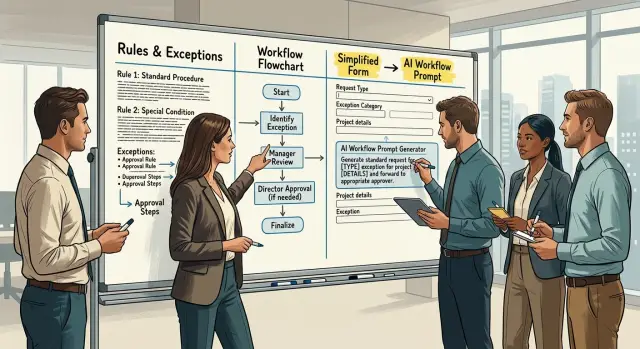
Table of Contents
Why example-first prompts break in real work
Example-first prompting looks good in a demo. Someone pastes a clean sample, the model copies the pattern, and the result feels smart. Real business workflows are less tidy. They have limits, edge cases, and approval steps, and examples are a weak place to store that logic.
A polished example teaches the shape of an answer, not the rule behind it. If a company allows refunds up to $100 without review, blocks gift cards, and sends anything higher to finance, one nice sample will not teach that policy clearly.
Small wording shifts can also change the output more than teams expect. "Customer asked for refund after delay" can get one answer. "Customer is upset and asked for immediate refund" can get another. The policy stayed the same. The phrasing changed. That is a bad foundation for repeatable work.
The risk grows when approvals matter. A prompt built from examples may produce a final answer when it should stop and ask for manager sign-off. In purchase requests, discounts, refunds, or vendor onboarding, that can create real trouble. The model sounds confident even when the process is incomplete.
Examples also make review harder. Finance, operations, and legal can inspect a rule table or a list of conditions. They cannot easily read a few paragraphs of prompt prose and tell which sentence controls budget limits, who can approve exceptions, or when the model should refuse.
A simple workflow shows the problem. Suppose an employee asks to buy software for $79 a month. One example might teach the model to approve it. But what if the tool stores customer data, renews automatically, or overlaps with software the company already pays for? Those missing rules matter more than the example.
Examples still help. Use them after the structure is clear, mostly to shape tone and format. Do not rely on them to carry business rules that people need to trust, review, and update.
What to collect before you draft the prompt
Start with the rulebook, not the wording. If the process already exists in a policy doc, email thread, shared note, or approval form, gather that material in one place first. Many bad prompts fail for a simple reason: the rules live in three places, and the prompt guesses when those sources disagree.
Use the current policy text even if it looks messy. Old wording, edge-case notes, and approval comments often show how the process really works. If finance says one thing in a handbook but managers follow a different rule in practice, write down both and mark the conflict.
Then list every input the model needs to make a safe decision. Think in fields, not prose. Instead of asking for "request details," split the request into exact parts such as amount, department, reason, deadline, vendor, contract term, and whether the spend is already in budget.
A small missed field can break the whole flow. If a software purchase needs security review only when customer data is involved, then "handles customer data: yes or no" must be an input. Without that field, the model will guess.
Approval chains need structure too. Write down who can approve each step, who can only review, and when approval changes based on amount, risk, or department. The model should route work, not invent authority.
Do the same for blockers. Some requests stop because a document is missing, a budget code is wrong, or a deadline has passed. Put those stop conditions in plain language so the prompt can say "cannot proceed" instead of pushing the task forward.
Keep the exception list short at first. Most teams do not need fifty edge cases in version one. They need the handful that happen every month and cause confusion.
A practical starting set is simple:
- the current policy text
- the exact input fields
- the approver for each branch
- the conditions that stop the process
- the exceptions people handle by hand
This step feels slow, but it saves rework. A prompt built from structured inputs is easier to test, easier to change, and less likely to send a request to the wrong person.
Turn policy into fields, choices, and flags
Prompts get safer when policy stops hiding in paragraphs and moves into inputs. The wording matters, but structure matters more.
Treat each rule as its own field. If managers can approve travel up to $1,000 and finance must review anything above that, do not bury that rule in a note. Store amount, requester_role, and approval_level as separate inputs. When the model sees clean parts, it makes fewer guesses.
Fixed choices help just as much. Free text invites drift. A person might write "trip," "business travel," or "client visit" and mean the same thing, but the model may not treat them the same way. Use a short set of allowed values for request type, status, and decision.
For example, an expense workflow might define request_type as travel, software, training, or other. status might be draft, pending_manager, pending_finance, approved, or rejected. requester_role might be employee, manager, or contractor. policy_exception can be yes or no, and policy_source can point to a specific rule set such as travel_policy_v3.
Keep limits, roles, and dates in separate fields too. Do not pack "manager can approve until June 30 up to $1,000" into one sentence and expect the model to parse it the same way every time. Split it into max_amount, approver_role, effective_date, and end_date. It looks boring, but boring is good when money or compliance is involved.
Add one field that points to the source policy or rule set. That makes reviews much easier. When someone asks why the AI sent a request to finance, you can trace the answer back to policy_source instead of arguing over prompt wording.
Comments still matter, but keep them in one free-text field and nowhere else. People need room to explain odd cases, such as "conference hotel was the only option near the venue." Everything else should stay structured.
This is the part many teams skip. They tune the prompt first, then wonder why outputs change. Usually the model is not the main problem. The inputs are messy.
Add exceptions and approval paths
Most business mistakes happen at the edges, not in the normal path. If your prompt handles only routine cases, the model will guess when it hits a refund without a receipt, an invoice with two tax rates, or a request that breaks policy for a valid reason.
Write those exception cases down before you tune the wording. Give each one a clear name and a simple trigger. "Missing document," "policy conflict," "urgent request," and "duplicate record" work better than vague notes buried in a paragraph.
A basic workflow usually needs fields such as exception_type, approval_required, approver_role, override_allowed, and exception_reason. These fields tell the model when to stop, when to ask a human, and when a rule can bend.
Set approval points as hard conditions, not soft hints. Require approval if the amount is over a limit, if the request breaks policy, if someone asks for an override, or if data does not match across documents. Once one of those conditions appears, the model should switch from "decide" to "prepare for review."
Be specific about authority. A team lead might approve a small budget exception. Finance might approve a tax change. Legal might clear a contract issue. If you skip this, the prompt will treat all approvals as equal, and that is where small mistakes turn into risky ones.
Missing or unclear data needs its own rule. Do not let the model fill gaps with a best guess. Tell it to stop and return a short list of what is missing, such as an unreadable receipt, no cost center, or two invoice totals that do not match.
Record every time the workflow leaves the normal path. Save the rule that triggered the exception, the reason, who approved it, and whether someone overrode the default rule. That record helps later when you review mistakes and tighten the process.
Write the prompt after the structure exists
Once your fields, rules, and approval states are clear, the prompt usually gets much shorter. That is a good sign. Short prompts tied to named inputs fail less often than clever prompts built around stories.
Start with one plain sentence that defines the model's job. Keep it narrow. "Review this request and return the next action based on the provided fields and rules" is better than a long setup with background, tone, and sample situations.
After that, refer to field names exactly as they exist in your form or payload. Use names like request_type, amount, country, policy_match, and manager_approval. Do not swap them for story examples such as "an employee flying to Berlin for a client meeting." Stories feel natural, but they also invite guesswork.
Order matters. Tell the model what to do first, second, and last:
- First, check that required fields are present.
- Second, apply the business rules in order.
- Third, decide whether the request fits auto-approval, rejection, or human review.
- Last, return the answer in the required format only.
That sequence removes a lot of bad output. If a field is missing, or two rules conflict, say so directly in the prompt: stop, do not guess, and ask a human. Many risky outputs come from a model trying to be helpful when it should pause.
The output format should be locked down. Pick one format and keep it, usually a small JSON object or a fixed table with named columns. Return fields such as status, reason, needs_human_review, and missing_fields. If you let the model answer in free text, it will drift. Some replies will be neat. Others will bury the decision in a paragraph.
A good prompt for this kind of work reads less like a conversation and more like a job instruction. Plain is what you want when approvals, money, or policy checks are involved.
A simple example: travel expense approval
Suppose an employee files a travel expense after meeting a client in another city. If you build the prompt from a few past receipts, the model will guess too much. A small input structure works better than a pile of examples.
Start with the fields the employee must enter: amount, purpose, and client name. Then add the fields the business needs for the decision, such as travel type and whether any part of the trip falls on a weekend. That gives the model facts to check instead of hints to interpret.
The rules can stay simple. The policy sets a spend limit for each travel type, such as train, flight, or car rental. If the amount stays under the limit and no exception appears, the model can approve. If the amount goes over the limit, the model should send the request to the manager instead of deciding on its own.
Weekend travel is a useful exception. A client visit that starts on Friday and ends on Sunday might be allowed, but finance still needs to review it. The prompt should say that weekend travel always goes to finance, even when the amount is low, because the issue is policy, not price.
The response should stay short and predictable. Approve when the request fits policy and needs no extra review. Reject when the request clearly breaks policy. Ask for more information, or route the item to a human, when details are missing or extra approval is required.
A realistic "ask" response might say that the amount is above the flight limit and needs manager approval, or that weekend dates need finance review. That helps the employee fix the request fast. It also gives the manager and finance team a clear reason instead of a vague paragraph from the model.
Mistakes that cause wrong or risky output
A lot of bad workflow prompts start with a sample email. The team pastes in two or three messages, adds "follow our policy," and hopes the model learns the pattern. It usually does not. Sample emails hide the real logic, especially the awkward parts like exceptions, missing receipts, split approvals, or policy limits that changed last quarter.
That is why workflow prompts often fail in ordinary, boring cases rather than dramatic ones. The prompt sounds polished, but the rules live inside examples instead of clear inputs. When a new case does not look like the examples, the model fills gaps with a guess.
One common problem is a field that tries to carry too much at once. A single text box might contain the amount, the reason, travel dates, and a note from a manager. That looks convenient, but it makes review harder. If the model needs to decide whether a hotel charge exceeds the nightly cap, it should not dig through a paragraph to find the date and total.
Missing facts create another risk. If the request does not include a receipt status, cost center, or trip type, the prompt should not invent one. It should stop, ask for the missing detail, or route the item for review. Guessing feels smooth, but fake certainty is expensive.
Teams also forget the no-action path. Every workflow needs a clear result for cases where the model should do nothing except flag the item. Without that path, the prompt tries to force a decision even when the input is incomplete or outside policy.
Tone tuning causes quieter damage. People spend time making the response sound friendly, formal, or on-brand before the logic works. That order is backwards. If the approval rules are wrong, a warm sentence only hides the mistake.
A quick test catches most of this. Give the prompt five messy requests: one with missing dates, one over the allowed amount, one with mixed reasons in the same field, one that needs manager approval, and one that should stop with no action. If it guesses, over-approves, or writes a nice message when it should pause, the structure is still wrong.
Quick checks before rollout
Run a dry test before anyone uses the prompt on live work. Ten sample cases usually expose weak spots faster than another hour of wording edits.
A reviewer should be able to point to each part of the output and say where it came from. If the model approves, rejects, or adds a warning, the reviewer should find the rule, field, or approval step behind that result. If nobody can trace a sentence back to an input or rule, the model made a guess.
Use a short review pass like this:
- Check traceability. Every decision, label, and comment should map to a rule or field.
- Check exceptions. Special cases need their own fields, not a catch-all notes box.
- Check missing data behavior. The model should stop, ask for the missing item, or return a fixed error state.
- Check repeatability. Give the same case to two reviewers and compare results.
- Check format. The output should always follow one shape.
Exceptions deserve extra attention because they often break otherwise good prompt design. If an expense is over budget but already pre-approved, or a purchase usually needs finance review but falls under an emergency rule, the prompt needs separate inputs for those cases. A vague note like "special case" is rarely enough.
Repeatability matters more than people expect. Two team members should test the same input and get the same outcome, or very close to it. If one person gets "approve" and another gets "send to manager," the structure is still too loose.
Format issues cause quiet damage. A model that sometimes returns a paragraph, sometimes a list, and sometimes a half-finished answer will create manual cleanup work right away. Pick one format and keep it strict.
This is the point where prompt writing stops being a writing exercise and becomes an operations check. If the prompt can trace decisions, handle exceptions, stop on gaps, match across testers, and return one steady format, it is ready for real traffic.
Next steps for your team
Start with one task that already has written rules, even if the process feels messy. Do not begin with the biggest process in the company. Pick one that people run every week and argue about a little, because that is where weak prompts fail fast.
A good first choice is something like purchase requests, refunds, access requests, or discount approvals. These workflows usually already have policy text, limits, exceptions, and named approvers. That gives you enough structure to build something real without dragging half the company into the first draft.
A short working plan is enough:
- Gather the actual policy, approval rules, and exception notes people keep in email or chat.
- Turn those rules into a simple form with fields, choices, and flags.
- Test common requests and awkward edge cases, including incomplete requests and cases that must go to a human.
- Rewrite prompt wording only after the form and decision logic give stable output.
This order matters more than most teams expect. If the structure is wrong, better wording will only hide the problem for a while. A polished prompt with missing inputs still guesses. That is where bad approvals and risky output start.
Keep the first version small. Ten solid test cases beat fifty vague ones. If a request over $5,000 needs finance approval, test $4,999, $5,000, $5,001, and a request with no amount entered. Those boundary cases often reveal more than a long prompt ever will.
If you need an outside review, Oleg Sotnikov at oleg.is helps startups and smaller companies turn messy technical processes into practical AI-supported workflows. That can be useful when the policy is clear in people's heads but hard to turn into approvals, exceptions, and automation your team can trust.
Frequently Asked Questions
Why are example-first prompts risky for business workflows?
Because examples teach style more than rules. A model can copy the pattern of a sample and still miss limits, blockers, or approval steps when the wording changes.
What should I gather before I write the prompt?
Start with the real policy, the exact input fields, the approval path, the stop conditions, and the few exceptions your team handles often. Put all of that in one place before you touch the wording.
Which details should become separate fields?
Split any fact that changes a decision into its own field. Amount, request type, department, vendor, budget status, customer data, and contract term often need separate inputs so the model does not guess.
When should the model stop and ask for human review?
Have it stop any time data is missing, two rules conflict, the request breaks policy, or the amount or risk crosses an approval limit. In those cases, the model should route the work or ask for the missing facts, not make the call itself.
Should I allow free-text input?
Use free text for comments only. Keep decisions tied to structured fields and fixed choices, then let people add context in one notes field for unusual cases.
What output format works best?
Pick one strict format and keep it every time. A small JSON object with fields like status, reason, needs_human_review, and missing_fields works well because people and systems can read it fast.
How do I handle exceptions and overrides?
Name each exception and give it a simple trigger. Then store who can approve it, whether an override is allowed, and why the team made that choice so nobody has to decode a long prompt later.
What is a good first workflow to automate with AI?
Start with a process that already has written rules and frequent confusion, like refunds, purchase requests, access requests, or discount approvals. You will find gaps fast without dragging the whole company into the first version.
How do I test a workflow prompt before rollout?
Run ten messy test cases before live use. Include missing data, over-limit amounts, duplicate records, policy conflicts, and cases that need no action, then check whether every result maps back to a rule or field.
When should we get outside help with this setup?
Bring in help when your team knows the process but cannot turn it into fields, approval states, and exception rules that stay stable in testing. An experienced CTO or advisor can tighten the structure before you spend more time tuning prompt wording.


