Prompt templates for regulated workflows that teams can update
Learn how prompt templates for regulated workflows separate fixed rules from task input, so teams can revise policy text fast and keep prompts clear.
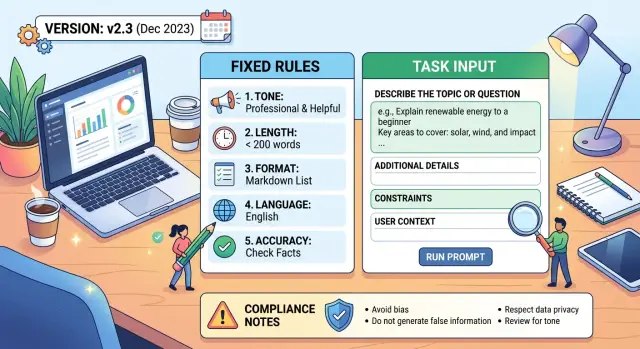
Table of Contents
Why one long prompt causes problems
One large prompt looks neat at first. Then it turns into a pile of mixed instructions.
That is a problem in regulated work because legal rules, case facts, and writing guidance do not change at the same pace. A disclosure might change today. The tone guidance might stay the same for months. Case details change on every run.
Most teams start with one block of text and keep adding to it. A compliance note goes in. Then a tone reminder. Then examples, edge cases, and a last-minute warning from legal. After a few rounds, nobody can tell which lines are permanent rules and which belong only to one request.
That causes a few predictable problems:
- Policy text sits next to case input, so people edit both at once.
- A small rule change triggers a full prompt review instead of a small update.
- Reviewers see a huge text diff and miss the real change.
- Teams copy old versions into their own docs, and the wording drifts.
The second problem wastes more time than most people expect. If one sentence in a disclosure changes, the team often rewrites the full prompt, reruns tests, and checks tone, format, and escalation rules again even when none of those changed. A tiny edit becomes a broad retest.
Review gets messy too. Legal wants to confirm the rule change. Support wants replies to stay clear and calm. Product wants the output to match a set format. When all of that lives in one paragraph block, reviewers cannot see what caused the output to change.
Copying makes it worse. One team updates the current version. Another team reuses a prompt from last quarter. A third team trims a few lines to fit a new tool. Soon, similar cases get different answers because each group runs a slightly different prompt.
That is why a template works better when it has clear parts. If the prompt has no seams, every update feels bigger than it is, and trust drops a little each time someone edits it.
What should stay fixed
Treat the fixed part of the prompt like a policy document, not daily input. If agents, operators, or analysts tweak it on each run, the wording starts to drift. Before long, two people handle the same case in different ways, and nobody knows which version legal approved.
Put all legal and policy language in one rules block. Keep it separate from customer details, case facts, and other run specific input. That split makes updates cleaner and audit trails easier to read.
A fixed block usually includes four things:
- required wording or approved claim language
- tone rules, such as plain language, no blame, and no promises
- refusal rules for topics that need a human
- approval limits that spell out what the model can draft and what still needs review
Keep those rules in one place and label them like controlled documents. Add the source, the owner, the version, and the approval date. "Claims response policy - Legal - v3.2" is much better than "latest rules."
It sounds dull. It saves time.
When compliance changes one sentence, your team updates one block instead of hunting through ten prompts. Testing also gets easier because you can compare outputs before and after one rule change.
Examples belong in the fixed section too, but keep them short and tied to a rule. If a rule says the model must not confirm coverage before review, the example should show that exact limit. For example: "I can explain the next step, but I can't confirm coverage in this message."
Do not keep old examples around just because they worked once. Models copy structure and wording. If an example uses outdated policy language, the model can repeat it even after the rule changes.
Teams often miss one simple point: examples are part of the rule set. Review them whenever you review the rules. If the rule changed, the example should change that same day.
What should change on each run
The part that should change every time is the task input, not the rules. Give the model the live request, the facts for that case, and the channel where the answer will appear. A chat reply needs a different length and tone than an email, even when the policy stays the same.
A clean task input usually includes:
- the user's request or question
- the case facts the model can use
- the output channel, such as chat, email, or internal note
- optional details like region, product, or customer type
Only add optional details when they affect the answer. If a refund policy changes by country, include region. If the rule is the same for every customer, leave customer type out. Extra fields seem harmless, but they often push the model toward details it does not need.
Keep source material separate from instructions. Instructions tell the model how to behave. Source material gives it facts to work from. When teams blend them together, the model can treat a quoted policy note like a command, or treat a command like evidence. Simple labels help: one block for instructions, one for case data, and one for approved reference text.
Old context causes more trouble than many teams expect. If you send a new task after a previous one without clearing the thread, the model may carry over facts, tone, or limits that no longer apply. In policy heavy work, one wrong detail can change the meaning of the answer.
The safest habit is simple: start each task with fresh input, pass only the facts for that case, and trim anything left over from earlier runs. If a reviewer cannot tell which parts are fixed rules and which parts came from the current case, the template still needs work.
A reusable template
Most prompt failures in regulated work happen when instructions, policy text, and case details sit in one block. Someone edits the wrong sentence, old wording stays in place, and review turns into line by line cleanup.
A better pattern is modular. Keep the job description short, lock fixed rules in one area, pass case details in another, and finish with an exact output format. That makes the template easier to update and much easier to review.
Reusable prompt
ROLE AND GOAL
You are a customer operations assistant. Write a clear, policy-safe response to the user request.

FIXED RULES
- Follow the approved policy text below exactly where required.
- Do not invent coverage, pricing, legal advice, or exceptions.
- If information is missing, say what is missing.
- Use a calm, plain tone.
- If the request falls outside policy, explain the next allowed step.

APPROVED POLICY TEXT
[Paste current compliance language, required disclaimers, escalation rules, and blocked claims here.]

TASK INPUT
User message: [Paste the current request]
Customer status: [Paste relevant account or case facts]
Product or policy type: [Paste type]
Channel: [Email, chat, ticket, other]

OUTPUT FORMAT
Return exactly:
1. Decision: approved, denied, or needs review
2. Reply to customer: 80 to 120 words
3. Reasoning note for internal team: 2 bullet points
4. Escalation needed: yes or no
The first line gives the model one job. Keep it plain. If you cram role, tone, policy, and edge cases into that first sentence, people will keep rewriting it.
The fixed rules section is where your team should spend review time. That block changes only when policy changes. A legal or operations reviewer can update one labeled area without touching the task input.
The task input section should contain only facts from the current case. No policy language belongs there. If teams mix live case data with permanent rules, mistakes get harder to spot.
The last block matters more than it seems. If you want a decision, a customer reply, and an internal note, ask for them in that order. Clear output fields cut editing time and make testing more reliable.
How to set it up
Start with one workflow that already gets human review. That gives you a safety net while the template settles. A good first choice is a reply type with strict wording, such as an insurance support response or a complaint follow up.
Then split the prompt into two parts. The first part is the fixed rules block. Put in the rules that change rarely: required disclosures, forbidden claims, tone limits, approval rules, and any sentence the team must keep exactly. Keep this block short and versioned. If a policy manager changes one line, the team should update one place, not ten prompts.
The second part is the run time input. This is what staff fill in for each case: the customer message, policy type, region, confirmed facts, missing facts, and the action requested. If people have to guess what belongs here, add plain field names and one line instructions. Good templates feel boring on purpose. People should use them the same way every time.
Do not start with made up examples. Pull five real cases from recent work, including one simple case, one messy case, and one case that needed extra review. Run the same template on each one and write down where the model slips.
- Did it miss a required disclosure?
- Did it answer something that should go to a human?
- Did it invent a fact?
- Did it use the wrong tone?
- Did the reviewer need to rewrite more than a few lines?
That record matters because it turns a vague concern into a short fix list.
Give ownership to two people. One person owns rule updates and approves changes to the fixed block. Another person owns testing and keeps the five case set current. If one person does both forever, blind spots creep in. If nobody owns either task, the prompt drifts fast.
After that, freeze the template for a short period and use it in live work with review still in place. Small edits beat constant rewrites. Teams that treat prompts like controlled documents usually make fewer mistakes and spend less time fixing avoidable errors.
Example: a customer support reply in insurance
Insurance support is a good test case because small wording mistakes can create real risk. A support agent may want a fast draft, but the company still needs tight control over what the model says about coverage, exclusions, and next steps.
A clean template splits the prompt into two parts. The fixed rules block tells the model what it may say about coverage, what it must avoid, and when it should ask a licensed teammate to review the case. The task input changes on each run and includes the claim type, the customer message, and the state.
A simple version looks like this:
Fixed rules:
- Only use the approved policy language provided below.
- Do not confirm coverage unless the policy text clearly supports it.
- If the customer asks about eligibility or payment amount, use cautious wording.
- Follow state-specific wording rules for the state in the input.
- End with a neutral next step.

Task input:
- Claim type: Auto glass damage
- State: Texas
- Customer message: "A rock cracked my windshield on the highway. Can I get this replaced today, and will my policy pay for it?"
- Approved policy text: "Comprehensive coverage may apply to glass damage, subject to deductible and policy terms."

Output:
- Customer reply in 80 words or less
- Internal review note in 2 sentences
With that structure, the model can draft a careful reply: the customer may have coverage under comprehensive terms, but the team needs to confirm the deductible and policy details before promising payment. The review note can tell the agent to check the policy type and Texas wording before sending.
This split matters when policy text changes. If legal or compliance updates one sentence about glass claims, the team edits the fixed rules or approved policy block once. They do not need to rewrite the whole prompt or touch the parts that carry the claim type, state, and customer message.
That saves time. It also cuts drift. Teams keep one approved rules block, use it across many replies, and change only the facts for each case.
Mistakes that create risk and rework
Most prompt failures start long before the model answers. Teams cram rules, examples, tone notes, legal wording, and edge cases into one giant prompt. Then nobody knows which lines are fixed requirements and which lines are just illustrations.
A common mistake is hiding rules inside long examples. Someone reads the sample, copies the style, and misses the one sentence that actually matters. Later, another teammate trims the example for length and removes a rule by accident. If a rule must stay, put it in its own labeled block, not inside a pretend customer reply.
Long prompts also tempt teams to mix draft policy text with approved wording. That creates quiet confusion. If both versions sit side by side, the model may borrow from each and produce language that nobody approved.
This gets messy fast in customer facing work. Picture an insurance team updating claim language after legal review. One manager pastes the new wording into the prompt, but the old phrasing still sits in an example lower down. The model starts using both, and agents spend the week fixing replies by hand.
Asking for two audiences in one answer creates a different problem. A prompt might ask for a customer message and internal guidance at the same time. Models often blend them. That is how private notes, approval hints, or risk flags end up in text meant for the customer.
Split those outputs. Generate the customer reply in one field and internal notes in another, or run two separate prompts.
Another mistake is local prompt ownership. If support, legal, operations, and product each keep their own copy, updates drift almost at once. One team adds a new disclaimer, another forgets, and a third edits the tone without telling anyone.
One shared template for the fixed rules solves a lot of this. Teams can still change task input, but they should not each carry their own private version of compliance language. One source cuts rework, speeds up review, and lowers the odds of an ugly surprise in production.
A quick check before release
Release day is where small prompt mistakes turn into real compliance problems. One outdated sentence in the rules block can change what the model says even if the task input looks fine.
The final review should stay narrow and repeatable. You are checking whether the prompt still matches approved policy, still behaves the same way, and still leaves a record.
Start with the fixed rules block. Put it next to the latest approved wording from legal, compliance, or whoever owns the policy text. Read line by line. Teams often miss small edits such as a changed disclaimer, a new refusal condition, or a phrase that moved from optional to required.
Then test three cases, not twenty. A safe case shows that the prompt still handles normal requests. A borderline case shows whether the model stays careful when the answer is not obvious. A refusal case proves the model can stop, explain the limit, and avoid unsafe advice.
A simple release pass can look like this:
- Run one routine input that should produce a normal answer.
- Run one gray area input that should trigger extra caution or a narrower reply.
- Run one input that should lead to a refusal or handoff.
- Compare all three outputs with the expected format from the last approved version.
Format drift causes more trouble than many teams expect. The wording may be correct, but if the model stops using the required sections, labels, or disclaimer placement, downstream tools and reviewers can miss the problem. If your workflow expects JSON, bullet points, or a fixed reply structure, verify that structure before release.
Keep a small release log. It does not need special software. A plain table with prompt version, release date, owner, and a short note on what changed is enough for most teams. When someone asks why the model started refusing a certain request, you can find the answer in minutes instead of guessing.
One more habit helps: save the three test inputs and outputs with the version record. That gives you a living baseline. On the next release, you can compare behavior side by side and spot drift before customers do.
Next steps for your team
Keep the first rollout small. Pick one task that already causes edits, delays, or approval loops. A single support reply, claim summary, or internal review note is enough to prove the structure before you copy it to other workflows.
Do not roll this out to ten teams at once. Start with one owner, one reviewer, and one place where the current template lives. That setup makes it much easier to see what changed: the fixed rules, the task input, or the review process.
A simple routine usually beats a clever one:
- choose one policy heavy task with clear pass or fail rules
- store the prompt, test cases, and rule versions in the same shared folder or repo
- assign one person to update policy text and one person to approve it
- review the template on a fixed schedule, even when nothing looks broken
That review schedule matters more than most teams expect. Rules drift quietly. A prompt can keep producing clean output while using old language, missing a new disclaimer, or following a retired exception. A monthly or quarterly review is often enough if the policy does not change every week.
Keep your tests close to the prompt. If someone updates compliance language, they should run the same examples every time and compare the result. This saves rework and gives the team a clear record of why a change happened.
When several teams touch the same workflow, the process gets messy fast. Legal may own the wording, operations may own the process, and support may feel the pain first. In that situation, a short consultation with Oleg Sotnikov at oleg.is can help a team set prompt structure, approval steps, and versioning rules before the process spreads.
Good compliance prompt design is boring on purpose. One shared template, a review calendar, a small test set, and clear ownership will take you further than a giant prompt that nobody wants to touch six weeks later.
Frequently Asked Questions
Why is one long prompt a bad idea for regulated work?
Because one long prompt mixes rules, facts, and writing guidance in the same place. That makes small edits feel risky, hides real changes in review, and leads teams to copy slightly different versions.
A split template keeps policy text stable and lets you change only the case details on each run.
What belongs in the fixed rules section?
Put legal wording, approved claim language, tone limits, refusal rules, and review limits there. Treat that block like a controlled document with an owner, version, and approval date.
If a rule changes, you update that one section instead of digging through old prompts.
What should change every time I run the prompt?
Change only the live case details. That usually means the user message, confirmed facts, channel, and any detail that changes the answer, such as region or product type.
Leave out fields that do not affect the decision. Extra details often pull the model away from the actual task.
Should I include examples in the template?
Keep examples with the fixed rules, not inside the case input. Models copy wording and structure, so an old example can bring back old policy language.
Review examples whenever you review the rules. If the rule changed today, the example should change today too.
How do I stop old context from leaking into a new case?
Start each case with fresh input and send only the facts for that case. If you reuse a thread, the model may carry over facts, tone, or limits from an earlier task.
When a reviewer cannot tell what came from the current case, the prompt still needs cleanup.
Do I really need a strict output format?
Use an exact format when the workflow needs a decision, a customer reply, and an internal note. Clear fields make review faster and make tests easier to compare.
Keep the format simple. If the model has to guess where each part belongs, people will spend more time editing it by hand.
How should I test the prompt after a policy update?
Run a small test set, not a huge one. Check one routine case, one gray-area case, and one refusal case, then compare the outputs with the last approved version.
That shows whether the rule change did what you wanted without forcing a full rewrite and full retest.
Should customer replies and internal notes come from the same answer?
No. Keep customer text and internal notes in separate fields, or use two prompts. When you ask for both at once, models often mix them.
That is how private guidance or risk notes end up in text meant for the customer.
How do we keep teams from drifting onto different prompt versions?
Store one shared template in one place and assign ownership. One person should own rule updates, and another should own testing and the case set.
Without clear ownership, teams copy the prompt into their own docs and the wording starts to drift.
What is the best first use case for this template?
Pick one workflow that already gets human review and uses strict wording. Support replies, complaint follow-ups, and insurance messages work well because reviewers can catch problems before anything goes out.
Start small, freeze the template for a short period, and make small edits instead of constant rewrites.


