Routing prompts by document type in one AI workflow
Routing prompts by document type keeps code, contracts, and support tickets on the right instructions, even when one model handles every request.
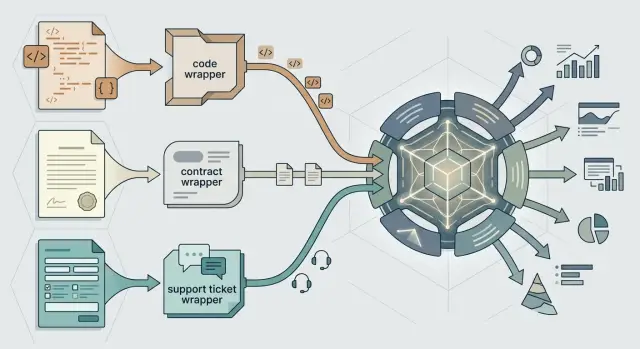
Table of Contents
Why one prompt fails across different documents
A single prompt sounds efficient, but it usually treats very different documents as the same job. Code, legal text, and support tickets are all plain text to the model, yet they need different reading habits, different caution, and different output.
Code needs precision. A contract needs careful wording and attention to risk. A support ticket needs fast sorting, plain language, and a clear next action. If one wrapper says, "analyze this document and summarize it," the model has to fill in the blanks on its own. That is where mistakes start.
The first problem is tone. A model can answer a customer ticket like a technical audit, or describe a contract clause with the casual style it would use for internal notes. The second problem is format. Engineering teams may want structured fields. Legal teams may want clause comments. Support teams usually need priority, category, and a reply draft. One generic prompt rarely gets all of that right.
This is why routing prompts by document type matters, even when one model handles every request. The model is only part of the result. The wrapper around the task decides what the model notices, what it ignores, and how it responds.
Teams often call this "random model behavior," but the inconsistency usually comes from the prompt, not the model. One team uploads a bug report and gets a neat triage summary. Another drops in a contract addendum and gets a shallow overview with no risk flags. A third pastes code and gets paragraphs when they needed a patch plan. Same model, uneven results.
Small routing mistakes grow fast. If a contract goes through the ticket wrapper, someone has to redo the output by hand. If code gets treated like general text, a reviewer has to recover file context, missing references, or edge cases. Five seconds saved at intake can turn into twenty minutes of cleanup later.
A prompt should not guess what kind of document it received. It should know.
Where federated systems create extra routing work
Federated systems make routing harder because the same document enters your workflow with different names, formats, and scraps of context. One model can still handle the work, but the router has to clean up a lot before the prompt reaches it.
Naming is the first problem. One tool may call a file a "ticket attachment," another calls it a "case note," and a third stores it as a generic "document." None of those labels tell you whether the content is code, a contract, or a support request.
The mismatches show up quickly. A help desk may export a bug report as a PDF with logs pasted inside. A legal system may store a contract draft as a Word file named "final_v2_review." A repo sync may send a plain text file with no extension even though it contains source code. An email gateway may strip filenames and leave only message metadata.
Metadata makes this worse. In federated prompt routing, you often get partial facts instead of a clean record. The filename may be missing, the author field may be wrong, or the source system may label almost everything as "text/plain."
Bundled requests add another layer. One incoming request can include a support message, a screenshot, a pasted code snippet, and a contract attachment in the same thread. If your router chooses one wrapper for the whole bundle, at least one item gets the wrong instructions.
Local rules can clash too. A legal team may treat an order form as a contract. Support may treat the same file as a customer case record. Engineering may focus on the API example on page two and ignore the rest. The model does not create that confusion. Your systems do.
That is why prompt routing usually needs a small normalization step before any model call. Compare labels across tools, inspect the content itself, and split mixed bundles when needed. If the router cannot decide with enough confidence, mark the request for review instead of guessing.
That extra work is not exciting, but it prevents the expensive mistake: sending the right model the wrong wrapper.
Choose document types before you write wrappers
Routing gets messy when teams start from file names. A PDF can be a contract, a product spec, or a support export. A text file can hold source code pasted from an editor. If you build wrappers around extensions, the model gets the wrong instructions before the real task even starts.
Start with a small set of document types that appear often. Three or four is enough for a first pass. That keeps the routing logic easy to test and forces you to separate common work from edge cases.
Group documents by task and by risk. A code review prompt needs different rules than a contract review prompt, even if both arrive as plain text. Risk matters too. A support ticket sent through the wrong wrapper may waste a few minutes. A legal clause sent through a casual summarizer can create real trouble.
A simple starting set looks like this:
- Code and technical artifacts
- Contracts and policy documents
- Support tickets and customer messages
- Mixed or unknown content
For each type, write one rule that a person can apply in a few seconds. Keep it plain and specific. "Code and technical artifacts" can mean files or pasted text where the job is to explain, fix, review, or generate software behavior. "Contracts and policy documents" can mean text that creates obligations, limits rights, or sets terms. "Support tickets and customer messages" can mean a user is reporting a problem, asking for help, or requesting a change.
If a document could fit two buckets, route it by the job you want the model to do first. A bug report with stack traces is still a support ticket if the first task is triage. A contract with one pasted SQL query is still a contract if the first task is risk review.
Keep one fallback bucket for unclear items. Name it something blunt, like "mixed or unknown." That bucket should trigger a safer wrapper that asks the model to classify the content, state its confidence, and avoid firm conclusions until the type is clear. That one escape hatch prevents a lot of bad routing.
What each wrapper should include
Routing works better when each wrapper is small and strict. The wrapper should tell the model what it is looking at, what to do, and what shape the answer must take.
Start with role and job. Keep the role to one short sentence, such as "You review software code for bugs and risk" or "You read customer support tickets and draft a reply." Then state the job in plain words. If the document is a contract, the job may be to find renewal terms, payment dates, and risky clauses. If it is code, the job may be to spot broken logic and return a fix summary.
The wrapper should also lock down the output shape. That matters more than people expect. If every contract review returns a different order and different labels, the next step in the workflow breaks.
Most wrappers only need a few parts: document type, task, required output fields, rules, and allowed context. Use named fields in the answer too. A contract wrapper might require parties, dates, obligations, risks, missing items, and confidence. A support wrapper might ask for issue type, urgency, customer sentiment, suggested reply, and whether escalation is needed.
Rules should be direct. Tell the model what to hide, how to sound, and where to stop. For redaction, say which data to mask, such as account numbers or private contact details. For tone, say whether the answer should be neutral, formal, or friendly. For boundaries, say clearly that the model can flag legal risk but should not present itself as legal advice.
Keep context narrow
Pass only the context that wrapper needs. A code review wrapper may need the file, the stack, and the error logs. It does not need the customer complaint that arrived in the same case. A ticket wrapper may need order history and the refund policy, but not the full source tree.
This narrow scope cuts noise. It also lowers the chance that one document type leaks into another and pushes the model toward the wrong task.
Build the routing flow step by step
A good router makes one decision before it reads too much. Check the metadata first. File name, source app, folder, sender, and MIME type often tell you more than the opening paragraph. A .py file from GitLab and a PDF named msa_v4 should not enter the same wrapper.
After that, read a small slice of the body and look for clear clues. Code fences, import lines, stack traces, clause numbers, signature blocks, ticket IDs, greetings, and refund language all point in different directions. You do not need deep semantic analysis at this stage. You need quick pattern checks that separate obvious cases from messy ones.
A clean routing flow usually has five steps:
- Collect metadata before parsing the body.
- Scan the first chunk for document markers.
- Score each type with simple rules.
- Send the document through one wrapper only.
- Log the route, confidence score, and wrapper version.
The scoring step matters more than many teams expect. If a document has ten legal clues and one code snippet, route it as a contract. If the scores sit too close together, do not guess. Send it to a fallback path or ask for a quick human check.
This is where routing prompts by document type becomes practical instead of theoretical. The model can stay the same while the wrapper changes the job. That is often enough to cut wrong outputs, especially in a single model setup where every document lands in one queue.
Teams that run lean usually do best with simple rules first. You can improve the scoring later. What matters on day one is that each document enters the right wrapper, and that you can see why the router made that call.
A simple example with code, contracts, and tickets
A small team might use one shared model for everything that lands in a central queue. On Monday morning it gets three files: a pull request diff, a signed PDF, and a bug report copied from support. If the team sends all three through one generic prompt, the replies start to blur. The model may explain code in legal language or treat a customer ticket like a debugging task.
The fix is to route by document type before the model reads the content. The pull request diff goes to a code wrapper. That wrapper tells the model to review changed files, look for risky logic, point out missing tests, and keep comments short enough for a review thread. The output should sound like a reviewer, not like a help desk agent.
The signed PDF goes to a contract wrapper. That wrapper asks for clause extraction, dates, parties, renewal terms, unusual wording, and items a lawyer or manager should check. The same model now behaves very differently because the wrapper changed the task, the tone, and the format. You do not need a different model for each file if the instructions are clear.
The bug report is the one teams often route wrong. A ticket may include a stack trace, an error code, and pieces of logs, but it should still go to support first. The first job is triage: summarize the customer issue, estimate urgency, identify the product area, and suggest the next owner. If the wrapper sees enough technical detail, it can add a note for engineering instead of sending the whole ticket down the code path too early.
Review output quality by document type, not as one blended score. Ask whether code reviews catch risky changes and obvious gaps, whether contract summaries pull the right clauses and dates, and whether support triage assigns urgency and owner correctly. That gives you a clearer picture of what is failing.
Handle mixed files and low confidence cases
Real input is messy. One email can include a bug report in plain text, a contract as a PDF, and a code snippet pasted at the bottom. If your router picks one label for the whole message, it will send at least one part through the wrong wrapper.
Split the message into parts before you route it. Treat the body text, each attachment, and any extracted text from images as separate items. Then classify each item on its own. A ticket can go to the support wrapper while the attached agreement goes to the contract wrapper.
A simple rule helps: route by the content you can read, not by the file name. "final_v2.pdf" tells you nothing. A page full of liability clauses tells you a lot.
When confidence drops, do not guess. Ask one short question and wait for the answer. Keep it narrow so the user can reply in a few words, such as "Should I treat this as code review, contract review, or support triage?" That one question fixes more errors than another layer of prompt logic.
If the user does not answer, send the item to a safe default wrapper. That wrapper should do less, not more. It can summarize the item, extract obvious facts, mark uncertain parts, and stop before taking any action that could create risk.
A safe fallback should check four things: whether the item contains legal, security, or personal data, what plain text can be extracted with confidence, what the likely document type is, and whether the item should wait for human review. Some content should never rely on a weak guess. Contracts, policy documents, breach reports, credentials, and anything that looks regulated need stricter handling.
This matters even in a single model workflow. One model can handle many jobs, but it still needs the right wrapper for each piece of input. The cleanest systems separate mixed files early, ask one short question when needed, and fall back to a cautious path when the signal is weak.
Mistakes that cause wrong routing
Most routing errors start before the model writes a single word. They start when teams assume the document type is obvious.
In federated systems, the same file can arrive from email, chat, uploads, and internal tools with different metadata. A text file might hold a support ticket, pasted contract language, or code notes. If you route by extension alone, you route the container, not the intent.
Another common mistake is using one giant prompt for everything. That looks tidy on paper, but it gets hard to control fast. Small edits change behavior in places nobody expects. A contract clause gets treated like a bug report, and a stack trace gets summarized like business prose.
Teams also create trouble with inconsistent field names. One app sends "doc_type," another sends "content_kind," and a third sends "task." They may mean the same thing, but the router still has to map them. If nobody normalizes those fields first, wrong routing becomes routine.
Low confidence cases often slip through because nobody wants to add a review step. That is a mistake. Real files are messy. A support ticket can include logs and code. A contract email can include screenshots, pasted terms, and a short technical question. Good routing needs a fallback path for mixed inputs and weak predictions.
Missing logs create another problem. When the route is wrong, keep a short record of the source system, the raw metadata, the selected document type, the confidence score, the wrapper version, and any final correction from a human. Those records make patterns easy to spot. Without them, teams argue from memory and patch the wrong rule.
The safer approach is usually the simpler one. Check content before file extension, keep each wrapper narrow, normalize field names early, and send uncertain cases to review. That adds a small pause in edge cases, but it prevents much larger errors later.
Quick checks before rollout
Most problems show up when you stop testing neat examples and start using the messy files people send every day. A clean code snippet, a polished contract, and a short support ticket rarely cause trouble. Scanned PDFs, pasted email threads, mixed notes, and half finished drafts do.
Run a small review with real samples from each document type before launch. Twenty to thirty examples per route is often enough to expose weak spots quickly.
Use actual files from recent work, not toy examples. Include odd cases, such as a contract with technical notes inside it or a support ticket that contains a stack trace. Score routing and output shape as two separate checks. First ask whether it chose the right wrapper. Then ask whether the result followed the format and tone that team needs.
Review mistakes with the people who do that work every day. Legal staff will spot bad contract handling in seconds. Support leads will catch ticket summaries that miss urgency or customer mood. Test the fallback path on unclear inputs too. If a file does not fit one route with enough confidence, the system should send it to a safe default, flag it for review, or ask for a human choice.
Cut wrapper text that does not change results. Extra rules, repeated warnings, and style filler often make the model less consistent, not more. Keep notes on every failure case. After a short review, patterns usually appear: one document type overlaps with another, one wrapper asks for too much, or one fallback rule never triggers when it should. Fix those before launch and the first version will feel much steadier.
Next steps for a small first launch
Start with the document types your team sees every day. Rare edge cases can wait. If support tickets and code snippets make up most of the incoming work, start there and leave contracts for a later round if the volume is lower.
That first launch should feel narrow on purpose. A small pilot is easier to debug, and people trust it faster when they can see where it works and where it still needs help. For a first pass, two or three document types are usually enough.
Keep the plan simple. Pick the busiest routes, write one wrapper for each with a clear output format, send uncertain files to manual review instead of guessing, and track route accuracy, manual fixes, and turnaround time every week.
Do not add a new wrapper because one strange file confused the system on Tuesday. Add one when you keep seeing the same mismatch, like invoice PDFs getting sent through a support wrapper or pasted code blocks landing in a general text flow.
Use a simple scorecard from day one. Route accuracy tells you whether the document reached the right wrapper. Manual fixes tell you how often people had to step in. Turnaround time tells you whether the routing layer is saving time or just moving work around.
A small example makes the point. If 70 percent of incoming files are support tickets and code samples, launch with those two. After two weeks, check where humans still intervene. If contract reviews appear often enough to justify their own rules and outputs, then add that wrapper.
Some teams can set this up alone. If the workflow touches product, engineering, infrastructure, and operations at once, an outside review can save a round of rework. Oleg at oleg.is works with startups and small teams on practical AI first workflows, including routing, automation, and technical delivery, so this is exactly the kind of process where an experienced Fractional CTO can help keep the first version simple and usable.


