Production ops automation: what to automate first
Production ops automation works best when you sort tasks by frequency, blast radius, and reversibility before you replace manual checks.
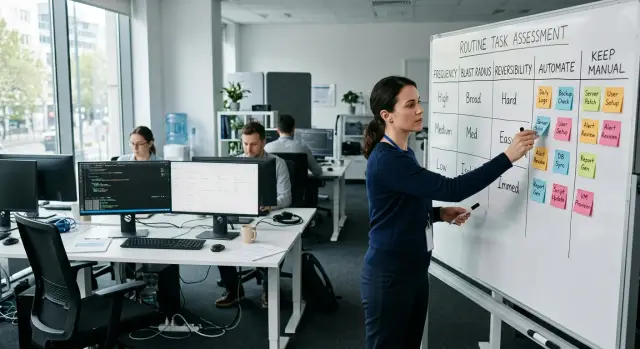
Table of Contents
Why full automation creates new problems
Routine work eats time, so teams often automate production tasks early. That makes sense. The risk is that a bad manual step hurts once, while bad automation can repeat the same mistake across every server, service, or customer in seconds.
Scripts do not hesitate. If a job points at the wrong database, restarts the wrong service, or rolls out a bad config, it does that quickly and exactly as written. Speed helps when the process is safe. It causes damage when the process still has sharp edges.
Some jobs look simple only because they usually happen on calm days. A release, a backup restore, or a firewall change can feel routine for weeks. Then traffic spikes, a vendor API slows down, or someone pushes a late fix. That is when a neat automated flow can fail at the worst time.
People still catch things scripts miss. A human can notice that error rates are already climbing, support tickets just jumped, or a customer demo starts in ten minutes. A tool sees only the checks you gave it. If nobody taught it to pause for messy real-world timing, it keeps going.
That is why full automation can raise release risk instead of lowering it. Teams stop looking closely because the dashboard says everything passed. Later they find out the checks were too narrow, the rollback covered only part of the change, or the alert fired after customers already felt the issue.
Good automation removes toil, not awareness. It should handle the boring parts and leave a clear trail: what changed, when it changed, who approved it, and how to stop it. If a process saves twenty minutes but hides the only warning sign, it is not much help. The safer goal is simpler than most teams think: less repetitive work, with the same or better visibility when something feels off.
Use three tests before you automate
A task that annoys the team is not automatically the right one to automate. Before anyone writes a script or adds a bot, score the task on three things: frequency, damage, and reversibility.
Frequency is easy. Count how often the team does the task in a normal week. A job done ten times a week creates more drag than something done once every two months.
Damage is about the most likely bad outcome if the task runs the wrong way, at the wrong time, or on the wrong system. Think downtime, bad data, surprise cloud spend, or alerts that wake people up.
Reversibility is the recovery test. If someone can undo the mistake with one click in two minutes, risk stays lower. If recovery means restoring a database and losing a night, slow down.
A simple 1 to 5 score works fine. You do not need a formal model. What matters is that everyone uses the same scale, so one engineer is not calling a task low risk while another sees the same task as an outage waiting to happen.
Write the score on one shared page. Keep it short: task name, owner, three numbers, and one sentence on why. That page does two useful jobs. It shows where manual work really piles up, and it forces the team to talk about hidden danger before automation hides it.
A small example makes the difference clear. Say a team clears a jammed background worker four times a week. Frequency is high. Damage is modest if the fix targets the right worker. Reversibility is good because the team can restart it again if needed. That is a solid automation candidate.
Now compare that with a production database change done once a month. Frequency is low. Damage is high. Reversibility may be poor if rollback is messy. Even if the manual step feels slow, full automation is probably the wrong move for now.
That is how automation stays useful. Cut repeat work first. Keep direct human control over actions that can break a release or hurt customers.
What to automate first
Start with work that happens often, follows the same steps, and is easy to undo if something goes wrong. That usually means boring jobs, not high-pressure decisions.
Build and test runs are an obvious first win. A pipeline can run the same commands every time and give a clean pass or fail result. People should not spend release day rerunning test suites by hand.
Routine cleanup jobs also fit well. Log rotation, temp file cleanup, cache pruning, and old artifact removal usually follow fixed rules. If the steps are already written down, a script can run them on schedule.
Backups should run automatically too, but only if the team also practices restores. A green backup job is not proof of safety. The restore is the part that matters.
Alert routing is another good early target. If database alerts always go to one team and billing alerts go to another, route them by rule. That cuts response time and avoids the usual confusion about who should act first.
A simple rule works here: automate tasks with a small blast radius and clear success checks. If a task runs ten times a day, people do it the same way every time, and a mistake is easy to reverse, it is usually a good candidate.
What to keep manual for now
Some jobs stay safer in human hands until the team has seen them enough times to trust the pattern. In production work, the risky tasks are usually rare, hard to undo, or able to hurt many users at once.
Database changes sit near the top of that list. A schema change, a large backfill, or a migration on busy tables can fail in ways a script will not fully understand. A person can pause, check load, watch error rates, and decide whether to continue.
Incident decisions should stay manual too. During an outage, teams often choose between speed, safety, and customer impact. One person may disable a feature, another may accept stale data for ten minutes, and someone else may hold the release. A runbook helps, but the call itself still needs judgment.
Security rule changes deserve the same caution. A firewall tweak, bot filter update, or access policy change can block real users in seconds. The rule may look fine in staging and still break login, checkout, or an API that a major customer depends on.
One-off data fixes for a single customer are another trap. They look small, but the details are messy. Names do not match, old records behave differently, and edge cases hide in plain sight. If you automate a rare correction too early, you can spread one customer problem to many accounts.
Large cost changes should stay manual as well. Turning off a cache layer, shrinking a cluster, or changing storage tiers can save money fast. It can also slow down every service that depends on that setup. Teams often rush these moves because the savings look obvious. The bill drops, then on-call gets much worse.
A simple rule helps: keep the task manual if it happens rarely, a mistake can hit many users or systems, and rollback is slow or unclear. That does not mean never automate it. It means watch it first. Once the team has handled the same task cleanly several times and written down the checks and rollback steps, automation starts to make more sense.
Review one task step by step
Pick one task and describe it in one plain sentence. "Deploy the billing service after tests pass" works. "Handle releases" does not. Vague wording creates vague scripts, and vague scripts fail in strange ways.
Use a short review before you automate anything:
- Write the task as one action with one clear end point. Name the system, the action, and how you know the task is done.
- Note who does it now, how often they do it, and what starts it. A task that runs ten times a week is easier to justify than something done once a quarter.
- Write down the worst failure you can picture, then write the undo step. Keep both short. If you cannot explain rollback in a sentence or two, keep the task manual.
- Add one guard before the script can change anything. Make it pause for approval, confirm the target environment, or require a clean health check first.
- Test the automation on a low-risk service before you touch something customer-facing.
After one or two runs, compare the automated path with the manual one. Did it save time? Did the guard catch anything? If not, the script is not ready. If yes, copy the pattern to the next task. Do not apply it to the whole stack at once.
Example: release day at a small SaaS company
A five-person SaaS team ships on Tuesday and Friday. They are not chasing a fully hands-off deploy yet. They automate the repetitive work and keep one human check before production.
By noon, every merged change has already passed tests, package builds, and a draft release note. Nobody copies versions by hand or pastes changelog text from commit messages. That part is worth automating because it happens every release and the steps barely change.
The release window still gets a manual review. One engineer looks at the calendar, current incident load, and support traffic, then decides whether it is a safe time to ship. A deploy during a customer migration is very different from a deploy on a quiet afternoon, and software still struggles with that kind of judgment.
Their flow is simple. CI runs tests and builds the package. The system prepares release notes from merged work. One person reviews the production window and approves the deploy. If something breaks, alerts open an issue, attach the release ID, and page the on-call person right away.
Rollback stays manual for now. The team can roll back, but they do it by hand because they have not practiced automatic rollback enough to trust it under stress. That sounds slower. In reality, it often lowers risk. A human can check whether the bad release touched only one service or included a database step that needs extra care.
After a few months, they may automate more. First they would rehearse rollback until every engineer can do it half asleep and the team knows which cases are safe to reverse automatically. Until then, manual rollback is not a weakness. It is a guardrail.
That is what practical manual and automated operations look like. Frequent, low-risk work runs the same way every time, while a few higher-impact decisions stay with people.
Mistakes that hide risk
The worst automation failures look clean right up to the moment they break. A button click disappears, a script runs on schedule, and everyone feels faster. Then one bad input, one wrong target, or one silent backup problem turns a small task into a real outage.
One common mistake is automating a flaky task before fixing why it flakes. If a deploy sometimes fails because package versions drift or services start in the wrong order, the script does not solve the problem. It just repeats the mess faster.
Another mistake is removing human approval too early. Teams often cut the review step for production deploys because it feels slow. That works until someone ships a schema change on Friday evening or pushes a config update that needed one more pair of eyes.
Backups create a different kind of false comfort. Many teams automate backup jobs, see green check marks, and assume they are safe. If nobody runs restore tests, those backups are still unproven. A backup matters only when you can restore it under pressure.
Risk also hides inside scripts that touch every environment at once. One command updates dev, staging, and production. One job rolls the same change to every region. That saves time on a calm day, but it removes your chance to stop after the first bad result.
This tradeoff is usually not close. Saving twenty minutes per release is not worth two hours of rollback because one script pushed a bad migration everywhere.
Warning signs are usually easy to spot once you look for them. The task still fails for reasons nobody fully understands. One script changes multiple environments in a single run. The team cannot undo the action quickly. Success metrics focus on minutes saved instead of outage cost.
Good automation lowers toil without hiding danger. Keep a human check on high-impact changes, test restores like real incidents, and make scripts fail small first.
Checks before you switch
A task is ready for automation only when you can stop it, see it, review it, undo it, and break it safely in a test. Miss one of those, and a simple script can turn a minor mistake into a long incident.
Before you switch a task over, ask five plain questions. Can you stop it fast? Can you see every action in the logs? Can one person review the risky run before it starts? Can you roll it back in minutes instead of hours? Did you force one failure on purpose to see what the automation does?
The stop button matters more than clever logic. If the job goes wrong at 2 a.m., the on-call person should not need to edit code just to disable it. Logging matters for the same reason. The job should record what it changed, when it ran, and what happened next. Silent automation is where confusion starts.
Approval is still useful for risky changes, even on fast-moving teams. One short review can catch a bad target, a wrong config, or terrible timing. Rollback speed matters just as much. If you cannot get back to a known good state in minutes, keep the task manual a little longer.
Do not test only the happy path. Force a timeout, a missing secret, or a failed health check and watch how the job behaves. A good test is boring on purpose. Run the change in a safe window, with a small scope, and have one person watch the logs live.
A small SaaS deploy is a good example. If the pipeline pauses for approval, logs each step, checks health after release, and can shift traffic back in two minutes, it is probably ready for regular use. If that same release also includes a database change you cannot reverse cleanly, keep that part manual.
The goal is not maximum automation. The goal is calm operations when something goes wrong.
What to do next
Start small and make scoring part of weekly ops work. Pick three tasks your team handles every week, then score each one by frequency, blast radius, and reversibility. You do not need a perfect spreadsheet. A simple note with a 1 to 5 score is enough.
Good starter tasks are the ones people quietly hate: rotating logs, restarting a stuck worker, clearing old build artifacts, or posting routine deploy notes. They happen often, they waste time, and if something breaks, you can usually undo it fast.
Then keep the plan simple. Automate one low-risk task. Run it for two weeks. Review what saved time, what created noise, and what confused people. Adjust the rule, the script, or the alerts before you automate the next thing.
Keep a short list of jobs that still need human judgment. Risky database changes, unusual incident calls, customer status decisions, and emergency access often belong on that list. If a person needs to weigh timing, context, or tradeoffs, keep the human in the loop.
A short review after two weeks can save a lot of trouble. Ask whether the automation saved time, whether it created extra noise, and whether anyone stopped paying attention because "the script handles it." If that last answer is yes, tighten the rules or scale the automation back.
If you want an outside view, Oleg Sotnikov at oleg.is works with small teams as a Fractional CTO on infrastructure, release workflows, and practical automation. A fresh review often makes it easier to see which jobs are safe to automate now and which ones still need a person.
Frequently Asked Questions
What should I automate first in production ops?
Start with frequent, boring tasks that follow the same steps and have a small scope of damage if they fail. Build runs, test runs, log cleanup, alert routing, and stuck worker restarts usually fit that rule.
Which production tasks should stay manual for now?
Keep rare, high-impact work manual until your team sees the pattern clearly and can undo mistakes fast. Database changes, incident calls, security rule changes, unusual customer data fixes, and large cost cuts often need human judgment.
How do I decide if a task is safe to automate?
Use three simple scores: frequency, damage, and reversibility. If a task happens often, fails in a limited way, and you can undo it in minutes, automation usually makes sense.
What does reversibility mean in real life?
Reversibility means you can get back to a known good state quickly without making the situation worse. If rollback needs a long restore, manual cleanup, or guesswork, wait before you automate.
Should I automate backups?
Yes, but do not stop at the backup job itself. Automate the backup, then practice restores on purpose, because the restore tells you whether the backup actually helps under stress.
Should production deploys run without any human approval?
Usually no. Let CI handle tests, builds, and release notes, then keep one human approval before production for timing, current incidents, and customer impact.
Why can full automation make outages worse?
Because automation repeats mistakes fast and without hesitation. One wrong target, bad config, or narrow health check can push the same problem across many systems before anyone notices.
How should I test a new ops script safely?
Try it on a low-risk service first and force a failure on purpose. Make the script pause for approval, log every change, confirm the target environment, and prove that you can stop it fast.
When can I remove the manual check?
Remove it only after the team has run the task cleanly many times, written down checks and rollback steps, and proved that the automation behaves well when something fails. If one bad run can still hurt many users, keep the approval step.
What signs show a task is not ready for automation?
Watch for flaky tasks, unclear rollback, one script touching every environment at once, and success metrics that care only about time saved. Those signs mean the script may hide risk instead of removing toil.


