Debugging production issues with event timelines faster
Debugging production issues with event timelines starts with clear markers for deploys, config edits, traffic spikes, and vendor outages.
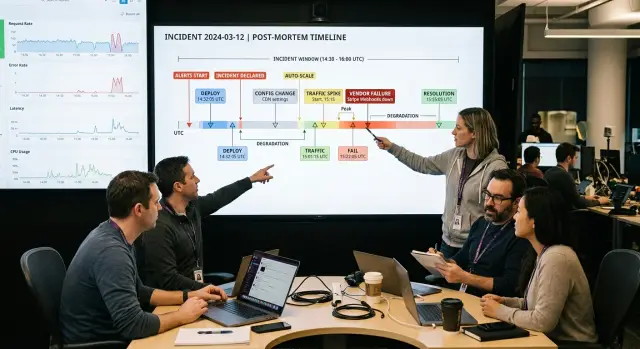
Table of Contents
Why the first hour often goes wrong
The first hour of an incident gets messy because alerts arrive before context. A dashboard shows errors, latency, or failed checkouts, but nobody knows what changed in the last 10 minutes. People open five tabs, scan chat threads, and start guessing.
Most teams keep the facts in different places. Deploy history sits in CI logs, config edits live in cloud audit records, traffic data lives in analytics or load balancers, and vendor status lives somewhere else again. When those records do not share one clear order, people fill the gaps from memory.
Memory is a bad tool in a live incident. One engineer remembers a deploy. Another remembers a traffic spike. Someone else swears nothing changed. By the time the team compares notes, 20 minutes are gone and the timeline is already fuzzy.
A single incident timeline fixes that. It puts changes, symptoms, and outside signals on one clock so the team can compare cause and effect instead of arguing about what feels related.
What belongs on one timeline
A useful timeline mixes internal events with outside signals. If you only track code changes, you miss the traffic jump that stressed a queue. If you only watch graphs, you miss the feature flag edit that changed behavior two minutes earlier.
Put anything on the timeline that can change request flow, system load, or user behavior. The point is simple: give the team one place to compare what changed and what broke.
Start with the basics. Record app deploys, hotfixes, and rollbacks with exact timestamps. Add feature flag changes, secret rotations, config edits, and database or job changes. Then add operating signals such as traffic, latency, error rate, retry volume, and queue depth. Vendor incidents belong there too, along with API timeout spikes and status page updates. The first user reports from support, sales, or account managers matter just as much, because they often show who noticed the problem first and which workflow actually failed.
Deploys need more than a note that "something shipped." Record the service name, version, environment, and the minute it went live. If someone rolls back, log that too. A rollback often says as much as the deploy itself.
Config changes slip through all the time because they do not look like releases. They still change production behavior. A new rate limit, a rotated credential, a cache setting, or a flag that opens a feature to 10% of users can trigger errors without any code deploy at all.
Plot traffic beside latency, error rate, and queue depth on the same clock. That makes it easier to tell the difference between "the app slowed down because demand spiked" and "the app slowed down after a change, then traffic exposed it."
Do not treat vendors as background noise. If a payment API starts timing out, or a cloud service posts a degraded status update, put that on the timeline with the same care you give internal events. Plenty of incidents look internal for the first 20 minutes and turn out to start outside your stack.
Build the timeline step by step
Start with the moment users felt the problem. That might be a checkout failure at 10:14, a mobile app timeout at 10:16, or a support ticket that says "pages stopped loading." Use the first user-facing symptom as the anchor, even if your monitoring system started alerting later.
Then work backward a little and forward a little. A practical order looks like this:
- Write down the first visible symptom and its exact time.
- Add every change from the prior 30 to 60 minutes, including deploys, feature flags, config edits, secret rotations, database changes, and scheduled jobs.
- Overlay traffic, latency, and error movement on the same clock.
- Add outside signals such as vendor errors, DNS trouble, cloud incidents, or network loss between regions.
- Mark the first event that changed system behavior, even if a louder alert fired later.
That order matters because the noisiest event is often not the cause. A cache misconfiguration might start a slow rise in error rate at 10:08. A traffic spike at 10:12 can make it much worse. Then a vendor timeout at 10:15 fills the logs with scary messages. If you start with the loudest alert, you can chase the wrong thing for an hour.
Use exact timestamps and one timezone. If Sentry shows a spike at 10:14, Grafana shows request volume rising at 10:12, and the deploy log says a config change went live at 10:07, keep those on one line of time. Do not split app data, infra data, and vendor data into separate notes. That breaks cause and effect.
Good deploy and config tracking helps, but it is only part of the picture. Vendor debugging and network checks belong on the same timeline because users do not care which team owns the failure. They only feel when the system changed.
Keep the order clean
Production timelines fall apart when each tool tells time a little differently. One dashboard shows local time, a deploy log uses UTC, and a vendor status feed rounds to the nearest minute. That is enough to send a team after the wrong cause for half an hour.
Pick one timezone and force everything into it. UTC is usually the least confusing choice because it avoids daylight saving shifts and mixed office locations. If one tool cannot switch, note that beside every event from that source.
The timeline also needs the same clock across different kinds of evidence. Match graph timestamps to deploy records, feature flag changes, config edits, job runs, and alert notifications. If the app slowed down at 09:14 but the config change landed at 09:19, those two events probably do not explain each other.
A few habits help a lot. Normalize times before you start guessing. Check whether dashboards, logs, and deploy tools agree down to the minute and second. Mark blind spots, such as missing audit logs or delayed vendor reports. If two events happen close together, label them as nearby until you prove they connect.
That last part matters more than people think. Teams often treat sequence as proof. A traffic spike at 10:02 and a deploy at 10:03 may look linked. Then you find out the spike started building at 09:58, or a payment provider began failing at 10:01. Close does not mean related.
Write gaps down in plain language. "No config audit log between 10:00 and 10:20" is useful. So is "vendor status page updated 12 minutes late." Notes like that stop the team from trusting weak evidence too much.
If two events sit almost on top of each other, keep both on the timeline and mark your confidence. One may be the trigger, the other may be noise, and sometimes both matter. Clear order will not solve root cause analysis on its own, but it removes a lot of avoidable confusion.
A simple release-day example
A checkout deploy goes live at 10:02. Five minutes later, card payment errors start climbing. Many teams stop there, assume the new code broke checkout, and rush to roll back.
The timeline gives you a better first move. At 10:09, the payment vendor starts timing out, but only in one region. At 10:11, traffic jumps after a campaign email lands. That changes the working theory right away.
If the deploy caused the whole problem, you would expect errors across regions and a clean split between the old version and the new one. Instead, the failures cluster around one vendor region first, then get worse when traffic doubles. The deploy might still matter, but it is no longer the only suspect.
Now the team can test a narrower set of ideas. Compare payment success by region. Check whether non-card methods still work. See whether calls to the vendor slowed before app errors rose. Compare old and new checkout instances too. If both versions struggle only when they hit that regional vendor endpoint, a rollback probably will not fix much.
This saves time because it cuts out guessing. The team does not need to read every log line or argue over five theories at once. They start with the first external change that matches the pattern, then check how later events made it worse.
That usually leads to a better first action. Instead of touching checkout code first, the team may route traffic away from the bad region, loosen a timeout, or slow the campaign if they control it. Those steps can reduce errors while root cause work continues.
A timeline does not prove cause by itself. It gives the team a sane place to start, and on a messy release day that can save 20 to 30 minutes before anyone changes code.
Read cause and effect without guessing
Time matters, but scope matters just as much. When an error starts right after a deploy, that does not prove the deploy broke the whole app. It points to a short list of nearby suspects: new code, the part of the fleet that received the rollout, or infrastructure touched at the same time.
That is why timelines work so well. They turn "it feels related" into a claim you can test. Instead of debating theories, you check what changed first and what changed only in one slice of the system.
A failure that begins before a deploy tells a different story. If API errors started at 10:02 and the deploy began at 10:07, the release is not your first cause. Keep it on the list if needed, but look earlier at traffic jumps, queue growth, expired credentials, or a vendor problem.
Small config edits can fool a team because they break only one path. A rotated secret may kill payment callbacks while page views, login, and search still look normal. If you only watch top-line uptime, you miss it. The timeline should show the edit and the narrow symptom side by side.
Match timing with scope
When you compare events, ask four questions. Did the symptom start before or after the change? Did it hit all users or one feature? Did it affect one region, one request type, or one tenant? Did the change touch code, config, infrastructure, or a vendor dependency?
Vendor issues often arrive in a narrow pattern first. Image uploads may fail only in one region because a storage provider has trouble there. Tax quotes may time out only for checkout requests because one external API is slow. That shape matters. A deploy usually follows your rollout pattern. A vendor problem often follows feature, region, or request type.
Good timeline work is less about finding one suspicious event and more about matching time, scope, and system boundaries. When those three line up, root cause analysis moves much faster.
Mistakes that slow root cause work
Teams often waste the first 20 to 40 minutes by chasing the loudest signal instead of the earliest one. A pager alert might fire at 10:12, but the first bad request may have shown up at 10:04. Start with the first symptom you can prove, then move forward in time.
That sounds obvious, but people still anchor on the newest alert because it feels urgent. The result is messy. One person inspects CPU, another checks logs, and nobody asks what changed just before users felt the problem. A clean timeline cuts through that noise fast.
Some changes hide in places teams forget to check: feature flags switched without a deploy, secrets rotated by automation, scheduled jobs that started at the same minute, vendor calls inside the request path, and cache or queue settings changed outside the app repo.
These often explain incidents that look random at first. A background sync job can flood a database. A secret update can break auth for one service. A vendor timeout can slow every request that depends on it, even when your own code is fine.
Traffic jumps cause confusion too. People see a spike and assume the system needs more capacity. Sometimes that is true. Often it is not. A retry storm, stuck worker, bad query, or failing dependency can create the same graph shape. If latency climbed before traffic did, scaling is probably not your first move.
Rollback is another common reflex. It can help, but only after you know what changed. If the deploy, config, and vendor status all changed within ten minutes, a rollback may remove one signal while the real fault stays in place. Then the team loses another half hour and decides the issue is "weird."
A simple rule helps: write down every change that could affect a request, even if it happened outside the app code. Put deploys, flags, secrets, jobs, traffic shifts, and vendor events on one clock. Root cause work gets faster when the timeline includes the boring changes people usually skip.
Quick checks for the first 15 minutes
Speed matters more than detail at the start. You are not proving the cause yet. You are trying to stop random guessing and find the smallest set of facts everyone can trust.
Start with change. Open the last 30 minutes and mark every deploy, feature flag edit, config push, secret rotation, scheduled job, and vendor notice. Most incidents stop looking mysterious once you line up what changed and when.
Then find where the failure showed up first. Was it one endpoint, one region, one tenant, or one customer segment? That first edge often tells you whether the problem sits in your code, your infrastructure, or outside your stack.
A fast first pass works well when you keep it narrow. Compare requests, latency, and error rate on the same chart. Check the first failing path. Split the data by region or customer group. Look at vendor status and vendor-specific errors in the same window. Public status pages often lag, so your own logs may tell you sooner. Then ask one practical question right away: can you roll back, disable a flag, or route traffic elsewhere to shrink the blast radius?
A small example makes this clearer. If error rate climbs at 10:04, latency rises at 10:05, and a payment provider starts timing out at 10:03, you already have a better lead than "the app is down." If only EU users fail after a config edit, the search space gets much smaller.
Teams that practice this usually solve the first mystery sooner. They do not spend 40 minutes debating theories while the facts sit in five different tools.
What to set up before the next incident
Most teams do not fail during an outage because they lack smart people. They fail because the facts sit in five places and nobody can line them up fast enough. Put deploys, config changes, traffic shifts, and vendor incidents into one shared view before you need it.
That view does not need to be fancy. It needs clear timestamps and short labels that people can scan under stress. If one person checks GitLab, another checks Grafana, and a third checks a vendor status page by hand, the timeline gets slow and messy.
A solid setup usually tracks four things first: when a deploy started and finished, when config changed and who changed it, when traffic moved sharply up or down, and when a vendor started returning errors or hitting rate limits.
Keep each note short. During an incident, nobody wants a paragraph. "Enabled new checkout flag for 20% of users" is useful. "Updated several settings to improve performance" is not.
Small habits make a real difference. Ask people to add a one-line reason for every release and every config edit. Use the same wording each time. When notes follow a pattern, the team can skim ten events in seconds and spot the odd one.
Practice the recovery path too. A rollback that exists only in a runbook is not enough. Run it in a safe setting. Flip the feature flag off. Revert the bad config. Check who has permission to do it. These steps should feel boring before a real outage starts.
If you already use tools like GitLab, Sentry, Grafana, Prometheus, or Loki, feed their alerts and change events into the same shared view. That gives you a cleaner story of cause and effect and cuts down on guesswork.
If your incident process grew in pieces over time, an outside review can help. Oleg Sotnikov at oleg.is works as a fractional CTO and startup advisor, and this kind of cleanup fits the monitoring, deployment, infrastructure, and team workflow problems he helps companies sort out.
A good timeline will not stop every outage. It does make the first hour less chaotic, which is often enough to find the real cause before the team burns time on the wrong fix.
Frequently Asked Questions
Why does the first hour of an incident get so messy?
Alerts show pain before they show context. People jump between dashboards, chat, and logs, then they start filling gaps from memory. Put deploys, config edits, traffic, and vendor signals on one clock right away so the team works from facts.
What should I put on an incident timeline?
Include anything that could change request flow, system load, or user behavior. That usually means deploys, rollbacks, feature flags, secret rotations, config edits, job runs, traffic shifts, latency, error rate, queue depth, and vendor trouble.
How far back should I look when I build the timeline?
Start with the first user symptom you can prove, then check the 30 to 60 minutes before it. Keep going forward until you see how the issue spread, because the loudest alert often shows up after the real trigger.
Should I start with alerts or with the first user report?
Start with the first visible symptom, not the noisiest alert. A support ticket or failed checkout often gives you the real starting point before monitoring catches up.
Do config changes matter as much as deploys?
Yes, they can break production without any new code. A rotated secret, cache setting, rate limit, or flag change can hit one workflow hard while the rest of the app looks fine.
How do I stop bad timestamps from sending us the wrong way?
Pick one timezone, usually UTC, and convert every source before you compare events. If a tool uses local time or rounds to the nearest minute, note that beside the event so nobody mistakes close timing for proof.
How can I tell whether a vendor caused the problem or we did?
Check both timing and scope. If failures start in one region, one payment method, or one request type, inspect the vendor path first. If the issue follows your rollout pattern across services or instances, your own change deserves the first look.
Should I roll back as soon as errors rise?
Do not roll back on instinct. First check whether the failure started before the deploy, whether old and new versions fail the same way, and whether a config or vendor event lines up better. Roll back when the timeline points to the release.
What should we do in the first 15 minutes?
Build a small set of facts everyone trusts. Mark recent changes, find the first failing path, compare traffic, latency, and errors on one chart, and look for a fast move that cuts impact, like turning off a flag or shifting traffic.
What should we set up before the next outage?
Set up one shared view that shows deploys, config changes, traffic movement, and vendor errors with clear timestamps and short labels. If your process grew in pieces and incidents still feel chaotic, an experienced fractional CTO can review your monitoring, release tracking, and rollback flow.


