Product event cost alerts that catch spend before billing
Learn how product event cost alerts warn you when tenant activity, retries, or loops start raising spend, so you can act before invoices spike.
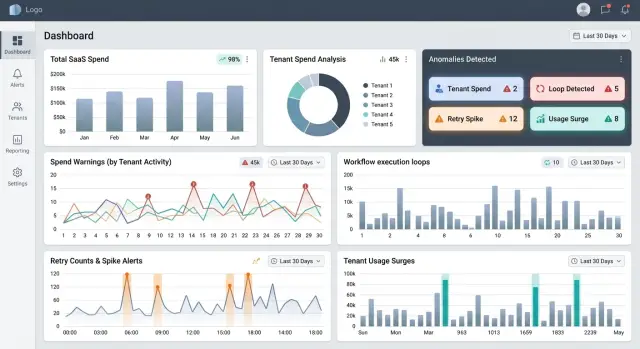
Table of Contents
Why billing views miss spend problems
Monthly billing pages tell you what already happened. They do not tell you why it happened, who caused it, or whether the spike is still running. By the time an invoice looks strange, the money is usually gone.
That delay hurts most in products where cost rises with activity. A tenant starts a large import, an automation fires on every record, or a background job retries the same failed step for hours. The billing dashboard may show a bigger total later that day or at the end of the month, but it rarely shows the chain of events that created it.
One noisy tenant can change the picture fast. A customer uploads 200,000 rows, runs a sync every five minutes, or turns on a workflow with a bad condition. Infrastructure cost jumps long before finance notices. The rest of your usage can still look normal, which makes the spike easy to miss.
Retries make this worse because they often look like ordinary traffic. A failed webhook retries 20 times. A queue worker keeps picking up the same job. A workflow loop calls an API again and again because one field never changes state. In a monthly billing view, all of that gets flattened into one usage number.
That is why product event cost alerts matter. They watch the actions that create spend, not just the bill that arrives later. A warning can fire when one tenant crosses an unusual event count in an hour, the same workflow runs far more times than normal, retries keep rising without successful completion, or a costly action starts happening in bursts.
That gives your team time to act. You can pause a loop, rate-limit a tenant, cap a batch size, or contact the customer before a small problem turns into an ugly invoice.
Billing views still help with reporting and planning. They are just too slow for early spend detection. Spend usually starts inside the product long before it shows up in accounting.
What should trigger a warning
Start with product events that create real cost, not with a finance dashboard that refreshes hours later. If a user action starts compute, storage, model tokens, queue traffic, or paid third-party API usage, it deserves attention.
Some events almost always map to spend:
- API calls to paid services
- File uploads, conversions, and exports
- AI prompts, embeddings, and image generation
- Background syncs, imports, and batch jobs
- Retries after failures or timeouts
These events do not carry the same risk. A single file upload may cost almost nothing. A workflow loop that uploads the same file 500 times in 20 minutes is a different problem.
Normal usage has a shape. It stays within a rough range for one tenant, one feature, or one hour of the day. Risky usage breaks that shape. You might see a sudden spike in requests from one tenant, a batch job running much longer than usual, or failed retries piling up because one dependency keeps timing out.
Tenant actions should trigger warnings when they cross a limit that fits that feature. A report export may need an alert after 50 runs in an hour. An AI text generation flow may need one after token use jumps to three times that tenant's normal daily level. Background jobs need their own limits too, especially scheduled imports, reindexing, video processing, and webhook fan-out.
Failed retries deserve extra attention because they create spend without giving users a result. One bad webhook endpoint or one broken workflow condition can burn money quietly. If the same job fails and retries 20 times, you want a warning long before the monthly bill tells you anything.
One rule rarely works for every event type. Cheap events happen in high volume. Expensive events happen less often but hurt faster. These alerts work best when each event gets a threshold based on unit cost, expected frequency, and how much damage a loop can do before someone notices.
How to map product events to spend
Start with the actions your product takes every day, not with the cloud invoice. A monthly bill tells you where money went. It does not tell you which user action caused it.
Pick a small set of events that create most of the cost. Good examples are "user uploaded a file," "AI summary requested," "report exported," or "workflow ran." For each one, assign a rough unit cost. Rough is enough. If an upload usually triggers storage, OCR, and one queue job, estimate the full cost of that path and write it down.
Trace the services behind each event
One product event often touches several services. An "AI summary requested" event might call an LLM API, write logs, store output in a database, and send a notification. If you only count the LLM call, the estimate will look neat and still be wrong.
A simple event cost map usually needs four fields: the event name, the services or vendors it touches, the average cost per run, and the multipliers that can raise cost.
Those multipliers matter more than most teams expect. Retries, fan-out jobs, and duplicate runs quietly turn a cheap event into an expensive one. A workflow that looks like one action to the user may trigger five background jobs, then retry two of them after a timeout. Your model should count all of that.
Say one tenant imports 2,000 records and each record starts an enrichment job. If every job calls an API, writes to storage, and retries once on failure, the real spend is closer to 4,000 runs than 2,000. That is the kind of pattern these alerts can catch early.
Keep the model simple enough to maintain
Do not build a giant spreadsheet with fifty columns. Most teams stop updating it after two weeks. A small table with ten or fifteen high-cost events is usually enough to spot trouble.
Review it once a month. Update unit costs when vendor pricing changes, when you add a new background step, or when a workflow starts branching more often. If the model is easy to edit, people will keep using it. That matters more than perfect accuracy.
You are building a working estimate, not an accounting system. If it points to the events that burn money fastest, it is doing its job.
A simple setup you can start this week
Start small. Most teams do not need a full cost monitoring project to catch waste early. They need a short list of product events that drive most of the bill, a rough baseline, and an alert that reaches the person who can act within minutes.
A practical first version usually fits into five steps:
- Pick three to five events that cost real money every time they run, such as AI calls, video processing, PDF generation, search indexing, and large exports.
- Look at one or two weeks of data and write down what normal looks like by hour and by day. You do not need fancy math. A simple range is enough.
- Add three alert types: sudden spikes, repeated loops, and failure storms.
- Send each alert to the person who can stop it fast.
- Review the first week of alerts and cut anything nobody uses.
Hourly baselines matter more than daily totals. A batch job at 2 a.m. may be normal, while the same volume at 2 p.m. may mean a bug or a tenant script stuck in a loop. Daily totals usually react too late.
Keep the first rules plain. If an event runs five times more than its usual hourly range, send a warning. If the same workflow fails 20 times in 10 minutes, alert someone. If one tenant uses 30% of the day's normal volume before lunch, flag it.
This setup is simple, but it catches the mess that monthly billing dashboards miss. Lean teams usually do better with a few sharp alerts than a wall of charts nobody checks.
A realistic example with one noisy tenant
A B2B SaaS team lets each tenant import customer data from a CSV file. One tenant uploads a 40,000-row file at 9:05 a.m. That part is normal. The app creates one import job, splits it into 80 chunks, validates each chunk, writes the clean rows to the database, and sends enrichment calls to an external API.
On a healthy day, this import costs about $18 in API usage and another $4 to $6 in compute, queue, and database work. Nobody worries about that. The tenant gets the result in a few minutes, and the cost stays inside the expected range.
The problem starts with a retry rule. One worker finishes chunk 57, times out before it writes the final status update, and the orchestrator decides the whole import stalled. Instead of retrying one failed chunk, it requeues the full job with the same payload. Ten minutes later, it does it again. Then again.
Now the tenant still looks like one customer doing one import, but the system is paying for four full runs. The API bill jumps from about $18 to $72. Compute and database load climb too, so the total cost reaches roughly $95 before anyone notices. If the loop keeps running for another hour, that single tenant can burn a few hundred dollars on one file.
A monthly billing screen will not catch this soon enough. An event-driven warning should fire when the same tenant starts the same import more than twice in a short window, or when one import_id creates spend that is three times higher than its normal pattern.
In this case, the warning should fire around the second duplicate run. That gives the team a small window to stop the bleed before the next retries stack up.
The response is usually straightforward:
- pause new imports for that tenant
- kill jobs with the repeated import_id
- turn off the full-job retry rule
- patch the worker so it retries only failed chunks
- replay the import once with deduplication turned on
That is the real advantage here. You catch the bad loop while it is still a product event, not later as a billing surprise.
Thresholds that catch issues without constant noise
Fixed caps are blunt. If a tenant crosses a hard daily limit at 4 p.m., you may already have paid for hours of waste. Event-based alerts work better when they watch speed as well as totals. A warning like "cost per 10 minutes doubled twice in one hour" catches a bad loop much earlier than a monthly billing view.
Separate tenant spikes from system spikes. One customer might trigger a retry storm after a broken import. The whole product might spike because a release changed cache behavior or a worker started reprocessing the same jobs. Both raise spend, but they need different fixes. Tenant rules should point to an account, workflow, or feature. System rules should point to shared services, background jobs, or recent deploys.
Planned work needs breathing room. Launches, backfills, and large migrations can look exactly like waste if your alerting stays too strict. Add a grace range with a clear start and end time for the specific tenant, job, or feature involved. That keeps your team from muting alerts by hand and then forgetting to turn them back on.
Escalation should depend on whether spend keeps climbing. The first warning should invite a check, not wake half the team. If the rate stays high after the first warning, send a stronger alert. If both rate and total spend keep rising after another interval, then page someone.
A simple pattern works well for most teams:
- warn when current spend rate is 2x normal for 15 minutes
- send a second alert if it stays above that line for another 15 to 30 minutes
- use separate thresholds for one noisy tenant and for the full system
- add temporary grace ranges for launches, imports, and backfills
- page only when the climb continues after earlier warnings
This cuts noise because short bursts often fade on their own. It still catches the expensive failures: stuck retries, runaway loops, and one tenant hammering a costly workflow.
Mistakes that make alerts useless
Alerts fail when they watch only total monthly spend. By the time that number moves enough to look scary, the damage often happened hours or days earlier. These alerts work better when they react to the action that creates cost, not the bill that shows up later.
Another common mistake is ignoring the quiet multipliers. A single user action can trigger far more work than anyone expects, especially when the system retries failed jobs or fans one task out into many smaller ones.
Common blind spots include API retries after timeouts, cron jobs that run too often, queue fan-out from one event into dozens of tasks, and workflows that loop after a bad state change. If alerts ignore those paths, teams get a false sense of control. The dashboard looks calm while workers stay busy and spend keeps climbing.
Teams also ruin alerts by sending every warning to everyone. When the whole company gets pinged for every spike, people mute the channel and move on. Route alerts to the person who owns the service, then escalate only when the spike keeps growing or crosses a higher threshold.
One flat limit for every customer tier causes trouble too. A large enterprise tenant and a small trial account should not trigger the same response. If both hit the same spend threshold, one alert will feel late and the other will feel silly. Limits should reflect normal usage for that tier, plan, or workflow.
Testing often gets skipped because the alert rules look simple on paper. That is a mistake. Fake a burst of tenant activity. Force a retry storm. Simulate a loop that keeps re-queuing work. You want to know whether the alert fires in five minutes, not after finance asks why compute costs doubled.
A useful alert should answer three questions quickly: which tenant caused it, which product event started it, and who should stop it. If the alert cannot do that, it is just more noise.
A quick checklist before you switch alerts on
Before you switch these alerts on, make sure every warning points to one clear cause. If an alert says "cost spike detected" but nobody can tell whether a file import, retry storm, or background sync caused it, people stop trusting it fast.
A solid warning answers three questions right away: what happened, which tenant or workflow caused it, and what someone can do in the next few minutes.
- Tie each alert to one event family, such as report exports, webhook retries, or AI generation jobs.
- Include the tenant ID, workspace name, or workflow run ID in the alert itself.
- Make sure someone can pause, rate-limit, or disable the noisy job within minutes.
- Count retries, replays, and duplicate runs in the same spend path.
- Test the rule against one normal day and one bad day.
The alert message should save time, not create more work. Put the event type, recent volume, affected tenant, and rough spend impact in the first lines. If an engineer has to open three dashboards just to understand the problem, the rule still needs work.
A small example makes the gap obvious. Say one workflow usually runs 2,000 times a day with 30 retries. Then one tenant uploads broken files, the parser retries 3,000 times, and the queue fans out extra calls. Your warning should point to that exact event pattern before the billing dashboard looks strange.
If even one check fails, fix that first. Five alerts that people trust beat fifty alerts that everyone mutes.
Next steps for a calmer cost control process
Cost control gets easier when every alert has a small plan behind it. If a warning fires and nobody knows what to do next, the alert becomes background noise within a week. Each alert should point to a clear owner, a quick check, and one safe action that can stop extra spend.
Keep the playbook short. One page is enough for most alerts. For each alert type, write down what product event triggered it, who checks the tenant or workflow, who can pause jobs or cap traffic, and when the team escalates the issue.
This matters even more when tenant activity can create cost fast. A support lead might confirm whether a customer action looks normal, while an engineer stops the job queue or caps retries. If both people assume the other one is handling it, costs keep climbing while the chat fills with questions.
Then add one simple monthly habit. Review the top three spend drivers from the last 30 days and compare them with the product events that caused them. You do not need a perfect finance model for this. You need a plain view of what burned money, why it happened, and whether the alert fired early enough to help.
Teams often get stuck when event names, billing labels, and infrastructure costs do not match cleanly. That is normal. If the setup feels messy, someone like Oleg Sotnikov at oleg.is can help map product behavior to real cost drivers and set alert rules that stay practical for a small team.
A calm process is usually a simple one. Pick the alerts that catch the most expensive mistakes, give each one an owner, and review what changed every month. That routine does more than another dashboard full of charts nobody checks.
Frequently Asked Questions
Why are billing dashboards too slow for spend problems?
Because billing pages show totals after the spend already happened. Event alerts show the action that started the cost, so your team can stop loops, retries, or noisy tenant activity before the invoice grows.
Which product events should I alert on first?
Start with actions that charge you almost every time they run. Good first picks are AI calls, file processing, exports, paid API requests, imports, and background jobs that can retry or fan out.
How do I figure out what normal usage looks like?
Look at one or two weeks of data and find the usual hourly range for each event. You do not need complex math; a simple normal range by tenant, feature, and time of day gives you a solid starting point.
What threshold should I use at the start?
Use a simple rule first: warn when an event runs about 2x to 5x above its usual hourly range, or when retries pile up for 10 to 15 minutes. Then tune the rule after you review a week of real alerts.
How do I catch retry storms early?
Watch repeated failures and duplicate runs, not just total volume. If the same job, webhook, or workflow keeps failing without success, alert early because those retries burn money and give users nothing back.
Should I track spend risk by tenant?
Yes. One tenant can create most of the waste while the rest of the product looks normal, so tenant-level alerts help you spot the source fast and rate-limit, pause, or contact that customer.
How do I map a product event to real spend?
Write down the event name, the services it touches, the rough cost per run, and anything that multiplies cost like retries or fan-out. Keep the model small and update it when pricing, workflows, or background steps change.
How do I avoid alert noise?
Keep the first rules narrow and send them to the person who can act fast. Short spikes often fade on their own, so warn first, escalate only if the rate stays high, and add temporary grace ranges for launches or backfills.
What should a good cost alert message include?
Include the event type, recent volume, affected tenant or workflow ID, and rough spend impact in the first lines. Then name one clear action, such as pausing imports, capping retries, or checking a recent deploy.
What should my team do when an alert fires?
Act in minutes, not hours. Check which tenant or workflow caused the spike, stop the noisy job, cap the event source if needed, and fix the retry or loop that keeps the spend climbing.


