Process managers in a modular monolith that stay simple
Learn when process managers in a modular monolith help, how they coordinate long business flows, and when you should keep rules inside one app.
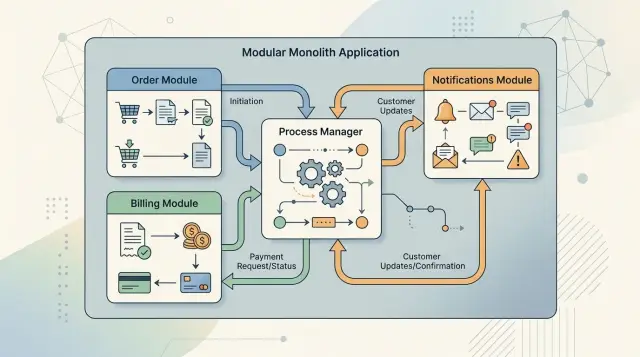
Table of Contents
Why one action turns into a messy chain
A single business action rarely stays inside one module. A signup can touch accounts, billing, email, permissions, and audit logs. A refund can start in orders, move through payments, update inventory, notify support, and write a finance record.
At first, that seems fine. Each module adds a rule that makes sense on its own. The trouble starts when nobody owns the whole workflow.
Take a refund inside one app. One module checks whether the payment settled. Another checks whether the order shipped. A third blocks refunds for flagged accounts. Support adds a manual override. Finance adds a rule for partial refunds. Before long, the same question gets checked in two or three places.
It usually grows slowly. Orders check refund eligibility. Payments check it again. Support tools add exceptions. An admin screen skips one of the checks. Later, a scheduled job tries to repair the cases that no longer line up.
Now the problem is bigger than repeated conditions. The real flow is spread across handlers, services, event listeners, and background jobs. To change one step, a developer has to remember every place that reacts to the action. Miss one, and the app behaves differently depending on how the action started.
That is when flags start to spread. You see fields like "is_manual", "skip_validation", or "needs_review". They begin as quick fixes. A few months later, they turn into hidden branches in the workflow, and nobody wants to remove them.
A modular monolith does not avoid this just because everything runs in one codebase. In some ways, it is easier to create the mess because calling another module is cheap. Teams keep adding local checks and special cases, and one business workflow turns into a long chain of side effects.
Good modular design keeps modules clean, but it also gives a cross module flow a clear owner. Without that owner, a simple action keeps growing until small changes feel risky.
What policies and process managers do
A modular monolith gets messy when one user action triggers several follow-up actions. Some rules belong right next to the domain action itself. Other rules need to watch what happens across modules and decide what comes next.
A policy is a small local rule. It answers a business question at the moment something happens. If a customer changes a plan, billing can decide whether to charge a prorated amount. If an order total is high, sales can require manual approval. These decisions belong close to the module that owns them, because that module already knows the terms, limits, and edge cases.
A process manager does a different job. It coordinates a flow that moves across modules or across time. It does not replace domain logic inside those modules. It watches for events, remembers the current step, and tells the next module what to do.
The split is straightforward:
- A policy makes a local decision inside one module.
- A process manager coordinates a longer flow across modules.
- Each module still owns its own rules and data.
That split matters. If you push every rule into a process manager, it turns into a giant traffic controller that knows too much. Change one billing rule and the whole workflow becomes fragile. If you bury every rule inside modules, nobody owns the flow from start to finish.
Inside one app, the two patterns work well together. A module handles its own decision first, then emits an event. The process manager reacts only when the flow crosses module boundaries or needs to wait, retry, or stop.
Take a plan upgrade. Billing decides the charge amount. That is a policy. After payment succeeds, a process manager tells the access module to unlock new features and tells notifications to send a receipt. If payment fails, it records the failure and ends the flow.
The process manager handles the journey. The modules keep the business rules.
Put rules in the right place
Confusion starts when one class tries to do two jobs at once: decide the business rule and run the workflow. That feels quick at first. Later, every change becomes a risky edit.
A policy answers, "Is this allowed?" or "Which option applies?" A process manager answers, "What happens next, and when?" Keeping that split makes the code easier to change.
Put fixed business decisions close to the module that owns them. Pricing limits belong with pricing. Permission checks belong with identity or access control. If a sales rep can discount up to 10% but a manager can approve 20%, that rule is a policy. The order flow should ask for the answer, not recreate the logic.
Put time and sequence in the process manager. Waiting for payment, retrying a failed email, creating a follow-up task after two days, or canceling a reservation after a timeout are flow concerns. They describe movement through steps, not the rule itself.
One decision, one owner
When ownership is blurry, code starts to argue with itself. The order module checks one discount rule, the invoicing module checks another, and nobody knows which one is right.
A clean split looks like this:
- Policies decide permissions, limits, and rule outcomes.
- Process managers react to events and move the flow forward.
- Modules keep their own data and expose clear actions.
- Shared state stays small and intentional.
Before modules share state, stop and ask why. Shared tables and direct writes feel convenient, but they blur boundaries fast. A process manager should coordinate modules, not quietly turn them into one big module.
Picture a large custom quote inside one app. The pricing policy decides whether the discount is allowed. The permissions policy decides who can approve it. The process manager waits for approval, reminds the reviewer after a day, retries the notification if delivery fails, and closes the quote if nobody acts in time.
Each decision has an owner. Each step has a place. That is what keeps the design understandable after the first version ships.
Build the first flow step by step
Start with one outcome that matters to the business. "Approve a refund" is enough. If you can move that case from request to final result inside one app, you have a solid base.
Map the modules that actually take part in that outcome. A refund may touch Orders, Payments, Risk, Notifications, and Accounting. Be strict. If a module does not make a decision or change state, leave it out for now.
Then name the messages that push the work forward. Commands ask a module to do something. Events report what already happened. A refund flow might include RefundRequested, CheckRefundPolicy, RefundApproved, PaymentReversed, and CustomerNotified. When those names match real business actions, product and support people can follow the flow without reading code.
Keep the process state in one clear record. Do not scatter it across several tables and hope logs fill the gaps. When a refund gets stuck, one record should tell you where it stopped and why.
That record usually needs a few plain fields:
- process ID and business ID, such as a refund ID or order ID
- current step and overall status
- retry count and next retry time
- last error or rejection reason
- start, update, and completion timestamps
Add timeouts and failure paths before the strange cases pile up. Decide what happens if Payments does not answer in 30 seconds, if Risk rejects the request, or if the refund succeeds but the customer email fails. Those are normal cases.
Each failure path should end in a named status, not a mystery. "WaitingForRetry" is clear. "Something went wrong" tells you nothing. If you retry, set a limit. If a person must step in, mark that state on purpose.
If the first flow feels a little boring, that is good. Boring flows are easier to change.
A simple example: refund inside one app
A refund often touches more than one module, even when everything lives in the same codebase. Support cares about the customer conversation. Billing cares about payment facts and refund limits. Inventory cares about stock. Notifications only send messages. Someone still has to coordinate the whole case.
That is where a process manager helps. It does not decide whether a refund is allowed. Billing owns that rule. It does not decide whether items can go back into stock. Inventory owns that rule. The manager watches the case and moves it forward.
One refund request, step by step
A typical flow might look like this:
- Support opens a refund request with the order ID, reason, and who asked for it.
- The process manager asks billing to check whether the payment settled and whether the refund fits policy.
- If billing approves, the manager tells inventory it can mark the items as returned.
- After each state change, notifications send the right update to the customer and support agent.
- The manager closes the case when every required step finishes, or sends it to manual review when something falls outside the usual path.
Notice what stays local. Billing does not call inventory directly. Inventory does not decide whether the customer gets money back. Notifications never own the rule. Each module answers one clear question, and the process manager keeps the order straight.
That small split pays off later. If you add a fraud check, a second approval for large amounts, or a different email template, you change one part instead of pulling logic out of three modules.
Handle state, waits, and retries
A flow that can pause needs memory. If the app sends a message, waits two days, and then checks for approval, "pending" is not enough. Store the current step, why the flow stopped, and the next action date in one place.
The state record matters more than clever branching logic. When someone opens it, they should see what happened, what the app expects next, and whether the app or a person needs to act.
A small set of fields usually does the job:
- current_step
- status
- pause_reason
- next_action_at
- last_error
Retries need the same care. If a timeout hits after the app sends an email or creates a payment request, the retry must not do it again by accident. Give repeatable actions a stable operation ID, or store a sent marker before the next attempt. If the worker runs twice, the result should stay the same.
This is where many teams create their own mess. They hide time based work in a generic job runner with names like "check stuck items" or "daily cleanup". Months later, nobody knows why one record is waiting or what the job plans to do next.
Keep the wait inside the flow instead. Let the process manager set next_action_at, and let a scheduler pick up only the records that are due. Now the context lives with the state. Support can inspect one record and understand the delay without reading job code.
When a step pauses or fails, write the reason in plain language. "Waiting for manager approval" is better than "blocked." "Bank API timeout" is better than "error." That note helps the next retry, helps support answer faster, and helps developers spot patterns.
A good test is simple: if a person cannot read the flow state and explain the pause in one sentence, the flow is too hidden.
Mistakes that make the flow hard to change
The fastest way to ruin a clean workflow is to turn one coordinator into a giant brain. It starts small. One class handles approval, billing, email, and audit logs. A month later, every new rule lands there too. Now one file decides everything, and nobody wants to touch it.
A process manager should coordinate steps, not hold every business rule in the app. Keep pricing rules with billing, refund limits with payments, and customer status rules with accounts. The coordinator stays easier to change when each module still owns its own decisions.
Another common mistake is direct table access across modules. It feels good for about ten minutes. Then the orders module reads the payments table, updates the support table, and checks a shipment flag somewhere else. Later, one schema change breaks three unrelated flows.
Use clear calls between modules instead. Ask a module for an action or a fact it owns. Let that module decide how it stores data.
Events can get messy too. Teams often fire events with vague names like "status_changed" or "updated." Six months later, nobody knows who publishes them, who listens, or whether they still matter. If an event has no clear owner and no clear meaning, it becomes noise.
You can usually spot a brittle flow quickly:
- one coordinator keeps growing
- modules depend on each other's storage
- event names say little
- failures stop the flow with no safe recovery path
- the team adds bigger patterns before the simple version works
That fourth point matters more than many teams expect. Automation stops sometimes. An API times out. A record gets stuck. If people have no manual recovery step, they edit the database or rerun random jobs and hope for the best. Write down what support or operations should do when a step fails.
The last trap is adding a saga because it sounds advanced. Most teams do not need distributed choreography inside one app. If the code runs in one monolith and one database, keep the workflow local until the simpler version clearly breaks.
Before you add distributed sagas
Teams often reach for sagas when a workflow starts to feel messy. That is usually too early. If one app still handles the work, splitting the flow across services can turn a hard problem into three harder ones: more failure cases, more moving parts, and slower debugging.
Start with the shape of the work. If the whole flow still lives in one codebase and one database, a process manager in the monolith is usually enough. You can keep state close to the business rules, inspect failures in one place, and change the flow without touching network contracts.
A few checks make the choice clearer:
- Does one app and one database still fit the load, team size, and release pace?
- How many steps truly need delayed coordination?
- Is the pain coming from weak module boundaries rather than the monolith itself?
- Can one team still trace a failure from start to finish without guessing who owns the bug?
- Do you have a real reason to split, such as separate uptime needs or very different scaling patterns?
A refund flow is a good test. If billing, orders, and notifications all run inside one app, you may only need a policy, a process manager, and a retry job. Split that flow into services too soon and a simple refund now needs message contracts, idempotency rules, timeout handling, and cross service tracing.
For many teams, the monolith lasts longer than they expect. The real fix is usually better boundaries and a clearer flow, not more infrastructure.
Oleg Sotnikov often works with startups on this exact problem: keep the architecture light, fix module boundaries first, and split services only when there is a real reason. Through oleg.is, he offers fractional CTO and startup advisory help for teams that need a practical review of architecture, process design, or AI-first development workflows.
What to do next
Pick one business flow that already causes small headaches. A refund, account upgrade, or invoice approval is enough. Draw the flow on paper first. Write each step, who makes the decision, what can fail, and what should happen after a retry.
That sketch often clears up the mess faster than another meeting. You can see which parts are domain rules and which part needs a coordinator. Many teams jump into code too early, then wonder why the workflow feels tangled a month later.
Next, split one confusing flow into two parts. Put one business decision into a policy. Put one longer sequence into a process manager. Keep both small. A policy should answer one rule in one place. A process manager should move work from step to step without turning into a second application hidden inside the first one.
A practical first pass looks like this:
- choose a flow that happens often and breaks often enough to matter
- name commands and events with words the business team already uses
- add logs for each step, retry, timeout, and manual fix
- write a short recovery note so another developer can handle a stuck case
Do that before you add more automation. If nobody on the team can answer "where does this rule live?" and "how do we recover this flow?" in five minutes, the problem is not scale. It is shape.
Be honest about scope too. If one process manager starts reading like a giant script with every rule mixed in, stop and cut it down. Move decisions back into the domain. Leave the coordinator with timing, order, and recovery.


