Private network CI: running builds without public cloud
Private network CI keeps builds, secrets, and logs inside restricted client environments. Learn runner placement, artifact flow, and approval gates.
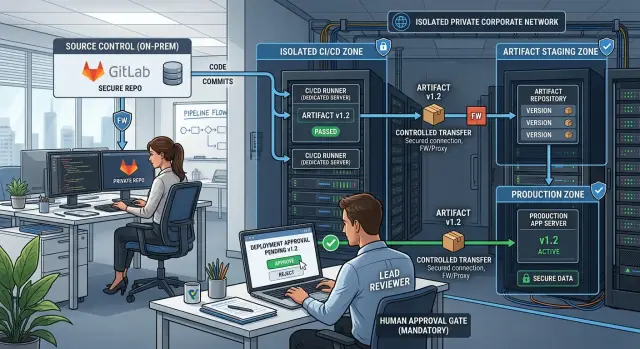
Table of Contents
Why public cloud CI fails here
Private network CI is usually not optional. It is a policy decision. Some clients ban outside build services because the moment a public runner pulls the repository, company code leaves the network.
That policy rarely stops at source code. Build logs can expose internal hostnames, package names, feature flags, and customer details. Environment variables, signing keys, test data, and deployment credentials add more risk.
A simple example shows the problem. A client keeps its code on an internal GitLab server inside a private network, and its rules say code, secrets, and logs must stay there. A public CI service breaks that rule before the first test starts, even if the vendor offers strong encryption and tight access controls.
Compliance teams care about traceability too. They want to know who started a build, what commit went in, which secrets the job used, and who approved the release. Public CI products can record some of this, but many clients still reject them because those records live outside systems they control.
Teams still need fast builds. Product work does not stop because security rules are strict. If developers wait hours for manual checks or need someone to run a script on a jump host, releases slow down and small mistakes slip through.
This is where ad hoc build scripts become a problem. One engineer keeps a folder of shell scripts, another copies artifacts by hand, and nobody gets a clean audit trail. When something breaks, the team cannot answer basic questions like which dependency changed or which binary actually reached production.
The better answer is simple: keep the build system inside the same controlled environment as the code. If code, secrets, and logs must stay in the client network, the runners need to stay there too.
What a workable setup looks like
A good private network CI setup is boring in the best way. Jobs run where they should run, artifacts move through a small number of controlled paths, and every release has a clear decision behind it.
Put runners close to the code, package mirrors, and secrets they need. If the source repo lives inside the client network, the main build runners should live there too. That reduces firewall exceptions, limits secret sprawl, and makes failures easier to trace.
Do not ask one runner to do everything. Build runners should compile code and create packages in the internal development zone. Test runners should run automated checks without access to signing keys. Separate signing runners should sit in a tighter segment and sign only approved artifacts. Release runners should publish only artifacts that already passed earlier checks.
Security teams usually like this layout because it is easy to explain. Code enters in one place, artifacts move forward in controlled steps, and production credentials stay in the smallest possible area.
Keep boundaries easy to explain
If a boundary takes ten minutes to explain on a whiteboard, it is probably too messy. Most teams do well with three zones: a development zone, a signing zone, and a release zone. Each zone needs a small job set, a named owner, and one clear reason for access.
Artifact movement should be one way whenever possible. Build jobs should push outputs into an internal artifact store, and later stages should pull from that store. Direct runner to runner copying is harder to audit, and people quickly lose track of where files came from.
Make approvals part of the system
Release approval should live inside the same system that tracks the pipeline. Record who approved the promotion, when they approved it, which commit they approved, and which artifact hash moved forward. If a client needs two person approval for production, enforce that rule in the pipeline instead of relying on memory.
That is what makes isolated runners practical. The setup does not need to be fancy. It needs simple zones, narrow permissions, and a release trail nobody has to rebuild later.
Where to place isolated runners
For private network CI, the safest default is plain enough: put runners inside each client network, close to the code, package mirrors, and internal services they need. If a client has separate environments, keep the runner in the same zone as the work it performs. A build runner that needs source code and test data should not sit in a wider admin network just because it is easier to reach.
That choice improves more than security. Builds usually run faster when runners pull dependencies from local mirrors and push artifacts to internal storage over short paths. It also removes a lot of strange failures caused by firewalls, proxy rules, or temporary cross network access.
Split the runner pool
Do not use one runner group for everything. Daily builds and test jobs can run on general internal runners with tight limits. Release jobs need a smaller and more controlled pool. Those release runners should live in a protected segment, accept only tagged or approved pipelines, and handle signing or final packaging only after a named person approves the job.
This split keeps routine work moving while making release paths harder to misuse. If a developer breaks a normal runner, you lose time. If the same runner can also publish to production, the risk is much higher.
Access should stay narrow. A runner rarely needs broad admin rights. Give it permission to fetch the repository, pull build dependencies, write logs, and publish artifacts to one approved location. If the job needs secrets, pass only the secrets for that stage. Do not let the runner browse file shares, manage servers, or reach production databases unless that job truly requires it.
Machine size matters more than teams expect. CPU heavy builds want more cores than memory. Large test suites usually need fast disk and enough RAM. Mobile or large frontend builds often need local caching to stay sane. Release runners need predictable performance more than raw speed.
How to move artifacts safely
In private network CI, trust often breaks during artifact transfer. Move the release package the runner produced, not the whole workspace around it.
A full workspace carries too much baggage: caches, temp files, local logs, test data, and sometimes secrets. If a runner builds an app, export the signed binary, package, or container image, then discard the rest. Small fixed outputs are much easier to audit than a pile of leftover files.
Use one transfer gate
Use one controlled transfer point between networks. That can be an internal artifact repository, a staging host at the boundary, or another approved handoff system. Open file shares age badly because nobody owns them, nobody cleans them, and access spreads over time.
Before any file crosses that gate, scan it. Run malware checks, file type checks, and simple policy checks such as size limits or blocked extensions. If your team signs build outputs, verify the signature again at the boundary instead of assuming the source side got it right.
Each artifact should travel with a short record that people can read later without digging through runner logs. Include the file hash, build time, source revision, the identity of the runner or service account that published it, and the retention date with a clear delete owner.
That record does two jobs. It proves that the file in test or production matches the file that left the build network. It also keeps storage under control, which becomes a bigger issue than most teams expect.
Access rules need a hard line. Let the CI service publish. Let approved users or deployment jobs pull. Give delete rights to a very small group. If everyone can remove old packages, someone will clean up the wrong file on a busy Friday.
A simple pattern works well. The isolated runner builds a signed package and pushes it to a boundary repository. The boundary host scans it, stores the hash and timestamp, and waits for approval. After that, the target network pulls that exact file. Nothing else crosses, and nobody has to trust a shared folder full of mystery files.
Approval controls people will follow
Teams inside private networks usually do not need more automation at the last step. They need a clear pause before production. Builds and tests can run on their own, but production promotion should wait for human approval every time.
That approval should happen after the artifact already exists. The team is not approving a branch name or a vague release ticket. They are approving one exact build for one exact target. That small change prevents a lot of avoidable mistakes.
Code review and release approval should stay separate. A reviewer checks the change before merge. A release approver checks whether this specific artifact should go to this environment right now. Those are different jobs. One person should not quietly do both unless the team is tiny and has no real alternative.
A good approval screen should show the commit hash, the branch or tag, the artifact ID or checksum, the target environment, who approved the build earlier in the pipeline, and the rollback version ready to use if something goes wrong. If any of that is missing, people start approving based on memory, chat messages, or ticket titles. That is where the process starts to look formal while the actual control disappears.
A small example makes this concrete. A developer merges a fix on Wednesday. Tests pass, and the runner produces artifact build-4182. On Friday evening, the release approver sees that build-4182 came from commit a41c9f, targets prod-eu, and has a rollback package ready. They approve that exact release. They are not approving "the latest build."
Emergency bypasses need hard limits. Give that power to a very small group. Make the bypass expire after use, and require the person who used it to enter a reason. Then log the time, user, ticket, commit, artifact, and environment. If a bypass leaves no record, people will treat it like a normal path.
The best approval flow is a little strict and a little boring. If it takes under a minute to see what will ship, people will use it. If it feels like paperwork, they will route around it.
Roll out in small steps
Private network CI usually fails when a team tries to rebuild its whole delivery process in one pass. Smaller rollouts work better. Pick one release path, keep the scope tight, and prove that it works before you copy it to other repositories.
Start by drawing the current path on one page. Show where code lives, which network zones it crosses, where builds run today, where artifacts land, and who approves a release. This exposes the awkward parts fast, especially manual file copies and hidden approval steps that only one person remembers.
Choose one repository that ships often but will not put the business at risk if you pause for a day. One service is enough. One branch policy is enough. If your team can build, test, sign, transfer, and release that single service inside the private network, you have a pattern you can repeat.
Set up runners in the zones where the work must happen. In most cases, that means one isolated runner for build jobs and another for test jobs, each with only the access it needs. Keep permissions plain and strict. The build runner should not deploy. The deploy step should not compile new code.
Then lock down the artifact path. Give every artifact a checksum, a version, and a clear destination. If the file moves from a build zone to a staging zone, make that transfer explicit and logged. If you sign release artifacts, verify the signature before the next stage accepts them. It sounds fussy, but it saves hours when someone asks, "Which exact file did we ship?"
Add approval gates only where people already expect them: before staging if changes are sensitive, and before production for every release. Keep the approval step short. One decision, one owner, one recorded action. If approvals take ten clicks, people will work around them.
Write the failure playbook early
Write short runbooks while the setup is still fresh. Cover the failures that happen first: runner offline, package mirror unreachable, transfer check failed, signature mismatch, approval blocked. A good runbook tells the on call person where the logs are, who can approve a retry, and when to stop and escalate.
That first narrow rollout gives you something better than a diagram. It gives you a release path people can use on a normal Tuesday.
A simple client example
A software vendor maintains an internal reporting tool for a bank. The vendor's developers write code and run local checks on their own office network, much like any other product team. The bank, though, does not allow builds on public services. Anything that compiles release code must stay inside the bank's private segment.
That changes the shape of the pipeline. The vendor keeps its day to day development setup, but the bank hosts the build runners. When developers prepare a release, they do not send a finished package into the bank. They send a reviewed source snapshot through a narrow transfer path that the bank controls.
The bank's runners sit on systems with no general internet access. They can reach only a small set of internal services, such as the repository mirror, package cache, and signing service. That build environment is boring on purpose, and that is exactly the point.
A normal release might look like this. A developer tags a version and submits a release request. A transfer service pulls that exact commit, scans it, and records hashes. An isolated runner builds the package inside the bank network. The transfer service moves the artifact into a staging area for review. A release manager then approves production from a separate console.
That last step prevents a common problem. Developers can prepare and request a release, but they cannot approve their own production deployment. Release managers can approve or reject, but they cannot change the code. Each person has a clear role, and the audit trail stays readable.
If the bank later asks, "What exactly went live on Tuesday?", the team can answer with one record: the commit ID, artifact hashes, scan result, build log, and the name of the approver. That matters more than raw speed in regulated environments.
Yes, this setup adds some delay. A release may take twenty minutes longer than it would on a public CI service. Most banks accept that trade if it means code never leaves approved paths and every production change has a clean record.
Mistakes that slow teams down
Most delays in private network CI do not come from the network itself. They come from process choices that feel acceptable at first and then waste hours every week.
One common mistake is asking a single isolated runner to do everything. Build jobs, test jobs, package creation, and urgent fixes all wait in the same queue. Before long, one slow pipeline holds up everyone else, and the team starts treating the delay as normal.
Artifact handling often goes wrong next. If people move files by chat, email, or ad hoc shared folders, nobody knows which package is the approved one. A file gets renamed, copied twice, or replaced with a newer build, and the audit trail disappears.
Approval rules can create the same kind of bottleneck. A team may decide that one senior engineer or one manager must approve every release. That works until that person is asleep, on leave, or stuck in meetings. Then people start looking for side doors.
Logs matter more than many teams expect. If the system does not record who built an artifact, who moved it into a restricted area, and who approved deployment, every incident turns into guesswork. People remember events differently, and that slows down fixes.
Test data creates another quiet problem. Teams often copy realistic data into protected environments because they want faster testing. That shortcut can push customer records, secrets, or internal business data into places where they do not belong.
A few habits prevent most of this. Split runners by job type and trust level. Move artifacts through one controlled path. Assign approval to roles with backups, not one person. Log every handoff and release decision. Use masked or synthetic data for testing.
Private network CI works best when the safe path is also the easy path. If the approved path is slow and messy, teams will invent their own.
Quick checks before rollout
Most private network CI problems start with small gaps, not big design mistakes. A runner has no owner, a token never rotates, or an artifact lands in the right place with no proof of what happened. Those gaps stay quiet until a release fails at 6 p.m.
If you want the setup to stay boring, check ownership and traceability first. A build system inside a private network should answer five simple questions quickly: who owns this runner, which secret does it use, what artifact moved, who approved the release, and what happened when a transfer failed.
Give each runner a named owner, not just a team name. Put every secret on a rotation plan with a date, a person, and a replacement path. Attach a checksum and a retention rule to every artifact. Name a backup approver for every release step. Make failed transfers leave a readable audit trail with the artifact name, timestamp, source, destination, and a plain error message.
The checksum rule matters more than many teams expect. If one runner builds a package and another network segment receives it, you need a quick way to prove the file stayed intact. That takes minutes to set up and can save hours of argument later.
Approval rules also need a reality check. If your release workflow depends on one security lead who is often offline, people will start looking for side paths. A primary approver and a backup keep control in place without turning every patch into a scheduling problem.
Readable failure logs are the last sanity test. "Transfer failed" is useless. "Checksum mismatch on artifact build-1842.tar at staging gateway" gives the team something they can act on.
Next steps for your team
Start with one delivery path, not your whole estate. Pick a single app or service and trace its route from commit to release: where code lands, which runner touches it, where artifacts go, who approves promotion, and where people still pass files by hand. That map usually shows the real bottleneck within an hour.
Manual file movement is often the first thing to remove. If one engineer downloads a build, renames it, and uploads it somewhere else, you already have a weak point. It slows releases, hides who did what, and makes audits harder than they need to be. Replace that handoff first with a controlled artifact step inside the client network.
Approval gaps deserve attention before you add more automation. Teams often automate builds quickly, then leave release decisions in chat messages or vague verbal sign off. A simple rule works better: define who can approve, what evidence they must see, and where that approval is recorded. If nobody can answer those three points, stop there and fix them.
A practical starting plan is short:
- Map one path from commit to production for one service.
- Remove one manual artifact handoff.
- Add a clear approval step with named owners.
- Log every build, transfer, and release decision in one place.
- Repeat the pattern for the next service.
Keep the first rollout boring. You do not need perfect tooling on day one. You need a path people trust and can follow under pressure, especially during urgent fixes.
If you need an outside review, Oleg Sotnikov at oleg.is works on this kind of setup as a Fractional CTO. His work with self-hosted GitLab runners and private infrastructure fits teams that need tighter runner isolation, cleaner artifact flow, and approval rules that hold up in real audits.
Pick one service this week, map the path, and fix the first uncontrolled handoff. That usually removes more friction than another month of debate.
Frequently Asked Questions
Why do some clients ban public cloud CI?
Because a public runner pulls your repository, logs, and often secrets outside the client network. If your policy says code and build records must stay inside systems you control, a public CI service breaks that rule before the job finishes.
Where should isolated runners live?
Put each runner inside the same network zone as the work it does. Build runners should sit near the repo mirror, package cache, and internal services they need, while signing and release runners should live in tighter segments with less access.
Should one runner handle build, test, signing, and release?
Yes. Use one pool for normal builds and tests, and a smaller protected pool for signing and release work. That split keeps daily work moving and stops one compromised runner from reaching production tools.
What should cross the boundary between network zones?
Move the finished package, binary, or container image, not the whole workspace. Leave caches, temp files, logs, and anything else behind so you can trace one exact output instead of a messy folder.
How do we move artifacts safely?
Use one transfer gate such as an internal artifact repository or a boundary host. Scan the file, store its hash, record who published it, and let the next stage pull that exact artifact after approval.
How should production approval work?
Keep approval short and tied to one exact artifact. The approver should see the commit, artifact ID or checksum, target environment, and rollback version, then approve that release instead of approving "the latest build."
What should we do about emergency bypasses?
Limit bypass rights to a very small group and make every bypass expire after use. Record the reason, user, time, commit, artifact, ticket, and target environment so nobody treats the bypass like a normal route.
How do we roll this out without rebuilding everything at once?
Start with one service that ships often but will not hurt the business if you pause for a day. Map its path from commit to production, place runners where they belong, lock down artifact transfer, and add one clear approval step.
What records should we keep for each artifact?
Keep the file hash, source revision, build time, runner or service account, retention date, and approver. Those details let you prove which file moved forward and save time when someone asks what actually shipped.
What mistakes slow private network CI down the most?
Teams lose time when one runner does everything, people copy files by hand, or one person owns every approval. Fix those first, then make failure logs readable so the on-call person can act without guessing.


