Privacy tiers in model federation for safer AI routing
Privacy tiers in model federation help teams send simple AI tasks to lower-cost APIs and keep sensitive work on stricter routes with clear rules.
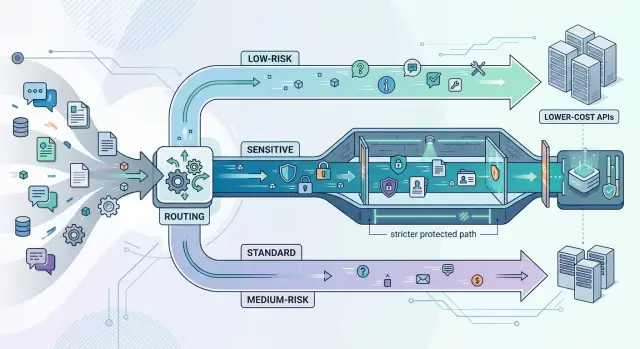
Table of Contents
Why teams need privacy tiers
Using one AI route for every task looks simple. In practice, it creates two problems: teams overspend on routine work, or they send sensitive data through a path that is too open. A short product summary and a contract review do not need the same controls.
Cost shows up first. Most teams generate a lot of low-risk requests every day. They rewrite support replies, summarize public meeting notes, clean up rough drafts, and turn bug reports into short status updates. Those jobs often work fine on lower-cost models because the input does not include customer records, legal terms, or source code.
Risk shows up when that same route handles everything else. A support agent pastes a full customer thread with names, billing details, and internal notes. A founder drops a draft contract into the same tool used for brainstorming copy. That kind of mistake is common. People move fast, and vague rules invite guessing.
In a model federation setup, privacy tiers solve this with routing rules that match the task. Public or low-risk content can go to cheaper APIs. Internal business material can go through a guarded path with redaction and tighter logs. Contracts, security issues, customer records, and private product plans belong on the strictest route.
The rules do not need to sound like policy language. Most teams only need something simple:
- Public or lightly edited text goes to the low-cost path.
- Internal business content goes to a guarded path.
- Legal, financial, customer, and security data goes to the strict path.
That split keeps spending sensible, makes sensitive data handling clearer, and avoids the mess of forcing every task through one route.
What belongs in each privacy tier
Privacy tiers only work when each tier has a clear job. If the labels are fuzzy, people guess, and that is where risk starts.
Low-risk work stays generic even after you send it to an outside model. That includes public text summaries, tone cleanup, formatting, translation of non-sensitive copy, or turning rough notes into a cleaner outline. If you would feel fine pasting the prompt into a public demo, it probably belongs here.
Medium-risk work includes some business context, but not the parts that would seriously hurt the company if exposed. Internal drafts often fit this tier. A product brief without customer names, a support reply template with placeholders, or a bug summary stripped of account details are common examples. The model can help, but only after the team removes direct identifiers and cuts extra context.
Sensitive work stays on stricter paths. That includes customer records, signed contracts, employee files, security incidents, health details, finance data, legal advice, and anything tied to account access. Raw support tickets often land here because people paste far more than the task actually needs. One unredacted field can change the whole route.
A simple way to decide
Ask two questions: what harm would follow from exposure, and can you remove the risky parts without breaking the task? If exposure would cause real harm, or if redaction ruins the task, keep it in the sensitive tier.
Teams should write these rules down in one place people already use. A short routing policy is usually enough if it lives where prompts get built and reviewed. That might be a shared prompt catalog, a ticket template for new automations, an internal policy page, or code comments next to routing logic.
Product, engineering, and whoever owns privacy or compliance should set the first version together. On a small team, that may just be the founder and CTO. Review the rules whenever a workflow changes. One extra field can turn a safe prompt into a sensitive one.
Why one model for every task causes trouble
A one-model setup sounds tidy, but it usually leads to oversharing. People paste more context than the task needs. A support agent asks for a simple refund summary, then includes the full email thread, billing notes, account history, and internal comments. The model can still answer, but it also sees private details that had nothing to do with the request.
Teams rarely leak data on purpose. They leak it because no one set limits on what each task can send. When every prompt goes to the same place, routine jobs and high-risk jobs get treated as if they were the same.
Lower-cost models still help. They can handle narrow, low-risk work very well, especially when the input is short and cleaned first. Language detection, spam checks, ticket tagging, and rewriting a public help article are good examples. Those jobs do not need customer records or internal notes.
The strict path matters too, but it should stay strict. More protected routes often cost more, run slower, and add review steps. That extra friction makes sense for legal text, customer account details, health data, financial records, or anything tied to identity. It makes no sense for every tiny task.
Clear routing rules fix both problems. They cut waste and remove guesswork for the people writing prompts. A short rule set usually works better than a clever one:
- Send public or sanitized text to a lower-cost model.
- Send internal but non-sensitive work to a standard guarded path.
- Send regulated, personal, or contract-heavy prompts to a stricter path.
- Block prompts that include data the task does not need.
When teams follow rules like these, they spend less and expose less. Just as useful, people stop arguing over where a prompt should go because the route is already defined.
How to set up routing rules step by step
Most routing mistakes happen before any model runs. Teams skip the plain work of writing down every place AI already touches the business. Start with tasks, not tools. Include support replies, summaries, code help, ticket triage, draft emails, document search, and anything people do by copy-pasting into a model.
Then sort each task by three things: data sensitivity, business impact, and review needs. That gives you usable tiers instead of vague labels. A generic FAQ answer and a contract review should never travel through the same path.
A simple rollout usually looks like this:
- Make a task inventory. Note who uses the task, what data goes into the prompt, and what happens after the answer.
- Put each task into a tier. Low-risk work can go to cheaper APIs. Sensitive or high-impact work should stay on stricter paths with tighter access and better logs.
- Approve one or two routes for each tier. Fewer options reduce guessing. If people see six choices, they will pick whatever feels fastest.
- Write routing rules in plain language. For example: "No customer PII in public models." "Financial forecasts need human review." "Production code changes stay on the internal path."
- Test the rules with real prompts before rollout. Use a small batch from support, sales, and operations. Check where each prompt lands, whether the answer is good enough, and whether the route matches the risk.
After that, publish the rules where people work. A short table usually beats a long policy. Your apps should follow the same logic with defaults, warnings, and blocked fields so staff do not have to memorize every rule.
Roll the system out in small steps. Start with one team for a week, collect edge cases, then tighten the rules. Teams that get AI routing right usually begin with a simple inventory and a few clear paths, not a giant automation project.
How to decide where a prompt should go
A prompt should go to a route based on the data inside it. The sender matters less than the content. A finance intern can send a harmless rewrite request, and a product manager can paste a contract, source code, and customer emails into the same box.
Start with a simple scan. Ask what the prompt contains and what the model must return. Those two facts usually tell you where it belongs.
A practical triage test
Before the system sends anything out, check for these signals:
- Public or low-risk text, such as generic copy, summaries, or empty templates
- Personal data, such as names, emails, phone numbers, addresses, or account IDs
- Business-sensitive text, such as contracts, pricing, internal plans, or policy drafts
- Technical secrets, such as source code, credentials, configs, or architecture notes
- Private files, such as PDFs, screenshots, exports, or logs
If the prompt only needs low-risk text work, send it to a cheaper API and keep it small. Limit file uploads, strip extra metadata, and block huge context windows unless the task truly needs them. Lower-cost routes save money, but they should never become a dumping ground for whatever users paste in.
If the prompt includes legal text, private files, or code, move it to a stricter path. That can mean a provider with stronger controls, a private model, or a human review step. The more specific and sensitive the input gets, the less room you have for convenience.
Mixed prompts need extra care. Someone might ask for a public blog summary and attach a customer export "just for context." That request should stop. When public and private data get mixed together, the safest move is often to split the work: redact or summarize the private part on a strict route first, then send the cleaned version to the cheaper one.
Good routing rules should feel almost boring. If a teammate cannot explain in one sentence why a prompt took a certain route, the rule is too loose.
A simple example from a support workflow
A support team can use different model paths in the same inbox without making the work messy. Picture an online store that gets the usual mix of tickets: "Where is my order?" "How do I get a refund?" "You charged me twice." And sometimes: "I will report this unless you fix it today."
The low-risk tickets are easy wins. If a customer asks about shipping times, return windows, or refund policy wording, the team can send that prompt to a lower-cost model. The model drafts a polite reply from approved help-center text, and an agent checks it before sending. That saves time and keeps cheap automation where the risk is low.
The path changes when the ticket needs private account details. If the reply depends on order history, billing status, address data, or past conversations, the system should route it to a stricter model path with tighter controls. The agent can still get a draft, but the model should only see the minimum data needed to answer.
A simple rule set might look like this:
- Generic policy questions go to the lower-cost model.
- Order-specific or account-specific questions go to the stricter path.
- Complaints with refund disputes, chargebacks, or legal threats go to a human first.
- If the system is unsure, it sends the ticket up, not down.
This is where privacy tiers start to feel practical instead of abstract. One support agent might handle three tickets in ten minutes and use three different routes without thinking much about it.
A customer can even move between tiers in one thread. The first message asks for refund policy wording, so the cheaper model drafts the answer. The second message includes an order number and says the item arrived damaged, so the stricter path takes over. The third message says the customer will contact a lawyer, and the system stops automation and sends the case to a senior human reviewer.
That kind of routing keeps costs under control and keeps sensitive data handling clear. The team does not need one model for everything. It needs rules that match the actual risk in each reply.
Mistakes that create risk fast
One of the fastest ways to create trouble is to mark an entire app as "safe" when only a few prompt types are actually safe. A support tool might send simple order-status questions to a low-cost model with no issue, then quietly send a refund dispute with names, account notes, and payment details through the same route. The app looks harmless from the outside. The prompts inside it are not all equal.
Another common mistake is sending full records when a small extract would do the job. If the model only needs the last message and product name, do not paste the whole ticket, CRM history, and internal notes. Extra context feels convenient, but it widens exposure for no real gain. Less input is often both safer and cheaper.
Teams also run into trouble when each employee decides the route on the fly. People guess. They rush. They follow habit. One person removes customer details before sending a prompt, while another pastes the full case because they want a faster answer. That kind of variation creates risk fast. Put routing rules in the system, not in someone's memory.
A few warning signs show up early:
- Staff ask each other which model is "okay" for a task.
- Prompts include whole documents when a short summary would work.
- Exceptions happen in chat or email with no record.
- Nobody reviews logs to see what actually got sent.
Logs, approvals, and exception handling matter because routing rules never cover every edge case on day one. If a workflow sometimes needs human approval before it sends sensitive text, build that step in. If a prompt breaks the normal pattern, log it and review it. Silent exceptions are where policy fails.
Rules also age faster than teams expect. A prompt template changes, a model gets replaced, or a new tool starts pulling more fields into context. The old route may no longer fit. Review rules whenever prompts, data sources, or models change. A small edit in a template can turn a low-risk task into a sensitive one by accident.
The safest setup is usually the least dramatic: small inputs, fixed routes, visible logs, and regular review.
Quick checks before you automate more
Automation usually breaks in small, quiet ways. A team adds one more prompt, one more tool, one more data source, and soon the routing rules no longer match the risk. That is why privacy tiers need routine checks, not just a good setup on day one.
Five checks catch most problems early:
- Give every AI task a named privacy tier. Simple labels like "public," "internal," and "restricted" are often enough.
- Cut each prompt down to the minimum data it needs. If the model can work from an order ID, do not send the full customer record.
- Match the model path to the tier every time. Lower-cost APIs are fine for low-risk work, but contracts, payroll, account access, and private customer details need the stricter path.
- Tell staff when to stop and ask for review. If a request looks unusual, mixes several data types, or could affect money or legal terms, a person should check it.
- Assign one owner for the rules and review them every month or quarter. New vendors, new automations, and new data flows change risk fast.
A small test makes this concrete. Imagine a support team wants AI to draft replies about delayed invoices. The draft does not need a home address, full payment history, or internal notes. If those fields still appear in the prompt, the workflow is too loose. If nobody can say which tier that task belongs to, the rules are too vague.
This review does not need to be heavy. One page of routing rules, one owner, and a short review meeting can catch most mistakes before they spread into every workflow. For a small company, that is often the difference between a system people trust and one they avoid.
How to keep the system useful over time
Routing drifts unless someone owns it. Prompts change, teams add new tools, and a cheap path that looked harmless at first can end up handling customer details a few weeks later. Privacy tiers only work when the team checks the system often enough to catch that drift.
Track a small set of numbers every week or every two weeks. Four are usually enough:
- Cost by route or model
- Error rate by task type
- Human review volume
- Blocked requests
Those numbers show where the rules help and where they get in the way. If a lower-cost route stays accurate and almost never needs review, some similar tasks may be safe to move down a tier. Simple work like rewriting text, tagging generic tickets, or drafting internal summaries often fits there once you strip out private details.
The opposite happens too. Real incidents matter more than theory. If support staff keep pasting account notes into a route meant for low-risk prompts, tighten the rule and move that task to a stricter path. One actual leak, or even a near miss, should change the routing logic faster than a long debate.
Keep the rules short enough that people can remember them. If the policy needs a diagram and a long training session, people will guess, skip steps, or send everything to the most convenient model. A short rule set gets used. A long one gets ignored.
Treat routing as an operating rule, not a setup project. Someone should review exceptions, retire rules that no longer help, and test new ones on a small batch before rolling them out. The goal is not a perfect policy. The goal is a system that stays cheap for routine work, strict where it needs to be, and clear enough that people actually follow it.
Next steps for a small team
Most small teams do better with a simple map than a full policy deck. Start with two or three tiers, not a giant matrix nobody will remember on a busy day.
A basic setup is often enough:
- Low risk for public or harmless prompts
- Internal for routine company work with no personal or contract data
- Restricted for customer details, financial records, security issues, or anything that could cause real damage if it leaks
That gives you a working version of privacy tiers in model federation without turning routing into a paperwork project. If a task does not fit cleanly, put it in the stricter tier until you decide otherwise.
Write down a few common examples for each route and keep them plain. "Shipping policy question" is better than "general support content." "Redacted bug summary" is better than "internal technical prompt." People follow rules more reliably when they can picture the actual work.
If your team needs help turning rough AI usage into clear routing rules, this is the kind of work Oleg Sotnikov does at oleg.is as a Fractional CTO and startup advisor. His focus on practical AI-first development, automation, and lean infrastructure fits the same goal here: keep routine work fast and affordable without letting risk drift out of control.
Start small, test with real prompts, and adjust the routes when the work changes. That is usually enough to make AI useful without making data handling sloppy.
Frequently Asked Questions
Why not use one AI model for everything?
One route creates two bad outcomes: you spend too much on simple work, or you expose private data on a cheap path. Split tasks by risk so teams send public text to lower-cost models and keep contracts, account data, and security issues on stricter routes.
How many privacy tiers does a small team need?
Most small teams do fine with three tiers: public, internal, and restricted. That gives people a simple rule set without a huge policy. If a task feels unclear, put it in the stricter tier until you review it.
What counts as low-risk work?
Low-risk work includes public summaries, tone cleanup, formatting, translation of non-sensitive copy, and generic FAQ drafts. If you would paste the prompt into a public demo without worry, treat it as low risk.
What should always go through the strict path?
Keep customer records, contracts, employee files, security incidents, health details, finance data, source code, credentials, and private product plans on the strict route. One unredacted field can move a prompt up.
How do I decide where a prompt should go?
Check two things: what data the prompt contains and what answer the model needs to produce. If the task still works after you strip names, IDs, and private files, send the cleaned prompt to a cheaper route. If the task needs private details to work, keep it on the stricter path.
Is redaction enough for medium-risk tasks?
Redaction works when you remove direct identifiers and extra context without hurting the task. A product brief without customer names often fits that pattern. If redaction breaks the meaning or leaves too much sensitive context, use the strict route instead.
What mistakes create risk fastest?
Teams create trouble fast when they mark a whole app as safe, paste full records instead of small extracts, or let staff choose routes from memory. Put rules in the system, limit prompt size, and log exceptions so you catch drift early.
When should a human review the prompt or answer?
Ask for human review when money, legal terms, account access, chargebacks, or threats enter the conversation. Do the same when a prompt mixes public and private data or when the route feels uncertain. If the system hesitates, move the task up, not down.
How often should we review routing rules?
Review the rules whenever prompts, data sources, tools, or models change. Even without major changes, a monthly or quarterly check keeps the routes aligned with real work. Watch cost by route, blocked requests, review volume, and repeat mistakes.
What is the best first step if we have no routing rules yet?
Start with a task inventory, not a model list. Write down where people already use AI, what data each task sends, and what happens after the answer. Then assign each task a tier and publish a short rule table where people work.


