PostgreSQL failover drills for small founder led teams
PostgreSQL failover drills help founder led teams test promotion, DNS changes, and app reconnection before an outage turns into a midnight scramble.
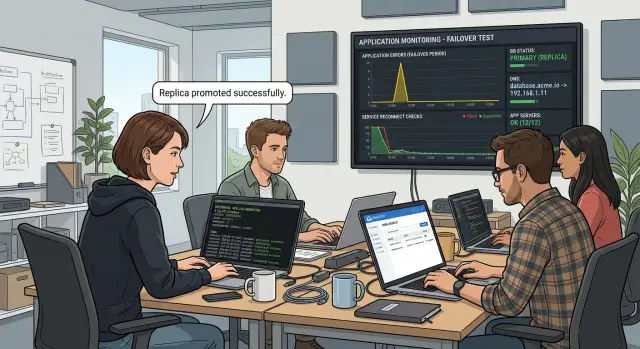
Table of Contents
Why it turns into a late-night panic
A database problem rarely stays "just a database problem" for long. If your main PostgreSQL node stops taking writes, signups can hang, billing retries can fail, and support can lose the ability to update accounts, issue credits, or fix simple customer mistakes. One broken write path can freeze half the business in minutes.
The panic usually starts before anyone touches the server. Small teams often know, in theory, that a standby can take over. That does not help much at 1:17 a.m. when alerts are firing and nobody has practiced the switch. People jump on a call and ask basic questions they should already know: who promotes the standby, which hostname the app should use, whether workers need a restart, and who tells the rest of the team what is happening.
That is where time disappears. The real recovery work is direct. Someone promotes the standby. Someone updates DNS or the app setting that points writes to the database. Someone checks whether the app reconnects and whether background jobs resume. Everything around that turns messy fast: hunting for credentials, digging through old notes, wondering whether cached DNS will keep part of the app talking to the dead server, and arguing about whether a slow login is really a database issue.
Small teams feel this harder because the same few people own product, support, infrastructure, and customer communication. The founder may be watching failed payments, answering angry messages, and making technical decisions at the same time. That mix leads to bad calls. People skip checks, forget to record timestamps, or change DNS before they confirm the promoted server actually accepts writes.
Failover drills cut that chaos down to something manageable. You are not staging a movie version of disaster recovery. You are testing the parts that matter under pressure: the actions, the timing, and the handoff between people.
If you already know the sequence and the rough timing, the next outage still hurts. It just stops being a blind scramble.
What a successful drill looks like
A useful drill ends with one answer: could your team restore the app fast enough, and with enough confidence, if the primary database stopped working tonight? If you cannot answer that with a number, the drill was only a rehearsal.
Set one goal before you start, and keep it narrow. For example: promote the PostgreSQL standby, point traffic to it, and get the app working again for users within 10 minutes.
That time limit is your recovery target. Pick a number you can measure with a clock, not a vague goal like "as fast as possible." For a small SaaS team, 10 to 15 minutes is a reasonable first target. If your stack is simple, aim lower next time.
You also need clear roles. One person leads the drill and decides when each step happens. Another records the timeline: when the primary was declared down, when standby promotion started, when DNS changed, when the app reconnected, and when user actions worked again.
That record matters because memory gets unreliable fast. A written timeline shows where you lost three minutes, where somebody guessed, and where the runbook needs work.
Success does not mean "the database came back." It means users would notice the app was working again. Before the drill starts, agree on a few checks that prove that happened:
- the promoted server accepts both reads and writes
- the app reconnects without manual edits on every machine
- login works for a normal user
- one common write action succeeds, such as creating a record or saving a change
- errors and latency settle back to their usual range
If one of those checks fails, the drill still did its job. It found a weak spot while people were calm, awake, and able to fix it.
Set the rules before you start
A failover test falls apart when people treat it like a casual experiment. You need a few rules before anyone touches the database, or the team will waste time arguing about what counts as expected behavior.
Pick a quiet window. Avoid launch days, billing runs, marketing sends, and customer demos. Tell everyone involved what will happen, when it starts, who will run commands, and who is only observing. If somebody sees an error spike during the drill, they should already know it is expected and where to report it.
Freeze anything that can muddy the result. Do not ship app changes during the test window. Do not run schema migrations. Do not tweak connection pool settings halfway through because it "probably helps." If the app breaks, you want one cause to inspect, not four.
Before you start, confirm a few basics. You need a recent backup, and someone should know exactly where it is stored. Someone should also verify restore access, not just backup creation. Have logs and metrics open for the database, the app, and the load balancer or proxy. Keep one shared note open so the team can record timestamps, commands, errors, and decisions in one place.
That restore check is easy to skip and expensive to regret. A backup file that nobody can restore is just a comforting idea. Even a quick check of credentials, storage access, and restore steps lowers stress.
Open everything you need before the drill starts: database logs, app logs, connection counts, error rates, and latency graphs. Keep one person responsible for writing down the timeline. In a noisy ten-minute incident, memory gets fuzzy.
A simple rule helps: if a step is not written down, it did not happen.
Run the promotion in order
Do not start a PostgreSQL standby promotion until you know the replica is close enough to the old primary. Check replication lag, the latest replayed WAL position, and whether the standby shows any recovery errors. If lag is already 20 or 30 seconds, the drill tells you less than you think.
If the app can still write during the switch, stop that first. Some teams turn on maintenance mode for two or three minutes. Others block writes in the app and leave reads on. Either approach can work. What matters is consistency. If you improvise in the middle of the drill, you will not know which writes made it to the new primary.
Keep the sequence simple. Check that the standby is healthy. Pause writes if your setup does not protect them during failover. Promote the standby and record the exact time, down to the second. Connect to the promoted node and test one read and one write. Then keep the old primary offline, or force it into read-only mode, for the rest of the test.
That promotion timestamp helps later when you compare database logs with app errors. It tells you whether a failed request happened before the switch, during it, or after the new primary came up.
Verification should stay plain. First confirm the new node is no longer in recovery mode. Then run a basic read query. After that, write a small test row to a throwaway table and read it back. If the read works but the write fails, you do not have a new primary yet.
Do not bring the old primary back just because the new one looks healthy. Leave the old node offline, or lock it down as read only, until the drill ends and you have a plan to rejoin it. That prevents the ugliest outcome of all: two servers accepting different writes at the same time.
Handle DNS like part of the failover
A failover often works at the database level and then falls apart because parts of your stack still point to the old host. That gap turns a clean drill into a messy outage.
If you can, lower the TTL well before the drill. Do it hours ahead, or the day before, so caches have time to age out. If your normal TTL is one hour and you drop it to 60 seconds five minutes before the change, plenty of clients will still hold the old answer.
When the standby becomes primary, update the record to the new write node or to the database proxy your app uses. A proxy is often simpler for a small team because the app keeps one stable hostname while you move traffic behind it. If you connect straight to the database host, check that every environment uses the same DNS name and not a hardcoded IP tucked away in one worker or cron job.
Do not test resolution from one laptop and call it done. Check from more than one network because caches differ. Test from your laptop, from a second network such as a phone hotspot or VPN, from at least one app server, and from a background worker or job runner.
This matters because stale DNS usually shows up in the least obvious place. The site may look healthy in a browser while a worker keeps writing to the old primary for another ten minutes. That is how you get split behavior: the app looks fine, but jobs fail or data quietly disappears.
Watch for stale records on laptops, servers, containers, and managed workers. Some systems cache longer than you expect. Some apps resolve the hostname once at startup and never refresh it until you restart the process.
Write down three times: when DNS changed, when each network first saw the new answer, and which processes needed a restart. Those notes will speed up the next drill.
Watch how the app reconnects
The database can come back before your app does. The first thing to watch is the gap between the switch and the moment the app starts acting normal again. Open the logs right away and look for connection pool errors, stale sessions, "connection refused," "read-only transaction," and retries piling up.
Those first few minutes tell you a lot. If the app heals on its own, good. If someone has to restart web servers, workers, or queue consumers by hand, write that down in the runbook instead of pretending recovery was automatic.
Use a few user-visible checks. Log in with an existing account. Create a new account. Run one billing action in test mode. Trigger one background job, such as sending an email or syncing a record.
Do not stop after the web app looks fine. Background workers and scheduled jobs often keep old connections longer than the main app does. Check each worker process, cron job, and queue consumer, and confirm they opened fresh sessions to the new primary.
Timeouts and retries can make recovery feel much slower than it really is. A pool that waits 60 seconds before giving up can turn a short database switch into a long outage. Check DNS cache time, pool recycle settings, connect timeout, and retry backoff. Shorter waits usually beat one long pause.
Finish with the check teams skip most often: make sure nothing still writes to the old node. Block writes there, watch both nodes for write activity, and make one small update you can trace in logs. If a worker, admin script, or forgotten service still talks to the old database, the drill found a real problem.
A simple example from a small SaaS team
One small SaaS team had a web app, a background worker, and a single PostgreSQL primary with one standby. The product was simple, but the weak spot was obvious: if the primary died, two tired people had to fix it fast.
Their drill started with a real-looking alert. The primary stopped answering health checks, login requests slowed down, and the error tracker filled with database connection failures. The founder opened the runbook while the only engineer on call checked replication lag on the standby.
They confirmed the standby was close enough to promote, ran the promotion, and verified that it accepted writes. Then they changed the DNS record the app used for the database host. The web app recovered within a minute. New logins worked, the dashboard loaded, and a quick test order went through.
Then they hit the surprise.
The worker still failed every job. It had started hours earlier, resolved the old database host once, and kept that address in memory. DNS had changed, but the worker did not care. It kept trying the dead primary and filled the queue with retries.
That changed how they thought about failover drills. The database had recovered, but the system had not.
They updated the runbook with a few practical fixes: restart workers after failover if they cache database addresses, lower DNS TTL so changes spread faster, make the app reopen connections after a short burst of failures, test one write from the web app and one real worker job before ending the drill, and record how long each step took.
On the next drill, they promoted the standby, switched DNS, restarted the worker, and retested both paths. Total recovery time dropped from about 18 minutes to 7.
That is the kind of boring result you want. When the real outage comes, boring wins.
Common mistakes in a first drill
Most failover drills go wrong for boring reasons, not dramatic ones. Teams want to see the standby promote, watch the app come back, and call it done. That is usually where the trouble starts.
One common mistake is starting without a stop point or rollback plan. Decide in advance what counts as success, who can pause the drill, and what you will do if the app starts acting oddly. Put that into the runbook before anyone touches the primary. If nobody owns that decision, the team starts guessing.
Another mistake is checking only the main app. The app matters, but it is rarely the only thing that talks to PostgreSQL. Workers, cron jobs, import scripts, admin tools, and support scripts often use their own connection settings. One forgotten process can keep hitting the old server and give you a split picture of what is happening.
It also helps to sweep for the usual hidden clients: queue workers, scheduled scripts, backup jobs, admin panels, support tools, local environment files, and health checks that still call the old host.
DNS creates a lot of false confidence. You update one record, test from your machine, and assume every system now sees the new primary. Real systems do not behave that neatly. One client may pick up the change in seconds while another keeps the old address long enough to break jobs or confuse the team.
Teams also skip the only test that proves the failover worked: a real write. Promotion shows that the standby can become primary. It does not prove your app can create, update, and read data through the new path. Make one real change in the app, then confirm it saved on the promoted node. If your product runs background jobs, trigger one and confirm it writes there too.
Old hostnames cause the most stubborn cleanup. They hide in environment files, deployment settings, shell scripts, and backup jobs. You can finish the drill with a healthy app and still have one hidden process talking to the wrong server.
A good drill feels almost dull. Every client reconnects, real writes work, and the team knows when to stop or roll back. If any step still depends on memory, the next outage will find it first.
Checks before you call it done
A drill is not done when standby promotion succeeds. It is done when the app behaves like a normal day again. Teams often stop too early and find the real breakage in sessions, workers, or write paths ten minutes later.
Start with the new primary. Do not stop at a health check or a SQL prompt. The app should read from it and write to it. Create one small record through the app, edit it, then delete it. That proves the full path works, not just the database in isolation.
User traffic comes next. Keep one test account logged in before the switch, then use that same session after reconnect. If the session survives and the user can still save data, search, and load a normal page, you avoided one of the most common failover surprises.
Use a short checklist:
- confirm the app reads fresh data from the new primary
- confirm it can write new data and update existing rows
- keep one user session open through the change and complete a normal action
- watch at least one scheduled job start on time and finish without retries piling up
- check that error rates and latency settle back to their usual range
Background jobs deserve extra attention. A queue worker that still points at the old primary can fail quietly while the main app looks fine. Check one real job, not a fake ping. If you send emails, build reports, sync data, or process webhooks, watch one complete run from start to finish.
Before anyone says the drill passed, write down the recovery time and the rough timeline: when promotion started, when DNS changed, when the app reconnected, and when errors returned to normal. Record every odd issue, even the small ones. "One worker needed a restart" is exactly the kind of note that saves an hour during a real outage.
What to do after the drill
A drill only pays off if the team changes something right away. While the timeline is still fresh, turn your notes into a short database recovery runbook. Keep it short enough that a tired person can use it at 2 a.m. without guessing.
Write down the exact steps you took, not the steps you hoped to take. Include the commands, the order, and the checks that proved the new primary could accept writes.
A small runbook usually needs five things: who starts the promotion, how you confirm the old primary is out of the way, where the DNS change happens and what TTL you expect, how you check the app and background jobs after the switch, and when to stop or roll back instead of pushing through.
Do not rush into more automation yet. Fix the first reconnect problem that slowed you down. That might be a sticky connection pool, a worker that kept an old socket open, or an app process that needed a restart when it should have recovered on its own.
One clean fix beats a pile of half-finished scripts. If your app takes 12 minutes to recover because one service ignores DNS changes, solve that first and rerun that part of the drill. These exercises get better when each round removes one real point of failure.
Then put the next rehearsal on the calendar before people forget the pain. Two to four weeks is a good gap for a small team. Change one condition next time so the exercise stays honest. Ask a different person to run it, shorten TTL, or keep background jobs active during the failover.
If you want a second set of eyes on the plan, Oleg Sotnikov at oleg.is works with small teams as a Fractional CTO on infrastructure, runbooks, and practical AI-first engineering workflows. That kind of outside review can help you tighten the process without turning it into something heavy.
When the next incident hits, you want fewer surprises, fewer manual restarts, and a team that already knows the script.


