Postgres row-level security: test tenant isolation first
Postgres row-level security helps isolate tenants, but support tools, exports, and background jobs often slip past weak tests. Learn what to check first.
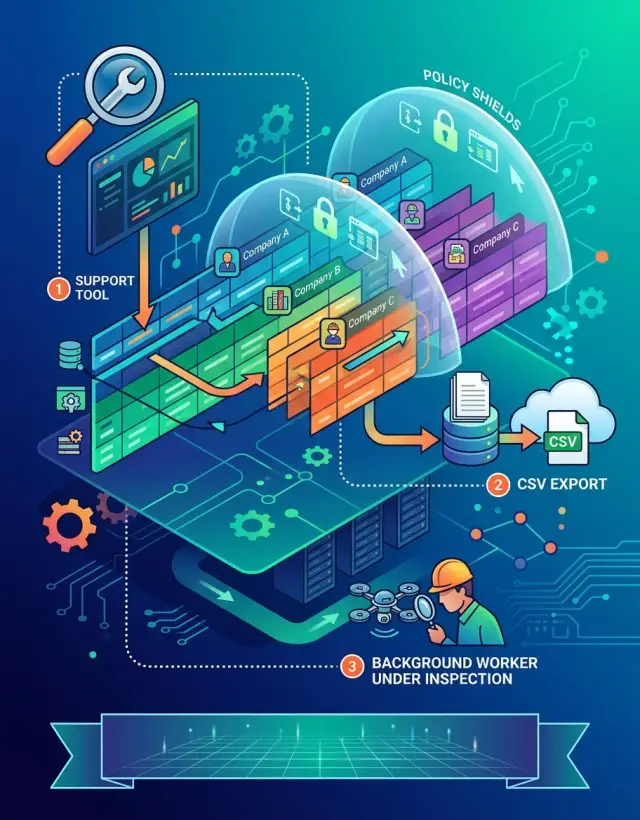
Table of Contents
Why tenant leaks still happen
Most tenant leaks come from side paths, not the screen your customer uses every day. A team can lock down the main app, add Postgres row-level security, and still leak data through one query that nobody reviewed closely.
The pattern is usually simple. People test the happy path and ignore the work around it. A signed-in user sees only their own records, so the app looks safe. Then a support agent opens an internal screen, types an email address, and the tool runs a broad query with no tenant check. One missing filter is enough to show another company's data.
Support tools cause trouble because teams build them fast. They often sit outside the main request flow, use direct database access, or call helper functions that skip the checks used in the product UI. A tool meant to solve one customer issue in 30 seconds can turn into the easiest way to peek across accounts.
Exports and search fail in the same way. A CSV export may join five tables and miss one tenant condition. Search code may build a shared index, then return rows that match a term but belong to a different company. These paths feel harmless because they are read-only, but read-only leaks still break trust.
Background jobs add another weak spot. Billing runs at night. Search indexing runs every hour. Cleanup tasks scan old records. Teams often give these jobs broad access because it is faster than mapping each job to the exact rows it should touch. Once that happens, the job can read across tenants, and any bug in logs, retries, emails, or generated files can spread the leak further.
The same few paths show up again and again: internal admin screens, CSV and PDF exports, search and reporting queries, scheduled jobs and queue workers, and service roles used for convenience.
A small B2B SaaS can do everything right in the customer app and still fail here. Policy rules help, but they are not enough on their own. You need to test every path that touches tenant data, especially the boring internal ones nobody thinks about until support finds a problem.
What row-level security covers
Postgres row-level security works at the table level. When a query reaches a table, Postgres checks the policy for that table and decides which rows the current role can see or change. That is useful, but it covers less than many teams expect.
A common mistake is thinking one policy covers every action. It does not. Reading rows and changing rows are different problems. A user may be allowed to read a customer record but not insert a new one, update it, or delete it.
You need separate checks for each type of access:
SELECTcontrols which existing rows a query can read.INSERTcontrols which new rows a role can add.UPDATEcontrols which old rows a role can target and which new values it can save.DELETEcontrols which rows a role can remove.
That split matters in a B2B app. A support agent might be allowed to view tenant A's tickets for debugging. If your SELECT policy is tight but your UPDATE policy is loose, that agent might still change a status or move data across tenants by mistake.
Row-level security also does not make every SQL path safe by itself. Views, joins, and functions can change what happens before the result reaches the app. A view may join tenant data with a shared table and expose fields you did not mean to show. A function can run under a stronger role than the caller, especially if you use SECURITY DEFINER. When that happens, your clean policy logic can stop protecting data the way you expect.
Service roles are another weak spot. If a support tool, export script, or background worker connects with a broad role, it may bypass the same rules your app users follow. In Postgres, roles with BYPASSRLS skip policies entirely. Table owners can also bypass them unless you force row-level security on the table.
So row-level security is a filter at the data layer, not a fence around the whole system. It helps a lot, but only when every query path and every role goes through the same checks.
Map every path into tenant data
Most teams check the customer app and miss the side doors. That is where leaks show up. A support lookup, a finance export, or a nightly job can ignore the rules you carefully set in the main product.
Start with a plain inventory. One row should describe one way data moves: a page load, an API request, a report, a search query, a webhook handler, or a scheduled task. If you use Postgres row-level security, this map tells you what you actually need to test.
A simple sheet is enough. For each path, write down what starts it, who runs it, which tables, views, and functions it touches, and what tenant filter you expect to apply.
Do not stop at customer-facing flows. Internal tools often have the widest access and the weakest review. Support may search by email. Sales may open trial accounts. Finance may pull invoice data across many tenants. Each one needs its own row in the inventory, even if it feels harmless.
The same goes for background work. A billing sync, analytics rollup, email sender, or search indexer can read large sets of rows without anyone watching. These jobs often use service roles, and that is exactly why they need extra care. Write down the role they use and whether they should see one tenant, many tenants, or all tenants.
A small example helps. Say a B2B app has accounts, users, invoices, and support notes. The customer invoice screen may read invoices through an API that filters by tenant_id. The support console may read accounts, users, and support_notes with a staff role. The monthly export job may join invoices and accounts with a system role. Those are three different paths, even when they all end up showing invoice data.
If you cannot point to a complete path list, you are guessing. That is how support tool leaks reach production.
Build test tenants that expose leaks
Synthetic test data fails when it looks too clean. If every tenant has different names, different email domains, and neat records, bad policies can look correct. You want test tenants that are easy to confuse, because real support tools, exports, and jobs often fail on messy overlap.
Start with at least two tenants that look similar on purpose. Give both tenants a user named "Alex Kim." Reuse the same external email on two records if your product allows invited users, billing contacts, or forwarded support mail. Create invoices with the same total, tickets with the same subject, and audit entries with the same action names. When a search box, CSV export, or admin view leaks data, these duplicates make the problem obvious.
Also fill each tenant with the rows teams usually forget: active and soft-deleted users, open and closed support tickets, paid and unpaid invoices, refunded invoices, audit log entries tied to deleted records, and records with null fields or old timestamps.
Soft-deleted data causes more trouble than most teams expect. A policy may block normal reads but still expose deleted rows through reporting queries or support screens. Audit tables catch people off guard too. Teams often protect customer tables and forget that audit entries still carry tenant IDs, email addresses, or object names.
Staff accounts need the same treatment. Create one account with normal tenant admin rights, one with limited billing access, one with support access, and one internal service account if your app uses it. Then test what each account can read, search, export, and update. A support user who should only inspect tickets can easily end up seeing invoices if your joins or views skip tenant filters.
This is when row-level security starts to prove itself. If tenant A and tenant B look almost identical, your tests stop passing by accident.
Run policy tests in a fixed order
With Postgres row-level security, the test order matters almost as much as the policy itself. If you jump between random screens and ad hoc queries, you miss patterns. A fixed sequence makes leaks easier to spot and easier to reproduce.
Start by writing the expected result before each run. Keep it plain: "tenant A sees 12 invoices," "tenant B sees 12 different invoices," or "update should fail for a row from another tenant." That one step stops a common mistake where people explain away a bad result after they see it.
Use two tenants with matching shapes of data. Give both tenants similar customer names, invoice numbers, status values, and dates. If tenant A and tenant B both have an invoice called "INV-1001," searches and filters get much harder to fake, and bad policies show up fast.
A good sequence is simple:
- Sign in as tenant A and open every tenant-facing screen.
- Repeat the same screens and actions as tenant B.
- Run searches, filters, bulk actions, and direct lookups by record ID or public slug.
- Test read, insert, update, and delete rules one by one.
Do not combine write tests into one big flow. Read might work while update leaks. Insert might pass, but the new row might land under the wrong tenant. Delete rules often fail in a different way: the row looks hidden, yet the delete still goes through because a helper function or policy condition is too loose.
Keep notes for each action. If a user searches by email, filters by "paid," opens a detail page, edits a field, and exports a selected set, record what should happen before you click anything. Then compare both tenants side by side.
It is repetitive. That is the point. Repetition catches quiet bugs, especially when both tenants look almost the same on purpose.
Check support tools, exports, and search
Support screens often leak data before the main app does. A staff account may open a global search box, type an email address, and get matches from every tenant because the search query hits a separate table or index. If you trust row-level security without testing these paths, you can miss the leak support uses every day.
Use a real staff account for this test, not a super admin. Search by email, customer name, invoice number, and anything else a support rep would try under pressure. Then confirm two things: the results list only shows records from the active tenant, and the detail page does not reveal extra data after the click.
A simple failure looks like this: a rep searches for "[email protected]" while helping Acme, and the search also returns a ticket from Beta Logistics because the index query ignored tenant_id. The rep did nothing unusual. The tool did.
Exports need the same care. Run CSV or spreadsheet exports for one tenant at a time and open the file, not just the success message. Check row counts, tenant names, account IDs, and hidden columns that the UI never shows. Export code often runs in a background worker or service role, so it can bypass the same rules your app follows.
Saved reports and dashboards can leak data in quieter ways. Grouped counts, totals, and trend charts may look harmless, but one cross-tenant count still exposes information. If a staff user filters to one customer account, every number on the page should change with that filter. Cached reports deserve extra scrutiny because they may reuse a result from a broader query.
Admin overrides need a hard review. Staff sometimes need a wider view, but the action should stay narrow and obvious.
- Require an explicit tenant selection before support search runs.
- Limit exports to the chosen tenant and stamp the tenant ID into the job input.
- Show when staff use an override, and log who used it and why.
- Block broad wildcard searches unless the role truly needs them.
If your admin area, exports, and reports behave correctly with a normal staff account, your rules are much more likely to hold up in real B2B SaaS security work.
Check background jobs and service roles
Background jobs often skip the guardrails your app uses. A queue worker, cron task, or webhook consumer may connect with a broad database role, then read rows across every tenant. That is where many row-level security setups fail.
Make a simple inventory of every process that touches tenant data. Include scheduled reports, billing runs, search indexing, email digests, import and export tasks, webhook retries, and admin scripts. For each one, check the exact database role it uses and the policy rules tied to that role.
Every job should receive tenant_id as input. Do not let a worker guess tenant scope from the first row it sees, a cached session, or a default account. If one batch handles several tenants, the code should switch tenant context on purpose for each step.
Then test the messy paths:
- Retry a failed job with old payload data.
- Replay a webhook after a tenant changed settings.
- Run one batch with records from two tenants in the same queue.
- Warm a cache, then request the same report as another tenant.
- Create a temp table in one run and read it in the next.
These cases sound small, but they cause real leaks. A nightly export job is a good example. It may pull the right tenant on the first run, then reuse a cache key or temp table on retry and mix another company's rows into the file. Prebuilt reports need the same care. If a job writes data into summary tables, test who can rebuild those tables and who can read them later.
Service roles deserve extra suspicion. Some teams give workers a role that can bypass policy rules because it makes jobs easier to write. That tradeoff often comes back as a leak. If you need a broad role for maintenance, keep that path narrow, log the role name and tenant scope, and make the job fail when tenant_id is missing. A broken job should stop, not guess.
A simple B2B example
A support agent needs a CSV of all open tickets for Acme. The app screen looks fine. Every row on the page belongs to Acme, and the agent sees nothing odd.
The trouble starts in the export query. It pulls tickets, then joins the users table to add the customer email and name. The ticket table has a tenant filter, but the joined users table does not. One Beta customer happens to have a user record that matches the join condition, so their email slips into Acme's export.
That sounds small until you picture the file in a real workflow. Someone downloads it, sends it to the wrong account manager, and now one customer's data sits in another customer's inbox. The web app still looks correct, so the team assumes Postgres row-level security is doing its job everywhere.
It is not. Support exports, admin search, and batch jobs often run different queries from the ones your product team checks every day. A clean screen can hide a bad join for months.
A simple test catches this fast. Create two tenants with records that look almost the same. Acme and Beta should each have open tickets. Both tenants should have users with similar names. Both should have tickets created on the same day. One email address should be easy to spot in an export.
Then run the export as the support role and inspect the raw file, not just the page before it. If Acme's export contains even one Beta email, your isolation failed.
This kind of test works because it removes lucky differences in the data. When tenant records look distinct, a broken query can pass by accident. When the tenants look similar, the leak shows up.
Mistakes that hide bad policies
Many teams test row-level security by clicking through two or three customer screens, seeing the right rows, and calling it done. That misses the places where leaks usually happen. A tenant boundary is only as strong as the least obvious path into the database.
One common mistake is testing reads and skipping writes. A bad policy can block SELECT correctly and still allow an UPDATE, INSERT, or DELETE that crosses tenant lines. That shows up later as strange account edits, broken reports, or records that seem to move between customers for no clear reason.
Empty demo data hides problems too. If every tenant has neat, unique records, weak filters look correct. Real systems have collisions: the same email domain, the same project name, the same invoice number pattern, the same support search terms. Good test data should feel a little annoying. If two tenants both have "Acme," your tests get much better.
Internal tools often make things worse. Many teams give support dashboards, admin scripts, export jobs, and back office pages the same broad service role because it is easy. Then one helper feature bypasses the rules that protect the app itself. That is often the biggest gap.
A safer pass checks each path separately: app user reads and writes, support tool searches and exports, background jobs that sync, bill, or notify, admin actions with elevated access, and cleanup scripts or one-off maintenance tasks.
Another trap is stopping after the first good result. Policies that worked last month can fail after a schema change, a new join, a rewritten query, or a new index-backed search path. Even a harmless refactor can swap the role, remove a tenant filter, or move logic into a function that runs with more access than expected.
If you change tables, roles, queries, or job code, rerun the whole set. That is still much cheaper than finding out through a support ticket that one customer just saw another customer's data.
Release checks that catch leaks
Before you call tenant isolation done, check the boring parts. Most leaks do not come from the main app screen. They come from an export script, a staff search page, a helper view, or a job that runs at 2 a.m.
If your Postgres row-level security rules only work in the happy path, they are not enough. Each tenant table needs a small test plan with clear expected results, not just a policy file in version control.
Keep the release check simple:
- Name the tenant column and the rule that limits it.
- Write one allowed query and one denied query for each tenant table.
- Test every view, helper, and function that reads tenant data.
- Confirm staff tools, exports, and background jobs keep tenant scope.
- Log who read or exported data, with tenant ID, time, and source.
The middle items matter more than many teams expect. A view can hide a missing filter. A helper function can read rows across tenants. A background job can run with a service role and pull far more data than the app ever shows. One common miss is a CSV export that works fine for customers but returns every tenant when staff runs it from an internal panel.
Run the same isolation tests before every release. Teams often test once, add new helpers later, and assume the old rules still cover them. They often do not. Even a small change, like a new search endpoint or billing sync job, can open a leak.
Keep audit logs plain and specific. "Admin search," "invoice export," and "nightly sync job" tell you what happened fast. Generic "read" events do not help much when you need to trace a leak.
If you want a second review before rollout, Oleg Sotnikov on oleg.is offers Fractional CTO advisory for startup architecture, infrastructure, and AI-first engineering workflows. A short review of roles, exports, and background jobs is often cheaper than cleaning up one cross-tenant incident.
Frequently Asked Questions
What does Postgres row-level security actually protect?
RLS protects rows when a query hits a table. It decides which rows a role may read, add, change, or remove, but it does not make every view, function, join, export, or job safe on its own.
Why do tenant leaks still happen after I add RLS?
Leaks still happen because teams test the customer app and skip the side paths. A support search, export query, report, or background job often uses different SQL or a stronger role, and one missing tenant filter leaks another company’s data.
Which parts of my app should I test first?
Start with internal tools, exports, search, reports, scheduled jobs, queue workers, and admin scripts. Those paths move fast, get less review, and often touch tenant data outside the normal request flow.
Do I really need separate tests for SELECT, INSERT, UPDATE, and DELETE?
Yes. Test read, insert, update, and delete as separate cases. A role may read the right rows and still write into the wrong tenant or delete rows it should never touch.
How should I build test tenants that expose leaks?
Create at least two tenants that look similar on purpose. Reuse names, invoice numbers, ticket subjects, and other values so search, joins, and exports cannot pass by luck when the tenant check is wrong.
Why are support tools and search so risky?
Support tools often search by email, name, or ID across shared tables or indexes. If the query skips tenant scope, staff sees matches from other accounts even when the customer app looks fine.
Can exports leak data even if the screen looks correct?
Yes. Export code often runs its own joins in a worker or staff tool, and one missed condition pulls rows from another tenant into the file. Always open the raw CSV or spreadsheet and inspect the contents, not just the success message.
What should I check in background jobs?
Give every job an explicit tenant_id and verify the exact database role it uses. Then test retries, mixed-tenant batches, cache reuse, temp tables, and webhook replays, because those paths often mix data when code guesses tenant scope.
Are service roles a problem for tenant isolation?
Yes. A broad service role can ignore the same rules your app users follow, and roles with BYPASSRLS skip RLS entirely. Keep those roles rare, log every use, and make jobs fail when tenant scope is missing.
What should I verify before each release?
Run the same isolation checks before every release, especially after schema, query, role, search, or job changes. Check app flows, staff tools, exports, functions, views, and audit logs so you catch leaks before support or customers do.


