Postgres read patterns that need a separate service
Postgres read patterns can slow the main app when reporting, search, or retrieval traffic piles up. Learn when to split reads into a separate service.
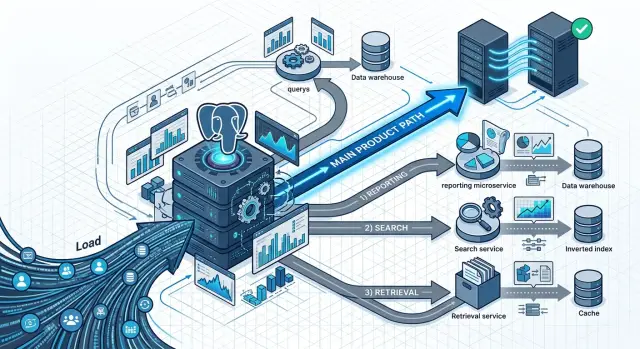
Table of Contents
Why the main app slows down
A product database does not care whether a query comes from login, checkout, a customer dashboard, a saved report, or a search page. They all fight for the same CPU time, memory, disk reads, cache space, and connection slots. Early on, that shared pool feels fine. As usage grows, one noisy read path can steal resources from the screens people use every day.
Normal product screens usually ask small, predictable questions. A user opens one account, one invoice, or one order. Postgres answers quickly when indexes match those lookups and the needed rows stay warm in memory.
Reporting queries behave very differently. One report might scan six months of orders, sort a large result, group it by region, and calculate totals for every team. That single request can run long enough to push useful data out of cache, hit disk hard, and keep a database worker busy while regular app requests line up behind it.
Search traffic often causes the same trouble, even when the page looks simple. A few extra filters, a date range, and partial text matching can turn one customer search into a wide sweep across a large table. Daily app screens may touch 10 or 20 rows. Search or retrieval pages may touch thousands before they return one page of results.
The pain shows up in places that seem unrelated. A customer clicks "Log in" and waits two extra seconds. Checkout stalls for a moment. A support screen times out. The team may not spot the source right away because the app itself did not change much. One heavy read can fill the connection pool, consume memory for sorts and aggregates, or create enough disk pressure that simple queries feel slow.
That is why Postgres read patterns matter so much. Users feel the delay first, usually in the most ordinary actions. By the time the team sees a clear spike in database load, the main product path already feels worse.
Which read patterns cause trouble first
The first reads that hurt a product are usually the ones that scan a lot of data, sort large result sets, or ask the database the same question again and again.
Large reports are a common source of pain. A monthly revenue report or usage summary often groups data across weeks or months, then sorts and aggregates it in one heavy query. That may feel fine when the table holds thousands of rows. It feels very different when it holds millions and the same report runs during business hours.
Search pages also get expensive faster than teams expect. A page with filters for date, status, owner, region, tags, and custom sorting pushes Postgres into hard choices. Users see a simple search form. The database sees many possible paths, lots of index checks, and sometimes a big sort after filtering.
Dashboards are another early problem, especially when each refresh joins several large tables. One chart may be cheap. Five charts that refresh every minute are not. If each widget asks for fresh numbers with separate joins and counts, the dashboard starts competing with the main product flow.
Retrieval jobs often look harmless because they run in the background. They are not harmless when they pull wide records for AI prompts, CSV exports, partner syncs, or internal pipelines. Reading large JSON blobs, long text fields, and many columns puts pressure on memory, disk, and network. The app may still write quickly, but user-facing reads start to wait.
There is also a quieter problem: background work that rereads the same data all day. Think of a sync worker that checks the same customer set every few minutes, or a job that rebuilds nearly identical payloads from scratch. Each query seems small. The total load is not.
A simple rule helps: reads that look across a lot of history, combine many conditions, or pull more columns than a page needs are often the first ones to split out. They do not always need a new database on day one. They do need attention before they sit on the same path as login, checkout, messaging, or any other action where users expect an instant response.
Signs you should split reads
A busy database rarely breaks all at once. More often, a few pages get worse every week while the rest of the app still seems fine. One clue shows up early: your slowest requests keep getting slower even on normal days, when orders, signups, or API traffic have not jumped. That usually means read work is fighting with the main product path.
Time patterns tell you a lot. If connection counts spike at 9:00 every morning, at month end, or whenever a scheduled export starts, a separate read workload is landing on the same Postgres box at the same time. The app may stay online, but the database spends more of its time serving dashboards, exports, and filtered tables instead of the user actions that keep the product moving.
Compare read-heavy screens with write actions. If saving a form still feels quick, but analytics pages, search results, or admin tables take several seconds, users are already seeing the split. That gap often shows which Postgres read patterns no longer belong on the same path as checkout, signup, or transaction updates.
Large queries leave another trail. A report that used to finish in 2 seconds now takes 8, then 15, then 30 under the same load. Soon the problem is not one slow query but three or four copies of it stacking up, holding connections open, and making unrelated requests wait.
Support usually hears about this before the graphs look bad. People do not write, "your reporting queries are crowding out the app." They say, "the dashboard gets slow every afternoon," or "exports make everything hang." If complaints cluster around reporting windows or bulk retrieval jobs, pay attention.
A split usually makes sense when the same pattern repeats: slow pages line up with a schedule, read-heavy screens degrade more than write actions, big queries overlap instead of finishing cleanly, and support can name both the screen and the time window. At that point, more tuning may buy time, but it will not change the shape of the traffic. One part of the product has grown into its own service, and the main app should stop carrying it on the same read path.
A simple SaaS example
A small SaaS company sells software to wholesalers. Every morning at 9:00, the sales team exports a large CSV with orders, invoices, refunds, and payment status for the previous month. A few minutes later, customers start their day, sign in, and open the dashboard to check fresh numbers.
Both flows read from the same Postgres tables. The export asks for a lot at once. It joins orders to invoices, filters by date, sorts large result sets, and scans far more rows than a customer dashboard needs. The dashboard looks lighter, but it still needs recent orders, unpaid invoices, account totals, and a few charts.
On paper, both are read-only workloads. In practice, they are not equal. The CSV export does the kind of work that pushes useful pages out of cache and keeps connections busy for too long. By the time customers arrive, the database is already tired.
The team may first notice this in small ways. Login slows down. Dashboard charts load in pieces. Support says the app "feels weird" every morning. Engineers look at the app servers, see nothing obvious, and spend a day chasing the wrong thing.
A clean first move is to split the export path before touching the customer dashboard. Let the main app keep reading and writing against the primary database. Move the export into its own service or run it from a read replica. The sales team can usually tolerate slight lag in exchange for not slowing down the rest of the product.
That does not solve every future database problem. It solves the one that is hurting users right now. That is usually enough for a first split.
How to choose what to split first
If several read paths share one Postgres cluster, do not start with the busiest endpoint just because it looks scary. Start with the read path that is expensive, annoys the fewest users, and can safely show data that is a few seconds or minutes old.
Write down every major read path in plain language. Think in terms of user actions, not tables: dashboard loads, CSV exports, admin reports, product search, or background retrieval jobs that collect context for emails or AI features. For each one, note how often it runs, how many rows it touches, and what happens if the answer is slightly old.
Most teams land on the same order. Keep the main product flow close to the primary database. Put reports and exports near the top of your split list. Consider search early if it already behaves unlike normal app queries. Move batch retrieval work if it scans a lot and runs outside the request path.
A billing report that scans two million rows every hour is a better first split than a customer profile page that reads twenty rows and must load right away. The report is heavy, but the user can wait a bit. The profile page is light, but every delay feels bad.
Pick one boundary for the first move. That boundary might be a reporting API, a search service, or a retrieval worker. One clear line is easier to test, explain, and roll back. If you split reporting first, the rest of the app can keep working exactly as before.
Keep writes in one place for that first step. Let the main app continue to write to the primary database, and let the new service read from a replica or another read store. This avoids a lot of mess around conflicts, missing updates, and hard-to-trace bugs.
Measure before you touch anything. Capture response time for the affected endpoints, database CPU, slow query count, connection pressure, and read volume. Then compare the same numbers after the change. The first split should feel boring: fewer spikes on the primary, steadier app latency, and no surprise behavior for users.
How to split it without drama
Start with one read path that already causes friction, such as a sales dashboard, product search, or account history page. Do not move three things at once. One narrow use case is easier to measure, test, and undo.
The safest move is to keep the old API shape. If the old endpoint returned order id, customer name, total, and status, the new service should return the same fields in the same order and with the same defaults. Your app code stays calm, and you learn whether the storage move helped instead of debugging a response change.
Then point that service at the store that fits the job. Reporting usually fits a read replica. Search often belongs in a search index. Heavy lookup pages sometimes do better in a smaller read store that keeps only the tables and joins they need.
Use a feature flag, copy one query path behind it, and feed that path from the new source. Keep the response contract unchanged. Write down freshness rules in plain language, such as "dashboard data can lag by 60 seconds" or "search updates within 5 minutes." Then send a small slice of traffic to the new path and compare rows, counts, and response time. Keep a rollback switch so you can move all traffic back in seconds.
Compare results before you celebrate. For a week, log mismatches, missing rows, and odd sorting. Some Postgres read patterns fail quietly after a split because the new source handles nulls, text search, or time zones a little differently.
A calm migration looks boring from the outside. That is good. Small, reversible moves beat a big rewrite every time, especially when the main product path already feels slow.
Mistakes that create more pain
Teams usually get into trouble when they split too much at once. Reporting, search, and retrieval traffic may all look noisy in Postgres, but they do not fail in the same way and they do not need the same fix.
If you move all three in the same sprint, you create three new systems to debug. When numbers look wrong, search feels stale, and dashboards slow down, nobody knows which change caused it.
Another common mistake is moving writes with reads on day one. That turns a simple traffic split into a data ownership problem. A read service should start as a boring copy or projection, not a second source of truth.
A small SaaS team might move product search to its own service because wildcard queries keep hitting the main database. That is reasonable. Moving product edits, inventory updates, and admin reporting there at the same time is how a safe change becomes a week of rollback work.
Teams also get tripped up by freshness. Support agents need to know whether a report is live, five minutes behind, or updated every hour. If nobody sets that rule, users report "bugs" that are really expected delay, and the support team wastes time chasing ghosts.
Another mistake is rebuilding every query instead of fixing the worst path first. That burns time and adds risk. If two dashboard queries cause most of the pain, split those first and leave the rest alone.
The new service also needs the same guardrails as the old path. Teams forget access rules, retention jobs, and monitoring because the first goal is speed. Then a private report leaks the wrong rows, old data piles up, or nobody notices that sync lag jumped from 30 seconds to 20 minutes.
A safer first move is boring on purpose: keep writes in the main app, split one read pattern first, define how fresh the new data must be, and copy auth checks, cleanup jobs, and alerts before launch.
Quick checks before and after the move
Many Postgres read patterns are safe to split only if the main app still has one clear owner for writes. Keep writes on the product path first. The new service can read from a replica, an index, or a cache, but it should not start making its own truth.
That rule keeps failures small. If the reporting service goes down, users should still create orders, save settings, and finish normal actions in the main app.
Before the move
Ask a few plain questions before you route any traffic away from the main database.
- Does the main app still handle every write and every user action that needs fresh data?
- Can the new read path lag for a few seconds or minutes without breaking anything users do?
- Do you measure query time, queue length, and error rate on both the old path and the new one?
- Can you turn the split off fast with a flag, config switch, or simple routing change?
- Does every team know which screens need fresh data and which screens can show delayed data?
Teams also need shared language. If product says a screen is "live" but engineering means "updated every minute," confusion turns into support tickets.
After the move
Watch the main path first, not the new service. You want lower load on the primary database, shorter wait times for user actions, and fewer slow queries during busy hours. If those numbers do not improve, the split did not solve the real problem.
Then watch the new path on its own. Track replica lag, timeout spikes, search index delay, and retry storms. A read service can look healthy while users still see stale results or half-updated reports.
Run one simple test every team understands: change a record in the app, then check when that change appears on each screen. Write the result down. "Search updates in 10 seconds" is clear. "Usually pretty fast" is not.
Keep rollback boring. If the new path misbehaves, send reads back to the main app, accept the temporary load, and fix the issue without guessing. Small teams do this better when the switch is obvious and someone owns it.
What to do next
Pick one read path that annoys users or your team every week. Maybe it is a report that spikes CPU at 9 a.m., or a search endpoint that slows down checkout. Split that first. A small win teaches more than a grand rewrite plan.
Before you move anything, write three rules on one page: who owns the new service, how fresh the data must be, and what you will do if the split causes errors or stale results. If the team cannot answer those points in plain English, the design is still too fuzzy.
Keep the first move simple. Copy one heavy read flow into its own service. Feed it from a replica, cache, or search index. Compare latency and error rates for a week. Keep a clean rollback path to the old query.
Teams get into trouble when they add too much at once. A search cluster, queue, cache layer, and new dashboards can turn one database problem into four operational problems. For most Postgres read patterns, one isolated read path is enough to prove the idea.
After the first split, review cost before you add another service. Check cloud spend, engineering time, alert noise, and how often someone has to fix stale data. If the new setup saves the main product path but eats the team alive, it is too expensive.
A simple rule helps here: every new service should remove a real pain you can name. "Reports no longer slow down the app" is a real result. "Our architecture is cleaner" usually is not.
If your team wants an outside review, Oleg at oleg.is works as a Fractional CTO and startup advisor. He helps teams make changes like this with a narrow scope first, so the main product stays stable while the heavy read path moves out.
Done well, the next step is small and calm. One read path moves out, the app gets breathing room, and your team keeps control of the system.
Frequently Asked Questions
When should I stop running reports on the main Postgres database?
Start when reports, exports, or search pages slow down normal product actions like login, checkout, or simple dashboard loads. If the same slowdown shows up on a schedule and read-heavy screens get worse while writes still feel fine, you have a good reason to split.
Which read workloads usually cause trouble first?
Reports, filtered search, dashboards with many widgets, and background retrieval jobs usually hurt first. They scan more rows, sort more data, and hold connections longer than normal product screens.
Does search need its own service?
Split search when it touches far more rows than the page returns or when filters and partial text matching make response times jump. If search starts competing with checkout, login, or account pages, move it out before it drags the rest of the app down.
Should I move writes when I split reads?
No. Keep writes on the primary database for the first step. Let the new service read from a replica, cache, or search index so you avoid data ownership problems and messy rollback work.
What should I split first?
Pick the path that costs the database the most and annoys the fewest users if data lags a bit. Reports and exports often win because they run heavy queries and people can usually accept data that is a little behind.
How much lag is okay on a read replica?
Most teams start with seconds or a few minutes, not hours. Set one clear rule for each screen, such as dashboard data can lag by 60 seconds, and make sure support and product use the same wording.
How do I know the split actually helped?
Measure the main app first. Check response time on user actions, slow query count, database CPU, connection pressure, and error rate before and after the split. If those numbers stay flat, the move did not fix the real problem.
What mistakes create more pain during a split?
Avoid moving reporting, search, and retrieval at the same time. Also avoid changing the API response while you change the storage path. One narrow move with a feature flag and fast rollback gives you cleaner results and fewer surprises.
Can a small team do this without a big rewrite?
Yes, if you keep the first move small. Copy one heavy read path, keep the response shape the same, route a small slice of traffic, and watch for mismatches. You do not need a full rewrite to prove the idea.
What early warning sign should I watch for?
If support hears the same complaint at the same time every day, pay attention. Phrases like "exports make everything hang" or "the dashboard gets slow every afternoon" usually point to a read path that no longer belongs on the main database.


