Postgres major version upgrade with logical replication
Plan a Postgres major version upgrade with logical replication: measure lag, rehearse cutover, protect writes, and keep a rollback path ready.
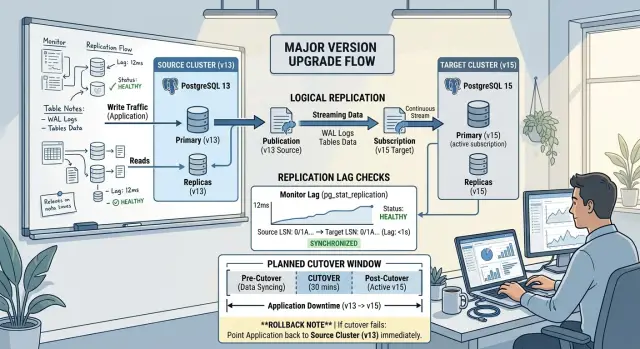
Table of Contents
Why this upgrade can still fail
Logical replication lowers the risk of a major Postgres upgrade, but it does not make the change safe on its own. Replication can run for days without errors, and the cutover can still fail. Copying rows is the easy part. Switching live traffic without losing writes or confusing the app is where things usually go wrong.
Most problems show up in small places. A new Postgres version can change query plans, extension behavior, defaults, and performance under load. The replica may look healthy while one slow table falls behind, one sequence drifts out of sync, or one background worker keeps writing to the old primary.
The biggest risk sits in the write path. Reads can move first and look fine. Writes are less forgiving. If the app sends even a few seconds of traffic to the old database after cutover starts, you can end up with missing orders, duplicate jobs, or users seeing data move backward.
Lag is another trap. Teams often check that replication is running and stop there. That is not enough. You need to know whether every important table has finished copying, whether recent writes are visible on the target, and whether sequence values are ready for new inserts.
What to check before building the replica
A major upgrade looks simple on a diagram. In practice, logical replication copies only part of the picture. Before you build anything, write down what runs on the current cluster and what the new cluster must match.
Start with versions, extensions, and database features. Check the source Postgres version, then list every installed extension and its version. Make sure the target version supports the same extension set, data types, and table features, including partitioning, generated columns, identity columns, and custom collations. Small differences here can turn into failed syncs later.
Then inspect the tables themselves. Logical replication works best when each published table has a primary key. Updates and deletes need a reliable way to find the correct row on the subscriber. If a table has no primary key, you may need to add one or set replica identity to full. That works, but it usually makes replication slower and heavier.
Some objects need separate handling. Sequences do not stay aligned through normal logical replication, so you must capture and apply their latest values near cutover. Large objects also need extra attention because logical replication does not move them the same way it moves table rows. Schema changes matter too. If your team runs DDL during the migration window, the source and target can drift fast.
Resource checks are dull, but they prevent bad surprises. The initial copy can hit disk, CPU, and network hard on both clusters. Make sure the source can serve that load without hurting production traffic, and make sure the target has room for copied data, indexes, WAL, and temporary spikes.
Decide ownership early and write it down. Pick the person who can stop application writes, the person who checks final lag, the person who updates connection settings or traffic routing, and the person who gives the go or no-go call. Teams skip this all the time, then spend 20 minutes waiting for approval at the worst possible moment.
How to set up logical replication
Build the target cluster on the new Postgres version before you touch production traffic. Give it the same locale, encoding, and basic settings you plan to keep after the upgrade. A cluster that looks "close enough" can still fail when it differs in the wrong place.
Before replication starts, copy the structure, not the data. Create the roles, permissions, schemas, and required extensions on the target so the subscriber can accept incoming changes cleanly. If an extension exists on the source but not on the target, fix that first. Do the same for default privileges, custom types, and any tables owned by roles that do not exist yet.
Logical replication moves rows, not your whole database setup. A schema-only dump is often the safest way to load tables, indexes, constraints, and views into the new cluster. Keep that script, along with the exact settings you changed on both sides. During rehearsal, write down every command, every parameter, and every fix. Memory gets unreliable late at night.
Choose tables carefully
Do not put every table into the first pass by default. Group them by how they behave. Normal application tables can usually copy right away. Very large tables may need a separate backfill window. Busy write tables need tighter lag checks. Cache or audit tables may be safe to rebuild later. Sequence values always need their own step.
After that, create a publication on the source for the tables you want to replicate, then create the matching subscription on the target. Start small in staging. Confirm that inserts, updates, and deletes arrive correctly. Only then widen the scope. If you use row filters or separate publications by schema, keep the names simple and obvious. Clear names cut down on mistakes during cutover.
Run the full sequence at least once before production. Time the initial copy, measure lag under normal traffic, and note any table that needs special handling. A written runbook beats a clever plan every time.
How to watch lag and sync health
During an upgrade, teams often stare at one green status and miss the real problem. Logical replication can look healthy while one busy table still trails behind, one table copy still runs, or a sequence already drifted far enough to break inserts after cutover.
Track lag in two ways. Measure time lag between a change on the source and the same change on the subscriber. If your tools can estimate backlog in bytes, keep that on the same dashboard. Time tells you what users might feel. Bytes tell you whether the subscriber can catch up after a burst of writes.
Table-level sync matters just as much as overall subscription status. Check whether each table finished its initial copy and moved to normal replication. One hot table can stay behind while the subscription itself still looks fine. In Postgres, views like pg_stat_subscription and pg_subscription_rel help you see both the apply side and each table's state.
A simple routine helps. Review time lag and byte backlog every few minutes during tests. Check per-table copy status until every important table reaches steady replication. Compare row counts on the busiest tables each day. Record sequence values on source and target before each rehearsal. Most of all, write down the lag limit you will accept for go-live.
Row counts catch quiet data gaps that lag charts miss. Start with tables that change all day, such as orders, events, sessions, or invoices. Exact counts work for moderate tables. For very large tables, sample recent ranges too so you are not trusting one total number.
Sequence drift needs its own check. Logical replication usually does not keep sequence values aligned the way many teams expect. If the target sequence sits behind the source, inserts can fail right after you switch writes. Rehearse the fix, not just the check.
Put the go-live target in writing. "Almost caught up" is not a target. A better rule is simple: lag stays under 2 seconds for 30 minutes, all important tables finished copying, row counts match on the busiest write tables, and sequences show no drift or have already been advanced on the target.
How to run the cutover
A clean cutover starts with timing. Pick a quiet period when traffic is low and your team is awake, available, and in the same chat channel. Tell users or internal teams that writes will pause for a short window, even if you expect the stop to last only a few minutes.
When the window starts, stop application writes on purpose. Do not rely on "almost no traffic." Put the app in maintenance mode, disable background jobs, pause workers, and block any admin tools that can still change data. Then wait until logical replication applies everything and lag reaches zero.
This is the part that tests patience. If one service keeps writing, your numbers drift and the switch gets messy fast.
Before you point anything at the new cluster, run a short set of final checks. Compare row counts for the tables that matter most. Verify sequences, especially on busy tables with inserts. Check replication status for apply errors or skipped changes. Review app and database logs for anything odd in the last few minutes.
Counts do not need to match every table in a huge system before the move, but your critical tables should. Sequences matter more than many teams expect. If a sequence sits behind the actual max ID, your first insert after cutover can fail.
Once the checks pass, change the app connection to the new cluster and bring writes back in a controlled way. Start with the main app, then workers, then scheduled jobs. Watch the first queries, first inserts, and first background tasks. Keep your dashboards and error tracking open, and have one person call out problems as they appear.
Expect a few surprises. A missed connection string, a stale secret, or one worker that still points to the old cluster can waste 20 minutes.
Do not shut down the old cluster right away. Keep it read-only while you build trust in the new one. That gives you a safe reference point for checks and makes rollback much less painful if something breaks.
How to prepare a rollback plan
Rollback works only if you protect the old database from day one. Keep the old cluster online, unchanged, and ready to take traffic again. Do not rush to remove replication settings, cleanup jobs, or access paths just because the cutover started.
Fast fallback depends on discipline. The old database should still have the same schema, the same connection path you can restore, and enough capacity to handle production load again. If you break that safety net during the upgrade window, rollback turns into a rebuild.
Set a firm rollback decision window before the switch. Fifteen to thirty minutes is common. That gives you enough time to see real traffic without creating a huge pile of post-cutover writes to recover if you move back.
Decide who makes the call
One person should own the go or no-go decision. Pick that person before the window opens. It can be the DBA, engineering lead, or a fractional CTO, but it should not be a group vote while alerts are firing.
That owner needs a short list of rollback triggers. Keep them measurable: app errors stay above the agreed limit for several minutes, write latency jumps and does not settle, sign-in or checkout fails, data checks show missing rows, or replication workers stop behaving as expected.
Plan for writes you may need to recover
This is the step teams skip. After cutover, new writes land on the upgraded cluster. If you roll back, those writes do not magically return to the old cluster.
You need a recovery method before cutover starts. Some teams pause writes for a short validation period. Others queue writes in the app. A more flexible option is to log every write that hits the new cluster so the team can replay those changes on the old one if needed.
Run one rehearsal with names and timestamps. If the switch fails at 2:07, who redirects traffic, who blocks new writes, who checks data, and who announces rollback? Clear answers save time when the window gets tense.
Common mistakes during these upgrades
Most major Postgres upgrades fail in boring ways, not exotic ones. Teams get the replica running, see rows moving, and assume the hard part is over. That is usually when the real risk starts.
The first mistake is skipping a full rehearsal on production-like data. A tiny staging database does not show the problems that appear with large tables, long transactions, busy write paths, or background jobs that change rows all day. If your test run finishes in 20 minutes but production needs hours of catch-up, your cutover plan is fiction.
A good rehearsal uses real table sizes or something close, includes write traffic during sync, exercises the busiest read and write paths, checks sequences after inserts, and includes a timed cutover and rollback drill.
Sequences trip up a lot of teams. Logical replication copies table changes, but sequence values need their own attention. Everything can look healthy until the first insert after cutover hits a duplicate key error because the new primary still hands out old IDs. That is not a rare edge case. It is one of the most common ways to ruin an otherwise clean switch.
DDL changes cause a different kind of trouble. During the replication window, someone adds a column, changes a default, creates an index, or renames something small and forgettable. The old and new databases drift apart, and the app finds the mismatch at the worst moment. Freeze schema changes or track them with real discipline.
Another mistake is testing only calm tables. Teams check a few admin screens, read a couple of rows, and call it done. Then the hot path breaks: checkout, signup, webhook ingestion, job queues, or whatever gets hit every second. Those paths deserve the first and hardest tests because they expose lag, locks, and sequence problems fast.
The last mistake is calling the plan "zero downtime" before measuring actual lag and cutover delay. If replication trails by 12 seconds and the app needs 30 more seconds to switch connections safely, you do not have zero downtime. You have a short outage or a period of stale reads. Name it honestly, measure it, and set expectations before anyone promises a smooth release.
A simple example of the full process
A small SaaS company runs a subscription app with steady writes all day: new signups, invoice rows, account updates, and background jobs. The team wants a major Postgres upgrade with logical replication because even a short outage would hurt support and billing.
They build the new cluster, copy the base data, start logical replication, and run a full rehearsal a few days before the real change. Test traffic looks normal, so the first results seem fine. Lag drops to zero, row counts match, and the team almost signs off.
Then inserts start failing on one busy table. New invoices try to reuse IDs that already exist. The problem is sequence drift. Logical replication moved the table changes, but it did not bring over the current sequence values the way the team expected.
That rehearsal changes the plan. They add a final sequence sync step after replication catches up, and they write a small smoke test that creates a user, creates an invoice, and updates a subscription. If any insert returns a duplicate ID error, they stop.
On cutover night, they pause background jobs, block new writes in the app for about a minute, and wait until lag reaches zero. They switch application traffic to the new database and open writes again. Replication lag is still zero, but the app throws a few errors anyway.
The lag metric was not wrong. It just did not cover everything. One app server kept an old connection and hit the invoices path before the team finished the last sequence check on the new side.
Because they planned rollback early, the choice stays small and fast. They keep the old database ready, limit the first few minutes to normal customer actions, and leave email jobs, exports, and webhooks paused. When the invoice errors appear, they point the app back to the old database, clear the stale connections, and review only a handful of writes on the new side.
After the second cutover works, they do a short review. They record the exact stop-write and resume-write times, save the lag charts and app error counts, note the sequence fix in the runbook, and keep the old cluster for a defined fallback window. That gives them something better than a success story. It gives them a process they can repeat.
Final checks and next steps
An upgrade goes much smoother when the team works from one page, not from memory. Keep a short runbook for rehearsal and another copy for go-live. If the plan only lives in chat, people miss steps when the pressure goes up.
That page should name the owner for each action, the planned time for it, the exact command to run, and the signal that tells the team to continue. It also needs clear stop points. If replication lag does not return to zero, if smoke tests fail, or if write traffic still reaches the old primary, stop and fix that before you cut over.
Save proof while you work. Keep terminal output, screenshots, query results, and smoke test notes in one shared place. Later, that evidence helps answer the two questions that matter most: did the replica fully catch up, and did the app behave normally after the switch?
Be strict with timings. If rehearsal shows that the app needs 4 minutes to reconnect cleanly, do not promise 30 seconds in production. Teams get into trouble when they assume the cutover will be faster on a busier day.
A final go-live check can stay simple. If lag shows zero pending changes, row counts match on the tables you care about, and your login, checkout, or job-processing smoke tests pass on the new primary, you can move forward with reasonable confidence. If one of those checks is missing, you are still guessing.
The next step is to rehearse the whole flow again and remove anything vague. Replace steps like "verify replication" with the exact query, the expected result, and the person who signs off.
If you want an outside review before you promise a near-zero downtime cutover, Oleg Sotnikov at oleg.is works with startups and smaller teams as a Fractional CTO and advisor. A second set of eyes on the runbook, rollback plan, and cutover steps can catch weak points before they turn into an outage.
Frequently Asked Questions
Does logical replication make a major Postgres upgrade safe?
No. Logical replication lowers risk, but the write switch still causes most failures. You still need lag checks, sequence sync, smoke tests, and a rollback plan.
What should I verify before I build the new cluster?
Match extensions, roles, schemas, locale, encoding, and table features before you start. Also check that the source can handle the copy load and that the target has room for data, indexes, WAL, and traffic spikes.
Can I replicate tables without primary keys?
You can, but updates and deletes get harder and slower. Add a primary key if you can; if not, use replica identity full and expect more load during sync.
How do I know the replica is really caught up?
Do not trust one green status. Check time lag, backlog, per-table copy state, row counts on busy tables, and a fresh write that shows up on the target.
Do sequences copy over automatically?
Not in the way many teams expect. Logical replication moves row changes, so you need a separate step near cutover to compare sequence values and advance the target before new inserts start.
Should I allow schema changes during the migration?
Usually no. One small DDL change can make the source and target drift, and the app may hit that mismatch at the worst moment. Freeze schema work for the window, or apply every change on both sides in the same order.
What is the safest cutover order?
Stop writes on purpose, pause workers and jobs, wait for lag to hit zero, run final checks, then switch the app to the new cluster. Bring the main app back first, then workers and scheduled jobs, so you can catch stale connections early.
Who should make the go or no-go call?
Pick one owner before the window opens. That person watches the written checks and makes the call fast; a group debate burns time when alerts start firing.
When should I roll back?
Roll back when app errors stay high, write latency does not settle, smoke tests fail, or data checks show missing rows. Set the rollback window before cutover so the team does not wait too long and create more writes to recover.
Why do I need a full rehearsal before go-live?
A tiny staging test hides the problems that show up with large tables, busy workers, and long catch-up periods. Rehearsal lets you time the copy, test sequence fixes, and make sure your cutover and rollback steps work under load.


