Postgres connection limits for bursty AI workers on queues
Learn how to set a pool budget by worker type, protect customer requests, and keep queue spikes from overwhelming Postgres connection limits.
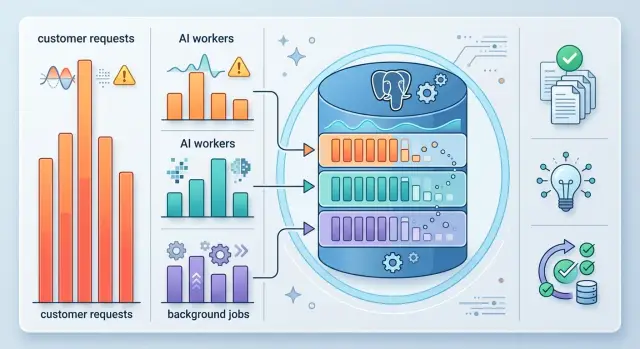
Table of Contents
Why queue spikes hurt customer requests
Many apps send customer requests and background workers to the same Postgres database. That setup is normal. It also creates a quiet risk: when a queue suddenly fills up, workers can grab a large share of the open connections before customers click their next page.
This happens fast. A worker pool that looks harmless at idle can wake up with dozens of jobs at once. Each worker opens a connection, starts reading or writing, and holds that slot long enough to push regular app traffic into a wait.
Users feel the damage before anyone says "the database is down." Pages load slowly. Checkout hangs. A save button spins and then fails. Support tickets start with "the site is acting weird," not "your workers used all the connections."
That is why Postgres connection limits matter so much for queue based systems. The database can stay technically alive while the product feels broken. CPU may look fine. Memory may look fine. The app may even pass a health check. But if customer requests cannot get a connection quickly, the service still fails where it counts.
A simple example makes it obvious. Imagine an app with 40 database connections available for normal traffic after admin tools and maintenance jobs take their share. Then a backlog lands on an AI worker queue, and 30 workers wake up together. The workers are doing useful work, but they leave too little room for real users. A few seconds later, customer requests stack up behind them.
The first signs are usually easy to miss:
- response times jump for logged in pages
- actions that write to the database start timing out
- retry logic makes the spike worse by adding more load
This is why teams get surprised. They watch whether Postgres is "up" when they should watch whether customers can still get served during a burst. A healthy system is not one where background jobs finish quickly. It is one where background jobs stay in bounds while customers keep moving.
Where connection pressure starts
Connection pressure usually starts in app defaults, not in Postgres itself. A team sets a pool size that looks small on one process, then forgets that the database only has one hard cap. Postgres connection limits do not care which service opened the session first.
The usual trap is simple: every worker process gets its own pool. That includes web servers, queue consumers, cron jobs, retry runners, and one-off scripts. A pool of 5 feels harmless until 30 processes all decide they need 5 at the same time.
This gets worse with AI worker queues because they often scale on backlog. A burst lands, the queue grows, autoscaling adds more workers, and each new worker opens its own small pool. Then retries join in, and connection demand jumps much faster than the job count.
A quick example shows why teams get surprised:
- 12 web processes with a pool of 10 = 120 connections
- 10 AI workers with a pool of 5 = 50 connections
- 8 retry or batch workers with a pool of 5 = 40 connections
- 4 admin or reporting jobs with a pool of 3 = 12 connections
That is 222 possible connections before Postgres keeps any headroom for maintenance, migrations, or monitoring.
The painful part is not only the total number. It is who gets there first. Low-value background jobs can grab connections before sign-ins, checkout, or customer API calls ask for one. Users feel the outage first, even when the database is still alive and background jobs keep running.
Retries add another layer of damage. When a job fails because it cannot get a connection fast enough, many systems requeue it. The worker comes back, asks again, and adds more pressure to the same bottleneck.
This is why "small" pools still cause big incidents. The problem is not one worker type in isolation. The problem is the combined pool budget by worker type, multiplied by autoscaling and retries, with no priority for customer traffic.
Pick a connection budget first
Start with the number Postgres can actually hold: max_connections. That is the hard ceiling for every app server, worker, script, and admin session that reaches the database. If the server allows 200 connections, workers do not get 200. Everything shares that same limit.
This is where Postgres connection limits stop being abstract. If you budget only for busy AI worker queues, customer requests will fight for the last free slots during a heavy run. The result is ugly: login requests hang, pages time out, and the team cannot even open a database console when things go wrong.
Reserve space for normal product traffic first. After that, hold back a few connections for admin access, migrations, and maintenance work. You also need headroom for spikes and slow queries, because a connection held for 30 seconds hurts more than one that finishes in 50 milliseconds.
Write the numbers down before you change any worker settings. A simple table keeps the discussion honest and stops guesswork.
| Group | Connections | Notes |
|---|---|---|
| Web app | 80 | Customer traffic during busy periods |
| Admin access | 5 | Console, debugging, emergency access |
| Maintenance | 10 | Migrations, cron tasks, vacuum, deploy work |
| AI workers | 60 | Shared across queue consumers |
| Headroom | 45 | Bursts, retries, slow queries |
| Total | 200 | Matches max_connections |
Even if you use a pooler, do this math against the real database ceiling, not the larger client-side pool. The database still has a fixed number of server connections, and that is the number that decides whether the system stays calm or locks up.
A written budget also makes tradeoffs clear. If you want 20 more worker connections, you must take them from somewhere else or raise capacity safely. That is much better than letting background jobs grab whatever they can and hoping customer traffic survives.
Set limits for each worker type
Postgres connection limits only work if each worker type has its own budget. If every job pulls from one shared pool, the loudest queue wins, and customer requests wait.
Start by listing each worker type and its normal concurrency. Use real numbers from a normal hour, not guesses from memory.
- user-facing async jobs
- AI processing workers
- imports and exports
- retries and replays
- backfills, reports, and cleanup
Then rank these groups by user impact. A job that finishes a customer action in the next few seconds goes near the top. A report, reindex, or backfill goes near the bottom, even if your team cares about it a lot.
Give every group two hard limits. The first is a database pool cap. The second is a queue or worker concurrency cap. You need both.
If a worker can run 30 jobs at once but its pool cap is 6, those jobs will sit around waiting for connections. That still burns CPU, memory, and queue time. Match worker concurrency to the pool budget so the app fails in a calm way instead of piling up hidden waits.
A simple rule works well: if one job usually needs one database connection, cap concurrency at or below the pool size for that worker group. If one job sometimes opens two connections, count that honestly and lower the cap.
After that, run a burst test. Push a queue spike that is a few times higher than normal and watch what happens to request latency, connection wait time, and job lag. If customer traffic slows, cut low-priority caps first. Do not raise every limit just because jobs look slow.
Low-priority jobs should also back off when the queue grows. Pause them for a minute, reduce their concurrency, or stop pulling new work until the database settles. That one rule often saves customer traffic during heavy AI worker queues, especially when batch jobs and live requests share the same Postgres server.
A simple example with three worker groups
Imagine a SaaS product with three kinds of work hitting the same Postgres database. Customers use the web app all day. In the background, email workers send receipts and reminders. Another queue creates embeddings after users upload documents. All three jobs matter, but they do not deserve the same access when load jumps.
The team decides the database can safely handle 80 connections. They treat that number as a hard limit. Once a system crosses it, waits get longer, timeouts appear, and the web app feels broken fast.
One budget for three groups
A practical split might look like this:
- Web requests: 50
- Email jobs: 15
- Embedding jobs: 10
- Reserved for admin tasks and short spikes: 5
This setup gives customer traffic the biggest share because customers notice delay right away. Email can wait a bit. Embedding jobs can wait even longer, especially after a large upload or import.
Email jobs sit in the middle. Password resets and receipts should still go out on time, but a large newsletter batch does not need to compete with live customer actions. If traffic rises, the team can slow bulk email work first and keep only urgent jobs running.
Now picture a customer importing 20,000 records at noon. That import creates a flood of embedding jobs. Without a cap, those workers might open dozens of connections and crowd out normal traffic. Pages start hanging. Saves fail. Support tickets show up within minutes.
With a pool budget by worker type, the import does not get to take over. Embedding workers keep their 10 connections. If the queue grows, jobs wait in line or the worker count drops. The import finishes later, but the product still works for everyone else.
That is the point of Postgres connection limits in a busy queue system. You choose which work waits. Customers can still log in, search, and update data while background jobs finish at a controlled pace.
Keep background jobs in their lane
When background jobs share the same pool as customer requests, the database cannot tell urgent work from optional work. During a big import, reprocessing run, or AI queue burst, bulk workers can take most of the open sessions and make normal requests wait.
You do not handle Postgres connection limits well by raising the cap every time. A better fix is separation. Give web requests their own pool, urgent jobs a smaller pool, and bulk jobs the smallest pool of all.
That pool budget by worker type puts a fence around each class of work. If bulk jobs get busy, they wait for their own slots instead of stealing capacity from sign in, checkout, search, or API calls.
Slow batch work also needs its own queue. Backfills, report rebuilds, large syncs, and embedding refreshes often run for minutes and touch many rows. They should not sit beside short jobs like sending a receipt or updating one order.
Concurrency should match query weight. A worker that reads one row and writes one row can usually run many copies at once. A worker that scans a large table, sorts a lot of data, or holds a connection for 20 seconds needs a much lower limit.
A simple setup often works well:
- Reserve the largest pool for web traffic.
- Give urgent background jobs a fixed, smaller pool.
- Put bulk jobs on a separate queue with a hard cap.
- Cut concurrency first for jobs that read many rows.
- Spread retries with backoff and random delay.
Retries need special care. If 40 failed jobs retry at the same second, they create a second spike right after the first one. Backoff with jitter spreads that load over time and gives the database room to recover.
It also helps to pause nonurgent runs during busy hours. Most teams can wait until evening for a backfill or a full reindex. Customers notice slow pages right away, but they rarely notice that a batch job finished three hours later.
If you make one rule and keep it, make it this: customer traffic gets reserved capacity, and bulk work earns whatever is left.
Mistakes that cause surprise outages
Surprise outages rarely start with a broken database. They usually start with small choices that look harmless until a queue spike wakes up dozens of workers at once. Then customer requests wait, time out, and pile up behind background jobs.
One shared pool for every process is a common mistake. If your API, batch jobs, embeddings, imports, and retry workers all draw from the same pool with the same limits, the noisiest group wins. During a heavy run, customer traffic can lose access to the database even though the app itself still looks healthy.
CPU count causes another bad decision. Teams often set worker counts by asking how many cores they have, then scale consumers until the machines stay busy. Postgres connection limits do not care that the CPUs still have room. If each worker can open several connections, a "safe" compute setting can still choke the database.
A few other mistakes show up over and over:
- Teams use every available connection in normal operation and leave no room for migrations, a manual shell, or incident work.
- They treat timeouts as a signal to retry immediately, so the failed jobs come back and ask for even more connections.
- They add a new worker fleet for a fresh AI task and keep the old budget, as if the database got bigger on its own.
- They scale queue consumers during a launch or backfill without checking whether read replicas, primary, and connection pooler limits still match.
- They only watch CPU and memory, while connection count, lock waits, and queue latency drift out of sight.
The retry problem is especially nasty. A timeout should slow the system down, not speed it up. Unlimited retries turn a short database stall into a flood. Five workers can become fifty active queries in a minute if every failed job comes back right away.
I see this in startup systems after a fast feature push. Someone adds more AI worker queues to clear backlog faster, but nobody updates the pool budget by worker type. The app works fine in testing, then a production burst blocks sign-ins, billing, or search while background jobs keep grabbing slots.
Leave headroom on purpose. If your team cannot open a migration session or a database shell during an incident, the budget was too tight before the outage started.
Quick checks before a heavy run
Before you start a large queue run, do the math on every connection pool that can wake up at once. Teams often count the main app and forget the worker pods, cron jobs, admin tools, migration tasks, and one-off scripts. Postgres connection limits are easy to break this way because each service looks harmless on its own.
The first number to trust is the total possible peak, not the average. If your web app can open 40 connections, your AI workers can open 60, and batch jobs can open 30, your real ceiling is 130. If the database stays healthy at 100, you already know a heavy run can spill over.
Web traffic should keep the biggest share. Real users feel pain first, and they do not care that a background task was almost done. Give customer-facing requests room to breathe even when the queue gets noisy.
A short pre-run checklist helps:
- Add up the pool caps across every service, worker group, and scheduled job.
- Check that web and API traffic still own the largest part of the budget.
- Run one burst test with queue volume that matches a real heavy run, not a tiny sample.
- Watch connection wait time, database errors, and queue age together.
- Keep a manual pause switch for bulk jobs so someone can stop the flood fast.
That third check matters more than people expect. A fake test with ten jobs tells you almost nothing if production bursts arrive in thousands. Use the real queue shape if you can: same worker count, same job mix, same retry rules.
Watch the three signals together because each one tells only part of the story. Wait time shows pressure before full failure. Errors show when pools or the database start refusing work. Queue age tells you whether jobs are falling behind even if the app still looks fine from the outside.
The pause switch should be boring and obvious. A flag in config, a disabled deployment, or a queue consumer count set to zero is enough. When customer requests slow down, you want one person to stop bulk jobs in seconds, not after a long debate in chat.
Next steps after you set the budget
A budget only works when the numbers live in code and config. If your Postgres connection limits exist only in a doc or in somebody's head, they will drift the first time a team changes a worker, bumps concurrency, or adds a queue.
Start by naming the budget in plain terms. Keep separate settings for web requests, fast background jobs, and heavy AI worker queues. Put those settings next to the worker config, commit them to the repo, and use the same names in dashboards and alerts.
A small checklist helps:
- Store pool caps and worker concurrency in config files or environment variables
- Keep one owner for budget changes so two teams do not raise limits at the same time
- Add a startup check that refuses to run if the total can exceed the database cap
- Write down the reason for each number in a short comment
That last point saves time later. Six months from now, nobody will remember why one queue gets 12 connections and another gets 4 unless you leave a note.
Review the split every time you add a new worker type. New queues often look harmless at first, then they pile up and eat the spare capacity you meant to keep for customer traffic. If a new job can wait, cap it hard from day one.
You also need to test again after any change that shifts load shape. Autoscaling can multiply connection demand faster than expected. A model change can make each job run longer. A new queue can turn short bursts into steady pressure.
Run one heavy test that looks like a real bad day, not a neat lab sample. Push customer traffic and background jobs together, then check three numbers: request latency, queue drain time, and total open connections. If customer requests slow down first, your split still needs work.
This is also a good time to decide who can change the budget in production. Fewer hands is better.
If you want a second set of eyes, Oleg can review your AI worker setup and pool budget in a practical CTO consultation. That kind of review usually finds one or two risky defaults before they turn into an outage.


