Postgres partitioning for audit tables and event logs
Postgres partitioning for audit tables works best when you set retention rules and query patterns first. Plan sizes, rollouts, and cleanup before ops pain starts.
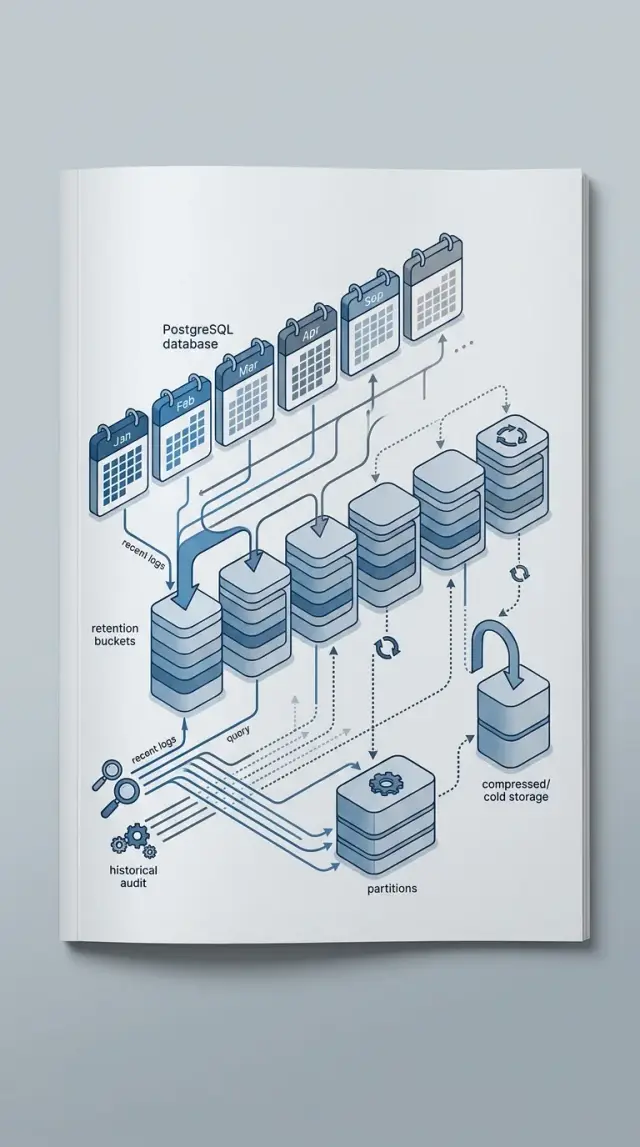
Table of Contents
Why these tables become a problem
Audit and event tables grow nothing like most product tables. A customer profile changes now and then. An event table can add a row for every login, API call, job run, webhook, or permission change.
That difference gets expensive fast. A product can have a few million business records and still feel manageable, while its audit log quietly races past hundreds of millions of rows.
Teams also use this data in a very uneven way. They check the last few hours or days all the time for support work, debugging, billing disputes, and security reviews. Older records often sit untouched until someone needs to investigate one specific incident.
That access pattern matters because large tables do not hurt only reads. They also make routine maintenance heavier. Deleting old rows creates churn. Vacuum has more work to do. Indexes get fatter. Backups, restores, and replication all carry data that almost nobody reads.
A familiar case looks like this: the product team opens recent events every day to answer "what happened to this account?" Meanwhile, the database keeps years of low-use history in the same table. Recent queries slow down, cleanup jobs drag, and every maintenance task gets a little more annoying.
That is why partitioning gets so much attention for audit tables. It can make retention much easier, and it can keep recent queries focused on smaller chunks of data. Dropping one old partition is far cleaner than deleting 200 million old rows.
Still, partitioning is not magic. It helps when queries match the partition boundary, usually time. If most queries ask for "events from the last 7 days," Postgres can skip older partitions. If queries mostly ask for "all events for customer 42" with no time filter, Postgres may still touch a long list of partitions.
That is where teams trip themselves up. They add partitions to solve growth, but they keep the same loose queries, the same long retention, and the same oversized indexes. Then they end up with more tables to manage and not much speed to show for it.
Decide retention before you design the table
Most teams start with partition size, naming, or automation. That is backwards. The hard part is not creating partitions. It is deciding what data must stay, what can shrink, and what should leave.
Do not treat all events as one pile. A security audit row, a billing change, an email delivery event, and a debug trace have very different lifespans. Write the retention period for each event type in plain language and use exact numbers. "Keep payment audit rows for 7 years" is useful. "Keep them for a while" is how tables grow until nobody wants to touch them.
A workable retention plan usually has three layers. Recent data stays raw in Postgres because people query it often and need full detail. Older data moves to archive storage or gets reduced to summaries. Expired data gets deleted on a schedule.
Keep team needs separate, even when the data looks similar. Legal may need a long record of who changed what and when. Support usually wants a shorter window to investigate a complaint or trace a broken workflow. Finance may need longer retention for rows tied to invoices, refunds, or access changes that affect money. One rule for all three groups is usually a bad fit.
Before you design the table, write down four decisions for each event family:
- how long raw rows stay in Postgres
- when rows move to archive storage
- when full rows turn into summaries only
- when you delete them for good
That one document saves a lot of cleanup later. It also makes backup scope, partition pruning, and deletion jobs much easier to reason about.
A small example makes the point. You might keep login events raw for 90 days, archive them for 1 year, and then delete them. Billing audit rows might stay raw for 12 months and remain archived for several more years. Debug events may deserve only 7 days because after that they are mostly noise.
Let real queries shape the partitions
Partitioning helps when it lets Postgres ignore most of the table. If partitions do not match the queries people run every week, you add maintenance and get very little back.
Start with a plain list of real queries. Pull them from dashboards, support requests, compliance exports, and admin tools. Ignore imagined future needs. The boring, repeated queries should drive the design.
In many systems, those queries sound familiar: show one tenant's audit trail for the last 30 days, find all login failures for one actor during the last 24 hours, export one month of events for billing, or inspect one event type during an incident window.
The pattern is usually obvious. Time appears in almost every serious query. Then tenant, actor, or event type narrows the search. That often means time should lead the partition design, while the other fields belong in indexes.
Partition pruning only helps when queries tell Postgres which partitions to skip. If teams often run queries without a date range, monthly or daily partitions will not rescue them. Postgres may still touch too many partitions, and planning time can grow as the partition count rises.
So ask the blunt question early: do your common queries always include a start and end date? If yes, time partitioning is usually the safe choice for audit and event tables. If not, fix the queries first or accept that partitioning will do less than you hope.
Be careful with filters that look neat on a whiteboard but do not show up much in production. Partitioning by actor, event type, or tenant often creates a pile of small partitions and extra ops work, while most reads still need a date filter.
The practical rule is simple enough: partition by the filter that appears in almost every serious query, then index the filters that narrow the result set. For most audit logs, that means time first.
Pick a partition size your team can operate
Most audit and event tables do well with monthly partitions. They keep each child table small enough to vacuum, reindex, and drop without turning routine maintenance into a late-night job. For steady growth, monthly is usually the boring choice, and boring is good.
Daily partitions make sense only when write volume is high enough to justify them. If one day can add a huge chunk of rows, daily splits can make cleanup faster and limit how much data one bad query touches. But if the table grows at a moderate pace, daily partitions create a different problem: too many tables, too many indexes, and too many chances for a scheduler or migration script to miss one.
Yearly partitions look tidy on paper, but they get heavy quickly. One oversized partition can make vacuum drag on, slow index work, and turn retention cleanup into a bigger job than it should be. When old data needs to go, dropping one month is a lot easier than carving up one giant year.
A rough guide works for most teams:
- Use monthly partitions when growth is steady and retention is measured in months or years.
- Use daily partitions only when each day adds enough rows to make a monthly partition awkward to maintain.
- Avoid yearly partitions unless the table stays small for a full year.
Create the next partition ahead of time. Do not wait for the first write of a new period to discover that partition creation failed, permissions changed, or a deploy skipped the job. A small scheduled task that creates next month, or the next few days for high-volume tables, saves a lot of stress.
Names matter more than people expect. Pick plain names that an on-call engineer can read in two seconds, such as audit_log_2025_04 or events_2025_04_15. Avoid clever abbreviations or numbering schemes that force someone to open a runbook during an alert.
The best partition plan is not the smartest one. It is the one your team will still understand after six months, one schema change, and one unpleasant Saturday incident.
Roll it out in stages
Changing a large audit or event table in one cut usually hurts twice: once during the migration, then again when a missed edge case shows up under load. A safer path is to run the new design next to the old one for a while and prove it with real traffic.
Start with numbers, not guesses. Check the last 30 to 90 days and write down daily row growth, disk growth, the biggest queries, and current insert latency. If your event table jumps from 2 million rows on quiet days to 15 million during imports or webhook bursts, that spike should shape the partition plan and the backfill speed.
A safe rollout often looks like this:
- Create a new partitioned table beside the current table.
- Point fresh writes to the new table first.
- Keep reads on the old path for a short window, or read from both if the application can do that cleanly.
- Copy older rows in small batches by time range or ID range.
- Before cutover, compare totals, sample records, slow queries, and write latency on both sides.
Small batches matter more than many teams expect. A backfill that looks fast in staging can flood autovacuum, stretch checkpoints, or make replicas fall behind in production. Ten smaller jobs that finish cleanly beat one big job that stalls writes at 2 a.m.
If the old audit table holds 900 million rows, do not try to copy it in one weekend push. Move one week or one month at a time, depending on row size and traffic. After each batch, check that counts match and that common queries really prune partitions instead of scanning everything.
Cut over only after the dull checks pass for a few days. Inserts should stay steady. Slow query logs should not get worse. Dashboards should show normal CPU, I/O, and replica delay. When those numbers stay calm, the old table becomes your rollback path instead of your biggest risk.
One practical setup
Picture a SaaS app with three busy event streams: user sign-ins, admin edits, and webhook events from outside systems. All three matter, but people use them in very different ways.
Support mostly searches recent activity. A customer says, "I could not log in yesterday," and the team checks the last few days of sign-ins and account changes. They rarely need data older than two weeks for that job, so the database should make recent rows cheap to search.
Finance needs something else. Billing webhooks, invoice status changes, and payment retries may need to stay available for a full year. Those records matter for disputes, refunds, and month-end checks. Product teams often do not need raw old events at all. After 90 days, they may only care about monthly counts, like how many sign-ins happened or how many webhook failures hit a certain integration.
A sensible setup is straightforward. Put raw events into monthly partitions. Keep recent partitions easy to query for support work. Keep billing-related events for 12 months. Drop or archive non-billing raw events after 90 days. Save monthly rollups in summary tables for product reporting.
Monthly partitions fit this pattern because they match the retention window without creating too many small pieces. Daily partitions would add more maintenance for little gain. Yearly partitions would bundle too much cold data together and make cleanup clumsy.
Summary tables finish the job. Once raw product events pass 90 days, a scheduled process can store totals by month, event type, or account, then remove old detailed rows. Product keeps trend data. Finance keeps the records it actually needs. Support spends most of its time on recent partitions, so partition pruning can cut down how much Postgres scans.
Partitioning makes sense when one table serves teams with very different time horizons. If one group needs yesterday, another needs one year, and a third only needs counts, monthly partitions plus summary tables are hard to beat.
Mistakes that create extra ops work
A lot of partitioned audit tables disappoint for one reason: the partition scheme does not match how people read the data. If support, compliance, and engineers usually ask "what happened last Tuesday?" then time should drive the layout. Partitioning by tenant can look tidy in a multi-tenant app, but it often makes every time-based query touch far too many partitions.
Tiny partitions create another slow leak. Daily partitions can be right when write volume is extreme, but many teams copy that pattern too early. They end up with hundreds or thousands of small tables, each with its own indexes and maintenance work. Planning gets noisier. Schema changes take longer. Routine admin work turns into a chore.
Indexes still matter after partitioning. A time-based layout without indexes that match real filters is just a pile of smaller problems. If people usually filter by created_at, tenant_id, and event_type, build for that shape. Otherwise Postgres may prune partitions correctly and still do too much work inside each one.
Cleanup usually fails first
Huge DELETE jobs are a common mistake. They bloat tables, create long-running write pressure, and can slow the rest of the database when surprises are least welcome. For event retention, dropping an old partition is usually cleaner and cheaper than deleting millions of rows from one large table.
Automation is the part teams skip until it hurts. If nobody creates future partitions ahead of time, inserts can fail. If nobody drops old ones on schedule, storage keeps growing until cleanup turns into a rushed project. In many cases, a small scheduled job is enough. It should create new partitions early, apply the right indexes, and remove expired partitions after a safety window.
One quick test tells you a lot. Imagine someone asks for all login events for one customer during the past 30 days. If that query still scans many irrelevant partitions, waits on a massive delete cycle, or depends on manual partition setup, the design is adding ops work instead of removing it.
Questions to answer before you commit
Partitioning pays off only when the layout makes daily work easier. If it adds ceremony, custom jobs, and surprise slowdowns, you built a filing system, not a fix.
Before you create the first partition, answer a few plain questions:
- When the app asks for the last 7, 30, or 90 days, does Postgres read only those partitions?
- When data expires, can you remove it by dropping an old partition instead of running a large delete job?
- If someone needs one month during an incident or audit, can you back up or restore that window without touching everything else?
- If a new engineer opens the schema, will they understand the naming, boundaries, and retention rules in one read?
- Can reporting use daily or weekly summaries for counts, trends, and alerts instead of hitting raw rows every time?
Then do one more thing: test three real production queries, not toy examples. One might fetch a single user's recent audit trail. Another might count failed events for the last day. A third might power a monthly report. If those queries do not get simpler, cheaper, or faster with the proposed layout, stop and change the plan.
Also check the human cost. A partition scheme that needs frequent manual fixes will annoy the team within a month. Simple monthly partitions with clear retention often beat a clever design with a lot of edge cases.
If you cannot explain the layout and the cleanup plan in one short page, it is probably too complex. Audit and event tables grow fast. The maintenance plan should stay boring.
What to do next
Start with a plain document, not with SQL. Write down how long you keep each audit or event table, when old data moves to cheaper storage, when it gets deleted, and who approves that rule. If a rule feels vague now, it will turn into extra work later.
Then list the queries people actually run. Ask support which searches they use when a customer reports a problem. Ask the reporting team which date ranges they need every week, every month, and during audits. A partition plan should match those habits, not someone's abstract idea of what "good" looks like.
A sensible first pass is small: list each table with its keep, archive, and drop dates; list the 5 to 10 most common queries for each table; test partitioning on one busy table first; and automate partition creation, archive jobs, and drop jobs before rollout.
That pilot matters. Partitioning can help a lot, but only when the table is large enough and the access pattern is predictable. If one test table gives you cleaner deletes, faster queries, and less vacuum pain, you have a pattern worth reusing. If it does not, you learned something cheap.
Do not review the design with database people only. Bring in the people who answer tickets, export reports, and deal with compliance requests. They often spot awkward gaps quickly. A monthly partition scheme may look fine to engineering, while support may need to search across three months of user activity dozens of times a day.
Automation should be part of the first rollout, not a cleanup task for later. Create partitions ahead of time. Archive on a schedule. Drop old partitions with clear safeguards. Test recovery too, so an archived month is not just theoretically available.
If you want a second opinion before rollout, Oleg Sotnikov at oleg.is reviews schema design, retention choices, and migration plans as part of his Fractional CTO and startup advisory work. That kind of review is often cheaper than fixing a partition setup that looked neat on paper and turned into an ops burden a month later.
Frequently Asked Questions
Is partitioning always worth it for audit tables?
No. Partitioning helps most when queries almost always include a time range and you have clear retention rules. If people often search without dates, you add more tables to manage and may see little speed gain.
Should I plan retention before I pick partition size?
Start with retention. Decide how long each event type stays raw in Postgres, when you archive it, and when you delete it. After that, picking monthly or daily partitions gets much easier.
What should I partition audit logs by?
Use time in most audit and event tables. Teams usually search the last day, week, or month, so time lets Postgres skip older partitions. Put tenant, actor, or event type in indexes unless your real queries show a different pattern.
Should I use monthly or daily partitions?
Monthly partitions fit most teams. They stay small enough for routine vacuum, reindex, and cleanup work without creating too many child tables. Choose daily only when one day adds so many rows that a monthly partition becomes awkward to maintain.
Do I still need indexes after partitioning?
No. Partitioning only cuts the number of partitions Postgres reads. You still need indexes that match the filters people use inside each partition, such as time with tenant or event type.
Is dropping old partitions better than deleting old rows?
Most of the time, yes. Dropping an old partition removes expired data cleanly and avoids the churn, bloat, and long write pressure that large DELETE jobs create.
How should I migrate a huge event table without too much risk?
Create the new partitioned table next to the old one and send fresh writes there first. Then backfill older rows in small batches, compare counts and sample records, and cut over only after real queries and write latency look normal.
When do summary tables make sense for event data?
Use summary tables when people need trends, counts, or monthly reports but do not need every old raw row. Keep recent detail for support and incident work, then roll older product events into summaries and remove the raw data on schedule.
What automation should I set up for partitioned tables?
Automate partition creation before the next period starts, add the right indexes, archive older data, and drop expired partitions after a safety window. If you skip that work, inserts can fail and storage can grow far longer than planned.
How can I tell if my partition design actually works?
Test real production queries, not toy examples. Recent searches should touch only recent partitions, retention should use partition drops instead of giant deletes, and inserts, CPU, I/O, and replica lag should stay steady after rollout.


