Polling, WebSockets, or webhooks for product updates
Polling, WebSockets, or webhooks for product updates: compare latency, server load, and client work to choose the right pattern for each workflow.
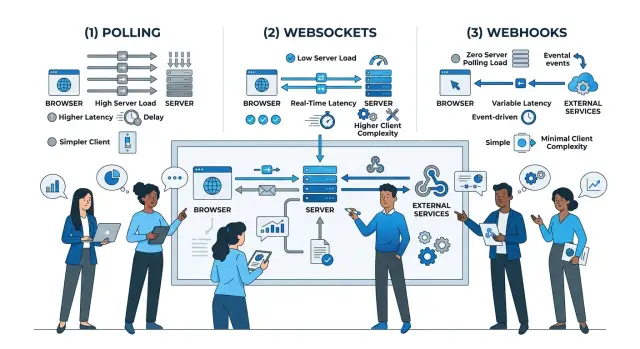
Table of Contents
Why this choice causes trouble
Choosing between polling, WebSockets, and webhooks looks simple until one product needs different update speeds in different places. A chat window feels broken if a new message shows up 8 seconds late. A monthly report can wait a minute and most users will never notice.
That gap in expectations leads to bad architecture choices. Teams often pick one delivery pattern early and force it onto every workflow. Then something feels wrong. The app looks slow, or the system wastes time and money checking for changes that almost never happen.
Polling is often where that waste begins. A page that asks the server every few seconds can seem harmless, but the cost grows fast when thousands of users keep tabs open. The server keeps answering the same question even when nothing changed.
WebSockets fix the delay problem on screens that need live updates, but they add work on the client side. The app has to keep a connection open, recover after drops, reconnect cleanly, and avoid showing the same event twice. That makes sense for a live dashboard or shared editor. It is a bad trade for a quiet settings page.
Webhooks move the update job away from the browser, but they create backend work instead. You need endpoints, retries, signature checks, and clear rules for duplicate events. If another system sends the same update twice, your code has to stay calm and do the right thing.
Most products do not have one update pattern. They have several. Ignore that early and the architecture gets messy fast. Fixing it later usually means rework in both the frontend and backend.
What each pattern does
Polling is the simplest model. The client asks the server for changes on a schedule, maybe every 5 seconds or every minute. The server answers every time, even when nothing changed.
That makes polling easy to build and easy to understand. It also means the system spends time handling repeated checks. With enough users, those empty checks add up.
WebSockets work differently. The client opens one connection and keeps it open, so the server can send updates as soon as they happen. For chat, live dashboards, or shared editing, that feels much faster because the client does not need to keep asking.
The tradeoff is connection management. Long-lived connections need more care. You have to handle reconnects, dropped sessions, and what happens when a user goes offline and comes back.
Webhooks are not for browser screens. They are for one service sending an event to another service when something happens, like a payment succeeding or a file finishing processing. Instead of pulling for status, the receiving system waits for the sender to call it.
That sounds clean, but the receiving side still has real work to do. It must verify the request, handle retries, and make sure the same event can arrive twice without causing duplicate actions.
Each option moves cost and complexity to a different place:
- Polling creates repeated request load on the server.
- WebSockets create more connection and state handling in the app and infrastructure.
- Webhooks cut down on checking, but add event handling rules between services.
A simple example makes the difference clear. A sales report page that updates every 15 minutes can use polling and stay simple. A support dashboard with new tickets appearing while agents watch the screen fits WebSockets better. A payment provider notifying your backend about successful charges fits webhooks.
Most debates about these patterns are really about three questions: how long the system can wait, who starts the conversation, and where the extra work should live.
Decide by latency first
Start with a number, not a feeling. Ask, "How many seconds can pass before this update feels late?" If your team cannot answer that, you will argue about tools instead of user needs.
A lot of teams say they need live updates when they really mean "within a minute is fine." That difference matters. A dashboard that refreshes every 30 seconds is a very different job from a trading screen, a live support queue, or a multiplayer feature.
Polling fits when some delay is acceptable and simple behavior matters more than speed. If a user checks an order page and seeing a status change 15 or 30 seconds later causes no harm, polling is often the better choice. It is easier to build, easier to debug, and usually easier to scale.
WebSockets make sense when people are actively watching the screen and expect changes to appear right away. Think of a chat window, a live ops panel, or a shared editor. In those cases, even a small delay feels broken.
Webhooks solve a different timing problem. They work best when another system needs the event as soon as it happens, without asking again and again. If a payment provider confirms a charge, your app should get that event quickly so it can unlock access, send a receipt, or start the next step.
A simple rule works well:
- If waiting 10 to 30 seconds is fine, polling is usually enough.
- If the update should appear within a second or two, WebSockets are often a better fit.
- If the event moves from one backend system to another, webhooks usually make more sense.
Pick the delay first. Then choose the delivery pattern that matches it. That order saves a lot of rework.
Check the load, not the demo
Load is where many teams make the wrong choice. A delivery pattern can look fine in development and then become expensive or fragile when traffic grows.
Polling looks harmless because each request is simple. The problem is volume. If 20,000 clients poll every 10 seconds, your system handles 120,000 requests a minute even when nothing changed. Most of those responses may be empty, but your servers still accept the connection, check auth, run code, and write logs.
That is why polling debates often turn into cost debates. Polling is easy to add, but frequent polling creates a steady stream of waste.
WebSockets remove many of those empty requests, but they are not free. You keep a live connection open for every active client. That means memory, heartbeats, connection state, and more care during deploys. The ugly part often comes during reconnect spikes. A short network issue, an app release, or a load balancer restart can make thousands of clients reconnect at once.
Webhooks shift the load again. Your clients do less work, but your backend now needs queues, retries, signing, idempotency checks, and delivery logs. If a customer endpoint is slow or down, your retry backlog grows quickly. One failing integration can turn into many repeated delivery attempts.
Before choosing, count traffic at the worst moment, not on a normal day. Look at peak active clients, polling intervals, reconnect bursts after deploys, webhook retries when receivers fail, and the logging you want to keep for delivery history.
This matters even more if you run lean infrastructure and want to keep cloud spend under control. A dashboard badge that updates once a minute can poll. A live operations screen may need WebSockets. A billing event that must reach another system usually fits webhooks better. The cheapest option depends on where the load lands when things go wrong.
Do not ignore client complexity
Client work often decides whether an update system feels simple or annoying. The server pattern matters, but the app still needs rules for timing, state, and failure.
Polling looks easy at first. You set a timer, fetch data every few seconds, and redraw the screen. The trouble starts when data gets old. The client needs rules for stale results, duplicate responses, and what to show while one request is still in flight.
Background tabs make polling less predictable. Browsers slow timers, phones pause apps, and users switch networks without warning. If you poll every 5 seconds on paper, the app will not always do that in real life.
WebSockets remove the timer, but they add connection management. The client has to know whether the socket is open, closed, reconnecting, or stuck. It also needs a plan for missed events after a disconnect. Skip that part and live data can quietly drift out of sync.
Most clients using WebSockets need a few extra rules: reconnect with backoff, resync after sleep or network changes, dedupe repeated events, and show connection state when it matters.
Webhooks are different because browsers and mobile apps usually do not receive them directly. Your backend receives the webhook, verifies it, stores the event, and then passes the update to the client through polling, WebSockets, or push notifications.
Mobile apps add another layer. iOS and Android can suspend background activity, limit network use, or kill the app outright. For many screens, a hybrid approach is more practical than pure live delivery. A startup dashboard might use WebSockets while open, then refresh on resume if the app was asleep for ten minutes.
If the client cannot recover cleanly, the update pattern is too ambitious for that workflow.
A practical way to choose
Teams often start from the tech. That is backward. Start with the receiver, because the right choice depends on what that receiver can handle and how long it can wait.
A user watching a trading screen notices a 2 second delay. A back-office report does not. A partner system may be fine receiving an event later, but only if it can expose a public endpoint and retry safely when something fails.
A simple order helps:
- Name the receiver. Is it a browser tab, a mobile app, your own backend, or a third-party service?
- Write down the acceptable delay.
- Check whether the receiver can accept incoming requests.
- Estimate peak traffic, not average traffic.
- Choose the simplest pattern that still meets the need.
That process removes bad options quickly. If the receiver cannot expose an endpoint, webhooks are out. If 30 seconds of delay is fine, polling is probably enough. If users expect changes almost instantly while watching the screen, WebSockets deserve a closer look.
A small example shows how this works. A live admin dashboard may need WebSockets because people watch it. A nightly sync with an accounting tool may work better with webhooks. A settings page that changes a few times a day can stay on polling and save you a lot of client code.
One product can use all three
A single product can use all three patterns at once. Picture an app with an order dashboard for staff, a chat screen for the team, and billing handled by a payment provider. If you force one update method onto all three, you usually pay for it in server load, delay, or client complexity.
The order dashboard can poll every 30 seconds. That is often enough for a queue view where people just need a fresh snapshot. The browser asks on a schedule, gets the latest orders, and updates the page. It is simple to build, simple to debug, and cheap enough when the data changes now and then instead of every second.
Team chat is different. A new message that shows up 30 seconds late feels broken. WebSockets work better because the app keeps one open connection and receives messages right away. You spend more time on reconnects, presence, and message ordering, but users notice the faster response.
Billing is different again because the event starts outside your product. A payment service already knows when a charge succeeds, fails, or gets refunded. Instead of polling that service all day, let it send webhooks to your backend. Your system can verify the event, store it, update the account, and trigger email or in-app notices after that.
The client work changes too. Polling is usually easy in a browser or mobile app. WebSockets need connection handling, retry rules, and a plan for stale sessions. Webhooks do not add much to the client, but the backend must handle retries, duplicate events, and signature checks.
That pattern shows up in many products. One workflow uses polling, another uses WebSockets, and a third uses webhooks. The choice is not global. It depends on what the user sees, how fast it must arrive, and where the event begins.
When mixing patterns works best
Most products work better with a mix than with one rule for every update. A payment event, an admin dashboard, and a background import job do not need the same delivery path, even when they touch the same record.
Use webhooks between services that already send events. If a billing provider, a Git repo, or your own job runner can push "order_paid" or "build_finished," let it. You avoid constant status checks and cut useless work.
For user screens, polling still has a place. A reports page or account settings screen can check every 30 or 60 seconds and still feel fine. If one request fails, the next request often fixes the view quietly. That makes polling a good fallback for pages that can recover without drama.
WebSockets fit a smaller set of views. Use them where people keep the page open and watch changes as they happen, like a support queue, an operations panel, or a live editor. If users open the page, glance at it, and leave, a permanent socket often adds more moving parts than benefit.
The part many teams get wrong is the data model behind these paths. Keep one event model no matter how the update arrives. If "invoice_sent" means one thing in a webhook, it should mean the same thing in a WebSocket message and in a polled API response. That saves cleanup later.
A simple split works well:
- Webhooks for service-to-service events
- WebSockets for live views that stay open
- Polling for quiet screens and fallback recovery
That is usually the safest answer. You keep low latency where users notice it, keep infrastructure load under control, and avoid pushing extra client logic into every screen.
Mistakes that cause rework
Teams often treat these patterns as one product-wide decision. That is where rework starts. A chat window, an invoice page, and a nightly export job do not need the same update path.
One common mistake is copying the chat pattern into every feature. Live sockets feel modern, so teams add them to dashboards, settings pages, and admin screens that users open for 20 seconds and barely watch. Then they spend time tracking reconnect bugs, sticky sessions, and odd client states for very little gain.
Polling creates its own waste when teams set an aggressive interval by default. If data changes once an hour, asking for it every 5 seconds is just background noise with a cloud bill attached. A refresh on page focus, or a poll every few minutes, is often enough.
Webhooks create a different sort of rework. Many teams assume each event arrives once, in order, and right on time. Real systems are messier than that. Providers retry, events arrive twice, and delivery order can drift. If your handler is not idempotent, one payment or status change can trigger duplicate emails, double processing, or broken audit logs.
Reconnect storms are easy to miss until the first deploy or outage. Thousands of clients can come back at the same time, all asking for missed updates. If you do not rate limit, back off, or let clients resync with a simple snapshot, recovery can hurt more than the outage.
Some pages should not have live updates at all. A rarely visited reports screen usually does fine with manual refresh or cached data that updates on open. Save the live path for screens where a delay changes what the user does next.
A small team can keep systems calmer by matching the update method to the actual behavior of the page, not to the coolest feature in the app.
Before launch, check the boring stuff
A delivery pattern can look fine in a demo and still break under normal use. Before launch, pin down the numbers that matter: how many seconds of delay users can tolerate, how many clients may connect at once, and what should happen when an update fails to arrive.
Write those limits down for each workflow. A chat message, a payment status, and a weekly summary do not need the same path.
Check a few things before you ship:
- Set an acceptable delay for every update flow.
- Measure normal traffic and ugly traffic.
- Decide how clients handle duplicate and out-of-order messages.
- Test behavior on real devices, not just desktop browsers.
- Record why each workflow uses its chosen pattern.
That last one matters more than teams think. A short note like "inventory updates use polling because 15-second delay is acceptable" saves a lot of debate later.
If this decision affects pricing, uptime, or a larger rebuild, getting a second technical opinion is usually cheaper than cleaning up the wrong choice later. Oleg Sotnikov does this kind of review in his Fractional CTO and startup advisory work, and oleg.is gives a clear picture of the systems and product problems he helps teams solve.
What to do next
Treat updates as separate workflows, not as one product-wide rule. A chat message, a nightly report, and a payment status change do not deserve the same delivery pattern.
Start with the simplest option your users can live with. If a page can refresh every 30 seconds and nobody notices, polling is fine. If a support dashboard needs changes in a second or two, move that workflow to WebSockets. If one system only needs to tell another that something happened, webhooks often keep the app simpler.
Write down the tradeoff while you choose: how fast the update should arrive, how much extra traffic the server will handle, what the client or receiving system must build and monitor, and what pain would justify changing the pattern later.
That short note prevents rework. Six months later, a new engineer can still see why one workflow polls, another uses live data, and a third sends webhooks.
Change patterns only when users actually feel the pain, not because one option sounds newer. A lot of overbuilding starts with live updates that nobody asked for. Watch missed updates, support complaints, reconnect issues, and server cost. Those signals will tell you where to spend effort.
Frequently Asked Questions
Is polling good enough for most pages?
Yes, if users can wait a bit. For pages like reports, order history, or settings, polling every 15 to 60 seconds often keeps the app simple and works fine.
If people stare at the screen and expect instant changes, polling starts to feel slow. That is when another pattern makes more sense.
When should I pick WebSockets instead of polling?
Use WebSockets when a delay of even a few seconds feels wrong. Chat, live support queues, shared editing, and ops screens fit that rule.
If users open the page, glance once, and leave, a permanent socket usually adds more app work than value.
Are webhooks only for backend systems?
Mostly yes. Webhooks fit best when one system needs to tell another system that something happened, like a payment, refund, or finished job.
Browsers and mobile apps usually do not receive webhooks directly. Your backend receives the event first, checks it, stores it, and then updates the app.
Can one product use all three patterns?
Yes. That is often the best setup. One workflow can poll, another can use WebSockets, and another can use webhooks.
Choose per workflow, not for the whole product. A chat screen, a billing event, and a quiet admin page do not need the same delivery path.
How often should I poll for updates?
Start with the longest delay users will accept. If 30 seconds feels fine, poll every 30 seconds or even less often.
Do not copy a 5 second interval everywhere. If data changes rarely, use a longer interval, refresh on page focus, or refresh when the user opens the page.
What usually goes wrong with WebSockets?
Reconnects cause most of the pain. Networks drop, laptops sleep, phones switch between Wi-Fi and mobile data, and deploys can push many users to reconnect at once.
Plan for backoff, a clean resync after reconnect, and rules to ignore duplicate events. Without that, the screen can drift out of sync.
Why do webhooks need idempotency?
Because senders retry. A payment provider or another service can send the same event more than once, and your code must not repeat the action.
Treat each event as something you may see again. Store an event id or another clear marker so one charge does not trigger two emails or two account updates.
Which option costs less at scale?
It depends on where your traffic lands. Polling gets expensive when many users ask for updates all day and most responses say nothing changed.
WebSockets cut many empty requests, but they use memory and connection handling. Webhooks save repeated checking, but your backend needs retries, logs, and duplicate protection. Count peak traffic before you choose.
What works best for mobile apps?
For mobile, a mix usually works best. Use live updates only while the app stays open on a screen that people watch, then refresh when the app wakes up again.
Phones pause apps and limit background work, so pure live delivery often breaks down in normal use. A simple refresh on resume fixes many stale views.
What should I document before launch?
Write down four things: the allowed delay, the worst traffic you expect, how you recover from missed or duplicate updates, and why you chose that pattern.
That note saves time later. When the team revisits the feature, they can see why a page polls, why a live screen uses WebSockets, or why a backend flow uses webhooks.


