PII redaction for AI prompts before data leaves your network
PII redaction for AI prompts helps you remove or mask sensitive fields, test logs and attachments, and stop leaks before data leaves your network.
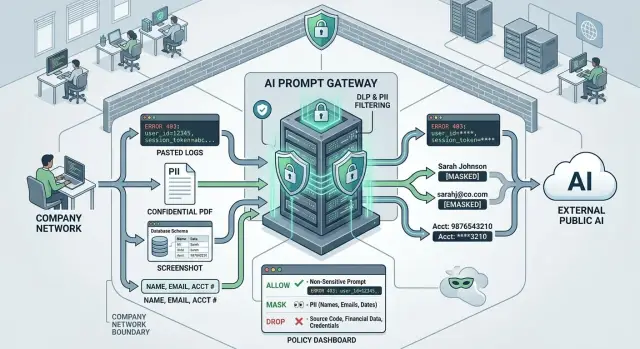
Table of Contents
What goes wrong when raw prompts leave your network
The problem starts earlier than most teams think. A prompt is rarely just a question. It often includes a customer email, a support note with a full name, an account number, or an internal comment someone pasted in a hurry.
Logs make the problem worse. One copied error report can contain API tokens, session IDs, internal IP addresses, file paths, stack traces, or pieces of a customer record. The sender may only want help with one error, but the whole block leaves your network.
Manual cleanup sounds sensible until people get busy. Support, engineering, and operations teams move fast. If an AI tool gives useful answers, people paste first and check later. That is how private data slips out during normal work, not only during a major incident.
Once data crosses your boundary, control drops fast. Security teams lose visibility. Audit work takes longer. Legal and compliance reviews get harder because someone now has to answer three blunt questions: what left, who sent it, and was it allowed?
A small copy-paste mistake can expose far more than people expect. A ticket note can include a customer's phone number and address. A debug log can expose a bearer token. A pasted email thread can reveal names, job titles, and internal notes. A crash report can include local usernames and file paths. Even a CSV snippet can contain hundreds of customer rows when the sender meant to share one sample.
Attachments carry the same risk. A PDF, screenshot, or spreadsheet often contains text people do not notice at first glance. Hidden columns, document metadata, and old comments can travel with the file.
That is why PII redaction for AI prompts has to happen before data leaves your network. Cleaning up exposure after the fact is slow, expensive, and hard to prove. Blocking or masking sensitive data at the edge is less dramatic, but it is much safer.
Which data to catch first
Start with a simple rule: catch anything that points to a real person or grants access to a real system. Teams often focus on obvious fields and miss the messy details around them. A prompt can look harmless while still carrying enough detail to identify a customer, employee, or account.
Direct identifiers come first. Names, email addresses, phone numbers, home addresses, account numbers, usernames, and invoice IDs usually add little or nothing to the model's answer.
Then look for secrets, not just personal data. API keys, session tokens, private URLs, internal hostnames, password reset links, and signed file links often sneak in through logs, ticket notes, and pasted error messages. One bad log line can expose more than a full customer profile.
A short policy works better than a long one. Remove fields the model does not need at all, such as full names, phone numbers, and account numbers. Mask fields that help with context but should not be exposed, such as emails, order IDs, or partial addresses. Block prompts that contain secrets like tokens, private links, or credentials. And treat free text with extra care, because notes and chat history often hide personal details in plain language.
Free text causes most misses. A support ticket might say, "John called from his personal number after he could not log in to the payroll portal," and that single sentence includes a name, a phone clue, and a sensitive business function. Internal comments, CRM notes, pasted chats, and old ticket threads are full of this kind of detail.
It also helps to decide what the model really needs. If the task is to summarize a bug report, the model probably needs the error text, product version, and device type. It probably does not need the customer's identity, billing history, or raw session data.
Teams that do this well stop treating every field the same. They keep the context that helps the model and strip out the details that create risk for no good reason.
Set rules for remove, mask, or allow
A redaction policy should answer one plain question for every field: does the model need the exact value, a partial clue, or nothing at all?
That usually means three actions. Remove data the model does not need, like full names, email addresses, phone numbers, street addresses, account numbers, and internal IDs. Mask data when people still need a hint, like the last four digits of a card, the first letter of a surname, or part of an order number. Allow context that actually helps the model do the job, such as product version, error code, device type, order status, or plan level.
Write those rules by field, source, and user role. A CRM field is predictable. A pasted ticket comment is not. A server log may contain tokens, IP addresses, or hidden query strings. The same value may be acceptable in one internal workflow and blocked in another.
Role matters too. A support agent may need masked customer details to keep a case straight. The model may only need the product version and error text. Finance staff may need invoice totals, while a general AI assistant should never receive tax IDs or bank data.
Unknown text needs a fallback rule. If content does not map to known fields, treat it as risky until proven safe. Scan free text, attachments, and pasted logs for email addresses, secrets, long number strings, auth tokens, and names. If the filter is unsure, remove the block, replace it with a short note, or send a summary instead.
One rule beats a dozen exceptions: when in doubt, keep less. You can always loosen a policy later after testing. Pulling sensitive data back out of prompts after people get used to sending it is much harder.
Build the redaction flow step by step
Start with a map. If you do not know where prompts come from, you will miss data on day one. List every source that can feed a model: web forms, chat boxes, support tickets, CRM notes, pasted logs, uploaded files, and any background fields your app adds behind the scenes.
Then tag each field with a simple action. Four labels are usually enough: allow, mask, drop, or review. A ticket ID might stay. An email address might become a placeholder. A password should never leave. A free-text note with mixed content may need review when the rules are unclear.
The system has to check data before the prompt crosses the boundary. In practice, that means two passes. First, run pattern checks for easy matches like email addresses, phone numbers, card numbers, API keys, and national ID formats. Then inspect the full text so you can catch softer cases, such as a pasted sentence that names a person or a log block that contains a full customer record.
When you mask data, keep the prompt readable. Replace each secret with a stable placeholder instead of deleting chunks at random. If the same email appears three times, use the same token each time, such as [EMAIL_1]. The model can still follow the story, compare repeated values, and answer the task without seeing the real data.
A practical flow looks like this:
- Collect all prompt inputs in one place.
- Classify each field by policy.
- Scan the combined text and any extracted file text.
- Replace or remove matches with stable placeholders.
- Log the action, then send the cleaned prompt.
Keep the audit trail lean. Record which rule fired, which field changed, and which placeholder replaced it. Do not store the raw secret again in logs, error reports, or analytics. Teams sometimes build a careful redaction layer and then leak the original value in debug output five minutes later.
If you review one thing by hand, review the change log. It tells you whether the policy catches real data without turning every prompt into nonsense.
Watch the edge cases people forget
A redaction rule can look solid in a demo and still fail on the messy input people send every day. Most misses come from content that looks harmless until your system opens it up.
Files and images
File names tell you almost nothing. A PDF called "report.pdf" might contain names, account numbers, and a pasted chat transcript. Scan attachment content after text extraction, not before. If your flow checks only file type or file name, it will miss the real risk.
Screenshots create the same problem. Teams often scan plain text fields and forget that a screenshot of a dashboard, invoice, or error page can contain email addresses, phone numbers, or session details. PDFs are tricky too because many are just images wrapped in a document shell. Run OCR on screenshots and image-based PDFs before the filter decides what can leave the network.
Stack traces need special care. Developers paste them into prompts because they want quick debugging help, but traces often include tokens, internal hostnames, email addresses, and local file paths. One line can expose a username, a server name, and a secret pulled from an environment variable.
Pasted content
Spreadsheets are easy to underestimate. One pasted cell can hold a whole block of records with line breaks inside it. Your filter should inspect the full payload, not split on tabs and assume each cell contains one neat value.
Long copied chats are another common miss. Support agents and account managers often paste a full conversation that mixes customer details with internal notes. The customer side may be safe after masking, while the internal comments may reveal account status, refund history, or staff opinions that should stay inside.
A good test set should include image-only PDFs, screenshots with small text, stack traces with secrets and local paths, spreadsheet cells with multiple records, and long chats with mixed public and internal notes. If your policy handles those, it is much closer to real life.
A simple example from support
Good redaction looks boring in practice, and that is exactly what you want. A support agent gets a ticket about a checkout crash, copies the customer message, and pastes part of the crash log into an internal AI assistant.
The raw text includes more than the agent needs. The customer message contains an email address and street address. The log includes an IP address and a session token. None of that helps the model explain why the app failed, so the filter removes it before the prompt leaves the network.
What stays is the technical context the model can actually use: product version 5.14.2, error code AUTH-417, and the time window when the crash happened.
The redaction layer swaps sensitive fields for labels such as [EMAIL], [IP], [SESSION_TOKEN], and [ADDRESS]. The prompt still reads clearly. The model can see that a user on version 5.14.2 hit AUTH-417 between 14:00 and 14:15, but it cannot see who the user is.
That is enough for a useful answer. The model can suggest likely causes and plain troubleshooting steps: check whether auth refresh failed, compare logs from the affected time window, and test the same flow on that product version. The support agent gets help quickly, and the customer identity never reaches the model.
This is where PII redaction for AI prompts either works or fails. Remove too much, and the answer gets vague. Remove too little, and you leak data for no reason. A simple allow list for version numbers, error codes, and timestamps usually works better than trying to guess everything the model might need.
The team should also store the masked prompt, not the raw one, along with the model response. Later, a reviewer can spot misses, like a token format that slipped through a log, and update the policy and tests. That feedback loop matters more than fancy rules.
Mistakes that break redaction in practice
Most failures are ordinary. A team writes a few regex rules for email, phone, and card numbers, tests them on clean samples, and calls it done. Then a user types, "my wife Anna Petrova at [email protected] used the same card ending 2241" into a free-text box, and the rules miss half of it.
Free text breaks neat patterns fast. People paste chats, ticket notes, shipping instructions, and error messages in ways no form designer planned for. If your rules only inspect labeled fields, sensitive data slips through the messiest part of the prompt.
Form masking creates a false sense of safety too. The UI hides a customer name or account number in visible fields, but the same value still sits in a PDF, screenshot, CSV export, or pasted log. Once the prompt builder bundles those files with the request, the masked form no longer matters.
Lower environments create quieter leaks. Developers copy production records into staging to debug a prompt flow, then a test run sends real customer details into model logs or tracing tools. Staging often feels temporary, but the data is still real.
Over-redaction causes a different problem. If the filter strips every order number, date, hostname, and error string, the model cannot tell one case from another. The answer gets vague because the prompt lost the details that made it useful.
A few checks catch most of this. Test rules on free text, not only structured fields. Scan attachments and pasted logs before prompt assembly. Inspect staging and development logs for real customer records. Compare model output before and after masking. Rerun tests after any form, model, or workflow change.
Rules age faster than people expect. A new support form adds an "additional details" box, a product team starts sending images, or an engineer attaches debug files to save time. If nobody retests, old rules keep passing while new paths start leaking data.
Redaction works when teams treat it like code. Version the rules, test them on ugly real-world samples, and review them whenever the workflow changes.
Quick checks before you turn it on
Run a few ugly tests before you trust the filter. Clean demo prompts do not tell you much. Real traffic mixes names, tokens, pasted logs, and strange formatting in the same request.
Start with three simple cases. One should contain names and contact details. One should contain secrets such as API keys, passwords, or access tokens. One should mix customer details with harmless business context, because that is where PII redaction for AI prompts often slips.
Then make the test messier. Add a fake attachment and paste part of a stack trace into the same request. Many teams only test the text box and miss what shows up in uploaded files, copied terminal output, or screenshots converted to text.
A short checklist keeps this honest:
- Test a prompt with names and direct identifiers.
- Test a prompt with secrets and credentials.
- Test a prompt with mixed data, not isolated examples.
- Add one fake attachment and one pasted stack trace.
- Check both the redacted prompt and the model answer.
Do not stop at "the secret disappeared." The model still needs enough context to answer the business question. If a support agent asks why an order failed, the system should still preserve the error type, product name, and timeline after it masks the customer name, email, and payment details.
That balance needs human review. Security should check whether the policy catches what must never leave your network. Legal or privacy staff should confirm the masking matches internal rules. The workflow owner should confirm the output still works for the team using it every day.
False alarms matter too. If the filter masks harmless terms too often, people will work around it or stop trusting the tool. A stack trace with every ID removed becomes useless fast.
Set a review schedule before launch. Monthly works for many teams, and higher-risk workflows may need more. Review missed items, over-masking, and policy drift after product changes, new forms, or new attachment types. Redaction is not a one-time setup. It needs small, regular checks.
Next steps your team can keep up with
Most teams do better when they start small. Pick one workflow where mistakes would hurt, such as support tickets, pasted error logs, or sales notes with customer details. Run redaction there first, fix the rough edges, and only then expand to other prompt paths.
A short policy beats a long document nobody reads. Keep it to one page if you can, and make each field someone's job. If email addresses belong to support, account numbers belong to finance, and employee IDs belong to HR, write that down so reviews do not drift.
That policy should say which fields you always remove, which ones you mask and how the masked result should look, which fields are allowed because the AI task needs them, who approves changes, and when the team reviews the policy again.
Use real test cases, not clean sample text. Paste in the messy things people actually send: stack traces, screenshots converted to text, signatures, chat transcripts, and long logs with customer names buried in the middle. A rule that works on a neat demo often fails on the second page of a real support thread.
Then watch what happens for a few weeks. Count three things: misses, false alarms, and workarounds. Misses show where sensitive data still slips through. False alarms show where the filter blocks too much and annoys staff. Workarounds show where people stop trusting the process and start copying text into side tools or private notes.
The daily process should feel boring. Staff should not need to guess, click through five warnings, or remember exceptions from memory. If the safe path feels slower than the risky one, people will avoid it.
If you want a second opinion, Oleg Sotnikov at oleg.is can review prompt flows, redaction rules, and test cases as part of his Fractional CTO work. An outside review is often enough to catch blind spots an internal team stops seeing after a week of tuning.
Frequently Asked Questions
What is PII redaction for AI prompts?
It means your system strips or masks personal data and secrets before it sends a prompt to any model. The goal is simple: keep customer details, staff details, tokens, and internal system data inside your network unless the model truly needs them.
Why do prompts leak more data than people expect?
Because people rarely paste just the one line they care about. A prompt often includes extra text from emails, tickets, logs, screenshots, or files, and that extra text may contain names, phone numbers, tokens, IPs, or internal notes.
Which fields should we catch first?
Start with anything that identifies a real person or opens access to a real system. Names, email addresses, phone numbers, addresses, account numbers, usernames, API keys, session tokens, signed links, and private hostnames should come first.
When should we remove data, mask it, or block the prompt?
Remove data when the model does not need it at all, like full names or account numbers. Mask data when the model needs a small clue, such as part of an order ID. Block prompts when they contain secrets like tokens, credentials, or private links.
Why should we use placeholders like [EMAIL_1] instead of deleting text?
Stable placeholders keep the prompt readable after cleanup. If the same email appears three times, replacing it with the same label lets the model follow the story without seeing the real value.
Do we need to scan attachments and screenshots too?
Yes. Files and images often hide the worst leaks. A PDF may carry comments or metadata, a screenshot may show an email or token, and an image-based PDF needs OCR before your filter can inspect it.
Are regex rules enough for prompt redaction?
No. Regex catches easy patterns like emails or phone numbers, but free text breaks those rules fast. People write names, personal details, and secret values in messy ways, so you need full-text checks as well.
How do we keep prompts useful after redaction?
Keep the technical context and strip the identity details. Error codes, product version, device type, timestamps, and order status usually help the model, while customer names, addresses, and raw session data usually do not.
How should we test a redaction flow before launch?
Run messy tests, not clean demos. Use sample prompts with mixed customer data, secrets, pasted stack traces, long chats, and fake attachments, then check both the redacted prompt and the model answer.
How often should we review and update redaction rules?
Review the rules on a fixed schedule and after every workflow change. New forms, new file types, and new prompt paths create fresh leaks, so teams should update rules, test cases, and logs often.


