PHP search packages for catalogs, help centers, and tools
PHP search packages can bridge the gap between plain SQL and full search engines. Learn what fits product catalogs, help centers, and internal tools.
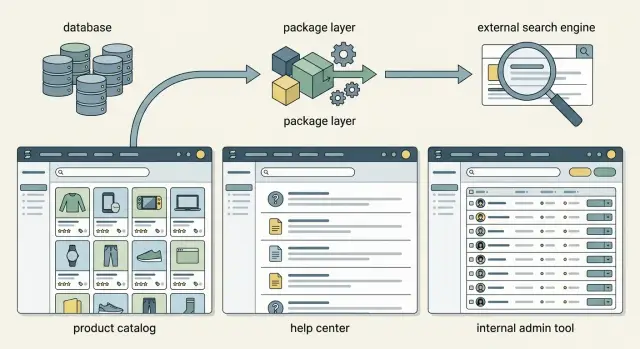
Table of Contents
Why search feels simple until it fails
Search often looks done after the first demo. You type an exact product name, article title, or user email, and the result shows up. That feels good for about a week.
Real users do not search that way. They type half-remembered names, old part numbers, misspellings, short phrases, and extra words that matter to them but do not exist as clean fields in your data. A customer might search "red running shoes under 100". A support user might type "can't log in after reset". An employee might enter a ticket ID, a client name, or just "Jane from sales".
A product catalog search breaks first because text matching is only part of the job. People want filters, price limits, size, color, stock status, brand, and sometimes synonyms. If your search finds every item with the word "red" but ignores size 8 and budget, it feels wrong even when the database technically returned matches.
A help center search has a different problem. People do not want a long list. They want the clearest answer fast. If the best article sits below vague release notes or older posts with matching words, users assume the help center has no answer. Then they open a support ticket for something they could have solved in 30 seconds.
Internal tools bring another layer of trouble. Staff search by IDs, names, emails, company names, invoice numbers, and odd shortcuts that only make sense inside the business. On top of that, access rules matter. The right result for one employee may be something another employee should never see.
This is usually the moment teams start looking at PHP search packages instead of plain queries alone. The search box did not get harder because users changed. It got harder because the real job finally showed up.
When search fails, people do the same few things:
- they try the same query three different ways
- they open more filters than they wanted
- they ask support or a coworker instead
- they assume the data is missing
That is why search feels simple at first. Early tests use clean inputs. Real use is messy, impatient, and full of context.
What people search for in each tool
People do not search the same way across a catalog, a help center, and an internal admin screen. If you treat them as one problem, results get noisy fast.
A shopper usually types short fragments. They search for a product name, part of a name, a SKU, a brand, or a size. "Air Zoom 42", "SKU 18452", or "black hoodie xl" are normal catalog queries. These searches need direct matches near the top. If someone enters an exact SKU and your search shows broad category pages first, they will think the store is broken.
Help center visitors act differently. They often write full questions in plain language because they do not know the article title. They ask things like "how do I change my shipping address" or "why did my payment fail". Good help center search should understand longer phrases and close wording, not only exact title matches. An article called "Update billing details" should still appear for "change my card".
Staff search is stricter and less forgiving. Support agents, ops teams, and sales staff usually look for identifiers: customer ID, order number, invoice code, email, or a status like "refunded" or "pending". They often search while a customer waits. One clean result beats ten clever guesses.
Each screen needs its own ranking rules. In a product catalog, exact SKU and exact product name should beat loose matches in descriptions. In a help center, question-like matches and article titles should beat keyword stuffing in the body text. In an internal tool, exact IDs, emails, and recent records should win first.
Even with basic database search in PHP, it helps to think of these as three separate search jobs. The query box may look the same on every screen. The intent behind it does not.
Start with database search
Most teams should begin with the database they already run. If your product catalog has a few thousand rows, or your help center has a few hundred articles, SQL usually does enough without another service to deploy, tune, and pay for.
Use LIKE for small tables and exact fields people search on purpose. Product name, SKU, article title, email address, and ticket ID are good examples. If users type short, clear terms, a simple query often feels fast and accurate enough.
When that starts to feel thin, try the full-text index built into MySQL or PostgreSQL before you add anything new. Built-in full-text search can rank results better than a pile of LIKE checks, and it keeps your setup simple. Before you test more PHP search packages, make sure your database search in PHP is doing the easy work well.
Keep the searchable columns tight. This matters more than most teams expect. Search title, short description, tags, SKU, and maybe the main article body. Skip admin notes, import leftovers, long JSON fields, and other text nobody expects to search. Wide search looks helpful at first, then fills results with junk.
Real query logs tell you when product catalog search starts to crack. Track what people typed, which result they opened, and which searches returned nothing. After a few days, you will see patterns: people search by part numbers you ignored, use nicknames instead of product names, or type two words that never sit together in one field.
That is the point of starting simple. You learn where help center search or internal tool search fails in real use, not in guesswork. For a small PHP team, keeping search inside MySQL or PostgreSQL a bit longer often saves money and avoids extra maintenance.
What a package layer adds
A package layer gives your app one place to ask for search results, no matter where the data lives. Your controllers stay small, your templates only render results, and the ranking rules live in code that is easy to test.
That matters more than people expect. Search rules spread fast when each screen builds its own query. One controller searches titles with LIKE, another adds tags, and a third sorts by date because nobody knew the first two existed.
With a package layer, you define search once and reuse it. A product catalog, help center, and internal admin tool can share the same pattern even if each one ranks results a bit differently.
For example, a catalog might give more weight to the product name and SKU than the full description. A help center might push article titles and headings above body text. An internal tool might rank exact IDs first, then names, then notes.
A good package layer usually gives you a few practical benefits:
- one search interface for different models or tables
- one place to tune weights for titles, tags, and descriptions
- one place to add filters, like status, category, or team
- less repeated query code across the app
- a cleaner path to swap the backend later
That last point saves real time. Many teams start with database search in PHP because it is cheap and fast to ship. Later, they need typo tolerance, better ranking, or faster results on larger datasets. If the app talks to a package layer instead of raw SQL from ten different controllers, moving to Meilisearch, Elasticsearch, or another engine is much less painful.
This does not mean you need an external engine on day one. It means your app should not care too much whether search runs on MySQL today and a separate engine six months from now.
If you build software with a small team, this kind of separation pays off early. You spend less time untangling search logic, and more time tuning the results people actually see.
How to choose your first setup
Many teams start by comparing PHP search packages, but the choice gets easier when you begin with the screens, not the package. A product catalog, a help center, and an internal admin tool may all say "search," but they ask for different behavior.
Write down every screen that needs search. Keep it plain: catalog listing, help article finder, order lookup, user directory. If a screen has a different goal, treat it as a separate search problem.
Then list the fields each screen should search. A catalog might need product name, SKU, brand, and category. Help center search may need title, body text, and tags. An internal tool often needs exact matches first, such as email, order ID, or company name.
A simple scoring sheet helps:
- Which screen needs partial matches, like "shoe" matching "running shoes"?
- Which screen needs exact matches, like an invoice number?
- Which screen needs sorting by relevance instead of date or price?
- Which screen needs filters, such as brand, status, or language?
- Which screen needs typo tolerance, and which one does not?
After that, collect 20 real queries. Pull them from support tickets, search logs, sales calls, or messages from your team. Real phrases beat guessed examples every time, because users type messy things like "refund policy eu" or "nik air size 10".
Run those queries against the simplest setup you can build fast. For many small PHP apps, that means database search in PHP with SQL full-text search or even basic indexed queries, plus a thin package layer only if it makes ranking, filters, or query building easier. If that setup passes most of your tests, stop there.
Judge the result on three things: speed, result quality, and upkeep. If pages load fast, users find the right item in the first few results, and your team can maintain the code without babysitting another service, you picked well.
If one screen keeps failing while the others work, do not move the whole app to an external engine yet. Upgrade only the problem area. A catalog with thousands of products may need more search power long before a small help center does.
A simple example with three search screens
Picture a small PHP app with three search boxes. Customers use one to find products. Readers use another to find answers. Staff use a third to find orders fast. The data sits in the same database, but each screen needs different matching rules.
For the catalog, people rarely type clean product names. They paste part of a SKU, misspell a brand, or search by category. If someone types "nike running" or "1842", the search should check name, SKU, brand, and category, then rank exact SKU matches above loose text matches. A package layer keeps those rules in one place instead of scattering SQL across controllers.
The help center needs a different style. People search with question phrases, not polished titles. Someone may type "reset password" even when the article title says "Change your login details." In that case, the search should look at article titles and stored question phrases, then give phrase matches more weight than broad text matches.
The admin tool is stricter. Staff search order IDs, emails, and company names, often while a customer waits. If they enter "ORD-10428", they want that order first, not a fuzzy list of maybe-related rows. Email search should allow partial matches, while company name search should stay flexible because people often remember only one word.
One package layer can cover all three screens if each search gets its own rules:
- The catalog uses fuzzy matching for names and brands, with strong weight on SKU.
- The help center favors article titles and common question phrases.
- The admin tool checks exact IDs first, then falls back to partial email or company matches.
This is where PHP search packages make sense even before you move to an external engine. You keep one search service, one indexing routine, and one place to tune ranking. The code stays cleaner, and each screen feels built for its actual job instead of acting like the same search box copied three times.
Mistakes that waste time
Teams lose time on search when they solve the wrong problem first. They buy more search than they need, index too much data, and only later learn what people were actually typing.
A common mistake is paying for an external engine before you collect real query samples. Search logs show the gap between what the team expects and what users do. In a product catalog, people often search with a color, size, or SKU fragment. In a help center, they usually type short problem phrases like "reset password" or "invoice failed". Without those samples, even good PHP search packages are mostly guesswork.
Another mistake is indexing every column because it feels safer. It usually makes ranking worse, not better. If your catalog search matches product titles, internal notes, legacy supplier labels, and hidden metadata with the same weight, noisy results take over. Start with the fields users mean to search. Add more only when the logs show a clear miss.
Teams also waste time when they mix products and help articles on one results page. Those content types need different ranking rules and different filters. Someone who searches "refund" in a store may want a policy article first, while someone searching "USB-C hub" clearly wants products. When you force both into one list, neither feels right.
Typos, plural forms, and abbreviations get ignored for too long. That hurts fast. People type "iphon", "qty", "auth", singular nouns, plural nouns, and half-remembered model names. If database search in PHP only handles exact matches, users think search is broken. Test your setup with messy, short, real-world queries before you tune anything else.
Staff-only tools add one more trap: access limits. Search must respect permissions every time. A support agent can search for an order number, but that should not expose finance notes or HR records. This matters more than relevance. A fast result that shows the wrong data is a serious failure.
If you want one simple rule, keep search narrow until user behavior proves you need more. Real queries beat assumptions every time.
When an external engine earns its cost
An external engine makes sense when search starts to limit the product, not just annoy the team. Until that point, database search in PHP is usually cheaper, simpler, and easier to maintain.
Scale is often the first hard signal. A catalog with 5,000 rows rarely needs more than good indexes and careful queries. A catalog with 200,000 products, frequent updates, and several searchable fields can push SQL into slow scans, especially when users combine text search with category, price, stock, and brand filters.
User expectations rise even faster than data size. People expect typo tolerance, partial matches, and suggestions that appear right away. If someone types "iphnoe charger" or only remembers half a help article title, plain SQL starts to feel stiff.
Facet counts are another breaking point. Databases can filter records well, but counting matches across many filters at once gets expensive. If one search screen needs live counts for sizes, colors, tags, regions, and status, an external engine often handles that work with less pain.
Ranking also changes the decision. Simple text matches are easy. Real ranking is not. Once you want results ordered by a mix of text relevance, popularity, stock level, freshness, support article quality, or internal permissions, you are building search logic that a dedicated engine was made for.
Language support can force the jump too. English alone is manageable. Add German compounds, Spanish word forms, or mixed-language help content, and search quality drops unless the engine understands stemming, tokenization, and language-specific analysis.
The cost is not just money. You add another service, indexing jobs, monitoring, and relevance tuning. That is why many teams should wait.
Move when these signs show up together:
- slow queries keep returning after normal SQL fixes
- search quality hurts conversions or article findability
- filters and facet counts feel heavy
- ranking needs business rules, not just text matches
- you support multiple languages with real search expectations
If search drives sales, support load, or daily staff work, the extra service can pay for itself quickly. If search is still a small feature, keep it in the database and spend your time elsewhere.
Quick checks before you commit
A search setup looks cheap until you pick the wrong one. Ten minutes of checking now can save weeks of rewrites, especially when you are choosing between plain SQL, a package layer, and a separate search engine.
Start with the search box itself. In a product catalog, many people search by SKU, part number, or exact product name. In a help center, they usually type loose phrases like "refund for damaged item". Internal tools often get both. If your users paste IDs half the time, fast exact matching matters more than fuzzy text tricks.
Content change rate matters just as much. A help center with a few updates each week is easy. A catalog with prices, stock, and titles changing all day is different. If data changes often, ask how fast search results must reflect those updates. A delayed index is annoying in support docs. It is a real problem in inventory screens.
Record count gives you another clear signal. A few thousand rows rarely justify much complexity. Tens of thousands still fit well with database search in PHP if you index the right columns and keep queries honest. Once each screen holds hundreds of thousands of records, or users expect typo tolerance and ranked results, the limits show up faster.
Filters deserve their own check. Many teams think they need smart text search, but users really care about brand, status, category, date, location, or price. If filters do most of the work, a relational database often wins because it already handles structured queries well.
One last check is boring, but it decides a lot: can your team run another service? External search engines add setup, monitoring, backups, memory use, and sync jobs. PHP search packages can soften that jump, but they do not remove it. If your team is small, simple usually beats clever.
A good first choice matches the search behavior you have today, not the one you imagine six months from now.
Next steps for a small PHP team
Small teams do better when they keep search narrow at first. Pick one page, ship it, and watch how people actually use it. A single search screen on the product catalog or help center will teach you more than weeks of guessing.
Many teams reach for PHP search packages too early. If your current query is fast enough and users can find obvious items, stay simple. Put your effort into better field matching, cleaner titles, and a small set of filters people understand.
A short weekly review helps more than a big rewrite. Keep a plain text list or spreadsheet of searches that failed, returned weak results, or led to no clicks. Fix the repeated ones first. If users search "refund status" and your help center only has "billing policy," that is not a search engine problem. It is a content and wording problem.
A practical routine looks like this:
- launch one search page and log queries
- review the top failed searches every week
- fix naming, synonyms, and missing content first
- measure search speed and zero-result rate
- set a date or threshold to review your setup again
That last point matters. Decide in advance when you will revisit your engine choice. For example, review it when search gets slow under normal traffic, when ranking starts causing support tickets, or when your team needs typo handling and relevance rules that feel hard to maintain in database search in PHP.
A good checkpoint keeps the team calm. It stops endless tool shopping, and it also stops you from clinging to a setup that no longer fits.
If you want a second opinion before adding more moving parts, Oleg Sotnikov can review your PHP search setup as a Fractional CTO. That kind of review is often enough to tell whether you need a few careful fixes or a real jump to a separate search engine.


