PHP scraping packages: when simple tools are enough
PHP scraping packages help with content checks, price tracking, and page monitoring. Learn when parsers stay cheaper and when browsers earn the extra cost.
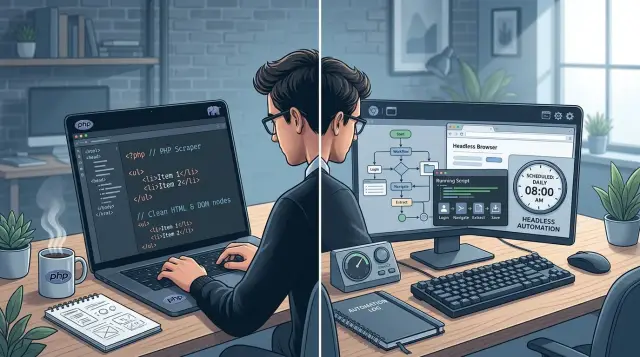
Table of Contents
Why this problem gets messy fast
At first, scraping a page with PHP looks simple. You request the HTML, parse it, grab the text you want, and store the result. For some sites, that works perfectly. A simple blog, docs page, or product page may send clean HTML right away, so a lightweight parser is fast, cheap, and easy to keep running.
Then you try the same script on a modern app-like site and get almost nothing useful back. The browser shows prices, reviews, or stock levels, but the server response only contains a page shell. JavaScript fills in the real content later. If your script reads only the first HTML response, the data may be missing, buried in a script tag, or loaded from another request after the page opens.
That is where this gets messy. A quick content check often turns into a small system.
A basic monitor may need to handle:
- login sessions that expire
- slow pages and timeout limits
- retries after random failures
- layout changes that break selectors
- duplicate alerts when nothing meaningful changed
The cost of mistakes grows when you run scheduled content checks every hour or every few minutes. A script that works once on your laptop can fail all week in production because one page loads slower at night, one cookie expires, or one button blocks the content until a script runs.
The wrong tool makes this worse in both directions. If you use browser automation for a page that serves plain HTML, you pay extra in speed, memory, and maintenance for no good reason. If you use a simple parser on a JavaScript-heavy site, the script becomes fragile because it never sees the page the user actually sees.
This is why PHP scraping packages are not interchangeable. The page itself decides how much machinery you need. A small checker can stay small, but only if the site returns the content directly and keeps doing that over time.
What simple PHP parsers do well
Simple parsers are best when the page already gives you the data in its HTML. If the title, price, links, or table rows appear in the page source, you usually do not need a full browser. A plain HTTP request plus DOM parsing in PHP gets the job done with less fuss.
That matters when you run scheduled content checks every hour, every 10 minutes, or across hundreds of pages. A lightweight parser starts fast, uses little memory, and finishes before a browser script would even warm up. In a cron job or a small container, that difference adds up.
For many teams, speed is not the only win. Simple tools are easier to debug. When a check fails, you can save the raw HTML to a file, open it, and see exactly what changed. Maybe a class name moved. Maybe the price now sits in a different element. You can inspect the response in seconds instead of guessing what a headless browser clicked or waited for.
A common pattern looks like this:
- fetch the page HTML
- load it into DOMDocument or DomCrawler
- select the nodes you need
- normalize the text
- compare the result with the last check
This works well for product pages, article lists, public tables, and basic page monitoring. If a store prints the current price in the markup, a small PHP script can check it all day without burning CPU. If a newsroom updates a headline block in the HTML, the same script can catch the change and log it.
Simple PHP scraping packages also cost less to run again and again. That matters more than people think. A single check may look cheap either way, but repeated jobs can pile up fast. If you watch 500 pages every 15 minutes, a lean parser keeps the bill and the failure rate lower.
Use the simple route when the page source already contains what you need. That includes most titles, links, table data, meta tags, and many visible prices. Save browser automation for pages that build content later with JavaScript or hide it behind clicks, logins, or lazy loading.
That is why many reliable PHP scraping packages still start with the boring option first. Boring is often faster, cheaper, and easier to keep alive.
When browser automation earns the extra cost
A parser reads HTML fast. A browser reads the page people actually see after scripts finish loading. That gap is small on plain pages and huge on pages that act more like apps.
Browser automation starts paying for itself when the source HTML is incomplete. You open the page in a normal browser, wait a second, and a table appears. Your parser never sees that table because JavaScript fetched it after the first response. In that case, waiting for the page to settle is not a luxury. It is the only way to read the real content.
It also helps when the page hides useful data behind small interactions. Many sites keep details inside tabs, accordions, drawers, or modal windows. Some block the whole screen with a cookie popup. A simple parser cannot click "Show more" or switch to the "Pricing" tab. A real browser can do both, then read the updated page state.
A few signs usually mean you need the browser option:
- The HTML source looks thin, but the live page shows lots of data
- Important content appears only after a click
- The page changes based on cookies or browser storage
- You need proof of what failed, not just a text error
Login is another common reason. Some pages depend on session cookies, local storage, or a full browser flow after sign-in. A raw HTTP request might get redirected, blocked, or shown a stripped-down version. Browser automation for PHP handles that better because it keeps state like a normal user session.
For scheduled content checks, screenshots are often worth the extra runtime by themselves. When a check fails at 3 a.m., a screenshot can show whether the page broke, the login expired, or a popup covered the button. That saves real time when someone has to fix the job later.
The trade-off is simple. Browser runs take longer, use more memory, and cost more to operate. A parser might scan hundreds of pages quickly. A browser may need several seconds per page, sometimes more. Among PHP scraping packages, this is the expensive path, so use it when the page behaves like an app. If the page behaves like a document, keep it simple.
Pick packages that match the job
Most scraping jobs do not need a full browser. If the page already includes the data in the first HTML response, keep the stack small. Use Guzzle to fetch the page, set sane timeouts, and retry when a request fails for a temporary reason. Then pass the response body to Symfony DomCrawler or DiDom and read the parts you need.
That setup is enough for many scheduled content checks. It works well for article titles, prices, stock labels, tables, and status text that sit in the markup from the start. It also runs fast, uses less memory, and usually breaks less often.
When people compare PHP scraping packages, they often start too heavy. A browser tool only makes sense when scripts build the page after load, or when the site needs clicks, login steps, or waiting for dynamic content. If you inspect the raw HTML and the target data is missing, a parser will not fix that. Panther can.
Panther earns its cost when you need the page as a user sees it. It can wait for an element, handle a cookie banner, open a menu, or load content that appears after JavaScript runs. The tradeoff is simple: more moving parts, slower checks, and more debug work when the page changes.
Package choice gets easier if you judge boring details first:
- Can you log request failures with enough detail to act on them?
- Can you save the final HTML, and screenshots if you use a browser?
- Can you tune retries, waits, headers, and cookies without fighting the API?
- Can you run it on a schedule without eating too much CPU or memory?
A small realistic example makes the split clear. A daily checker that confirms a pricing page still shows the right plan names can use Guzzle with DiDom or DomCrawler. A checker that verifies numbers inside a logged-in dashboard probably needs Panther, because the page builds that content in the browser.
Start with the lightest stack that answers the question. If a simple parser gets the data cleanly, stop there. Add browser automation only when the page forces you to.
Build a scheduled checker step by step
For many scheduled content checks, a normal HTTP client plus DOM parsing in PHP is enough. Start small. Most failed checkers do too much on day one, then become hard to trust.
Save one real page sample before you touch selectors. Use the raw HTML from an actual request, not a simplified mock. When the live site changes or starts timing out, that saved sample gives you something stable to test against.
Then choose one value to watch. A single price, status label, or publish date is enough for the first version. If you monitor a store page, track the price first. If you monitor a blog or news page, track the latest publish date first.
A checker works best when the code stays split into small parts:
- fetch the page
- parse the target element
- compare the new value with the last saved value
- store the result with a timestamp
- report any failure in plain language
That separation matters more than people expect. If the page fetch fails, you should see a network error. If parsing fails, you should know which selector missed. If the compare step finds a change, save both the old and new values so you can confirm it was real.
Add guardrails early. Set a timeout so one slow page does not block the whole run. Add one or two retries for temporary failures, but do not keep retrying forever. Write error messages that tell you what broke, such as "request timed out after 10 seconds" or "selector .price not found". Vague logs waste hours.
Run the checker on a schedule that matches the page. A product price may need hourly checks. A press page may only need a few runs per day. Cron is often enough. Store every run, even when nothing changed, with the timestamp, extracted value, and status. That history helps you spot patterns, like a selector that fails every night or a page that returns empty content once a week.
If your script stays stable for a week on one value, then add the next field. That pace feels slow, but it usually beats rebuilding a messy checker later.
A simple example that stays realistic
A small retailer checks one supplier page every morning at 7:00. They care about two fields only: stock status and price. If the page says "In stock" and the price drops from $49 to $44, they want one alert. If nothing changed, they want silence.
That job fits simple PHP scraping packages surprisingly well. A scheduled script downloads the page HTML, finds the same selectors each day, cleans the text, and compares the result with yesterday's saved values. This is plain DOM parsing in PHP, and for a stable product page it is often enough.
The flow is simple.
- Fetch the page HTML.
- Read the product name, stock text, and price from fixed elements.
- Normalize the values so "$44.00" and "44" do not count as different.
- Compare the new values with the last saved record.
- Send an alert only if one of those values changed.
That last part saves a lot of annoyance. A daily email that repeats the same stock and price is noise. A message that says "Price changed from $49 to $44" is useful.
Store one more thing: the raw HTML from each failed run. If the parser suddenly cannot find the price node, the HTML snapshot tells you why. Sometimes the supplier changed a class name. Sometimes they added a popup. Sometimes the page loaded an error page and still returned status 200. Without the saved HTML, you waste time guessing.
A small database table or even a JSON file can hold the latest values and the last successful check. For one page, that is enough. You do not need a heavy system to run PHP page monitoring for a single supplier site.
Trouble starts when the supplier moves the stock or price into JavaScript after the page loads. Your parser fetches the HTML, but the fields are missing because the browser normally builds them later. That is the point where browser automation for PHP earns its extra cost. Do not move your whole checker at once. Move that one page, keep the rest simple, and pay the extra time only where it helps.
Mistakes that waste time
Most scraping jobs fail for boring reasons. People pick the loudest tool, watch the wrong part of the page, and skip the checks that make debugging easy.
The first trap is regex. It feels quick, but it breaks on tiny HTML changes like extra spaces, reordered attributes, or one new wrapper div. If the page already gives you proper markup, DOM parsing in PHP is usually cleaner. A selector aimed at one price, date, or status label is easier to read and much easier to fix later.
Another common mistake is hashing the whole page. That creates noise. Many pages change all the time even when the thing you care about does not. A timestamp updates, a banner rotates, a hidden token changes, and your checker fires another alert. Track the exact field you need instead. If you only care about a product price, store that value. If you only care about a job count, compare that node and ignore the rest.
Teams also waste time by starting with browser automation for every site. If the HTML already contains the data, a browser adds cost without giving much back. It runs slower, uses more memory, and fails in more ways. For scheduled content checks, that extra load adds up fast. A simple request and parse cycle can watch many pages on a small budget. A browser for every check burns time and cloud spend for no good reason.
Request timing matters too. If your monitor hits a site too often, with no pause or variation, the site may throttle you or return a different page. Then you debug the parser when the real problem is your request pattern. Add sane intervals, small random delays, and clear retry rules.
Logs save hours. Without them, you cannot tell whether the site changed or your code broke.
A small logging setup goes a long way:
- Save the HTTP status code and fetch time
- Record the selector or parsing rule you used
- Keep the last extracted value, not just a yes or no change flag
- Store the raw response for failed checks
- Note when a site starts returning empty or partial HTML
That simple discipline keeps PHP page monitoring cheaper, calmer, and much easier to repair when one site changes a class name overnight.
Quick checks before you choose
Start with the page itself. Open View Source and look for the text you need, such as a price, title, stock label, or publish date. If you can already see it there, simple PHP scraping packages and DOM parsing in PHP will usually do the job faster, cheaper, and with fewer moving parts.
The next question is about behavior. Some pages do not show the real content until a script runs, a button gets clicked, or the user scrolls. A members area adds another layer because you may need a login, cookies, or a two-step flow. That is the point where browser automation for PHP starts to make sense.
A quick test saves a lot of time:
- Check whether View Source includes the exact text you want to track.
- See if the page needs clicks, scrolling, or tab changes before the content appears.
- Estimate whether one full run can finish within your schedule, such as every hour or every morning.
- Count how many pages you expect to check each day, not just how many you have today.
- Decide what proof you need when something changes: raw HTML, a screenshot, or both.
Speed matters more than many teams expect. A simple parser can check hundreds of pages on a light schedule without much drama. A browser can do the same work, but it uses more memory, takes longer to start, and fails in more ways. If you only need one value from a stable page, paying that cost is hard to justify.
Volume changes the decision too. Checking 20 pages once a day is very different from checking 2,000 pages every 15 minutes. Even if a browser script works, your hosting bill and retry logic may become the real problem.
Proof is the last filter. HTML snapshots help when you need to compare text or debug a selector. Screenshots help when layout matters or a non-technical teammate needs to see what changed. Many PHP page monitoring jobs need both, but not on every run. A common compromise is simple parsing first, then capture a screenshot only when the checker finds a change.
That approach is usually the sensible one: start cheap, add browser steps only where the page forces you to.
What to do next
Start small. Pick one page you care about and give it one simple rule that tells you whether the check passed or failed. That rule might be "the product price exists," "the article title matches a selector," or "the page still contains a known phrase."
This first step matters more than people think. A narrow check shows whether your parser works, whether the page changes often, and whether the alert is useful or just noise.
For most teams, simple DOM parsing in PHP is the right first move. It is cheaper to run, easier to debug, and usually good enough for pages that return clean HTML. Browser automation for PHP should stay in reserve until a page needs JavaScript, login flows, or user-like interaction.
Use one week as a test window and track three numbers:
- run time for each check
- failure rate, including false alarms
- hosting cost or worker usage
Those numbers will tell you more than guesses. A parser that finishes in 300 milliseconds and fails once in a week is often a better choice than a browser job that takes 12 seconds just to prove the same thing.
If you monitor ten pages, do not move all of them to a headless browser because one page is difficult. Keep the easy checks on parsers. Move only the stubborn pages to browser automation. That split keeps your PHP page monitoring setup cheaper and easier to maintain.
A good rule is simple: use the lightest tool that gives you stable results. Many PHP scraping packages handle everyday checks without much trouble. Save the heavier setup for pages that truly need it.
If your team needs help designing that split, Oleg Sotnikov can advise on architecture, automation, and cost control. His work focuses on lean systems, so the goal is not to add more moving parts. It is to build scheduled content checks that stay reliable when the page count grows.
Start with one page this week. Measure it for seven days. Then add the second page only after the first one behaves the way you expect.


