PHP PDF libraries: choosing tools for invoices and signing
PHP PDF libraries differ in layout control, speed, and signing support. Compare the right options for invoices, reports, forms, and signing flows.
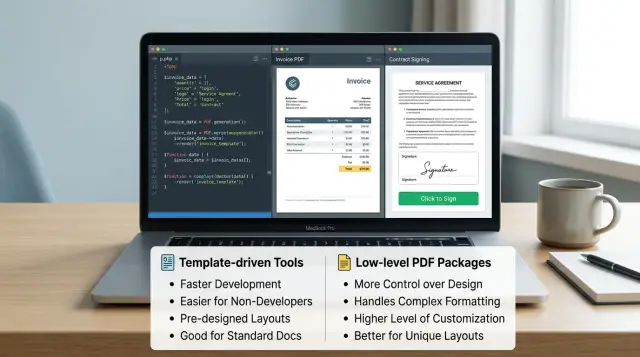
Table of Contents
Why this choice gets messy fast
One app rarely has just one kind of PDF. A billing page might need invoices, the admin area might export reports, and onboarding might send a signing packet. All of those are "PDFs," but they ask for very different things.
An invoice usually needs repeatable layout. The logo must stay in the same spot, totals must line up, and page breaks cannot split the wrong table row. A report pulls in another direction. It may need long tables, charts, notes, and sections that grow or shrink based on data. A signing packet is stricter still. Signature fields, initials, and page numbers need predictable positions, or the whole flow turns brittle.
This is where teams get stuck with PHP PDF libraries. A template-driven tool feels fast at first because you can reuse HTML and CSS. That works well when your document looks like a web page with a print button. But the same choice can turn into a headache when a customer wants a contract with fixed signature blocks or a multi-page invoice that must match an accounting format exactly.
Low-level PDF packages have the opposite trade-off. They give you tight control over coordinates, fonts, page size, and drawing. That control helps with forms, labels, signing prep, and documents where small shifts matter. The cost is time. Even simple layouts take more code, and every design change asks for manual updates.
A poor pick shows up later, not on day one. You start seeing broken page breaks, odd font spacing, overlapping elements, and one-off fixes that nobody wants to touch again. Then the team rewrites the document layer after launch.
The real split is simple. Template-driven tools help when content changes a lot and the layout can stay flexible. Low-level packages fit when placement must stay exact. Many apps end up needing both, even if nobody plans for that at the start.
Start with the document job
Most teams look for "a PDF library" as if one tool should cover every document. That is where the bad fit starts. An invoice, a shipping label, a board report, and a signed contract all end up as PDFs, but they need different things.
A clean split helps:
- Documents you create from your own data, like invoices, receipts, reports, and labels
- Documents that already exist as PDFs and need changes later, like contracts, forms, or files from partners
The first group usually works well with template-based tools or HTML to PDF in PHP. You control the data, the branding, and most of the layout. For invoices and reports, some flexibility is fine. A table can grow, a page break can move, and the result still looks right.
The second group is less forgiving. If you need to place a signature area on page 3, stamp "paid" in a corner, fill fixed fields, or merge a cover page into an existing file, exact positioning matters more than flexible layout. That is where low level PDF packages often make more sense.
Labels show the difference fast. A label that prints a few millimeters off can fail in the real world. Contracts can be just as strict when a signer must see marks in the right place and the document must stay readable after edits.
Teams also forget the work that happens after the first export. Many flows need to merge files, split large PDFs, stamp status text, or fill an existing government or bank form. Those jobs usually push you beyond plain invoice PDF generation in PHP and into tools that can edit PDF structure directly.
Name the document job in plain words before you pick a library. "We generate invoices from database records" is one job. "We accept uploaded contracts and add signature fields" is another. If your team has both, using two tools is often the practical choice.
When template-driven tools make sense
Template-driven PDF tools work like this: you build a document as an HTML page, style it with CSS, and then turn that page into a PDF. If your team already knows how to build emails, admin screens, or printable pages, this feels familiar fast.
That is why these tools often fit business documents better than low-level drawing libraries. Invoices, receipts, account statements, order summaries, and simple reports usually follow a clear layout with repeated blocks: logo, address, line items, totals, footer. HTML handles that structure well, and CSS makes it easier to keep spacing, colors, and typography consistent.
Common choices in the PHP PDF libraries space include Dompdf, mPDF, and PHP wrappers around wkhtmltopdf. They all aim at the same basic workflow, but they do not behave the same way. Some are easier to install. Some handle complex layouts better. Some are much stricter about the CSS they understand.
Good fit for repeatable business documents
Template-driven tools make sense when the document looks close to a web page and changes mostly in content, not in structure. A monthly invoice is a good example. Customer name changes, line items change, tax changes, but the layout stays almost the same every time.
They also help when more than PHP developers touch the document. Frontend developers and designers usually adapt faster here because they can work with templates, classes, spacing, and fonts instead of PDF drawing commands. That cuts down review time and makes small visual updates much less painful.
Where teams get tripped up
CSS support is the first headache. A layout that looks fine in Chrome may break in a PDF engine. Flexbox, grid, sticky elements, or advanced print styles may work partly, or not at all.
Page breaks cause trouble too. A table can split in ugly places. Totals may jump to the next page. Headers and footers may repeat in ways you did not expect. Fonts are another common snag. If the font file is missing, embedded wrong, or unsupported, spacing changes and the whole document can shift.
For invoice PDF generation in PHP, that tradeoff is usually still worth it. If your documents are mostly structured, branded, and repeatable, template-driven tools are often the quickest path to something your team can ship and maintain.
When low-level PDF packages fit better
If a document must place every field in the same spot every time, low-level PDF packages usually fit better. They let you draw directly on the page with coordinates, so you decide that a value starts at x=32, y=118, a line runs across 140 mm, or an image sits in the top-right corner.
That approach is very different from HTML to PDF in PHP tools. You are not asking a browser-like engine to "figure out" layout. You are placing text, boxes, lines, barcodes, and imported pages yourself, often page object by page object.
This works well for document jobs with tight layout rules. Common cases include:
- shipping labels and barcode sheets
- fixed monthly reports with the same columns every time
- government or bank forms with boxes that must line up
- preprinted paper where your PDF only fills the blank areas
- invoice overlays built on top of an existing PDF template
FPDF is a common starting point when you want something small and direct. TCPDF gives you more built-in features, including richer text handling and barcode support. FPDI is useful when you need to import or merge existing PDF files, such as adding data onto a predesigned form or combining generated pages with signed attachments.
The trade-off is code. You have to handle spacing, page breaks, margins, and table layout yourself. Long customer names wrap badly unless you measure them. A row can spill off the page unless you calculate height before drawing it. Even simple invoice PDF generation in PHP can turn into a lot of layout code when line items vary.
A small example makes the difference clear. If you print 4x6 shipping labels all day, direct coordinates are great. If every label has the same zones for address, barcode, and order number, low level PDF packages give you clean, repeatable output.
But precise control costs time. Teams often spend more hours on pagination rules, font sizing, and edge cases than they expected. If the layout is fixed, that cost can be worth it. If the document changes often, the code gets old fast.
How signing flows change the decision
A PHP document signing flow rarely ends with the PDF file itself. Your PDF library makes the document, but signing usually happens in another service or in a separate part of your app. That changes how you choose a tool.
Once signing enters the picture, predictable output matters more than pretty output. A signature field needs fixed coordinates on a fixed page. If a font renders a little differently, a page breaks one line earlier, or a note block grows, the signature box can land in the wrong spot.
That is why stable layout matters before you place any signature fields. HTML to PDF in PHP can still work well, but only if you lock down the template and test ugly cases, not just the happy path. Long company names, extra tax rows, and multi page terms can all shift the layout.
Teams also need a clean version trail. In practice, you usually track at least these states:
- the draft PDF your app created
- the exact file sent for signature
- the final signed copy returned to your system
That record solves real problems fast. A customer may sign an older draft. A sales rep may resend a corrected invoice. Legal may ask which version the signer approved. Filenames alone do not help much. Store a document ID, a version number, and the signing status in your database.
Where tool choice starts to change
Low level PDF packages fit better when you need exact field placement, custom signature areas, or later edits to the file after generation. They give you tighter control over pages, coordinates, and overlays. Template driven tools are often faster for invoices and standard forms, but they can get shaky when the signed page must stay identical every time.
You also need to think about what happens after signing. Some teams only archive the signed PDF. Others pull it back into their workflow, attach it to an invoice record, trigger billing, or send it to support and finance. If the signed file comes back from an outside signing service, your app needs to fetch it, match it to the right record, and store the final copy without confusion.
A library can look fine in a demo and still create trouble later. When signing is part of the job, layout stability, version tracking, and handoff back into your workflow matter just as much as PDF generation itself.
Pick a library step by step
Most teams choose too early. A library can look fine on a simple invoice and then fall apart when a contract needs signing fields or a report runs to 40 pages.
A better test takes one afternoon. You do not need a full proof of concept. You need a small set of real documents and a short scorecard.
- Write down the exact documents your app must create over the next 6 to 12 months. Include rough volume too. Ten invoices a day is a different job than bulk statements, monthly reports, and signed contracts.
- Build three samples with real-looking data: one invoice, one long report, and one contract that people will sign. These three usually expose most weak spots in PHP PDF libraries.
- Check the output by eye. Look at page breaks, fonts, logo sharpness, table rows, margins, and whether the file opens fast on a phone. Also check file size. Big PDFs get annoying fast.
- Measure generation time and memory use with realistic data, not a tiny demo record. A report with 200 rows tells you much more than a report with 8.
- Choose the simpler tool unless one document clearly needs tighter control. If the HTML to PDF option handles the invoice and report cleanly, keep it. If the contract needs exact field placement, a lower-level package may be the better fit for that part.
A small team can compare tools with a plain spreadsheet. Give each test a pass, fail, or warning. That keeps the decision honest.
One opinion that saves time: do not optimize for a future document you might build someday. Pick for the documents you know you need now. If one outlier shows up later, you can add a second tool for that job instead of forcing one library to do everything badly.
A simple example
A small SaaS company sends monthly invoices to 400 customers and annual renewal contracts to the same accounts. The finance team wants invoices to look clean and update fast when pricing, tax rules, or branding change. The legal team wants contracts to stay fixed because signature boxes, initials, and dates must land in exact spots.
For invoices, an HTML template usually wins. The app pulls customer data, loops through line items, adds a tax row only when needed, and shows credits or discounts when they apply. If the company changes its invoice footer or adds a second tax column for one country, the team edits the template, tests a few cases, and ships the change the same day.
That works well for invoice PDF generation in PHP because invoices behave like web pages. They have repeating rows, conditional blocks, and totals that can grow or shrink based on the month. A template-driven tool handles this without much pain.
The renewal contract is different. It might be a two-page PDF with fixed legal text, a company name in one box, a renewal amount in another, and signature fields near the bottom of page two. If one paragraph wraps differently, the signature area can shift and break the signing step. That is where a low-level PDF package, or a prepared PDF form, fits better. The team fills exact field positions and keeps the layout stable.
This is why many teams keep two tools instead of forcing one tool to do every job. They use HTML to PDF in PHP for invoices, and a separate tool for the PHP document signing flow.
If they try to use the invoice tool for contracts, small layout changes can move signature fields. If they try to use a low-level PDF package for invoices, they end up drawing tables by hand and fighting spacing for every extra line item.
That split is often the practical choice. One tool handles changing content. The other handles fixed documents where a few millimeters matter.
Mistakes teams make early
Many teams pick a library the same way they pick a UI package: by stars, age, or how often it appears in forum answers. That usually backfires. A one-page invoice, a packed shipping label, and a contract with signature fields are different jobs, even if all of them end up as PDFs.
The first bad assumption is that HTML to PDF will look exactly like the browser. It often gets close, but not identical. Page breaks, margins, fixed headers, table splitting, and print CSS can behave differently, so a layout that looks clean on screen can break on page two of a real invoice.
This shows up fast in invoice PDF generation in PHP. A simple invoice with a logo and totals may render fine, then a customer with a long company name, accented characters, or a large item table blows up the layout. If you only test the happy path, you miss the cases real customers create every day.
Another early mistake is putting everything into one class. Teams mix invoice rules, PDF rendering, file storage, and the PHP document signing flow in the same code path. That feels fast at first, then every small change becomes risky.
A cleaner split is usually enough:
- prepare document data
- render the template or drawing commands
- generate the PDF file
- apply signing or send it to a signing step
- store and deliver the final file
Text support gets ignored more often than people expect. Fonts are not just a design choice. Licensing can block production use, and weak Unicode support can break customer names, addresses, or legal text. Right-to-left text adds another layer, so if you may need Arabic or Hebrew later, test that now, not after launch.
Load testing also gets pushed aside for too long. One PDF request in development says very little about production. The real problem starts when 300 users download monthly invoices at once, or when staff export large batches and memory use jumps hard.
With PHP PDF libraries, the boring checks save the most time: odd customer names, long tables, missing glyphs, batch exports, and signing steps that fail halfway through. Teams that test those early spend less time rewriting document code a month later.
Quick checks before you commit
A PDF tool can look fine in a demo and still fail on the one document that matters most. Test it with your hardest real document first, not a clean sample. Use the invoice with tax rows, discounts, notes, page breaks, and a footer that must stay in the same place.
If that file needs manual fixes after every export, stop there. Small layout errors turn into daily support work.
Another early check is simple: do you only create new PDFs, or do you need to edit existing ones too? Many HTML to PDF tools work well when they render fresh documents from templates. They struggle when you must open a supplier PDF, add a stamp, place a signature box, or merge extra pages into a final packet.
Your team also has to live with the debugging. If they are comfortable with HTML and CSS, template-driven tools often feel faster. If they lose hours on print styles, page breaks, and odd font behavior, a low-level package with fixed coordinates may be easier, even if it looks less friendly at first.
Run a short test pass before you decide:
- Export a long table that spans at least three pages.
- Check page numbers, repeated headers, and footers.
- Try one document with unusual spacing or a strict brand layout.
- Time how long it takes to fix one broken element.
Signing changes the choice more than most teams expect. A signing flow usually needs exact field positions, a clear document version, and a record of who signed which file. If your contract changes after someone signs it, you have a process problem, not just a PDF problem. Tools that generate pretty documents but make version tracking messy will cause trouble later.
A small example makes this obvious. Say you send invoices from a template and contracts from uploaded PDFs. One tool may handle the invoices perfectly and still be the wrong pick for contracts, because the signature block must land at fixed coordinates on a file you did not generate.
That is why the best choice is often the one that passes three boring tests: it handles your worst layout, it supports the kind of PDF work you actually do, and your team can debug it without guesswork.
What to do next
Use real documents for a short proof of concept. Toy samples almost always pass. Your live files are where problems show up: long item tables, mixed fonts, VAT rules, page breaks, stamp images, and signature blocks that must stay in the right place.
A good test set is small but messy. Pick five to ten documents you already send to customers or partners. Include one simple invoice, one long invoice, one branded quote, and one document that needs a signing step. That mix will tell you more in two days than a week of reading package docs.
A short proof of concept should answer four things:
- Does the output stay stable when data gets longer than expected?
- How much code will your team maintain after the first release?
- Where will signing, storage, and audit records live?
- Can support staff understand failures when a document breaks?
Setup speed matters, but it can fool you. A package that feels fast on day one may cost more after release if every small layout change needs custom fixes. Compare the second month of work, not only the first afternoon. Think about who will own templates, who will update legal text, and who will debug broken PDFs when a customer cannot open a file.
Signing adds another layer. Decide where the signed file is stored, how you track who signed it, what audit data you keep, and how you handle retries if email delivery or signature collection fails. If those steps sit outside the PDF library, write that down early so the team does not mix rendering logic with business rules.
If this choice will shape your product architecture or change how your team works, get a second opinion before you commit. Oleg Sotnikov reviews these tradeoffs as a Fractional CTO, especially for startups and small teams that need a document flow that stays simple after launch.


