Per customer rate limits to stop one account hurting everyone
Per customer rate limits keep heavy accounts from eating shared capacity. Learn simple guardrails, burst rules, and checks that protect every user.
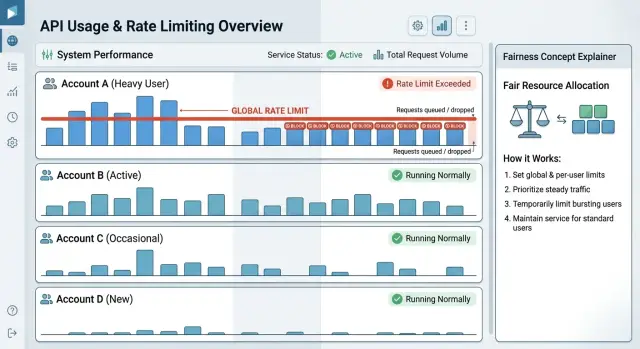
Table of Contents
Why one busy account hurts everyone
Most shared systems do not fail in one dramatic moment. They get crowded.
CPU, database connections, worker slots, cache memory, and outbound API quotas all have limits, even when the app feels fast most of the day. One busy account can consume a big share of that capacity in minutes. That often happens during a bulk import, a retry storm, a bad script, or a scheduled sync that suddenly sends far more requests than usual. The customer may not be doing anything wrong, but their traffic can still fill queues and push everyone else to the back.
Once queues start growing, the slowdown spreads. Requests wait longer. Retries create even more traffic. Background jobs hold resources longer than expected. Pressure starts in one place, then the whole system feels it.
Smaller customers usually notice first. They do not send enough traffic to overpower the queue, so their normal requests get stuck behind someone else's flood. A page that used to load in a second now hangs. A webhook arrives late. An API request times out. From their side, it feels random and unfair because they changed nothing.
Support teams get the messiest version of the problem. They see scattered complaints, not one clean outage. One customer reports slow logins, another says exports are stuck, and another only sees errors during certain hours. If you only watch total system load, you can miss the real cause because averages hide which account created the spike.
That is why per customer rate limits matter in shared products. They protect multi-tenant fairness by putting clear guardrails around how much one account can consume at once. That does not block healthy growth. It stops one account, even a good customer, from starving smaller ones and turning a single traffic spike into a support mess.
What to limit first
If you try to limit everything at once, you will probably cap the wrong things. Start with the actions that burn the most CPU, database time, queue workers, or storage. A simple read request is often cheap. Bulk imports, file uploads, report generation, and large background jobs usually are not.
Per-account limits work best when they reflect cost, not just endpoint count. One account can make 5,000 small reads and barely stress the system. Another can start 200 exports and tie up workers for minutes. If both sit under the same cap, the heavy account still wins and smaller customers still wait.
A simple setup is to track a few separate counters:
- incoming requests
- background jobs
- file uploads
- report or export runs
That gives you a much clearer picture of where the pressure comes from. It also makes support easier. When a customer says, "we only sent a few requests," you can check whether the real load came from uploads or long-running jobs.
Writes need tighter guardrails than reads. Reads often finish fast and may come from cache. Writes do more work. They update the database, trigger checks, touch indexes, and often kick off other jobs behind the scenes. A short burst of writes can slow the whole service even when total traffic still looks normal.
Do not stop at total volume. Concurrency matters just as much, and often more. Ten long report jobs running at the same time can hurt more than a thousand small requests spread over an hour. Put per-account caps on in-flight jobs, concurrent uploads, and active report runs. That stops one customer from filling every worker slot.
A simple rule works well: count cheap reads separately, watch writes more closely, and cap heavy work by concurrency. An account might get a generous read budget, a smaller write budget, and only a few export jobs at once. That is usually enough to protect multi-tenant fairness without making normal usage feel cramped.
How to set a fair default per account
Start with traffic you already have, not a guess. Pull a few weeks of request data by account and look for three numbers: normal hourly use, busy-hour use, and the highest short spike that did not cause trouble. Those numbers give you a sane floor for per customer rate limits.
Averages alone will mislead you. One account may look quiet all day, then send ten minutes of heavy traffic every morning when a batch job starts. Another may stay steady for hours. If you set one flat limit from daily averages, both accounts get the wrong rule.
Group accounts before you pick the default. Most teams do this by plan, contract, or expected load. In practice, that often means one shared default for small accounts, a higher ceiling for larger paid accounts, and a separate reviewed limit for special contracts. That keeps the policy fair without turning it into a custom deal for every customer.
Keep the number high enough for normal peaks. A good default should survive the ordinary rush: cron jobs, opening hours, webhook retries, and import jobs. If a customer hits the limit during normal use every week, the limit is too low and support will pay for it.
At the same time, leave a hard stop that protects everyone else. Shared systems work best when each account gets room to grow, but no single account can take over the whole pool.
The rule should fit in one sentence. For example: "Each account can send up to 120 requests per minute, with short bursts up to 300." If your team needs a long chart to explain who gets what, the default is too messy.
A small example helps. Say most starter accounts stay under 40 requests per minute and their usual peaks reach 90. Setting the default at 120 gives them breathing room without handing out far more capacity than they need. Bigger accounts can move to a different tier when their steady traffic proves they need it.
That approach is boring on purpose. Boring limits are easier to explain, easier to monitor, and much less likely to surprise customers.
How burst rules should work
Burst rules should absorb short traffic spikes, not excuse sustained overload. Real customer traffic is uneven. A scheduled import, a batch sync, or a retry storm can send a lot of requests in a few seconds.
That is why the limit should have two parts: a small burst bucket and a steady refill rate. The bucket lets an account go over its normal pace for a moment. The refill rate decides how fast that account earns capacity back.
A simple example makes the trade-off clear. If one account gets 20 requests per second with a burst bucket of 100, it can handle a brief spike and then fall back to its normal pace. If you make the bucket 2,000 instead, the limiter reacts too late and shared workers still get swamped.
For most teams, a few rules keep burst behavior sane. Keep the bucket close to what your workers can absorb in a few seconds. Refill capacity at a flat rate, second by second. Add a short cooldown after a bucket gets drained. Put hard ceilings on queues, worker pools, and database access.
That cooldown matters more than people expect. Some large customers will burst, pause, then burst again in a loop. Without a cooldown, they can keep pressure on the system for minutes and make latency worse for everyone else.
A short penalty window is often enough. You might slow refills for 30 seconds after a full burst, or block new heavy jobs from that account until the queue drops. That can feel strict, but it is much kinder than letting every tenant hit timeouts.
Hard ceilings protect the parts of the stack that fail first. If shared workers are full, if queue depth jumps past a safe number, or if the database pool is near its cap, stop admitting more work from that account. Return a rate-limit response early.
This matters even more when you run lean infrastructure to keep costs under control. Good per customer rate limits let a customer survive a short spike without letting one account drag the whole service down.
A simple rollout plan
Start with real traffic, not guesses. If you set limits too early, you will either block normal use or leave enough room for one large account to push everyone else into slow responses.
Two weeks is a good minimum. Look at requests per minute, short spikes, time of day, and which accounts create the most load. Separate steady traffic from sudden bursts. Those patterns need different rules.
Start with account groups
Most teams do better with a few account groups than with a custom limit for every customer. You might use one default for small accounts, one for growing accounts, and one for large contracts with known traffic patterns.
Give each group a normal request limit and a burst cap. The normal limit protects shared capacity. The burst cap gives customers room for short spikes without letting a single account sit at peak usage for too long.
Keep the first version boring. Generous burst rules and clear per customer rate limits are easier to explain and safer to support than clever logic with lots of exceptions.
Before you touch production, replay staging traffic that looks like your real workload. Then add one noisy account to the test and let it spike hard. If smaller test accounts still get acceptable latency, you are close. If queue time jumps or error rates rise, lower the burst cap or shorten the burst window.
A careful launch usually follows the same pattern:
- enable limits for a small set of customers first
- pick accounts with different usage patterns
- review blocked requests every day
- check queue time, error rates, and support tickets together
- widen the rollout only after the numbers stay calm
Do not wait for complaints. Look at the dashboard every day for the first week. A small rise in 429 errors may be fine if latency for everyone else improves, but a spike in support tickets means your limits do not match real usage.
If one pilot customer keeps hitting the cap, do not rush into a global increase. Check whether they need a higher tier, a separate queue, or a better retry pattern. That keeps multi-tenant fairness intact and stops one exception from becoming the new default.
Example: one large customer has a spike
At 9:05 on Monday, a large customer starts importing a weekend backlog. Their usual traffic is steady, then it jumps to about 10 times normal in a few minutes. The import is legitimate. It is not abuse, and it is not a bug. It is still enough to cause trouble if every account shares the same pool with no limits.
Without per customer rate limits, that one import can fill worker queues, take most database connections, and push response times up for everyone else. Smaller customers feel it first. Pages load slowly. Reports take too long. A simple search starts timing out because one account is consuming most of the system at once.
With account guardrails in place, the same spike looks very different. The large customer's import still runs, but the system meters it. Instead of letting the account grab every worker, it only gets its share. The import takes longer, but it keeps moving. Other customers can still load dashboards, run reports, and finish normal API calls.
Burst rules make this feel less harsh. If the customer normally sends 100 requests per minute, you might allow a short burst to 200 for a minute or two, then bring the account back to its steady cap. That helps with short spikes, like a user clicking through pages quickly or a small batch job starting up. It does not give the account an unlimited path for a two-hour backlog import.
Picture the sequence in plain terms. The customer starts the import, traffic jumps and stays high, the account hits its cap and gets paced, and everyone else keeps using the product normally.
That is the point of fair limits. You are not blocking a paying customer for being active. You are making sure one account cannot turn a busy morning into a support incident for the rest of your customer base.
Mistakes that create support pain
Support teams feel rate-limit mistakes early. The inbox fills with "why did my sync stop?" and "why do only some requests fail?" Most of that pain comes from rules that sound simple but break under real traffic.
A single cap for every customer is the first trap. A small team sending 50 requests a minute and a large account running imports all day do not create the same load. If they share one ceiling, the smaller customer rarely notices it and the larger one hits it constantly. Raise that ceiling for everyone, and the noisiest account starts eating shared capacity.
Unlimited bursts for top-paying accounts create a different mess. Bigger contracts do not change physics. If one account can spike far above its normal level, other tenants pay the price with slow requests and random 429s. Support then gets stuck explaining why someone else's traffic affected them.
Background jobs are another common blind spot. A customer may click around in the app while scheduled exports, webhook retries, and batch syncs keep firing under the same account. If you only limit front-end or interactive calls, that account can still flood the system through work it started earlier. Count all traffic started by the same account, or give each traffic type its own budget with a clear total cap.
Hidden limits make every issue worse. Customers get much less angry when they can see the cap, the remaining budget, and when it resets. They get much angrier when the first sign of a limit is a failed import halfway through the workday.
Teams also create support pain when they change rules before they study real traffic. A new threshold can look fine in a meeting and still block a customer's daily sync at 9:05 every morning. Check actual request patterns first, especially retries and scheduled jobs.
The complaints are usually predictable: "Our import worked yesterday and fails today." "Only some requests return 429." "The dashboard works, but our nightly job dies." "We did not know there was a burst limit."
Good per customer rate limits feel boring. Customers know the rules, bursts stay bounded, and one account cannot turn everyone else into your support problem.
Quick checks before launch
Per customer rate limits should feel boring on a normal day. If customers hit the limit during routine traffic, the cap is wrong or your baseline is too close to the edge.
Start with real numbers from recent traffic. A simple test works well: compare each account's usual peak to the proposed hard cap. If a customer normally peaks at 20 requests per second and the cap is 25, expect complaints. If the cap is 80 or 100, normal traffic has room and support stays quiet.
Short bursts need a separate check. A spike should finish fast, then the queue should drain instead of growing for minutes. If one account sends a 10-second burst, watch what happens after the burst ends. The backlog should shrink quickly. If it keeps growing, your burst rules are too loose or your workers are too easy to monopolize.
One noisy customer also should not grab every worker at once. This is where multi-tenant fairness stops being a theory and becomes a real launch check. Run a test where one account floods the system while several small accounts keep sending normal traffic. The small accounts should still get steady responses, even if the large account starts getting 429 errors.
Before launch, confirm a few basics:
- normal account traffic stays well below the cap
- a short spike clears without a long queue afterward
- one account cannot take all concurrency
- error responses explain the limit and the next step
- support has a clear rule for limit increases
The error message matters more than teams expect. "Rate limit exceeded" is not enough. Tell customers what happened, whether they should retry, and when. If you send a 429, include the current limit, a retry window, and plain language such as "reduce request rate or contact support for a reviewed increase."
Give support a short playbook before rollout. They should raise a limit when the customer has a stable pattern, pays for more capacity, and does not hurt others. They should say no when the customer sends avoidable bursts, ignores retry behavior, or asks for unlimited access. One page like that saves a lot of tickets.
Next steps for your team
Your team should treat rate limits as a product rule, not just an ops setting. Customers need plain language, and your staff needs the same plain language internally. If someone hits a limit at 2 a.m., support should know what happened, what the customer can do next, and when the limit resets.
Write one short policy that answers the basic questions without jargon. Say what counts toward the limit, how long the window lasts, how burst rules work, what the customer sees when they hit the cap, and who can approve an exception. Keep the wording the same in customer docs, support notes, and on-call runbooks so nobody improvises under pressure.
That small step cuts a lot of support pain. It also makes per customer rate limits feel predictable instead of random.
After launch, give the rules a month before you change them unless something breaks badly. One noisy week can fool you. A full month gives you weekday traffic, weekend traffic, billing cycles, and at least a few real spikes.
When you review the numbers, look for patterns instead of anecdotes. Check which accounts hit the cap often, whether smaller accounts saw slower response times during spikes, and whether support tickets came from real business growth or bad client behavior. If one account sits near the limit every day, that may justify a higher plan or a different burst setting.
Do not raise limits because the loudest customer complains first. Raise them when the data shows steady, legitimate use and the rest of the system stays healthy. If the data does not support a change, keep the guardrail.
Some teams benefit from an outside review. Oleg Sotnikov at oleg.is works as a Fractional CTO and startup advisor, and this is the kind of traffic, capacity, and account-guardrail problem he helps teams sort out. A second look at limits, retries, and queue behavior can catch weak spots before customers feel them.
Frequently Asked Questions
What is a per customer rate limit?
It sets a clear cap on how much one account can use in a shared system over a short period. That cap keeps one customer's import, sync, or retry storm from slowing logins, reports, and API calls for everyone else.
Why is one global limit not enough?
One global limit misses who created the spike. A single busy account can fill workers and database connections while total traffic still looks normal, so smaller customers end up waiting behind traffic they did not create.
What should I limit first?
Start with the actions that consume the most resources. Bulk imports, file uploads, exports, and background jobs usually hurt more than normal reads, so cap those first.
Should reads and writes have the same cap?
No. Reads often finish fast and may come from cache, while writes touch the database, indexes, and follow up jobs. Give reads more room and watch writes more closely.
Why does concurrency matter so much?
Request count only tells part of the story. One account can start a small number of long jobs and still block every worker, so you need caps on in flight jobs, uploads, and report runs.
How do I choose a fair default limit?
Use your own traffic data, not a guess. Check normal hourly use, busy hours, and the highest short spike that caused no trouble, then group accounts by plan or expected load and set the cap above normal peaks.
How should burst rules work?
Give each account a steady refill rate and a small burst bucket. That lets short spikes pass without letting one customer sit at peak traffic long enough to swamp queues and workers.
What should happen when an account hits the limit?
Return a 429 response early and explain what happened. Tell the customer when to retry, show the current cap if you can, and slow or stop new heavy jobs from that account until pressure drops.
How do I roll this out without breaking normal usage?
Roll out in stages. Test with real traffic patterns, start with a small pilot group, review blocked requests every day, and watch queue time, error rates, and support tickets before you widen the launch.
When should I raise a customer's limit?
Raise it when the account shows steady legitimate demand and the rest of the system stays healthy. Do not raise it just because one customer complains loudly; first check their retry behavior, job patterns, and whether they need a higher tier or a separate queue.


