Paid implementation package: what to charge for setup
A paid implementation package should cover setup, data cleanup, training, and handoff so product pricing stays clear and services work gets paid.
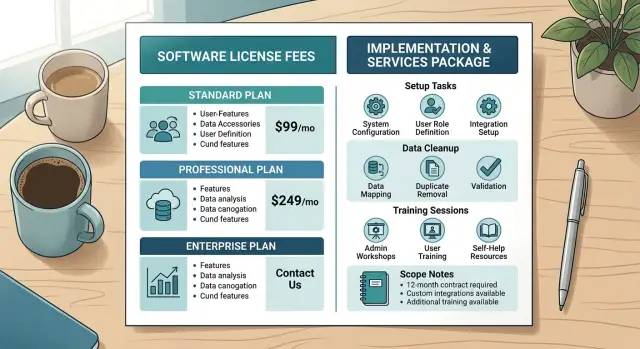
Table of Contents
Why this work disappears into the product price
Most teams price the software and ignore the work around it. The license has a clean number, so sales can quote it quickly. Setup feels smaller and less formal, even when it pulls hours from product, support, and engineering.
That is where margin starts leaking.
One customer needs a data import. Another wants fields mapped. A third needs help cleaning old records before launch. Each request sounds minor on its own. Put them together and the team spends days on work nobody priced.
Sales often makes this worse by accident. To close the deal, someone says, "We can help with that" or "We'll take care of the import." The customer hears a promise. Finance books product revenue. The delivery team gets unpaid service work.
The same kinds of tasks disappear again and again: account setup, data cleanup before import, one-off migration help, live training, and hand-holding after go-live. Training slips fastest. A buyer asks for a kickoff call, then another team wants its own session, then new hires arrive next month. Soon "training" means ongoing support, but the quote never changed.
Early-stage companies do this all the time because they want the sale and they want happy customers. The instinct is understandable. It still creates a bad habit. If you keep folding service work into the product price, buyers learn to expect free labor every time.
For a while, the numbers can look fine. Revenue reports show solid subscription income, so the product seems profitable. The real cost hides somewhere else: payroll hours, slower onboarding for the next customer, and engineers doing setup instead of product work.
A paid implementation package fixes both the accounting and the expectation. It tells the customer what setup includes, what data help costs, and where training stops. Without that line, teams keep selling software while quietly running a service business for free.
What the package should cover
An implementation package should cover the work that turns a login into a usable system. If a customer buys on Monday, they should know who can access the product, what data goes in, how the team will use it, and who owns the setup after launch.
Start with the account itself. Create the workspace, add the first users, set roles, and apply the access rules the customer needs. This sounds small, but it takes real time. Someone has to confirm owners, invite the right people, and make sure nobody starts in the wrong place.
Data work belongs in the package too. Most teams do not arrive with clean files. They bring duplicate records, missing fields, old naming habits, and columns that do not match your system. The scope should cover import prep, field mapping, and light cleanup so the first import works and the customer can trust what they see.
A practical package usually includes workspace and user setup, one structured import with clear mapping rules, cleanup for common data issues, a small amount of configuration, training, and short handoff notes.
Configuration matters because customers rarely use a tool exactly as it ships. They may need a custom pipeline stage, a few statuses, a basic approval flow, or default views for different roles. Keep this part grounded in their current process, not every future idea mentioned in a sales call.
Training works best when you split it in two. Admin training is for the person who will own the system after launch. They need to understand settings, permissions, imports, and what to check when something looks wrong. User training should be shorter and focused on daily tasks so the wider team can get started without stress.
Finish with handoff notes. A short document saves hours later. It should say what you configured, how data was mapped, what stayed unchanged, and who should handle updates on the customer side. That turns setup from a vague promise into a clear service the customer can review and approve.
What to leave out
The package should cover work you can define, schedule, and finish. The moment you include open-ended requests, margin disappears.
The base fee should handle agreed setup, initial data prep, and the training needed for launch. Anything that changes the product, continues after go-live, or depends on unknowns needs its own line item.
Keep custom feature work outside the package. A client may start with a normal onboarding, then ask for a custom report, a new workflow, or a special integration. That is product or engineering work, not implementation. Quote it separately so the cost is visible.
Long-term support also needs its own plan. The implementation package should end. If the client wants weekly check-ins, admin help, bug triage, or small changes for the next three months, sell a support plan or monthly retainer. Otherwise a one-time fee turns into ongoing labor.
Process redesign needs extra care. If a client says, "While we're doing setup, can you also redesign how sales, operations, and finance hand work to each other?" stop and scope discovery first. That request usually hides politics, exceptions, and decisions nobody has made yet. It does not fit inside a standard package.
Use the same rule for data that appears after launch. If you cleaned one agreed dataset during onboarding and the client later finds another messy export full of duplicates and blank fields, that is new work.
A simple example makes this easier to explain. A company buys onboarding for a new internal tool. During kickoff they ask for user setup, one import, and two training sessions. Fair enough. Two weeks later they want a custom approval flow, help desk coverage for 60 days, and cleanup for a second spreadsheet they forgot to mention. None of that belongs in the base package.
If the work does not have a clear endpoint on day one, keep it out.
How to scope it step by step
An implementation package needs its own task list and its own finish line. If you start with a flat product quote and add setup work later, hours vanish fast.
Begin with the customer's first usable day. Write down every task that must happen before they can log in, use the product, and get a basic result. That usually includes kickoff, account setup, permissions, data import, light cleanup, small template changes, testing, and training.
Then put hours next to each task. Do not rely on gut feel if you can avoid it. Use calendar history, time logs, old tickets, or notes from past projects. If past imports took six hours, write six. If they usually took six but often became eight, scope eight.
A few limits keep the scope honest. "Training included" is vague. "Two 60-minute sessions for up to eight users" is clear. "Import included" invites trouble. "Import up to 10,000 rows from one clean CSV" protects your time.
Define done before the project starts. Keep it plain. A good finish line might be: system configured, one workflow tested, admin access confirmed, old data imported within agreed limits, and one training session completed. If the customer asks for more after that, you can point to the scope.
Price extras before anyone needs them. Add rates for extra meetings, additional cleanup, added users, rushed timelines, or custom work. That avoids awkward calls later, when everyone is tired and the customer assumes it is "just a small change."
For example, if Oleg helps a small company set up an AI-assisted development workflow, the package might include one discovery call, repository access setup, two automations, one training session, and a fixed amount of migration work. If the team later wants five more workflows and extra review sessions, those move into paid add-ons.
Tight scope can feel strict at first. It saves arguments, protects margin, and makes the quote easier to trust.
How to price it without guesswork
Price the work in three buckets and keep them simple. Use one flat fee for the base package. Give common add-ons fixed prices. Put everything else on a day rate or hourly rate.
The base fee should cover the work almost every customer needs: kickoff, account setup, standard configuration, one clean import, one training session, and a short launch check. Quote it as one number, even if you calculate it from hours behind the scenes.
To set that number, look at your last five to ten projects and count the real time spent on delivery, project management, calls, revisions, and admin. Multiply the average by the lowest rate that still gives you a healthy margin, then add a small buffer for the surprises that always show up.
If your average project takes 14 hours and your floor rate is $140 per hour, your internal cost target is $1,960. Add a 10% to 15% cushion and round it to a clean number. A quote of $2,200 is easier to explain than a page full of tiny charges.
Common extras should be ready in advance. If you keep seeing the same requests, price them once and reuse them: extra data cleanup for messy files, additional training sessions, custom reports or dashboards, and extra migration help after launch.
Then draw a hard line around out-of-scope work. If a customer asks for a second import, more workshops, or manual cleanup you did not include, bill it at the stated hourly or day rate. Put that rate in the proposal, not in a later email.
Longer projects also need a payment schedule that protects cash flow. For short jobs, 50% upfront and 50% at go-live usually works. For larger work, split the fee into milestones tied to clear deliverables.
When every task fits one of these buckets, pricing gets calmer. Your team stops giving away service hours, and customers can see what they are buying.
A realistic example
A five-person sales team buys your software on a yearly plan. The product price gives them access to the tool, but they still need help before anyone can use it well. Their customer list lives in three spreadsheets with different column names, missing fields, and duplicate accounts. They want all of it moved into their CRM.
Instead of hiding that work inside the annual fee, you quote a separate implementation package. It covers cleaning and merging the spreadsheets, mapping fields for the import, one admin setup call for users and permissions, and two training sessions - one for admins and one for the team.
Now the buyer can see the split. The yearly plan pays for the software. The package pays for setup, cleanup, import work, and training. That makes the deal easier to explain and protects your margin. If spreadsheet cleanup takes six hours, you bill for six hours of service instead of quietly absorbing the cost.
You can make the scope even tighter with a few limits. For example, the cleanup covers up to 5,000 rows, one import into one CRM, and training sessions up to 60 minutes each. Those limits look small, but they matter. They stop vague requests from turning into work nobody priced.
After launch, the client asks for three custom reports for different managers. The request is reasonable. It is still new work. The original package covered setup, data cleanup, import, and training. It did not cover report design, revisions, or reporting logic, so you send a separate quote.
That is the whole point of a clean package. The customer gets a fast start and knows what is included. You keep service work visible, billable, and easier to manage when the project grows.
Mistakes that eat margin
Implementation packages usually lose money through small decisions that feel harmless at the time. One extra cleanup pass. A few unplanned calls. Another training session for a new employee. By the end, the customer feels supported, but your team has done hours of unpaid work.
Free data cleanup is one of the fastest ways to wreck the margin. A salesperson wants the deal to move, so someone fixes the spreadsheet "just this once." Then the file turns out to have duplicate rows, broken dates, missing fields, and old contacts mixed with current ones. That is service work. Give it its own line item or a clear time limit.
Unlimited onboarding calls cause the same problem. Customers rarely mean to abuse them. They just keep booking 20-minute chats for each new question, and your calendar fills with meetings that should have been one planned session. A fixed number of calls works better because it pushes both sides to gather questions and use the time well.
Training expands quietly too. You agree to train the first team. Then a manager asks if you can walk the evening shift through it. Then a new hire arrives next week. Then a replacement joins a month later. Training every future employee is not part of onboarding. Train the first group, record it if needed, and price extra sessions separately.
Another leak starts when you begin work before the customer sends final files. If they send draft data, your team maps it, tests it, and finds issues. Then the customer sends a revised version and asks you to "just update it." Now you have done the same work twice. Start only when the customer sends final files, names one approver, and confirms the inputs are ready.
Vague requests are the worst because they sound simple. "Help us set everything up" can mean basic configuration, data migration, workflow design, admin training, and weeks of back-and-forth. If the scope fits inside one fuzzy sentence, it is too loose.
A few guardrails stop most of this: separate data cleanup from data import, cap onboarding calls by number or hours, train the first team only, begin work only after final files arrive, and write deliverables in plain language with real counts.
A realistic scope sounds boring, and that is a good sign. "Import one cleaned customer file, configure three workflows, train up to five users, and run two review calls" leaves far less room for margin to disappear than "full setup support."
Quick checks before you send a quote
Quotes go bad when the basic facts are still fuzzy. Before you price an implementation package, stop and confirm what you are actually taking on. Ten minutes of checking now can save days of unpaid work later.
Start with the data. Many projects sound simple until you discover three exports from different systems, each with different field names, missing values, and duplicate records. If the client cannot name every source you need to touch, your estimate is still a rough guess.
You do not need a giant discovery process. You need a short pre-quote check. List every source file, app, spreadsheet, and manual input that feeds the setup. Name one client owner for the raw data and one person who can approve the cleaned version. Count how many people need training and what kind of training they need. Define the exact point where launch is done. Set an hourly or daily rate for anything outside scope.
Approval matters more than most teams expect. If nobody owns the source files, you will waste time chasing the latest version or arguing about which rows are correct. The same problem appears after cleanup. Someone on the client side must sign off on the result, or the data work never really ends.
Training scope can change the quote quickly. Training two admins for 90 minutes is very different from training 25 staff across sales, support, and operations. Ask who needs training, what they need to do afterward, and whether new-hire training belongs in the package or in a separate service.
Be strict about the finish line. "Go live" is too vague. A better launch rule is concrete, testable, and easy for both sides to approve.
If you do advisory or hands-on delivery for startups and small teams, this check step is where margin is often won or lost. A clean quote is not about sounding careful. It is about billing for real work with fewer surprises on both sides.
Next steps for a package that stays profitable
Start with your last five projects. Do not look at what you planned to do. Look at what your team actually did, how long it took, and where the extra work came from.
Most companies already have the raw material for an implementation package. It is buried in old emails, project boards, time logs, and support threads. Pull those jobs apart and mark the tasks that show up again and again. You will usually find the same cluster of work: account setup, data cleanup and mapping, admin training, user handoff, and odd requests that never belonged in the base deal.
Once you see the pattern, turn it into one standard package with clear limits. Then create add-ons for the work that changes from client to client. That keeps the core offer easy to sell and stops unusual requests from eating margin.
Write the package in plain language. Say what is included, what the client must provide, how many meetings are part of the job, and what counts as out of scope. Then train sales to use the same wording every time. Consistency matters almost as much as the price.
If your work includes AI tooling, internal automation, or technical onboarding, the same rule applies. Oleg at oleg.is does this kind of scoping in Fractional CTO and startup advisory work, where setup can easily grow beyond the original deal if nobody sets limits early.
When setup, data work, and training have clear boundaries, customers know what they are paying for and your team stops giving service hours away for free.


