Package update calendar for small teams that works
A package update calendar gives small teams a simple rhythm for library, image, and runtime upgrades without weekly fire drills or surprise breakage.
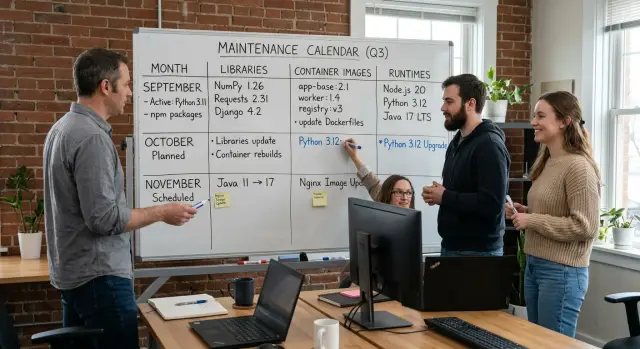
Table of Contents
Why small teams get stuck in catch-up mode
Small teams usually don't fall behind on updates because they're careless. They fall behind because updates arrive in small pieces, at bad times, and each one looks easy to postpone.
A library patch takes 15 minutes. A base image bump takes 30. A runtime warning can wait until next sprint. By Friday, the team has lost half a day to work nobody planned.
The pattern is familiar. One person spots a security notice. Another sees tests fail after a transitive dependency changes. Someone else gets a warning from the cloud provider about an aging runtime. None of those jobs feels big enough to schedule, so they get squeezed between feature work, support, and bug fixes.
That switching cost is the real problem. The work itself is often simple. The interruptions are what drain the team.
In a normal week, that can mean a minor package update that breaks one test, a container image update for a security fix, a runtime notice that feels safe to ignore, and a build tool change that slows CI or changes output. Each task is small. Together, they eat attention.
Teams delay upgrades for a simple reason: if the app still runs, product work wins. If customers are waiting, maintenance slips again. After a few months, those small updates turn into a stack of bigger and riskier changes.
Then something breaks for real. A deploy fails. A vendor drops support. A security issue needs a same-day patch. Now the team has to mix urgent repair work with planned work. Stress goes up fast. People rush, skip checks, and make wider changes than they meant to.
That's why catch-up mode feels endless. The team is always reacting and almost never choosing the timing.
A simple routine changes that mood quickly. When teams use a package update calendar, updates stop feeling like random interruptions. Similar changes get batched together, testing happens on purpose, and the gap stays small enough that routine maintenance doesn't turn into rescue work. For a small team, that matters more than finding the perfect process.
What to put on the calendar
Most teams track app packages and forget the rest. That's why updates keep showing up as surprises.
A useful package update calendar covers every layer that drifts over time. Skip one layer, and the work comes back later, usually when the team is already busy.
Start with the dependencies your team chose on purpose: application libraries, SDKs, and the direct packages listed in your project files. These deserve regular review because each one reflects a real engineering or product decision.
Then include the layers under the app. For many small teams, these are the ones that cause the most annoying surprises:
- base container images
- operating system packages inside those images
- language runtimes such as Node.js, Python, Java, or Go
- build tools, package managers, and CI runners
- deploy images used in release jobs
If you ship in containers, base images and OS packages belong on the same calendar as app libraries. Updating dependencies on top of an old image still leaves you exposed to security fixes, build quirks, and bugs that are harder to trace later.
Runtimes need their own line item too. A Node.js or Python upgrade can change package behavior, test output, and local setup. Teams often put those off because they feel larger than a normal dependency bump. That delay only makes the next jump harder.
Build and delivery tools matter more than people expect. When the CI runner, Docker image, or deploy image gets stale, the team starts debugging the pipeline instead of shipping the product. That's one reason experienced technical leaders treat delivery tooling like production code rather than a side folder nobody owns.
Keep all of this in one shared inventory. Don't split it across private notes, stale tickets, and half-finished docs. One table is enough if it shows the item, current version, owner, update rhythm, and last review date.
That list becomes the source of truth. When the next batch starts, nobody has to guess what counts.
Choose a rhythm your team can keep
The best update rhythm is the one your team can repeat for months without dreading it.
Weekly cycles work well for teams that ship often or maintain several services. The batches stay small, tests are easier to read, and nobody has to remember what changed three weeks ago.
Biweekly cycles fit many small teams. There's enough room for feature work, but not so much time that updates pile up.
Monthly cycles make sense for slower-moving products, internal tools, or teams where one person handles most maintenance. The tradeoff is simple: fewer maintenance sessions, but each one takes longer and carries more risk.
A rough guide helps:
- Weekly works best if you deploy every day or run several apps.
- Biweekly fits teams that release regularly but need longer focus blocks.
- Monthly suits slower codebases with fewer releases.
Release habits matter as much as team size. A two-person team shipping daily may need a tighter dependency update schedule than a five-person team maintaining a stable internal dashboard.
Put the work on a fixed day or half-day. Friday afternoon is usually a bad choice because people rush. A quieter slot, like Tuesday morning every other week, gives the team time to update, test, and roll back if needed.
Keep emergency fixes outside the batch. If a serious security issue hits a base image, runtime, or public-facing library, patch it right away. Don't wait for the next planned window just to protect the routine.
If the backlog already feels heavy, start smaller than you want. Pick one lane first, maybe container image updates and runtime work, and leave lower-risk libraries for the next cycle.
Consistency matters more than ambition. A modest schedule you keep is better than a perfect one that collapses after two rounds.
Sort updates by risk and urgency
Before you schedule a batch, sort each update into a small number of lanes. If one session mixes a security fix, five harmless patch bumps, and a major runtime jump, it gets hard to tell what caused a failure.
Pull security fixes out of normal maintenance. If a package closes a known hole in the app, image, or runtime, give it its own path. That doesn't mean panic. It means the team reviews it first, tests it quickly, and ships it sooner than routine cleanup.
Low-risk patch updates belong together. These are the quiet version bumps that usually keep the same behavior and mainly fix bugs. Batch them into one maintenance task, run the test suite, and move on. Small teams waste a lot of time opening ten tiny upgrade branches instead of one tidy batch.
Minor and major upgrades need different handling. Minor releases often fit your normal cycle, but they still deserve a changelog check and a quick scan for deprecated settings. Major releases are separate work. Give them a real owner, time for code changes, and a rollback plan.
Some parts of the stack break more often than others. Auth libraries, database drivers, ORMs, front-end build tools, SDKs with native bindings, and container base images tied closely to OS packages all deserve extra caution.
When one of those changes, expect more than a version bump. Run broader tests and avoid pairing it with another risky change.
You also need one person to make the final call when risk is unclear. On a very small team, that might be the senior engineer. On another team, it could be a technical founder or a fractional CTO. What matters is speed and clarity. One person reviews the evidence, decides whether to ship or defer, and records why.
That simple split keeps routine work routine. It also stops urgent work from getting buried under chores.
Build the upgrade cycle step by step
A good upgrade cycle should feel almost dull. If the batch looks too large to finish in one session, shrink it before you start.
Begin with a short candidate list. Pull from dependency alerts, items you skipped last time, and packages that are clearly drifting behind. For a small team, five to ten changes is usually enough.
Start by defining the exact scope. List the libraries, base images, and runtimes you plan to change, and leave everything else out. Small batches are easier to test, review, and roll back.
Then update one layer at a time. A simple order works well: application libraries first, container images next, and language or platform runtimes last. That makes failures easier to trace.
Test after each layer. Run automated checks, then do one or two manual checks on the paths people use every day. If the app breaks after a library bump, you'll catch it before image and runtime changes muddy the picture.
Keep notes while you work. Write down version jumps, config edits, errors, and the fix that solved each one. The notes don't need polish. They just need to save the team from solving the same problem again next month.
When the batch is done, ship it and book the next review date before switching back to feature work. The routine works best when the next session is already on the calendar.
A simple example makes the order clear. Say the team runs a Node app in Docker. First update the npm packages and run tests. Next bump the base image and test again. Only after both steps pass should the team move from one Node version to the next.
That can feel slower when everyone's in a hurry. In practice, it saves time because each failure has a short suspect list. If you keep each batch narrow, the runtime upgrade process stops feeling like a risky project and starts feeling like normal maintenance.
A simple example from a small product team
Picture a SaaS product with one app, two engineers, and a founder who still handles support on busy days. The team ships customer work most weeks, so maintenance keeps slipping. A library warning appears on Tuesday, a base image update lands on Friday, and a runtime release sits untouched for months. Nobody is ignoring updates on purpose. They just show up one by one at the worst time.
The team switched to a simple update calendar. Instead of reacting all month, they blocked one half-day near the end of each month for upgrades, tests, and deploys. They didn't add another meeting. They used the first ten minutes of the normal planning call to decide what would go into the batch.
Their monthly pass was plain on purpose: low-risk libraries and container images, the current runtime patch release, smoke tests, one short regression check, and a note for anything that looked too risky to bundle in.
In one monthly cycle, they updated patch and minor releases for common packages, refreshed the container base image, and moved Node to the next patch version. The test suite passed. One image build needed a small fix. They shipped the batch the same afternoon. Total time was about three hours across both engineers.
One change didn't make the cut. Their database driver had a major release with a different connection setting. They read the notes, saw that it could affect production traffic, and pushed it into a separate task. One engineer wrote a short test plan and scheduled it for a quieter week.
That one decision changed the feel of maintenance. Patch work stayed small. Riskier work got its own space. The team stopped mixing routine updates with changes that could break customer flows.
After two months, they saw fewer surprise CI failures and fewer late-night dependency fixes. The routine didn't prevent every issue, but it stopped the constant drip of update debt.
Mistakes that create more work
Most upgrade pain starts when a team changes too much at once. If you jump to a new runtime and replace several major libraries in the same batch, you lose the trail quickly. When tests fail or production behaves oddly, nobody knows which change caused it.
Keep runtime jumps separate from major library changes. A runtime upgrade can affect builds, memory use, deployment scripts, and older dependencies. A large library update can change APIs and edge-case behavior. Split them into different batches even if that feels slower for a few days. Over a month, it usually saves time.
Another common problem is tribal knowledge. One engineer knows which container image updates are safe each week, which packages need manual checks, and which services need extra testing. Then that person gets busy or leaves, and the dependency update schedule stalls. Write the rules down in the repo or team docs so anyone can follow them.
Release notes deserve close attention when a package touches login, billing, or permissions. Teams often skim them because the version bump looks small. That's a mistake. A short note about token handling, session expiry, webhook signing, or retry logic can lead to very real user-facing problems.
Large batches also make rollback messy. If one release updates ten libraries, two base images, and the runtime, reverting becomes detective work. Smaller batches are easier to test, easier to undo, and easier to explain during review.
Cleanup matters after a failed upgrade too. Reverting the branch isn't enough. Remove temporary flags, delete half-finished migration code, reset rushed version pins, and leave a short note about what broke. If you skip cleanup, the next attempt starts in a worse place.
A few plain rules prevent most of this trouble:
- Change one runtime at a time.
- Limit each batch to one major library family.
- Record review and rollback steps where the team can see them.
- Read release notes closely for auth, billing, and permission-related packages.
Small teams usually do better with simple habits than with ambitious cleanup sprints.
Quick checks before you close the batch
A package update calendar only works if each batch ends with a short review. Skip that step, and small problems roll into the next cycle.
Start with the basics: tests, build output, and startup logs. Green tests matter, but they aren't enough. Read the build output for warnings, then start the app and scan logs for missing environment variables, deprecation notices, slow boots, or repeated retries.
A short checklist helps:
- Confirm the app builds the same way you ship it.
- Run the test suite you trust for upgrade batches, not every test you own.
- Start the app and worker processes, then read the first few minutes of logs.
- Check image size, memory use, and startup time.
- Assign the next batch owner and date before closing this one.
Database changes need extra care. If a migration ran, make sure it finished cleanly, didn't lock tables longer than expected, and matches the code now in production. Check background jobs too. A queue worker that still expects the old schema can fail quietly for hours.
Container image updates can hide costs in places people don't watch. A newer base image can add hundreds of megabytes, raise memory use, or slow startup enough to hurt autoscaling and deploy time. Compare the new image to the old one. If startup jumped from three seconds to eighteen, fix that now rather than carrying it into the next month.
After release, keep an eye on error tracking for the first day. You don't need a war room. Just check for new exception types, retry spikes, job failures, and strange login or payment errors. Many upgrade bugs only show up under real traffic.
For one small product team, all of this can take 15 to 20 minutes if the checklist is written down. That's a good trade.
Next steps that make the routine stick
A routine lasts when it's small enough to survive a busy month. Pick one update slot, put it on the team calendar, and use one shared tracker for every batch. That tracker can be a simple board or spreadsheet. What matters is that everyone sees the same list, owner, and due date.
Keep the first version plain. The process doesn't need a perfect workflow on day one. It needs a fixed time, a short scope, and a clear record of what changed.
Track a few numbers for each batch: how many updates you skipped, how many breakages the batch caused, and how much team time it took. Those numbers tell you enough to adjust the rhythm without overthinking it. If skipped updates pile up, the batch is probably too big or too frequent.
Don't rewrite the process after one messy week. Teams hit rough patches because of releases, holidays, or one awkward runtime upgrade. Wait for two or three full cycles before changing the schedule. That gives you a real pattern instead of noise.
If the process keeps slipping, the problem usually isn't effort. It's setup. The team may need a cleaner runtime upgrade process, safer test gates, clearer ownership, or a tighter release flow so maintenance stops colliding with product work.
That's where outside help can make sense. Oleg Sotnikov at oleg.is works with startups and small companies as a Fractional CTO, helping teams tighten CI/CD, infrastructure, and AI-augmented development workflows. If update work keeps turning into fire drills, a small change to the delivery setup often does more than another round of reminders.
When the schedule feels ordinary, you're doing it right. Updates stop being a constant background worry and become another task the team finishes on time.
Frequently Asked Questions
How often should a small team schedule updates?
Most small teams do well with a biweekly or monthly slot. If you ship every day or run several services, use weekly batches. Pick a day you can protect, like Tuesday morning, and keep the same rhythm for a few cycles before you change it.
What should go on a package update calendar?
Track more than app packages. Put application libraries, SDKs, container base images, OS packages, language runtimes, build tools, package managers, CI runners, and deploy images in one shared tracker. Include the current version, owner, update rhythm, and last review date.
Should security fixes wait for the next batch?
No. Fix serious security issues right away. Keep routine maintenance on the calendar, but pull urgent fixes into their own path so the team can review, test, and ship them fast.
How many updates should we bundle at once?
Keep each batch small enough to finish in one session. For many small teams, five to ten changes is enough. If you include a runtime jump or a major library change, shrink the rest so you can spot the cause of any failure.
Do runtimes belong in the same schedule as library updates?
Yes, but do not pile them into the same change set as everything else. Put runtimes on the same calendar, then handle them in their own batch or later in the cycle after simpler updates pass. If you delay runtime work for months, the next jump gets harder.
What order should we update things in?
Start with app libraries, move to container images, and update the runtime last. Test after each layer. That order gives the team a short suspect list when something breaks.
When should we split an upgrade into a separate task?
Split the work when an update changes APIs, config, auth, billing, database behavior, or deploy scripts. Major releases need their own owner, a small test plan, and a rollback path instead of getting tucked into routine maintenance.
What should we check before we close the batch?
Run the build the same way you ship it, use the test suite you trust for upgrade work, then start the app and read the first logs. Check image size, memory use, startup time, and error tracking after release so you catch problems under real traffic.
What if only one engineer knows the upgrade process?
Write the rules in the repo or team docs now. Record which packages need manual checks, which services need extra testing, and how to roll back. If one engineer keeps all that in their head, the schedule will slip as soon as that person gets pulled into something else.
When should a small team ask for outside CTO help?
Bring in help when updates keep colliding with product work, CI starts failing because tools drifted, or the team keeps postponing runtime jumps. A fractional CTO can tighten ownership, testing, and delivery setup so maintenance stops turning into fire drills. Oleg Sotnikov helps small teams with that kind of work.


