Outside CTO playbook for noisy alerts and slow response
This outside CTO playbook shows how to cut noisy alerts, assign service owners, clean routes, and respond based on user impact.
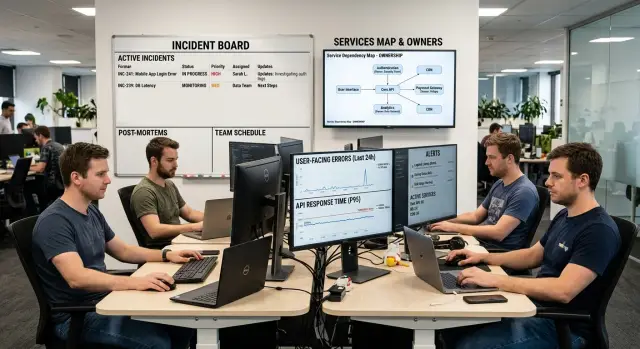
Table of Contents
What goes wrong when every alert looks urgent
When every ping arrives with the same tone, teams stop believing the system. After enough false alarms, people mute channels, silence phones, or wait a few minutes before checking. That pause feels small until a real outage hits.
The problem is bigger than alert fatigue. Urgency loses its meaning. If a minor disk warning, a short traffic spike, and a login outage all look equally severe, nobody can tell what needs attention now and what can wait until morning.
Messy routing makes this worse. One alert goes to Slack, email, PagerDuty, and a group chat. Several people see it, but nobody owns the first move. Each person assumes someone else is already on it. Ten minutes pass. Then twenty. Customers are still staring at errors.
Weak service ownership usually sits underneath that delay. Teams know they have "the API," "the website," and "the database," but they don't know who leads when payments fail or signups drop to zero. The page reaches a group, not a person. Groups are slow.
Small teams feel this hard. At 2:14 a.m., a short database spike wakes the developer on call, the founder, and the ops contractor. The spike clears on its own. Half an hour later, checkout actually breaks, and everyone assumes it's more noise. That's how bad alerts train a team to miss the problem that matters.
More dashboards rarely fix this. A chart can help you inspect a problem after an alert fires. It doesn't decide who responds, which signal matters, or when to wake someone up. If the route is messy and the rules are sloppy, another screen just gives people more places to stare.
An outside CTO should treat this as a trust problem before a tooling problem. Teams move faster when alerts point to user impact, one person owns the first response, and low value noise never reaches the paging path.
Start with a simple service ownership map
When alerts pile up, teams often chase symptoms. A simple ownership map cuts through that fast. It does not need to be a new tool or a polished dashboard. A one-page doc or spreadsheet is enough.
List every customer facing service in plain language. If users touch it, depend on it, or complain about it, put it on the page: login, checkout, search, mobile sync, admin panel, public API, billing. Next to each service, name one owner and one backup. One person makes the first call when alerts fire. One backup covers if that person is asleep, busy, or away. Shared ownership sounds nice, but it slows response because everyone waits.
The page should answer four things at a glance: what the service is called, who owns it, which shared systems it depends on, and what users notice when it breaks.
That dependency column matters more than most teams expect. Shared systems cause the worst alert floods. A database, auth service, queue, DNS provider, or email provider can knock over several services at once. If login, billing, and the dashboard all rely on the same database, that should be obvious the moment you open the page. When those alerts fire together, the team should check the database first, not page three people and lose 20 minutes.
Describe failure in user terms, not machine terms. "Customers can't log in" is better than "auth error rate above 8%." "Orders stop at payment" is better than "timeout on service B." People triage faster when the impact is obvious.
Most small teams can build this map in under an hour. Open a doc, fill in the services, assign names, and mark the shared pieces. Don't wait for perfect detail. A rough map people actually use beats a detailed map nobody opens during an incident.
Clean alert routes before adding new rules
Most teams react to noisy alerts by adding more rules. That usually makes the mess worse. Before touching thresholds or building another dashboard, trace each alert from trigger to final destination. Who gets it first? Who gets it next? Who actually acts on it?
That trace usually exposes a lot of waste. Old Slack channels stay in rotation after teams change. Former owners still sit on escalations. Dead services keep sending alerts because nobody removed the rule after a migration. Bad routes teach people to ignore alerts, and that's how real incidents get missed.
A clean route is boring on purpose. One alert should have one clear first owner. If three teams get paged at once, all three assume someone else will pick it up. Page the team closest to the user problem first. Other teams can watch the channel, but they shouldn't all get the first wake-up.
Start with a few simple fixes:
- remove channels nobody watches
- delete rules tied to old services or former staff
- merge duplicate alerts that describe the same outage in different words
- keep the escalation chain short: owner, backup, then incident lead
Duplicate alerts are one of the biggest noise sources. A single database slowdown can trigger an infrastructure alert, an API error alert, and an app timeout alert within a minute. That's still one problem. Merge them into one primary alert with enough context for the first responder to act.
Long escalation trees look safe, but they waste minutes. Most small teams do fine with a short chain. If checkout slows down, page the service owner first, not backend, product, and infrastructure all at once. That owner can pull in help quickly if the issue crosses systems.
Put user impact signals first
Most teams page people for server symptoms long before they page anyone for customer pain. That's backwards. If users can't log in, pay, load the app, or finish a task, that alert should outrank a CPU spike every time.
A simple filter helps: does this signal describe user harm, or only system activity? Background warnings still matter, but they rarely deserve the same urgency as a broken checkout or a spike in login failures. When everything looks severe, the pager loses credibility.
For many products, a small set of user impact signals does most of the work:
- failed login rate jumps above normal
- checkout or payment success rate drops
- page load time rises sharply on the main user path
- error rate climbs on the API endpoints customers use most
- signups, bookings, or form submissions suddenly fall
These alerts work because they lead to action. If login failures jump, someone checks auth, recent deploys, identity providers, and rate limits. If checkout breaks, the team looks at payment provider errors, order creation, and inventory locks. If page load time doubles, they inspect the slow endpoint, database queries, and anything new in the last release.
Sharp changes matter more than slow drift when you're deciding who to wake up. A database disk at 78% probably doesn't need action tonight. A payment success rate that falls from 97% to 81% in five minutes probably does. Alerting on change helps teams catch live incidents instead of collecting trivia.
Dashboards still matter, just later. They help people explore a problem after the alert fires. They don't rescue a weak alert design. If the signal doesn't tell the team what broke and what to check first, it isn't ready to page anyone.
Rebuild alert rules one at a time
Big alert cleanups sound efficient, but they often fail because nobody can tell which change helped. Pick one service that pages too often. Pull two to four weeks of alert history and compare it with actual incidents. You'll quickly see which alerts led to action, which ones sent people hunting for context, and which ones never mattered.
Start small. One noisy service, one alert route, and one bad week of pages is enough to expose stale thresholds, duplicate rules, and messages nobody can use.
When you review each alert, ask a few blunt questions. Did it trigger a clear action? Did it reach the right person? Did users feel the problem before the alert fired? Did the same issue wake people up again and again? Those questions usually tell you what to keep, what to cut, and what to downgrade into a daytime review.
Then rewrite the alert text. Each message should name the service, describe the symptom, and give the first check. "Checkout API error rate 12% for 10 minutes. Check the last deploy, then review payment provider latency" is far better than "High error rate detected."
Watch for rules that bundle different problems together. A slow database, a stuck queue worker, and a third party timeout may happen at the same time, but the response is different in each case. If the first move changes, split the alert.
Add a cooldown so the same issue doesn't page people all night. Repeated alerts teach the team to ignore the pager. One alert, a clear owner, and a sensible repeat window is usually enough.
If you can test the new rules against old incidents, do it. If not, watch the next week closely. Count how many pages led to real work, how many went nowhere, and how many user complaints appeared before any alert fired. Fewer alerts is not the goal. Alerts that mean something is the goal.
A realistic example from a small team
A seven-person SaaS team had a common problem. Their monitoring stack sent 40 to 60 database warnings on a normal day, and almost all of them looked serious. CPU spikes, slow queries, replica lag, failed retries - every page sounded urgent, so people stopped trusting the pager.
The worst signal didn't come from engineering. It came from support. Customers wrote in about login problems before anyone had opened an incident. The team had alerts, dashboards, and logs, but they still learned about user pain from the inbox.
So they stopped tuning thresholds for a week and drew a simple map. They grouped alerts by service: auth, app API, database, and background jobs. Then they labeled each alert by likely user harm.
That small exercise changed the order of response. A database warning that didn't affect sign-in or saved work stopped going to the main pager. A spike in login failures went straight to the engineer who owned the app layer first, because that person could check recent deploys, rate limits, and error patterns in minutes. If the app owner found a real database issue, they pulled in the database owner next.
The difference was immediate. Before the cleanup, the first page often woke the wrong person for an issue that started somewhere else. Afterward, the first alert carried enough context to act on. "Login failure rate up 8% in 10 minutes" beat "database connections high" every time.
Their daily process got simpler. Support tagged complaints by user flow, starting with sign-in. Engineering matched each noisy alert to one service owner. The team muted warnings that never changed what users could do.
Within two weeks, median response time fell from about 18 minutes to 6. They didn't get there by building another dashboard. They got there because the first page finally made sense to the first person who received it.
Mistakes that keep the noise alive
Teams rarely keep alert noise because they like it. They keep it because the same habits survive every cleanup.
One common mistake is paging on technical strain that users never feel. High CPU, short load spikes, or a full disk on a noncritical worker may matter later, but they shouldn't wake someone up if the product still works. Save those for office hours, summary reports, or low priority queues unless they are tightly tied to a customer facing failure.
Another mistake is sending one symptom to several groups at once. That creates a fast burst of activity and a slow start to real work. Everyone joins the chat. Nobody owns the first move. If the answer to "Who should act right now?" is "it depends," the rule is probably wrong.
Old systems add another layer of noise. Teams retire a service, move a job, or merge two apps, then forget to clean the rules and escalation paths around it. Months later, alerts still point to people who no longer touch that area. That's how you end up with 2 a.m. pages for systems nobody owns.
Vague alert text makes all of this worse. "Database issue detected" tells the on-call person almost nothing. A useful alert says which service is affected, what users are seeing, which threshold fired, and where to look first.
If your setup stays noisy, you will usually find the same faults underneath: unclear ownership, dead routes, duplicate pages, technical signals ranked above user pain, and alert messages that start responders from zero.
Quick checks for the next incident
When an alert fires, speed comes from clarity, not from more graphs. A small team should be able to run a fast check in under a minute and know who moves first.
Use these checks before anyone opens three dashboards and starts guessing:
- Can someone name the service owner within 10 seconds?
- Does the alert describe the user problem, not just an internal metric?
- Does one person know the first action to take right now?
- Will the paging system send the same incident twice through different rules?
- Can support verify the problem quickly from what they already see?
If the first answer is no, the problem is ownership, not monitoring. A service without a clear owner gets slower response, noisier chat, and more repeat pages.
If the second answer is no, the alert is too technical. "CPU at 92%" may matter, but users don't feel CPU. They feel failed logins, slow checkout, missing emails, or blank pages. The alert should say that in plain language.
The third check keeps people from freezing. One person should know the first move, even if it's simple: restart a worker, pause a job queue, roll back the last deploy, or check a dependency status. You don't need the full fix in minute one. You need a clear first step.
Duplicate pages are a quiet time sink. One database problem can trigger host alerts, app alerts, synthetic alerts, and support pings at the same time. If your system can wake two people for one fault, clean the routes before you add another rule.
Support matters more than many engineering teams admit. If support can confirm the issue in 30 seconds, they can stop bad guesses, calm customers, and give engineers a real symptom to work with.
What to do next
Don't try to fix every alert at once. Pick one service that wakes people up too often, confuses support, or slows incident response. One service is enough to expose the usual issues: unclear ownership, messy routing, and too many alerts that don't match real user pain.
In one short work session, do four things. Name one owner and one backup. Cut, merge, or reroute the alerts that rarely lead to action. Add two signals tied to user impact, such as failed checkout rate or login errors. Then review the route with engineering, support, and operations so the right person gets the first page.
After the cleanup, watch the next week of pages. Count how many alerts led to action, how many went to the wrong person, and how many users noticed before the team did. That gives you a baseline for the next service.
If you want an outside review, Oleg Sotnikov at oleg.is works as a Fractional CTO and startup advisor for small and medium businesses. He helps teams sort out service ownership, production infrastructure, and practical AI supported development workflows, which makes this kind of alert cleanup much easier to do without adding more noise.
Frequently Asked Questions
What should I fix first if alerts wake up the whole team?
Start with a one-page ownership map. Write down each customer-facing service, name one owner and one backup, and route each alert to that first person. That usually cuts response time faster than tuning thresholds or building another dashboard.
Which alerts should page someone at night?
Page people for user harm. Broken login, failed checkout, blank pages, and sharp error spikes on main flows deserve a night page. CPU spikes, slow drift on disk use, and short load bursts can wait for office hours unless users feel them.
How can I tell if an alert is too noisy?
If people mute it, ignore it, or need several tools before they know what to do, the alert is too noisy. A useful alert tells the owner what service hurts, what users notice, and what to check first.
Should the same alert go to Slack, email, and PagerDuty?
No. Send one first page to one owner through one paging path. Keep Slack or a shared channel for visibility if you want, but don't wake several groups for the same symptom.
What do I do about duplicate alerts from one outage?
Merge them into one primary alert with enough context to act. A single database slowdown can trigger host, app, and timeout warnings, but the team still has one problem to solve first.
What should a good alert message include?
Write the service name, the user symptom, the threshold or time window, and the first check. "Checkout API error rate 12% for 10 minutes. Check the last deploy, then payment provider latency" gives the on-call person a real starting point.
Will more dashboards fix slow incident response?
They help after the alert fires. A dashboard lets the responder inspect the problem, but it won't fix weak routing, vague messages, or unclear ownership. If the first page doesn't point to action, another chart won't solve that.
How often should we review alert rules?
Review noisy services every few weeks and after major changes like migrations, new flows, or owner changes. Compare alert history with real incidents and remove rules that never led to action.
What should support do during an incident?
Support can confirm the user symptom fast and tell engineering which flow broke first. When support tags complaints by login, checkout, or signup, engineers stop guessing and start with the right service.
When does it make sense to bring in an outside CTO for alert cleanup?
Bring one in when pages hit the wrong person, support hears about outages before engineering does, or nobody can name a service owner right away. An outside CTO can map ownership, clean routes, and rebuild alert rules without adding more noise.


