OpenFGA vs homegrown RBAC for B2B permission rules
OpenFGA vs homegrown RBAC for B2B apps: compare rule flexibility, audit demands, and migration cost before roles turn into a maintenance mess.
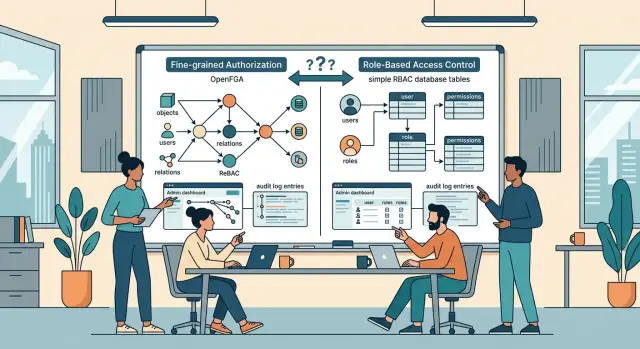
Table of Contents
Why this choice gets messy fast
B2B permissions rarely stay simple for long. One customer wants managers to edit billing but not export data. Another wants partners to see only their own accounts. A third asks for temporary access during an audit. The trouble starts when all of those rules have to live inside one product.
At first, homegrown RBAC tables feel easy. You create users, roles, and permissions, then connect them with a few lookup tables. That works for broad rules like "admin can manage users" or "viewer can read reports." It starts to bend when each customer wants its own version of those roles.
Sales often makes this harder without meaning to. A deal gets close, the buyer asks for one exception, and someone says yes. Then the next customer asks for something similar, but not quite the same. Soon you are not really managing roles anymore. You are managing tenant-specific exceptions, edge cases, and old promises that were never written down clearly.
Support feels it next. A customer asks, "Why can Sara edit this contract but Tom cannot?" If the answer depends on role tables, override tables, account settings, hardcoded API checks, and a few hidden UI rules, nobody can answer quickly. That slows support and chips away at trust.
Small permission changes also spread farther than teams expect. A new rule can touch database tables, backend checks, frontend visibility, admin screens, audit logs, and tests. So the OpenFGA vs homegrown RBAC choice gets tricky early, not late. You are not only picking a data model. You are deciding how much permission logic will leak into product code, support work, and customer promises.
If your product sells to one type of customer with one clean access pattern, simple tables may hold up for a while. If each account negotiates access a little differently, the cost shows up much sooner.
What these two models look like in practice
In an OpenFGA vs homegrown RBAC decision, the day-to-day shape of the data matters more than the label. Both models answer the same question: "Can this person do this action?" They just store and check access in different ways.
With homegrown RBAC, most teams use their own database tables. One table maps users to roles, another maps roles to permissions, and sometimes another connects those roles to an account, workspace, or customer. Your app reads those records and decides whether to allow the action. It is easy to understand, and it fits simple roles like admin, manager, and member.
OpenFGA works more like a relationship map. Instead of only saying a user has a role, it stores facts like "Sara is an admin of Acme" or "Leo can view this project through the finance team." Then your app asks OpenFGA whether the action is allowed under the rules in your model. The permission logic lives in one system instead of being repeated across controllers, services, and SQL checks.
For a product that uses the same role set in every customer account, plain RBAC tables often feel right. They are close to the app data, cheap to start with, and familiar to most engineers. If your B2B permissions stay flat, you may never need more.
The trouble starts when access follows business structure instead of neat roles. Shared accounts, parent and child companies, partner access, delegated billing admins, and narrow exceptions all push simple RBAC past its comfort zone. Teams usually respond by adding more roles, more join tables, and more special rules in code. After a while, the permission model stops being clear.
OpenFGA fits that kind of structure better because relationships can match the real world. A user can inherit access from a team, keep editor rights in one workspace, and still get read-only access in another. When the business adds a new rule, you often update the model instead of inventing another role name. That looks like a small difference at first, but it changes how fast permission rules spread through the product.
Where policy flexibility starts to matter
A simple role table feels fine when every customer has the same setup. One company, one account, three roles. That calm usually lasts a few months.
Then the exceptions arrive. One customer wants a finance lead who can approve invoices but cannot invite users. Another has a parent company with four child accounts and wants one team to see everything, while local managers should only see their own branch. The old role matrix starts to bend.
With homegrown RBAC tables, each new rule often turns into one more column, one more mapping table, or one more special case in code. It still works, but the logic spreads across queries, API checks, background jobs, and admin screens. After that, small permission changes stop being small.
OpenFGA vs homegrown RBAC becomes a real question when access depends on relationships, not just roles. A user may work for two companies at once. A consultant may need access for 30 days. A manager may act on behalf of someone else during leave. Those rules are awkward in flat role tables because the answer is no longer just "what role does this user have?" It is also "in which company, for which resource, and under what condition?"
Relationship-based rules usually age better here. You can model that a person belongs to several organizations, inherits access from a parent account, or gets delegated rights for a short period. The rule stays close to the business situation, which makes it easier to reason about later.
A common B2B example makes this clear. Imagine a software vendor that sells to franchise groups. The group owner needs global reporting, each store manager needs local access, and an outside accountant needs temporary billing access for two stores only. You can force that into homegrown tables, but every exception makes the schema harder to trust.
Flexibility starts to matter when permission questions sound less like software and more like company politics. Once that happens, a simple role list is rarely enough.
What audit and compliance work adds
Audit work changes this decision faster than most teams expect. A permission model can look fine in development, then fall apart when a buyer asks a simple question: who gave this user access, when did they get it, and who removed it?
That is where the gap in OpenFGA vs homegrown RBAC starts to show. Homegrown tables often answer the current state well enough. They usually struggle with history unless you build that history on purpose.
Enterprise customers rarely stop at "does it work?" They want a trail. They want to know who approved access to a customer account, when a role changed, why a user could open one record but not another, and who removed access after a contract change.
If your system only stores the latest role row, you cannot answer those questions cleanly. Teams then patch the gap with admin notes, support messages, and spreadsheet reviews. That works for a short while. After that, nobody trusts the record, and support wastes time comparing screenshots with database exports.
OpenFGA does not remove audit work by magic, but it pushes you toward a clearer permission model. If you log every tuple write, keep the model under version control, and store who made each change, you get a much better authorization audit trail. Support can inspect the rule path instead of guessing which join or override created an allow result.
A small example shows the difference. Say a buyer gives a partner manager temporary access to three client accounts. Two weeks later, one client complains that the manager still sees billing data. With a basic RBAC table, the answer may sit across user_roles, custom exceptions, and a manual note from sales. With a cleaner relationship model plus change logs, you can see who granted the access, whether it expired, and which rule still allows it.
Compliance adds time cost too. Someone has to review access, confirm approvals, and prove that revocations happened. If your process depends on exporting CSV files and checking them by hand, it will break as soon as account structure gets a little messy.
The hard part is not the access check itself. It is keeping a record that another human can read six months later and still understand.
What migration cost really includes
The expensive part of a permissions migration is rarely the new tool. It is the work around it. When teams compare OpenFGA vs homegrown RBAC, they often look at storage or setup first and miss the slower part: changing how the product thinks about access.
Start with the areas you have to touch. A role table swap can reach far beyond the database. It usually means schema changes for roles, relations, and membership data, plus code changes in APIs, background jobs, admin screens, and internal tools. Then come the test updates, logging changes, and support workflows needed so people can explain who could do what, and why.
That adds up fast because permission logic tends to leak into every corner of a B2B product. A quick search for is_admin or can_edit usually tells the story.
Mapping old roles to new rules takes time too. A simple role like "manager" often hides several behaviors. Maybe managers can edit users in one workspace, approve invoices in another, and view reports only for their own region. In a table-based RBAC setup, those rules may live in code, not in the schema. Someone has to find them and rewrite them into the new model.
Cutover is another real cost. Most teams need a period where both systems run at once. They compare the old answer and the new answer side by side, then review mismatches before switching traffic. That means extra code, extra logs, and extra support work for a while. It is not glamorous, but it prevents a Monday morning release where customers suddenly lose access.
Support after launch needs budget too. Customers will ask why a user can no longer see a page, why an auditor now has broader read access, or why an old custom role disappeared. Product, support, and engineering all spend time on those questions.
A realistic RBAC migration cost has four parts: build time, time spent running both systems, cleanup, and customer-facing support. If your estimate only counts developer days to "move permissions," it is too low.
A simple B2B example
Imagine a SaaS product for procurement and project work. Buyer company Acorn has one owner, three managers, regular staff, and a few contractors. They all use the same account, but they should not all see the same data.
Contractors need a narrow set of permissions. They can upload files to a project folder and leave comments. They must not invite users, change team settings, or touch billing. Finance staff sit in a different lane. They need invoices, payment status, and credit notes, but they should not see project files, delivery notes, or internal project discussions.
Now add a reseller. One reseller team manages setup for three client companies. Mia, the reseller manager, needs access to all three client accounts, but only within the scope each client approved. In client A she helps with onboarding. In client B she reviews settings. In client C she handles support. She should not get broad access just because she belongs to the reseller.
A homegrown RBAC table often starts with four simple pieces: users, roles, permissions, and user_roles. That works for owner, manager, staff, and contractor. Trouble starts when the rules depend on company, resource type, and business relationship. Soon you add reseller-client mappings, invoice-only flags, contractor exceptions, and custom checks in code. The permission model still looks simple on paper, but the real logic spreads across tables and application code.
In OpenFGA, you model the relationships directly. Mia is a reseller for client A, B, and C. A contractor is a member of one company and uploader on one folder type. A finance user is a billing viewer for one company, without any project access. That usually maps much closer to how B2B permissions behave in real accounts.
The audit side gets clearer too. If someone asks why Mia could open client B settings but not invite users, or why a finance user saw invoice 142 but not project Zeus, you can trace the answer back to explicit relationships and rules instead of hunting through role tables and one-off conditions.
How to choose step by step
Start with actual screens and actions, not architecture diagrams. Most teams decide too early, then spend months patching rules they never wrote down.
Make a plain list of every permission check in the product. Include obvious actions, like "can edit invoice," and quieter ones, like "can see customer billing email" or "can invite a contractor." If a rule exists in code, the admin UI, or support playbooks, count it.
Then sort each rule by scope. Ask where the decision lives: the whole company, one team, one project, or one record. This matters more than people expect. A homegrown RBAC table stays manageable when most checks sit at one level. Once rules mix company admins, team leads, project guests, and one-off exceptions, the table starts to grow sideways.
A simple way to judge the fit:
- Count how many checks are simple role-to-action rules with no special cases.
- Count how many rules depend on relationships, such as "user can edit this because they manage the team that owns the project."
- Count the exceptions you already carry in code, support notes, or manual admin changes.
- Pick one real workflow and walk it end to end with real users, edge cases, and approval steps.
That fourth step is where weak models show themselves. A B2B SaaS product might let a company owner view all projects, a team manager edit only that team's projects, and an external auditor see records for one customer account but change nothing. If you can model that cleanly in your current tables without special flags and custom joins, homegrown RBAC may be enough.
If the test workflow needs relationship logic, clear reasoning for each decision, and room for more exceptions next quarter, OpenFGA often wins. It asks for more setup, but it can save a painful rewrite later.
One practical rule helps here: if you keep saying "mostly role-based, except for..." stop and measure those exceptions. They usually decide the architecture.
Common mistakes that create rework
Most permission systems do not fail because the first version is impossible to build. They fail because small shortcuts turn into rules nobody can explain six months later. In OpenFGA vs homegrown RBAC decisions, this is usually where the real cost appears.
One common mistake is naming roles after screens instead of actions. A role like "dashboard_user" or "billing_page_admin" feels clear at first, but it ties permissions to today's UI. The moment the product changes, the role name stops matching what people can actually do. Roles last longer when they describe actions such as viewing invoices, approving refunds, or managing team members.
Another mistake is mixing billing rules with product permissions. These are different decisions. Billing answers who paid for what plan. Permissions answer who can do what inside the app. When teams blend them together, they end up with messy checks like "allow export if user is manager and company is on Pro unless this account came from reseller sales." That logic spreads fast.
Special cases grow faster than expected
The fastest way to create rework is to hardcode an exception for one customer. Maybe one enterprise client wants regional managers to edit users only in their own division, or wants support staff to see tickets but not account settings. A single custom rule sounds harmless. Ten custom rules turn your permission model into a patchwork.
This is where homegrown tables often start to sag. Teams add one more join, one more boolean column, and one more conditional in code. Then nobody wants to touch it. A cleaner model keeps customer-specific rules in the permission layer instead of hiding them across controllers, jobs, and SQL.
Audit work gets painful when added late
Logs help only if they match how decisions actually happen. Teams often add logging after the model is already tangled. By then, one permission check lives in middleware, another in a background job, and a third in a direct database query. You can record events, but you still cannot answer a simple question: why did this user get access?
That matters more in B2B permissions than many teams expect. Sales will promise enterprise controls. Security reviews will ask for an authorization audit trail. If the model is already scattered, adding clean audit data gets expensive.
A better habit is boring but effective: name permissions by action, keep billing separate, reject one-off hacks, and log decisions early. That saves a lot of cleanup later.
A short checklist before you decide
If a customer asks why a user could open an account record at 9:00 and lost access at 9:15, your team should be able to answer without a long Slack thread. That one test tells you more than a feature matrix.
In most OpenFGA vs homegrown RBAC discussions, teams spend too much time on schema design and not enough on daily friction. A permission model is usually fine at 10 rules. It gets painful at 60, when sales wants one custom exception and support needs a clear answer right away.
- Pick one recent access decision and ask support to explain it in under a minute. If they need an engineer to read tables or app code, the model is already hard to operate.
- Ask whether a customer admin can handle normal role changes alone. If every new manager, contractor, or regional lead needs engineering help, the system will slow account growth.
- Test one awkward exception, like "billing managers can export invoices, except for subsidiaries under legal hold." If that change forces edits across several services, the rules are too scattered.
- Look at the change history. You should see who changed access, what changed, and when. If you cannot review that cleanly, audits will turn into manual reconstruction.
One small scenario makes this real. A B2B customer adds a partner user who can view orders but cannot see pricing. That sounds simple. In a homegrown setup, teams often patch this with one more column, one more join, and one more service rule. Six months later, nobody trusts the result. In a cleaner model, you add the exception once and read it back clearly.
If you fail two or more of these tests, pause before adding more roles. Permission sprawl is cheap at first and expensive later. That is when gaps appear in the authorization audit trail, customer admins get blocked, and RBAC migration cost starts climbing.
What to do next
Stop adding new roles for a week. That short pause gives your team room to see the permission model as it is, not as everyone assumes it works. Write down every current rule, every exception, and every place where one customer can affect another customer's data or settings.
Then pick one area that can hurt you fast if it goes wrong. Admin actions are a common one. Cross-company access is another. If a sales manager can see the wrong tenant, or a support admin can do too much in production, the problem is bigger than messy tables.
A useful first pass is simple: export your current roles and joins, mark the rules that exist only in application code, choose one risky workflow and model it both ways, then estimate the real change cost in code, tests, and support time. That small trial usually tells you more than a long debate about OpenFGA vs homegrown RBAC.
Some teams learn that their tables are still fine after cleanup. Others find that exceptions already drive the whole system, and a policy model will save time within a few months.
Be honest about your starting point. If your current tables have duplicate roles, unclear naming, and rules split across services, cleaning them up first may cut migration risk. If the product already needs partner hierarchies, delegated admin, or tenant-to-tenant sharing, moving straight to a policy model can be the cleaner choice.
This decision affects product scope, delivery speed, and future rework. If you want a sober outside review before committing, Oleg Sotnikov at oleg.is can help map the current rules, size the migration, and keep the plan practical. That kind of review is often cheaper than spending three months rebuilding B2B permissions twice.


