OpenAI batch jobs vs live API calls for smarter routing
OpenAI batch jobs vs live API calls: learn when to use each one based on response time, user impact, and cost so teams stop routing all tasks the same way.
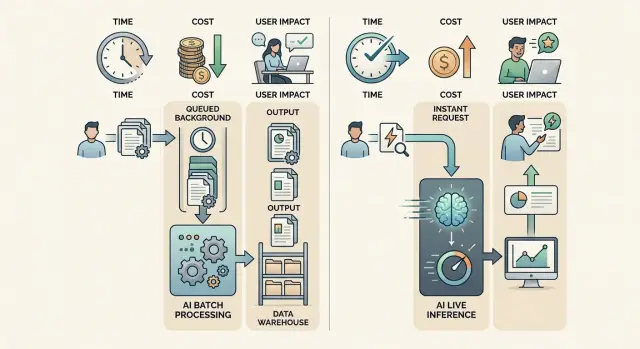
Table of Contents
Why one path for every task causes trouble
Many teams start with one simple rule: send every AI task through the live API. It works early on because it is easy to build and easy to explain. Then usage grows, and that shortcut starts creating problems.
A user waiting on a screen needs an answer now. A nightly job that tags 50,000 records does not. When both tasks go through the same path, urgent work and background work compete for the same budget, the same queue, and the same engineering time.
The symptoms show up fast:
- screens load more slowly
- background jobs pile up
- retries push costs higher
- queue rules become messy because every task has different timing needs
The choice between batch jobs and live API calls is not a small API detail. It shapes both product feel and operating cost. If a task happens after a click, a chat message, or a search, even a short delay feels bad. If nobody is waiting for the result, paying for fast handling on every request is usually wasteful.
A small product team can run into this earlier than expected. Picture a support tool that uses AI for live replies, ticket tagging, and weekly summaries. Live replies need seconds. Ticket tagging can wait a few minutes. Weekly summaries can run overnight. If all three go through one live path, a busy support hour can slow the replies users actually notice.
The queue logic also gets harder than it needs to be. Some jobs need immediate retries. Some can wait until traffic drops. Some should run in bulk to save money. One path for everything turns those differences into constant cleanup work.
The decision is usually simple: speed first or savings first. Once a team makes that choice task by task, the system gets easier to manage. Users stop waiting on work they should never see, and the company stops paying rush prices for background jobs.
What batch jobs fit best
Batch jobs are AI tasks you queue and run in the background. No user waits on the screen for the answer. The result still matters, but it can arrive later without hurting the experience.
That makes batch a good fit when timing is loose and volume is high. If the output can show up tonight, tomorrow morning, or before the next internal review, you do not need a live call for each item.
Good batch candidates include nightly summaries of support tickets, calls, or product feedback, plus large-scale tagging, cleanup, and backfills. If you need to label thousands of records by topic or sentiment, clean messy text across a catalog, or fill in missing metadata, batch is usually the better path. The same goes for reviewing stored transcripts, logs, or older AI output.
These jobs share one trait: delay is acceptable. Nobody clicks a button and expects an answer in two seconds. The system can process a thousand items while the team sleeps, then deliver the finished set in the morning.
Imagine a product team that uploads a week of customer interviews and asks AI to label pain points and group similar comments overnight. Nobody needs those labels at 3:14 p.m. They need them before the next planning meeting. That is batch work.
The trade-off is straightforward. You usually save money and keep your live request path clear, but you accept delayed results. If something fails, you may notice later than you would in a real-time flow. That is fine for internal reports and maintenance jobs. It is a poor fit for chat replies, search help, checkout support, or anything that blocks a user.
A simple rule works well here: put high-volume background work in batch, and keep immediate user-facing work on the live path. Teams that make that split early waste less money and avoid a lot of self-inflicted latency.
What live API calls fit best
Live API calls fit moments when someone is waiting for an answer right now. Your app sends a request, the model responds within seconds, and the user stays in that flow.
These calls matter when the AI output changes what the user does next. If the reply takes too long, the feature feels broken even when the answer is good. A fast, good-enough answer often beats a perfect answer that arrives after the user has already moved on.
Typical examples are chat inside a product, search help that rewrites or explains results, form feedback while someone is typing, moderation checks before content goes live, or small workflow steps such as drafting a reply on demand.
These are interactive tasks. A person clicks, types, or submits something, then waits. That waiting time becomes part of the product.
Take a simple signup form. If the app gives instant feedback on unclear answers, missing details, or tone, the user can fix the problem on the spot. That works well as a live API call. If you send the same task to a batch job, the answer may arrive after the user has already left.
Live calls also make sense for system actions that block the next step. A support tool may need to suggest a reply before the agent sends a message. A search box may need to explain a result before the user clicks away. In both cases, speed matters more than total daily volume.
That last point trips teams up. They focus on request count, but live requests are mostly about delay, not scale. Even if total volume is modest, these calls deserve the fastest path because they shape what the user feels second by second.
How latency changes the decision
Latency matters most when a person is waiting and deciding what to do next. If the answer changes what they type, click, or approve in that moment, use a live API call. If the work can finish after they move on, a batch job usually makes more sense.
A few extra seconds feel very different depending on the screen. In a chat box, even a short pause feels awkward. People wonder if the app froze, they rephrase their message, or they click twice. In a back-office workflow, that same delay often causes no trouble at all. If a system classifies invoices, rewrites product descriptions, or scores support tickets in the background, a queue is often fine.
The simplest rule is this: if the user is staring at the result, latency is expensive. If the user can leave and come back later, latency is usually cheap.
You do not need perfect metrics to sort most tasks at the start. Ask a few plain questions instead. Does the result affect the next action on the same screen? Is the task part of chat, search help, an agent handoff, or a quick form check? Or is it really an import, summary, tagging run, cleanup job, or another piece of work nobody needs to watch?
A small product team can see this quickly in practice. If a user asks a support bot, "Can I change my plan today?" the answer needs to arrive right away because the user is still in the conversation. Now compare that with scanning 8,000 old tickets to find refund patterns. No customer is waiting for that result on screen. The team can run it later without hurting the experience.
Queues frustrate users when they block a flow that feels live. They work well when they stay behind the scenes and the product makes that clear. A simple status such as "processing" or "you'll see this soon" often removes confusion.
If you are unsure, ask one question: does this task belong to the person in front of the screen, or to the system in the background? That answer usually tells you which path to pick.
How cost changes with volume
Cost does not rise in a straight line. A few live requests each minute may seem cheap, but the math changes when the same pattern scales to thousands or millions of calls. Every live request pays for urgency: instant processing, higher concurrency, and stricter retry logic when something fails.
That makes this a budgeting question as much as a technical one. If work can wait, batch usually gives you a better cost profile at higher volume. A nightly run that classifies support tickets, summarizes transcripts, or tags product data can process a large backlog without paying the extra price of immediate answers.
Batching also helps when work arrives in spikes. Many teams have quiet hours followed by a flood of documents, messages, or records. If they push that entire spike through the live path, they often spend more on rate limit handling, repeated retries, and extra infrastructure around the request flow. A queue and batch processing flatten that spike and make spending easier to predict.
The hidden costs usually come from habits that look harmless at first. Teams retry failed live calls without checking why they failed. They send full documents when a short excerpt would do. They use the same live model for both user actions and background cleanup. They keep processing low-priority data that nobody reads or uses.
Live calls still make sense when delay hurts revenue, trust, or task completion. If a user is waiting for an answer in chat, during checkout, or inside a support tool, the higher unit cost can be worth it. One fast reply that prevents an abandoned order can pay for many cheap batch runs.
A practical rule works well here too: spend more only where speed changes the outcome. Spend less where time does not matter.
How to sort tasks step by step
Most teams make this harder than it needs to be. The cleanest way to handle routing is to sort work by one rule: is a person waiting right now, or not?
Start with a plain list of every AI task in your product. Include the obvious ones, like chat replies and search answers, but also the quiet background jobs people forget about, such as tagging content, cleaning data, writing summaries, scoring leads, or checking support tickets overnight.
Then go through the list one item at a time. Write each task in plain language. "Reply to a chat message" is better than "assistant feature." Mark whether the user is waiting. Estimate rough daily volume and how much delay the task can tolerate. Then route by urgency first and scale second.
This simple pass gets you surprisingly far. Fast, visible actions usually belong on the live path. Large runs, retries, and background processing usually fit batch better.
Mixed flows deserve extra attention. Some features need both paths. A live call can give the user a quick first answer, while a batch job does deeper analysis later.
That matters more than most teams expect. Products rarely split cleanly into all real-time AI requests or all asynchronous AI workflows. A support tool is a good example. An agent may need an instant draft reply during a conversation, but the full conversation can still go through a batch job later for quality scoring, topic tagging, and weekly reporting.
If you are unsure about a task, check the cost of being late. A late background summary is annoying. A late answer in live chat feels broken.
Keep the first version of your routing rules simple. You can refine them after a week or two of real traffic. What matters is that every task has a reason for its path instead of all of them fighting for the same one.
A realistic example from a small product team
Picture a five-person SaaS team that handles support inside its product. The team wants two things at once: faster replies for customers and better insight into what keeps going wrong. They do not need one AI path for both jobs.
During the day, support agents answer tickets live. When an agent types a reply, the app sends a live API call with the current message, the last few support notes, and the customer plan level. The model returns a suggested answer in a second or two. That speed matters because the agent is still in the conversation. If the answer lands 30 seconds later, it is useless.
At night, the team runs a batch job on the full day of conversations. The model drafts replies for older tickets still waiting in the queue, scores past chats by topic and sentiment, and groups common issues into buckets such as failed exports, login trouble, or billing confusion. Nobody needs those results right away, so the team chooses the cheaper path and lets the work finish in the background.
By morning, agents open the support tool and see two kinds of help. They see overnight drafts on older tickets, which saves time on the backlog. They also still get live suggestions when a fresh message comes in.
The product goal never changed. The team still wants better support and shorter response times. They just stopped treating every task like a real-time request.
That is the practical side of OpenAI batch jobs vs live API calls. One team can use both without changing the user experience. Customers get quick answers when they are waiting. Managers get grouped issues and trend reports later, when timing does not matter.
Small teams usually feel the benefit quickly. Live calls help the front line. Batch jobs handle the heavy analysis after hours. Costs stay under control, and the team gets more useful output than it would from a single route.
Mistakes that waste money or slow users down
One expensive mistake is treating every AI task as if it needs the same speed. A chat reply, autocomplete hint, or support agent assist should not sit in a slow queue for minutes or hours. Users notice delay fast. If they are waiting on a screen, send that request live, or do not put AI in that step at all.
The opposite mistake hurts the budget. Teams often push nightly tagging, transcript cleanup, large backfills, or report generation through live calls because that path already exists in the code. It works, but the bill climbs for no good reason. If nobody needs the answer right now, move it to batch and let the system run while people sleep.
Another common problem is using one rule for tasks that only look similar. "All summaries go to batch" sounds tidy until one summary appears inside the inbox UI and another runs in the background for analytics. Same model. Different timing need.
Duplicate work is another quiet leak. One team may trigger a live classification when a user uploads a file, while another team runs the same classification again overnight for reporting. Now the product pays twice and stores two answers that may not match. Give each task one owner and log where it runs.
A short review catches most waste:
- check whether a person waits for the answer
- check whether the same task already runs elsewhere
- check whether costs jump when volume spikes
- check whether slightly older results are still fine
- check whether the product changed since you made the rule
That last check matters a lot. A background task can become user-facing after one UI update. A live request can become overnight processing after one workflow change. Revisit routing when the product changes, not only when you launch.
Quick checks before you choose
Teams often pick one AI path by habit. That is how costs creep up and users start waiting for work that never needed an instant answer.
A better filter is simple: ask what the person on the other side expects, and ask what the job looks like at scale. If someone is staring at a loading state, a live call usually makes sense. If nobody will notice whether the answer shows up now or after lunch, batch is often the cleaner choice.
Before you route a task, check five things. Is a person waiting on the result right now? Can the task run later without confusing anyone? Does the job arrive in large, predictable waves? What actually breaks if the result shows up minutes or hours later? And what happens when the live path gets crowded?
That last question matters because good systems need a fallback. Sometimes that fallback is a queue. Sometimes it is a cached result, a smaller model, or a message that says the result will arrive shortly.
A small product team can test this quickly. Put support chat drafts and in-app assistants on the live route. Move nightly ticket summaries, lead scoring refreshes, and bulk content cleanup into batch. That split alone often cuts waste because you stop paying live prices for work nobody sees in real time.
If you still hesitate on a task, run one last test: would a delayed answer feel broken to the user, or merely later than usual? That answer tells you more than any architecture diagram.
What to do next
Do not rebuild your whole AI stack at once. A small review usually shows enough to make a better routing plan.
Pick two workflows this week: one that costs more than it should, and one that feels slow for users. That gives you a clean before-and-after view instead of a messy rewrite.
Treat this as an operations decision, not a model preference. Write down each task, where it runs now, where it should run, and one plain reason for that choice. Measure current wait time on the live path. Check monthly request volume and token spend. Mark each task as live or batch. Then test the new split on a small sample first.
Keep the test narrow. Leave chat replies on live calls, but move nightly summaries, tagging, or bulk cleanup into batch jobs. If support agents still get fast answers and your monthly bill drops, you have proof before you change more.
A simple spreadsheet is enough for the first pass. You do not need a new dashboard before you know what you are fixing. In many teams, 20 minutes of honest mapping reveals work that never needed real-time AI requests in the first place.
Watch two numbers during the test: user wait time and monthly usage. If users do not notice a delay and the slower path cuts cost, keep it. If the batch path creates a queue that hurts operations, move that task back to live and try another candidate.
When routing logic touches product, infrastructure, and budget at the same time, an outside review can help. Oleg Sotnikov, through oleg.is, works as a Fractional CTO and startup advisor for teams dealing with AI-driven products, infrastructure, and automation. If your routing choices are tangled up with architecture and delivery problems, that kind of review can save a lot of trial and error.
Start small and keep it concrete: review two workflows, test one split, and keep the change only if the numbers improve.


