Open source SaaS alternatives for a young product stack
Open source SaaS alternatives can cut early costs if you choose practical tools for auth, email preview, queues, feature flags, and files.
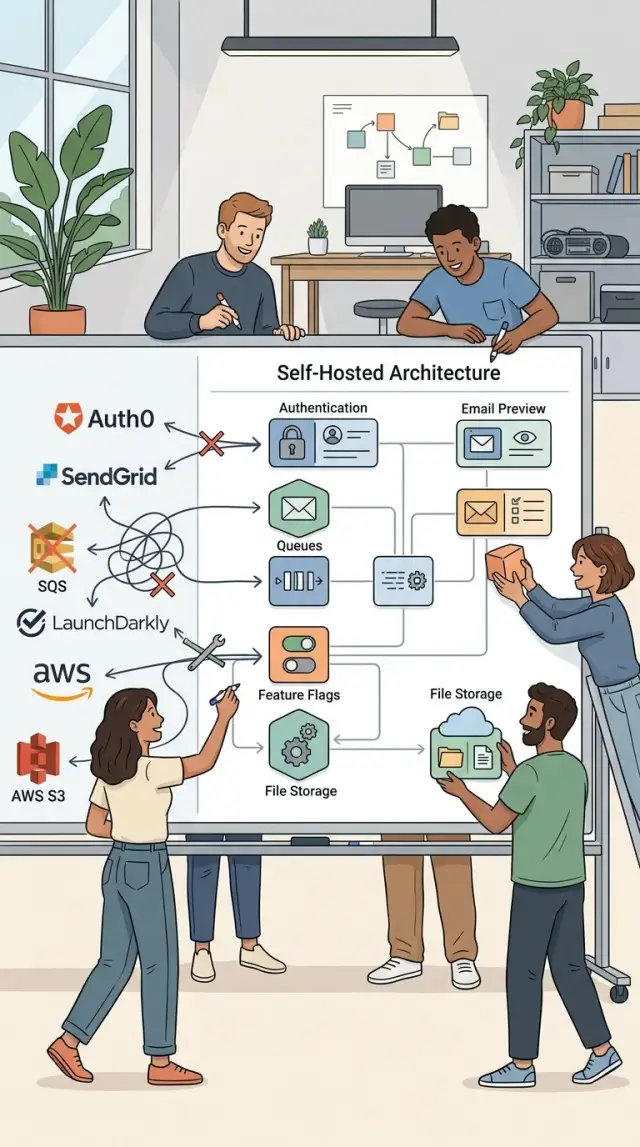
Table of Contents
Why SaaS bills pile up early
Early product teams buy hosted tools for a simple reason: they save time on day one. A login service, an email testing inbox, a queue dashboard, a file tool, a feature flag service. Each one looks cheap on its own.
The problem starts when those small charges become fixed monthly burn. A team might pay $19 here, $49 there, then another fee for seats, logs, storage, or API calls. Before the product has steady revenue, the stack already has a real rent bill.
There is also the hidden cost of too many admin panels. Someone has to manage users, roles, billing settings, webhook secrets, alerts, and renewals across all of them. Even when the tools work fine, the team spends time switching tabs and keeping everything in sync.
Usage pricing makes this worse as the product grows. More users mean more logins. More signups mean more emails. More activity means more background jobs and more files to store. Costs rise with success, which sounds fair until a young product gets hit with bills built for a much larger company.
A lot of early needs are simpler than SaaS pricing pages suggest. Many teams do not need a hosted service for every part of the stack. They need password reset emails that render correctly, a queue that runs jobs, and file uploads that do not break. That is why open source SaaS alternatives can make sense early.
Oleg Sotnikov often pushes teams to trim duplicate services first. It is a sensible rule: spend money where hosting truly saves time, and run the boring parts yourself when they stay small and predictable.
What to replace first
Start with the SaaS tools that get more expensive every time your product grows. Per-seat billing and per-event billing look harmless at first, then turn into a monthly tax on normal usage. Admin accounts, internal testers, queued jobs, and preview environments can push costs up long before revenue catches up.
Good first replacements usually share one trait: your team can run them without learning a whole new craft. If setup takes a week, needs three extra services, or breaks every time you deploy, it is too early for that switch.
A simple order works well:
- Replace tools billed by seat or by usage spikes first
- Keep payments on managed services for now
- Keep real email delivery on managed services for now
- Move one layer at a time, then watch it for a week
Payments and outbound email are usually not the best first target. They touch money, deliverability, fraud checks, compliance, and support headaches. A young team rarely saves enough by moving them in-house early.
Feature flags, internal auth, queue workers, email preview, and file handling are safer places to start. They are closer to your app, easier to test, and easier to roll back if something goes wrong. That makes them better candidates when you are comparing open source SaaS alternatives.
A small example helps. If your product has six team members and a few thousand background jobs a day, swapping a paid queue dashboard or preview inbox tool can cut bills fast. Swapping payments at the same stage can create far more work than it saves.
Pick the layer your team already understands, replace it, and leave the rest alone until the new setup feels boring. Boring is the goal.
Auth you can host yourself
Paid auth tools feel easy at first, then the bill grows with every new user. For a young product, self-hosted auth often gives you enough control without adding another monthly cost.
If your app uses Next.js or a simple Node setup, Auth.js is a practical starting point. It fits well when you want sign-in, sessions, and common providers without a heavy admin layer. If your team already knows the app code well, Auth.js usually feels close to the rest of the stack.
SuperTokens works well when you want more built in from day one. It covers login, sessions, password reset, and user management in a way that saves time for small teams. You still host it yourself, but you get more guardrails than a lighter library.
Keycloak is a different choice. It makes sense when you need SSO, detailed roles, or one login across several products. For a small app with one web client, it can feel bigger than you need. For a B2B product with admin roles and company accounts, it starts to make more sense.
A simple rule helps:
- Pick Auth.js for a lean Next.js or Node app.
- Pick SuperTokens if you want auth flows ready sooner.
- Pick Keycloak if SSO and role control matter early.
Start with email login before social providers. Google or GitHub sign-in sounds nice, but it adds setup, edge cases, and support work. Email magic links or email plus password are often enough for the first version.
Keep reset and invite flows plain. A founder inviting two teammates does not need a complicated account system. One clear reset email, one invite email, and short session rules will cover most early users.
If you cannot explain the auth flow on one page, it is probably too complex for a young product.
Email preview without a paid inbox tool
Early products send a surprising number of emails. Password resets, invites, sign-up confirmations, billing notices, and support replies all need testing before you let real users see them.
A paid inbox testing tool can feel unnecessary at this stage. If your team mostly needs to catch outgoing mail during development and check templates locally, Mailpit or MailHog usually does the job.
Mailpit or MailHog
Mailpit is the easier pick for most new projects. You run it next to your app, point SMTP to it, and every outgoing message lands in a local inbox instead of going to a real email provider. That makes it easy to review subject lines, sender names, broken layouts, and missing variables.
MailHog still works well, especially in older Docker setups where teams already know it. It is simple, light, and good enough if you only want to inspect raw emails and basic HTML output.
This setup catches the stuff people miss when they test too late. A reset email might show the wrong product name. An invite email might have a broken button. A confirmation email might look fine on desktop and awkward on mobile.
For a young product, these are the checks that matter most:
- Send a password reset email from the real app flow
- Trigger an invite email for a new teammate or test user
- Open both HTML and plain text versions
- Check placeholder data like names, URLs, and expiry times
- Confirm nothing goes to a real customer by mistake
If you use email preview tools this way, you catch small errors before they turn into support tickets. It also speeds up day-to-day work. A developer can change a template, reload the inbox, and see the result in seconds.
Use a real email service only when you need delivery, reputation, and production sending. For local work, a self-hosted inbox is cheaper, faster, and usually less annoying.
Queues for background work
If your app sends emails, resizes images, calls webhooks, or imports data, do not make users wait for that work in the request itself. Put it in a queue. The page responds fast, and the job finishes a few seconds later.
This is one of the easiest ways to cut load spikes and random timeouts in a young product. It also makes failures less painful. If a webhook target is down for two minutes, the app does not need to fail with it.
For Node apps, BullMQ is a solid pick. It uses Redis, handles delayed jobs well, and gives you a clean way to schedule retries and control concurrency. If your stack already has Redis, BullMQ usually feels like the shortest path.
If you want fewer moving parts, pg-boss is a smart option. It runs on Postgres, so you can keep jobs in the same database you already use. That choice is often better for small teams that do not want another service to watch, patch, and back up.
Python teams often land on Celery. It fits long-running tasks well, especially when jobs can take a while, like document parsing or video processing. Celery takes more setup than a lightweight queue, but it pays off when background work is a real part of the product.
A simple rule helps: move slow, failure-prone work off the request path first. That usually means:
- image processing after upload
- outgoing webhooks
- email sending
- report generation
- imports and sync jobs
Set a few guardrails on day one. Add retries with a limit, log every failure with the job payload and error, and cap concurrency so one noisy job type does not choke the worker. Teams often skip that early, then spend a weekend guessing why jobs disappeared or ran five times.
Feature flags without another bill
Feature flags help small teams ship code before they expose it to everyone. That matters when you want to test a new flow with 5% of users, turn it off fast, or give early access to one customer without a fresh deploy.
Unleash is a good fit when you need more control. It gives you rollout rules, user segments, and audit history, so you can see who changed a flag and when. That makes a big difference once more than one person touches releases.
Flagsmith is easier when your needs are simpler. It works well for app and API toggles, and it does not take much effort to understand. If your product is young and you mostly need to hide unfinished work or enable a feature for a small group, that may be enough.
Use flags for release control, not as permanent settings. A flag should help you launch, test, and remove risk. If the switch stays on for months and nobody plans to remove it, move that logic into normal product settings or plain code. Old flags pile up fast, and they make bugs harder to trace.
Flag names matter more than teams expect. Name them after the user action or product behavior, not an internal sprint label. "allow_team_invites" tells the truth. "sprint_17_toggle" tells you almost nothing three months later.
A simple rule works well:
- add a flag when a release needs safety
- review old flags every few weeks
- delete the flag when the feature becomes normal product behavior
That habit keeps feature flags useful instead of turning them into clutter.
File handling you control
Paid file services look easy at first, but they often get expensive right when people start uploading real data. A young product can avoid that bill with a small stack it runs itself.
MinIO is a good base. It gives you S3-style object storage on your own servers, so your app can store images, documents, backups, and exports without changing how developers think about file storage. If you already use tools that expect S3, MinIO usually fits without much drama.
On the browser side, Uppy makes uploads feel normal instead of fragile. It handles file picking, progress bars, retries, and status messages. That matters more than it sounds. If a user uploads five photos and one fails, they need to know which one failed and what to do next.
Large uploads need extra care. tusd helps when someone sends a big video or a large ZIP file from a weak connection. If the upload stops at 82 percent, tusd can resume it instead of forcing the user to start over. That alone can save a lot of support messages.
For images, keep processing simple. libvips is often the better pick if you want fast resizing and lower memory use. ImageMagick still works well and has wider name recognition, but it can feel heavier than you need for basic thumbnailing and format conversion.
Set a few rules before launch:
- limit file size by type
- allow only the formats you actually need
- scan uploads for malware
- store originals and generated thumbnails separately
- delete abandoned temp files on a schedule
A simple example is enough for many teams: Uppy in the frontend, tusd for resumable uploads, MinIO for storage, and libvips for image jobs. That stack is boring in a good way. It gives you control, lower costs, and fewer surprises when upload volume starts to climb.
A simple setup for a young product
A young product does not need a pile of paid services to work well. A small team can run a web app on Next.js, keep core data in Postgres, and use Redis for caching, sessions, and background jobs. That gives you a stack that is easy to explain, easy to debug, and still cheap enough to live with while the product finds its shape.
A practical setup uses a few self-hosted tools around that base.
- Auth.js manages sign-in and sessions inside the app.
- Mailpit catches password resets, magic links, and welcome emails during development.
- BullMQ handles slower tasks like report generation, file processing, and upload cleanup.
- MinIO stores user files in an S3-compatible bucket you control.
- Postgres stays the source of truth for users, products, and billing data.
The nice part is how these pieces fit together without much ceremony. A user logs in through Auth.js, uploads a file to MinIO, and the app pushes a job to BullMQ to scan or convert that file. If the flow sends an email, the team can inspect it in Mailpit before anything reaches a real inbox.
This is why open source SaaS alternatives make sense early on. You keep the moving parts close to the product, so local development feels like production instead of a rough copy of it. When something fails, the team checks one app, one database, one Redis instance, and the services around them.
For many young products, that is enough for a long time. You can run this setup on modest infrastructure, keep monthly costs predictable, and replace parts later only when real usage forces the change.
How to switch without breaking the product
A safe swap starts with boring paperwork. Make a plain list of every paid tool, what it actually costs each month, and what part of the product depends on it. Include hidden costs like extra seats, overage fees, and the time your team spends working around the tool.
Then pick the loudest bill first, not the tool with the fanciest replacement. If one service costs $300 a month and another costs $20, you usually learn more by replacing the expensive one. Young teams do better with one clear win than five half-finished migrations.
Use a small process and repeat it.
- Run the new tool in local development first.
- Copy one real workflow, such as signup, file upload, or a background email.
- Move that single workflow to production for a small group.
- Watch errors, support messages, and task times for a few days.
- Keep going only if the numbers stay steady.
This step-by-step approach matters more than the tool itself. A self-hosted auth system can work well, but it still causes trouble if password resets fail or session timeouts change without warning. The same goes for queues, file storage, and feature flags.
Keep short notes while you migrate. You do not need a big manual. Write down how to back up the service, how to restore it, how to update it, and who owns it. When something breaks on a Friday night, those four notes save more time than a long planning doc.
Teams that switch carefully usually spend less and sleep better. Teams that move everything at once often end up paying for both stacks while they fix avoidable mistakes.
Mistakes that create more work
The fastest way to waste time with open source SaaS alternatives is to pick tools built for a team ten times your size. A two-person product usually does not need a cluster, three dashboards, and a week of setup just to send emails or run background jobs. If a tool needs constant care, it is not cheap. It is extra work.
Another mistake is adding a new database for every service. One tool wants Redis, another wants Postgres, and a third wants both. That may be fine later, but early on each extra data store adds backups, updates, alerts, and more ways to fail. If one solid Postgres setup can cover most of your needs, that is often the calmer option.
Teams also copy enterprise auth flows too soon. Single sign-on, tenant mapping, complex roles, device history, and long approval steps sound smart, but they slow down a simple product. If your users only need email and password plus reset flow, start there. Add more when real customers ask for it.
Files and jobs often get ignored until something breaks. A young product can run for months without trouble, then one full disk or bad deploy wipes queued work or uploaded files. Backups feel boring, but restoring lost invoices, images, or signup emails is much worse.
Feature flags create their own mess. After a launch, many teams leave old flags in place because removing them feels risky. Six months later, nobody remembers what "new_checkout_v2" controls, and every change touches dead branches. If a flag has done its job, delete it from code, config, and notes. That cleanup saves real hours later.
Quick checks before you choose
A cheap tool can still cost too much if your team has to learn a new stack just to keep it running. Start with what your developers already use every week. If your product already runs on Node.js and Postgres, a package that fits that setup will usually beat a clever pick written in a language nobody on the team knows.
Before you add anything to your open source SaaS alternatives list, check a few practical points:
- Your team can read the code, debug the logs, and update it without outside help.
- You can run it with Docker and as few moving parts as possible, ideally one database.
- You can back it up with the same routine you already use for the rest of the product.
- It can handle the file uploads, background jobs, and retries you expect over the next year.
- A new engineer can understand the setup in one sitting.
Backups deserve extra attention. A tool may look easy on day one, then become annoying when you need to restore user data, email templates, or job records after a bad deploy. If backup and restore steps feel messy during setup, they will feel worse during an incident.
Volume matters too. A queue that works fine at 100 jobs a day may struggle when you send thousands of emails, process uploads, or generate reports in bursts. You do not need huge scale on day one, but you do need a clear idea of where the limits are.
A small team should prefer boring tools. If auth needs three extra services and a long setup guide, skip it. When the next engineer joins, they should understand the stack fast and make changes without fear.
Next steps for your stack
Most teams do better when they replace one paid service at a time. Swapping auth, queues, feature flags, and file handling in the same month sounds efficient, but it often creates bugs, extra support work, and messy rollbacks.
Pick the area that hurts most right now. If login costs keep climbing, start with self-hosted auth. If background jobs fail too often, move the queue first. If your team only needs a safe place to inspect emails during development, replacing the inbox tool may give you the fastest win.
A small plan is usually enough:
- choose one service to replace this month
- give one person ownership of updates, backups, and monitoring
- copy only the features your product already uses
- keep the old service available for a short overlap if possible
Keep the first version boring. That is usually the right call for a young product. If your app sends password resets and magic links, support those flows first. If you upload avatars and PDF files, handle those well before you build image pipelines, virus scanning rules, and six storage backends.
A simple example: a small team may leave paid auth alone for now, but replace a paid email preview tool in a day and move background jobs the next week. That cuts costs without touching the riskiest part of the product.
Monitoring needs an owner, even for a tiny setup. Someone should check logs, watch disk usage, rotate secrets, and know what breaks when a service stops.
If your team is split between options, Oleg Sotnikov can review the tradeoffs as a fractional CTO. A short review can save you from choosing a stack that looks cheap at first but costs time every week.


