OIDC for CI/CD: replace long lived cloud keys in pipelines
OIDC for CI/CD lets GitHub Actions and GitLab reach AWS and Google Cloud without stored keys. Learn setup steps, checks, and common mistakes.
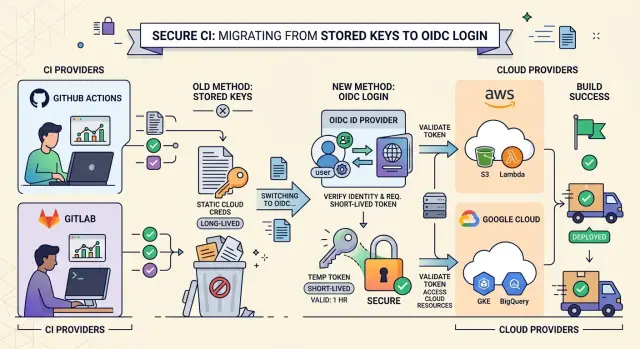
Table of Contents
Why stored cloud keys cause trouble
Teams often put cloud credentials in places that feel safe enough. They add AWS access keys to GitHub Actions secrets, keep Google service account JSON in GitLab CI/CD variables, copy credentials into runner env files, or pass them through a secret manager into build jobs.
That setup works, but it creates quiet risk. A pipeline secret can leak through debug logs, copied config files, a forked project, a backup, or a developer laptop that used the same value for testing.
The bigger problem is how long the damage can last. If someone gets a static cloud key, they can often use it for weeks or months. The pipeline run ends in minutes, but the stolen credential stays valid long after the job finishes.
Manual rotation sounds easy until it meets real work. One team updates the secret in GitHub but forgets the staging runner. Another rotates the AWS user but misses an old scheduled job. People put it off because nobody wants to break deployments on a Friday.
Static secrets also spread. One credential starts in a single repo, then ends up in copied pipeline templates, local test scripts, emergency notes, abandoned projects, and shared vault entries. After a while, nobody knows where the last live copy still exists. That uncertainty is a security problem by itself.
Short-lived access fixes the part that hurts most. If a job gets credentials only for one run, a leak has a much smaller window. An attacker cannot reuse last month's secret if last month's secret no longer exists.
That is why OIDC for CI/CD is more than a cleanup task. It cuts down secret sprawl, reduces rotation pain, and lets the pipeline ask the cloud for temporary access only when a job actually needs it.
How OIDC changes the sign-in flow
With OIDC for CI/CD, a job asks its CI platform for an identity token when it starts. GitHub Actions or GitLab creates that token for that specific job and signs it. The token includes claims that describe who issued it, who it is for, and which repo, branch, tag, or pipeline created it.
AWS or Google Cloud does not accept that token blindly. The cloud checks the issuer, then the audience, then the subject and any other claims you use in policy, such as repo name, branch, environment, or project path. If those values match your rules, the cloud returns temporary credentials. If they do not match, the job gets nothing.
In AWS, the job usually receives a temporary role session. In Google Cloud, workload identity federation exchanges the CI token for a temporary access token or service account access. Either way, the credential expires soon, so a leak has a much smaller blast radius than a long-lived cloud secret.
That is the real shift. The job does not carry a saved secret in repo settings, CI variables, or runner config. It proves who it is at run time and gets access only for that session.
The old model is like a pipeline carrying a permanent badge in its pocket. OIDC works more like a front desk. The job shows a fresh signed pass, the cloud checks the details, and then hands over a badge that stops working soon after the run ends. That small change removes a lot of secret storage and a lot of cleanup later.
What to prepare before setup
OIDC for CI/CD gets much easier when you map access before you touch AWS or Google Cloud. Many teams start on the cloud side first, then end up with roles that are too broad or trust rules nobody understands a week later.
Start with a simple inventory. Write down each repository and mark the jobs that truly need cloud access. In many pipelines, tests, linting, and local builds do not need any cloud identity at all. The usual candidates are image publishing, infrastructure apply jobs, and deployment steps.
For each job, note four things: what repo it belongs to, what exact step needs cloud access, whether it needs read, write, or deploy rights, and which branch or tag is allowed to trigger it. That small exercise saves time later.
Split build and deploy permissions early. A build job may only need to push an image or upload an artifact. A deploy job can change live systems, so it should use a different AWS role or a different Google Cloud service account with tighter trust rules.
This matters more than people expect. If one job token leaks in logs or a workflow file changes by mistake, the damage stays smaller when the role covers one narrow task.
Be specific about who can assume each role. Decide whether main, protected branches, release tags, or scheduled pipelines should have access. For example, you might allow main to deploy to staging, allow only signed release tags to deploy to production, and give feature branches no cloud access at all.
Test the first rollout outside production. Pick one low-risk repo and one non-production account or project. Run the pipeline, inspect the issued identity, and make sure denied actions fail cleanly. A good OIDC setup should block the wrong branch, the wrong tag, or the wrong job without any drama.
Teams that work across several repos or environments often get better results by keeping the design boring: few roles, clear trust rules, and a staging rollout first. That approach makes the move away from static credentials much calmer.
Connect GitHub Actions to AWS
GitHub Actions can sign in to AWS without stored secrets. AWS trusts a token that GitHub issues for one job, then gives that job a temporary role session. If you keep the trust rules tight, a workflow from the wrong repo or branch cannot use it.
Start in AWS IAM by adding GitHub as an OpenID Connect identity provider. AWS uses that provider to verify the token GitHub Actions sends during a run.
Then create an IAM role for the workflow to assume. The trust policy matters more than most teams expect. Do not allow every repository in your GitHub account. Limit the role to the exact repo, and if possible, the exact branch or tag pattern that should deploy.
In practice, the trust rule usually does four things. It allows the GitHub OIDC provider as the federated principal, requires the audience claim AWS expects, matches the subject claim to one repo, and narrows access to refs/heads/main or another approved branch.
That alone removes a lot of risk. A pull request from a fork, a test repo, or a random branch should not be able to touch production.
Next, attach only the AWS permissions the job actually needs. If the workflow only pushes a container image, give it ECR permissions. If it only uploads a build artifact to S3, give it access to that bucket and path. Avoid broad admin rights just to get the first run working.
In the GitHub workflow, request an ID token and then assume the role. The job needs id-token: write so GitHub can mint the token, and it usually needs contents: read to fetch the repository. Then use the AWS role ARN in the authentication step.
Before you add deploy commands, test the session with a simple identity check. Run aws sts get-caller-identity and confirm the account, role, and session name match what you expect. That command catches most setup mistakes quickly.
For a safe first rollout, point one non-production workflow at the new role, verify the identity check, and then remove the old static credentials from repository secrets. That order keeps the change small and easy to undo if the trust policy is too strict.
Connect GitLab to AWS
GitLab can get temporary AWS credentials during a job, which means you can stop storing an access key in CI variables. The part that matters most is trust. Decide exactly which GitLab token claims AWS should accept, then keep that scope narrow.
Most teams should trust one project and one ref. For example, allow mygroup/myapp on main, or allow protected tags for releases. If you trust every branch in a group, any stray pipeline can reach the same role.
Create the AWS trust
In AWS IAM, add GitLab as an OpenID Connect identity provider. If you use GitLab.com, the issuer is https://gitlab.com. If you run GitLab yourself, use your own GitLab URL. Set the audience to sts.amazonaws.com.
Then create a role for the pipeline and lock its trust policy to GitLab claims. A common match uses the sub claim, such as project_path:mygroup/myapp:ref_type:branch:ref:main. That ties the role to one repo and one branch. If you also deploy from tags, create a separate rule for tags instead of widening the branch rule.
Keep the permissions policy small at first. Give the role only what the job needs, and start with a read-only check before any deploy action.
Update the GitLab job
Ask GitLab to mint an ID token for the job, write that token to a file, and let the AWS CLI use it as web identity credentials.
aws-check:
  image: amazon/aws-cli:2
  id_tokens:
    GITLAB_OIDC_TOKEN:
      aud: sts.amazonaws.com
  script:
    - echo "$GITLAB_OIDC_TOKEN" > /tmp/web_identity_token
    - export AWS_ROLE_ARN=arn:aws:iam::123456789012:role/gitlab-deploy
    - export AWS_WEB_IDENTITY_TOKEN_FILE=/tmp/web_identity_token
    - aws sts get-caller-identity
aws sts get-caller-identity is a good first test because it proves the role assumption worked without changing anything. Once that passes, add the real deploy permissions and remove the old CI secrets.
This is usually a small change in GitLab, but it closes an obvious gap. You remove a secret that can leak, make each branch prove who it is, and keep AWS access temporary by default.
Connect CI to Google Cloud
On Google Cloud, OIDC for CI/CD usually means Workload Identity Federation. Your CI job gets an OIDC token from GitHub Actions or GitLab, Google checks that token, and then issues temporary credentials. You no longer need to store JSON service account keys in project secrets.
Start by creating a workload identity pool, then add a provider for your CI system. The provider tells Google which issuer to trust and which token claims to read. For GitHub, teams often use claims like repository, ref, and sub. For GitLab, common claims are project_path, ref, and sub.
Claim mapping matters a lot. If you trust only the whole issuer, any repo on that platform could try to get access. Map the repo or project path into Google Cloud attributes, and if possible map the branch too. That lets you say "only this repo" or "only this project on the main branch" instead of trusting every pipeline.
Next, bind a service account to the trusted principal set that comes from those mapped attributes. In practice, you grant roles/iam.workloadIdentityUser on the service account to that principal set. Then give the service account only the cloud roles the job needs, such as read access to one bucket or deploy access to one service.
The token exchange happens during the job. The CI platform issues an OIDC token, Google Security Token Service accepts it, and the job receives temporary access tied to that service account. Most teams use an auth action or a small login step, then run gcloud or the SDK as usual.
A safe first test is this:
gcloud auth list
If the setup works, gcloud shows the federated or impersonated account instead of falling back to an old credential. After that, run one read-only command for the exact service you plan to use. If that read works and the old secret stays unused, you are close to removing static cloud credentials for good.
A simple migration example
A small team often starts with one deploy job and two saved secrets: AWS_ACCESS_KEY_ID and AWS_SECRET_ACCESS_KEY. The job works, but those secrets sit in repo settings for months, and anyone who can trigger the right workflow might end up using them.
A safer migration starts with that single job. Keep everything else the same for the first test. Change only the way the job gets cloud access.
Before:
env:
  AWS_ACCESS_KEY_ID: ${{ secrets.AWS_ACCESS_KEY_ID }}
  AWS_SECRET_ACCESS_KEY: ${{ secrets.AWS_SECRET_ACCESS_KEY }}
After the change, the workflow asks the CI platform for an OIDC token and swaps it for a temporary AWS session. In GitHub Actions, that usually means adding id-token: write and assuming an IAM role that trusts only your repo and branch.
permissions:
  id-token: write
  contents: read
Then lock production deploys to main only. The IAM trust policy checks the branch claim, and the workflow itself runs the deploy step only on pushes to main. That gives you two locks instead of one.
Untrusted forks need special care. Do not give cloud access to workflows triggered by pull_request from forks. Build and test can still run there, but deploy should wait for a trusted branch or a protected environment.
A simple rollout is enough. Leave the old secrets in place during the first test run, switch one deploy job to role assumption through OIDC, deploy to a non-production target first, verify the role can deploy only from main, and confirm forked pull requests cannot reach AWS.
Once that works a few times, delete the old AWS secrets from the repository or group settings and run the pipeline again. If the deploy still works and no step asks for the deleted secrets, the migration is done.
GitLab follows the same pattern. Use OIDC, trust only protected branches, and keep forked or untrusted pipelines away from cloud roles.
Mistakes that weaken the setup
The most common failure is treating OIDC like a simple swap for an old secret. OIDC for CI/CD reduces risk only when the trust rules stay tight. If your cloud role trusts any repository, any branch, or any tag from the CI provider, you have moved the secret problem rather than fixing it.
A deploy job should not accept tokens from pull requests, personal forks, or random feature branches. Limit trust to the exact repo, the exact branch or protected tag, and the exact workflow or pipeline context that needs it. That little bit of setup work blocks a lot of avoidable damage.
Another weak spot is access scope. Teams often give one job broad admin rights because it is faster during setup. Then the shortcut stays there for months. A build job usually needs to push an image or read a bucket. It does not need permission to change IAM, delete databases, or touch production secrets.
Using one cloud role for build, test, and deploy creates the same problem. Split them. Build can publish artifacts. Test can read test resources. Deploy can change production. If one token leaks in logs or a third-party action misbehaves, the blast radius stays smaller.
A few checks matter every time. Match the token subject to the repo and branch you expect. Check the audience claim so the token works only for your cloud trust setup. Create separate roles or service accounts for separate jobs. Remove any fallback path that still allows old secrets.
That last point trips up many teams. They finish workload identity federation, see it working, and leave long-lived cloud keys in CI variables "just in case." Then a later job keeps using the old credentials, or someone copies them into another project. Once the new path works, remove the old keys, rotate anything that existed before, and make the pipeline fail if a static credential appears again.
Good OIDC setups are usually boring. That is exactly what you want.
Quick checks before you remove the old keys
A clean cutover needs proof, not guesswork. Before you delete the old secrets, run the pipeline in the exact place your trust policy allows. If your rule says only the main branch can assume the AWS role or Google Cloud service account, trigger that job from main and confirm it succeeds without any stored cloud key.
Then try to break it on purpose. Run the same job from a branch that should not have access, such as a feature branch or a fork-safe test branch. The job should fail at the cloud sign-in step. That denial matters just as much as the success case because it shows your trust rules actually limit who can get temporary credentials.
Check the cloud audit log right after both runs. In AWS, confirm the expected role was assumed. In Google Cloud, confirm the expected service account was used through workload identity federation. You want to see the real identity from your CI system in the logs, not a mystery user and not an old access key.
A short checklist helps here:
- Run one successful job from an allowed branch.
- Run one blocked job from a branch outside the trust rule.
- Review the audit log entry for each run.
- Remove the old secrets only after both tests pass.
- Write down the trust rules in team docs.
That last step saves time later. Write the exact branch rules, repository names, audience settings, cloud role or service account names, and any subject claims you depend on. Six months from now, someone will rename a repo, split a monorepo, or add a release branch. If the rules live only in one engineer's head, the setup becomes fragile again.
Once both tests pass, delete the static keys from CI settings, project variables, secret stores, and any local fallback scripts. Leaving them around "just in case" defeats the whole point.
What to do next
Start with one pipeline that matters, but will not hurt too much if you need to pause it for an hour. A staging deploy is often the best first move. Replace the stored cloud secret with OIDC for CI/CD, run a few normal jobs, and write down what changed.
Track a few results so the team can judge the move on facts: how many stored secrets you removed, how long setup and rollback took, which trust or permission errors appeared, and whether your audit logs show the expected workload identity.
After one workflow works well, repeat the same pattern instead of redesigning it for every environment. Keep role names, claim checks, and branch or tag rules easy to read. Teams make fewer mistakes when staging and production follow the same shape.
Do not skip the people side. Spend a short session with the team on the two failures they will see most often: the cloud rejects the incoming token, or the token works and the action fails later because the role lacks permission. That sounds basic, but it saves a lot of time during the first real incident.
A short cheat sheet also helps. If sign-in fails, check the trust rule, issuer, audience, subject claim, and branch condition. If sign-in works but the job still fails, check the IAM policy or Google Cloud role binding.
If your setup spans GitHub Actions, GitLab, AWS, and Google Cloud, it helps to get a second set of eyes before you roll the pattern out everywhere. Oleg Sotnikov at oleg.is works as a Fractional CTO and startup advisor, and this kind of review fits well when a team needs help tightening trust rules, planning rollout order, or cleaning up infrastructure without adding more long-lived secrets.
Frequently Asked Questions
What problem does OIDC fix in CI/CD?
OIDC stops your pipeline from carrying long-lived cloud credentials. The job proves its identity at run time, then AWS or Google Cloud gives it short-lived access that expires soon after the run ends.
Do I still need stored AWS or Google Cloud secrets?
No. After you finish the setup, your pipeline can request temporary credentials instead of reading stored AWS access keys or Google service account JSON files from secrets.
How should I start the migration?
Start with one low-risk deploy job, usually staging. Keep the first rollout small, test the new sign-in path, and remove the old secret only after the job works a few times.
Which pipeline jobs should get cloud access?
Only give cloud access to steps that truly need it, like pushing images, applying infrastructure, or deploying. Tests, linting, and local builds usually do not need any cloud identity.
How do I lock GitHub Actions to one AWS role?
Create an IAM OIDC provider for GitHub, then create a role that trusts only your repo and approved branch or tag. In the workflow, add id-token: write and test with aws sts get-caller-identity before you deploy anything.
How does GitLab sign in to AWS without a saved secret?
Ask GitLab to issue an ID token for the job, write that token to a file, and let the AWS CLI use web identity to assume the role. Keep the trust rule narrow so only one project and one ref, such as main or protected tags, can use it.
How does this work with Google Cloud?
Use Workload Identity Federation. Your CI job gets an OIDC token from GitHub or GitLab, Google checks claims like repo or project path and branch, then your job uses a service account with temporary access.
Should pull requests from forks get OIDC cloud access?
No. Let forked pull requests build and test, but keep deploy roles away from them. Give cloud access only to trusted branches, protected tags, or protected environments.
How do I verify the setup before I delete old secrets?
Run one job from an allowed branch and confirm it succeeds without any stored cloud secret. Then run the same job from a branch that should fail, and check your cloud audit logs to confirm the right role or service account appeared.
What mistakes make an OIDC setup unsafe?
Teams usually trust too much and grant too much. They allow any repo or branch to assume the role, keep one broad role for build and deploy, or leave the old static credentials in CI settings as a fallback.


