Observability reset for a small company that cuts waste
Learn what an observability reset looks like in a small company, which signals to keep, what to drop, and how to cut noise and spend without losing visibility.
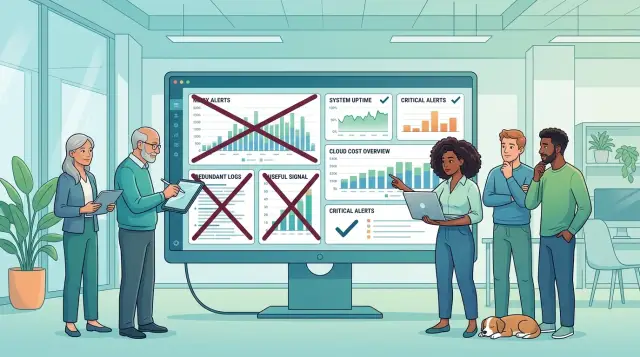
Table of Contents
Why small teams end up with too much noise
Small teams do not set out to build a noisy monitoring stack. It usually happens after a few stressful incidents. Something breaks, people add more alerts, keep more logs, and build another dashboard. That feels safe at the time, but the pile keeps growing.
After one painful outage, nobody wants to delete the alert that might help next time. So alerts stack up. A warning for high CPU stays. A second warning for the same issue appears in another tool. Then someone adds a third check, just in case.
A few months later, the team gets pinged for problems that fix themselves before anyone can react. That is how alert fatigue starts. People mute notifications, ignore dashboards, or assume the next page is another false alarm.
Data grows the same way. Logs stay longer because storage looks cheap at first. Extra metrics stay on because turning them off feels risky. Traces get collected too broadly because nobody has time to tune them. Soon the company pays to store a lot of data that nobody reads after the first few days.
Different tools often report the same problem two or three times. The cloud provider sends an alert. The error tracker sends another. The application monitor sends a third with slightly different wording. One real issue turns into a flood of messages, and nobody knows which one to trust first.
A typical setup ends up with the same few problems:
- alerts added after every incident
- retention rules nobody revisits
- multiple tools watching the same service
- rising bills and less trust in the numbers
That last part matters most. Noise is not just annoying. It changes how people work. Engineers stop checking charts during normal work because too many charts say too many things. During an incident, they waste time sorting through duplicates instead of finding the first clear signal.
That is usually when an observability reset makes sense. If the stack costs more each month but gives less clarity when something breaks, the team is collecting noise, not insight.
What good coverage actually looks like
Good monitoring starts with user pain, not with every number your tools can collect. If people cannot sign in, pay, load a page, or finish the main task, your team needs to know fast. That matters more than a dashboard full of graphs nobody checks.
A solid observability reset ties coverage to a short list of failure points. For most products, that list is simple: users can reach the app, the main action still works, response time stays reasonable, and background work such as emails, imports, or syncs does not pile up.
That is enough for many teams. More data often means nobody chose what matters.
Each service should also have a small health view. In practice, a handful of measures is usually enough: success rate, latency, error spikes, queue backlog, and one business signal such as completed orders or submitted forms. If a graph does not help the on-call person decide what to do next, it does not belong on the front page.
A small example makes this clearer. Picture a SaaS product with login, billing, and a nightly import job. Good coverage tells the team if login failures jump, payment requests start timing out, or the import queue stops moving. It does not collect endless debug logs from every container all day just because the tool allows it.
Storage should follow the same rule. Keep data only if it changes a decision. Cheap, long-term metrics are useful for trends. Detailed logs help with recent bugs, but only for a short window. Full raw logs with long retention sound safe, yet they often grow the bill faster than they help during incidents.
One test works well. Look at the last few incidents and ask which alerts, charts, and logs people actually used. Keep those. Remove the signals nobody opened, the alerts nobody trusted, and the logs that never answered a real question. Quiet systems are easier to run, and they usually tell you more when something breaks.
Start with the questions your team asks
Use the last real incident as your map. A team does not need more charts first. It needs a clear memory of what went wrong, what people checked, and what actually moved the fix forward.
Start the reset with one recent outage, slowdown, or strange bug. Pull the team into one room and replay the event in plain language. Skip theory. Talk about the last time customers felt pain.
Ask what actually broke. Be specific. "The site was slow" is too vague to guide anything. "Checkout requests timed out after a deploy" or "background jobs stopped sending invoices" gives you something you can measure. Once the problem gets specific, weak signals stand out fast.
Then ask who noticed first. This question exposes blind spots quickly. If support found the issue from angry emails, your monitoring missed a customer-facing failure. If an engineer spotted it from an error spike or failed health check, that signal earned its place.
Customer impact should come next. Many teams can tell you CPU, memory, and container counts, but they cannot say how many users got blocked. That is backward. You need a fast way to answer simple questions: how many logins failed, how many orders stopped, how many jobs got stuck, and how long the issue lasted.
Then ask which checks helped people fix it. During a real incident, teams ignore most of the stack. They open a few things again and again. Maybe one error tracker view showed the failing endpoint. Maybe one database latency chart pointed to the problem. Maybe one deploy marker explained the timing. Keep those.
Everything else should justify itself. If nobody opened a dashboard, alert, or log stream during the incident, it might look busy without being useful.
A five-minute replay often tells you more than a week of dashboard debate. Maybe a release slowed login for 18 minutes, support noticed first, and the team fixed it after checking the deploy timeline and one database chart. That teaches you far more than a wall of host metrics.
If a signal does not help answer what broke, who noticed, how customers were hit, or what fixed it, it is probably growing the bill more than it helps the team.
How to run the reset in one week
Seven days is enough if one engineer owns the work and one product person checks it against real incidents. The fastest way to cut noise is to compare every signal with what the team actually used in the last month.
Start with a single sheet. List every alert, dashboard, log stream, metric source, trace setup, and vendor line on the bill. Add the owner, monthly cost if known, and the last time someone used it. Unknown entries deserve attention first because they often survive for years on habit.
Then sort each item with plain labels. Useful means it helped detect, explain, or fix a real problem. Duplicate means another alert or dashboard tells the same story. Unused means nobody opens it, trusts it, or knows why it exists.
Be strict. A dashboard that looks nice but never changes a decision is unused. Three alerts that all fire during the same deploy are duplicates, even if each one comes from a different tool.
Before you delete old logs or traces, shorten retention. That gives you a safer test. If you keep debug logs for 30 days, cut them to 7 or 14 and watch support, incident response, and compliance needs for one release cycle. Most teams learn they needed a short window for deep detail and a longer window only for summary metrics.
Next, merge overlapping alerts into one rule a sleepy engineer can understand at 3 a.m. "Checkout is failing for more than 5 minutes" is better than a stack of CPU, memory, restart, and timeout alerts that all fire at once. This is where alert fatigue usually drops fast.
Use the last day to trim dashboards. Keep a small set: one service health view, one release view, and one place to inspect errors. If a chart has no owner or no action tied to it, remove it.
After the next release, review what the team missed and what nobody noticed was gone. That check matters more than debate in a meeting. If nobody asked for a deleted signal after a real release, you probably made the right cut.
A simple example from a small product team
Picture a five-person product team with a web app, a checkout flow, an API, and a few background jobs. Over time, their monitoring stack filled with noise. They had lots of dashboards, lots of alerts, and debug logs for almost every request. The bill kept growing, but answers did not come faster.
Their reset starts with four signals they actually use. They track app errors because broken screens hurt trust fast. They watch checkout failures because lost payments matter more than almost anything else. They measure API latency because slow requests often show up before bigger failures do. They keep an eye on database load because it often explains why the rest of the app feels slow.
Then they cut what nobody reads. The team stops storing debug logs for every request. Those logs helped during a few deep investigations, but on normal days they added huge volume and almost no value. Instead, they keep structured error logs, a small sample of request logs, and enough context to trace a customer problem when one appears.
They also shrink their alerts. Before the reset, nearly every metric had a threshold and someone got pinged for harmless spikes. That created alert fatigue, so people started ignoring notifications. After the cleanup, they keep one alert for customer-facing failures and one for background jobs that get stuck. If checkout errors rise or a job queue stops moving, someone acts. If CPU jumps for two minutes and nothing breaks, nobody gets dragged out of focus.
Their weekly review gets simpler too. They stop bouncing across ten tabs. One short check-in covers a few charts: error rate, checkout success, API latency, and database load. If a chart moves in the wrong direction, they ask one question: did users feel it?
That is usually enough. The team spends less on observability costs, finds real issues faster, and keeps attention on the parts customers notice first.
Where the bill usually grows
Small teams rarely overspend because they picked one expensive monitoring tool. The bill grows in quiet steps. A few extra labels, longer retention, full tracing turned on for everything, then a second tool that shows almost the same signal.
Metrics often cause the first jump. A team adds labels like user ID, route, region, plan, build number, and device type because each one seems useful. Put them together and one metric turns into thousands of time series. Most of those series never answer a real question, but you still pay to store and query them.
Logs are the next leak. Teams keep 30, 90, or 365 days because deleting data feels risky. Then nobody reads anything older than last week unless a legal, audit, or security need forces it. If your product has steady traffic, old logs pile up fast.
A simple rule helps: keep short retention for routine app logs, and keep longer history only for the small set you truly need. That alone can cut observability costs without hurting day-to-day debugging.
Tracing gets expensive even faster. Full traces for every request sound safe, but they flood storage when the system works normally. Most teams learn more from sampled traces plus good error tracking than from a giant pile of perfect trace data. Save full traces for failures, very slow requests, and fresh releases where engineers need detail.
Overlap between tools drains money too. One service stores logs, another stores metrics, a third collects traces, and a fourth promises incident insight while reading the same events. The team pays several invoices to answer one basic question: what broke, when did it start, and who noticed first?
A small SaaS team might use one tool for infra graphs, one for app logs, one for APM, and one for alerts. After an observability reset, they often find that two of those tools tell the same story with different charts. Cutting one duplicate usually hurts less than people expect.
If you want a lean setup, pay for signals your team checks during real incidents. Ignore the rest until someone can name a clear reason to keep it.
Mistakes that make the reset fail
Most failed resets do not fail because of the tool. They fail because the team changes dashboards and alert rules without changing how people work during incidents.
One common mistake is cutting alerts without asking the people who answer them at 2 a.m. or during a release. A manager may see 40 noisy alerts and delete half of them in one pass. The on-call engineer often knows that only three were noise, while two quiet-looking alerts were the early warning for a broken signup flow or a stuck billing job.
Another mistake is deleting data too early. Teams often reduce log retention or tighten thresholds before they test whether the new setup still helps during a real problem. That saves money fast, but it can leave you blind. If you shrink logs from 30 days to 3 days and a payment bug returns after a weekly batch run, you lose the trail you needed.
A safer approach is to keep a short overlap period. Run the new thresholds for a week or two, compare incidents, then remove old data and rules that nobody needed.
Watch the customer first
Teams often watch internal details and miss user pain. CPU, memory, queue depth, and container restarts matter, but customers do not feel those numbers directly. They feel slow pages, failed logins, missing emails, and checkout errors.
A product team can have perfect graphs for database load and still miss the fact that mobile users cannot finish registration. That is a bad trade. Your first layer of monitoring should tell you when users cannot complete the actions that keep the business running.
The last trap is adding metrics because they look interesting. Curiosity is fine during a one-off investigation. It is expensive as a permanent habit. Every metric, log stream, and alert should lead to an action.
Keep a signal only if the team can answer all four questions:
- Who checks it when something breaks?
- What action does it trigger?
- Which user or business step does it protect?
- Would losing it slow diagnosis in a real incident?
If nobody can answer those questions, cut it for now. An observability reset works when the team keeps the signals that change decisions and drops the rest.
Quick checks before you add anything new
Most stacks get bigger one urgent request at a time. A new alert shows up after an outage. A new dashboard appears after a customer complaint. Six months later, nobody knows which signals still help and which ones just sit there running up the bill.
A good reset needs one simple rule: do not add a metric, log stream, or trace unless someone can say what decision it helps them make. If a signal cannot change what the team does, it is noise dressed up as caution.
Use a short filter before anything new goes into the stack:
- Ask what action the signal should trigger. "CPU is high" is weak. "Queue latency is above 2 seconds, so we scale workers or inspect the slow job" is clear.
- Ask who will actually look at it. If nobody reviews it in a weekly check or during incidents, do not store it yet.
- Ask whether another graph already gives the same answer. Many teams pay twice for the same story, once in metrics and again in logs.
- Ask how long the team truly needs the data. Debug logs from a normal week rarely need the same retention as audit events or billing records.
- Ask whether sampling is enough. Keeping 10 percent of repetitive traces or logs often shows the pattern without storing every single event.
Small teams usually waste the most money through duplication and habit. One dashboard tracks API latency. Another dashboard tracks the same latency by endpoint. Logs also carry the same timings. Traces do too. During an incident, the team checks one or two of those sources, not all four.
A simple example: a product team adds full request logs for every successful API call because one release caused timeouts. That feels safe for a week. After a month, storage grows, search gets slower, and engineers still open the latency chart first when something breaks. In that case, sampled request logs plus traces for slow requests do the job at a lower cost.
An observability reset is not about removing visibility. It is about keeping the signals that help people act and cutting the ones that only make the bill look serious.
Next steps after you trim the stack
A lean setup stays lean only if the team writes down a few plain rules. If those rules live only in one engineer's head, the noise comes back fast. New services get added, old dashboards stay around, and the bill starts climbing again.
Keep the rules short enough that anyone on the team can follow them:
- Every alert must name the action a person should take.
- Every dashboard must have one owner and one purpose.
- Logs need a default retention period, with longer storage only for a clear reason.
- New metrics should answer a real question, not just "maybe this will help later".
- Teams should remove unused panels, alerts, and queries during normal maintenance.
Put these rules somewhere visible and review them when you ship something big. That matters more than writing a long policy nobody reads.
A monthly review helps more than a giant cleanup every six months. Spend 30 minutes looking at the noisiest alerts, the most expensive log streams, and the dashboards nobody opened. If an alert fired three times and nobody acted on it, change it or delete it. If a service keeps too much data, shorten retention before that habit turns into a permanent line item.
Growth needs some slack. A small company should leave room for a few extra signals when it launches a new feature, changes infrastructure, or enters a busier season. Keep those additions on a short leash. Decide when you will review them, and remove them if they stop helping after the launch settles down.
This is also where an outside review can save time. A fresh set of eyes often spots tool overlap, duplicate alerts, or log retention that no longer makes sense. Oleg Sotnikov at oleg.is works with startups and smaller companies as a Fractional CTO and advisor, and this kind of architecture and infrastructure review fits naturally into that work.
The best trimmed stack is not the smallest one. It is the one your team still trusts on a bad day.


