OAuth scope design for partner apps without permission sprawl
OAuth scope design for partner apps works better when you start narrow, group scopes by real actions, and plan revocation early.
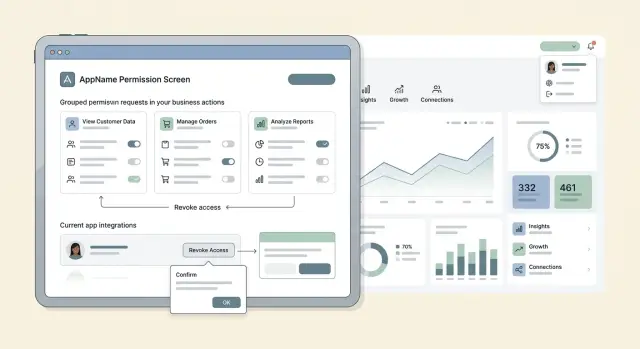
Table of Contents
Why scope lists grow out of control
Scope lists usually get messy for ordinary reasons, not because someone made one terrible decision. A team ships one partner integration, it works, and that scope set becomes the default for the next one. A few months later, nobody remembers why write:all or account-wide read access got approved in the first place.
Copy-paste reuse is one of the biggest problems in scope design. Old scopes often reflect rushed launches, temporary needs, or edge cases that no longer matter. When teams reuse them without checking what a new partner actually needs, extra access starts to feel normal.
Partners add pressure too. They want fewer approval cycles, faster testing, and less back-and-forth. So they ask for broad access up front, even when their app only needs a small part of your API. That saves time early on, but your permission model gets wider with every request.
Teams also make things worse when they mix user roles with API permissions. "Admin," "manager," or "support" might make sense for people inside your app, but those labels do not cleanly describe what a partner app should do through an API. A role describes who someone is. A scope should describe a specific action.
Then there is the problem many teams ignore until it becomes painful: nobody plans how access will be removed later. A scope gets added during a launch, a pilot, or a large customer deal. Then it stays because nobody defined a clean revocation path. Once partners depend on that access, removing it turns into a product, support, and legal issue at the same time.
A common example is a reporting partner that starts with read access to transactions, then asks for customer data, then export access, then write access for "sync fixes." Each request sounds minor on its own. Together, they create partner permissions that are far broader than the original use case.
Permission sprawl rarely starts in one bad meeting. It grows one exception at a time, usually when speed wins over review.
Start with the actions a partner actually needs
Bad scope sets usually start with endpoints. Better ones start with the partner's job. Write that job in plain language a support person can understand: "read order status," "create shipment," "refund payment," "update store settings." If the task sounds vague, the scope will sound vague too.
A simple worksheet is enough. For each requested action, note what the partner wants to do, whether they only read data or change it, whether the action touches money, customer data, or account settings, and whether they truly need it on day one.
That last question removes a lot of noise. Teams often add access for future features, one-off customer requests, or a partner's guess about what they might need later. Most of that access sits unused, but it still adds risk and review work.
Split read actions from write actions early. A partner that reads delivery status usually needs much less access than one that can cancel orders or edit prices. Those actions should not sit behind one broad scope just because they touch the same resource.
Treat sensitive actions separately. If an action can move money, expose personal data, or change settings, treat it with extra caution even if the API call looks small. issue_refund might be a single endpoint, but it deserves far more scrutiny than several harmless read calls.
A shipping partner is a good example. It may need to read paid orders, create labels, and post tracking numbers. It probably does not need saved cards, full customer exports, tax settings, or admin controls. If you hand those over on day one, taking them back later gets much harder.
The basic rule is simple: name scopes around business actions people can reason about, and leave out anything the partner can request later through review. Starting narrow can feel slower for a few days. Cleaning up broad access can take months.
How to build your first scope set
Most teams start too wide because they picture every future partner instead of the first real one. That is where permission sprawl begins.
A better first pass is smaller and a little stricter. Start with one read-only scope. Pick the single thing the partner must see to make their app useful on day one. If a reporting app only needs order status, give it read access to orders and stop there. Do not add customer write access, admin access, or broad account access just because they might ask later.
Write scopes need more proof. Add one only when the partner must change data to complete a real task. "Might need to update records later" is not enough. "Needs to create a shipment label from the partner screen" is enough, because the action is concrete and easy to test.
A practical rule helps here: each scope should map to one call group or one screen in the partner app. If you cannot point to the exact call, button, or page that needs the scope, it probably does not belong in version one.
Before you ship, do a short review:
- Name the user action the scope enables.
- Match it to the endpoint or screen.
- Remove the scope and see what actually stops working.
- Keep it only if the partner cannot launch without it.
That removal test matters more than many teams expect. If taking away a scope changes nothing important, it was extra. If it only breaks a minor convenience, leave it out for now. Partners can still launch with a few limits if the core job works.
This also makes support easier. When a partner says, "We need one more permission," your team can ask one clear question: what exact action fails without it? That keeps the conversation tied to behavior instead of vague requests for broader access.
Ship the smallest set that lets the partner go live. Then learn from real usage and expand only when there is a clear reason.
Group scopes by business action
Teams create messy scopes when they mirror internal org charts. A partner does not care which internal team owns orders, shipping, or billing. They care about what their app can do.
Name scopes after the action and resource, such as read_orders, write_shipments, or refund_payments. That makes them easier to review because the permission explains itself.
This approach also keeps unrelated work separate. Reading customer profiles is different from creating shipments. Exporting invoices is different from changing tax settings. If a partner needs one task, you can grant one task. You do not need to open an entire product area because one endpoint happens to live there.
A small set might look like this:
read_orderswrite_shipmentsread_invoicesmanage_webhooks
What matters just as much is what is missing. There is no vague partner_api scope and no giant full_access scope for routine work. Those names save a little time at launch, then cost hours during approvals, audits, and support.
Admin work needs its own boundary. admin_users or manage_api_keys should not ride along with common tasks like reading orders or posting tracking numbers. Admin scopes affect settings, credentials, and account control. Daily scopes move data through a normal workflow. When teams mix them, people approve more access than they intended.
Plain names matter more than many teams expect. If your support lead, lawyer, or partner manager cannot guess what a scope means, the name is too internal. write_shipments is clear. logistics_execute needs a meeting.
Think about a partner app that prints labels and syncs tracking updates. It probably needs read_orders and write_shipments. It does not need billing access, user management, or broad permissions across every product. When scopes map to business actions, those lines stay clear even as the API grows.
Plan revocation before rollout
Teams spend a lot of time on consent screens and scope names. Revocation gets less attention, even though it often causes more pain later. A good permission model includes a clear exit path before the first partner app goes live.
Start by deciding who can pull access. The answer should be specific. A workspace owner might revoke an app for the whole company. An end user might remove their own access. Your internal team might disable a partner app if it misuses data or breaks policy. If nobody owns those decisions, access stays open longer than it should.
Users should also be able to remove one scope without deleting the whole app when your product supports that level of control. That changes how safe the system feels. If a partner only needs billing read access for a short audit, the user should be able to drop that permission later and keep the rest of the integration running.
Keep a record every time a partner asks for broader permissions. Log who asked, what scope they wanted, why they wanted it, and who approved it. That record helps when the same request shows up six months later with a different name.
Unused scopes deserve regular review. Teams add them for edge cases, then forget them. If partners almost never call the endpoints behind a scope, stop granting it to new apps and plan how to retire it for older ones. That reduces clutter and risk.
Revocation also needs a fallback for the workflow that stops after access changes. A sync may fail. Reports may go blank. A background job may start throwing errors. Plan that response before rollout. Show a plain error that says which permission is missing. Pause only the affected feature instead of breaking the whole app. Notify the user and the partner about the change. If a smaller scope still supports the task, offer that path.
A simple example makes this concrete. If a partner app loses refund permissions, order imports can keep running while refund actions stop and show a prompt for re-approval. That is much better than disconnecting the whole integration and leaving everyone guessing.
A realistic partner app example
A store connects a shipping partner app to its order system. The app needs two things: it must read new orders, and it must create shipment records with tracking details. A small scope set covers that cleanly: read_orders and write_shipments.
That partner does not need access to refunds, pricing rules, or user admin. It does not decide what an item costs. It does not approve money going back to a customer. It does not manage staff accounts. If you grant those permissions anyway, one simple integration turns into a much larger risk.
Strict scope design can look a little annoying at first. That is usually a good sign. A shipping app should do shipping work, not wander through the rest of the business.
A realistic permission set might look like this:
read_ordersto fetch order number, items, address, and shipping statuswrite_shipmentsto create labels, add tracking numbers, and mark shipment progress
Now imagine support gets a ticket. One order cannot ship because it has a special handling flag. The partner says, "We need broader access so we can fix cases like this ourselves." This is the moment when teams often give in and add a large scope such as full order management or account-wide admin access.
That is the wrong fix.
A better fix is a new narrow scope for that one job, such as read_order_flags or read_fulfillment_exceptions. The shipping partner can now see the extra field that blocked the shipment, but it still cannot touch refunds, edit pricing, or manage users.
That sounds like a small choice, but small choices shape the whole permission model. One edge case should not rewrite your access rules for every partner you add later. If a request comes from support, treat it as a product problem to define clearly, not a reason to open the door wider.
Teams that handle this well keep integrations simpler. Security reviews also move faster because each scope maps to one business action people can explain in plain language.
Mistakes teams make early
Permission problems usually start in the first version, not the tenth. A rushed scope model can stay in place for years, even after everyone knows it is too broad.
The most common mistake is a single full_access scope. It feels convenient at launch. Later, it becomes hard to justify. If a partner only needs to read orders and update shipment status, full_access turns every bug, leaked token, or bad integration into a much bigger issue.
Another common mistake is naming scopes after internal systems instead of business actions. Partners do not think in terms like billing-service.write or crm-admin. They think in tasks: read invoices, create customers, cancel subscriptions. When names mirror your org chart, reviews get messy and access expands by accident.
Teams also grant destructive access too early. Delete scopes are a good example. Many partner apps never need them. A partner may need to create or update records for months before anyone has a real reason to delete data. If you grant delete access on day one, you accept that risk on day one.
Approval flow is another weak point. Many teams approve new scopes in chat because it feels faster. Someone asks, someone else says "sure," and the change ships with no written reason, no owner, and no review date. Six months later, nobody remembers why the partner has that permission.
Old scopes also pile up after product changes. A feature gets removed, a sync path changes, or an endpoint is replaced, but the old scope stays active. Users still grant it. Partners still request it. Sometimes the docs keep it alive by mistake.
A few habits prevent a lot of this trouble:
- Reject "temporary" broad scopes unless they have an expiry date.
- Name scopes after partner actions, not team names.
- Require review outside chat for new access.
- Remove unused scopes when features change.
Early mistakes rarely look dramatic. They look small, harmless, and efficient. Then one partner asks for the same shortcut, and the shortcut becomes policy.
Quick checks before you add a new scope
A new scope looks small on paper. In practice, it can stay in your API for years, show up in audit questions, and give partners more room than they need.
Teams usually get into trouble when they approve a request that sounds reasonable but stays vague. If a partner says they need "order access," stop there and ask what the app actually does.
Use a short review every time. Define the action in plain language. "Mark an order as shipped" is clear. "Manage orders" is not. Check whether an existing scope already fits without giving extra access. Reuse is fine when it stays narrow. Look at the damage if the token leaks or the partner app misbehaves. Reading shipping status is one thing. Refunding payments or changing payout details is another. Test the revoke path yourself. A user should be able to disconnect the app in product settings and cut off access without opening a support ticket. Finally, give the scope an owner and a review date. If nobody owns it, it tends to stay forever.
A small example makes this easier. A partner asks for orders.write because they want to print packing slips and confirm shipment. That sounds like one workflow, but it may hide several actions. Printing a slip may only need read access. Confirming shipment may need a narrow fulfillment scope. Neither task should quietly include refunds or customer profile edits.
This is the practical side of permission design. You are naming permissions, but you are also deciding how much trust a partner gets, what customers can turn off, and how painful cleanup will be later.
If you advise startups or review partner APIs on a small team, keep one rule simple: no new scope without a clear action, a tested revoke path, and one person who will still defend that scope six months from now. That short pause saves a lot of cleanup.
Next steps for your team
Most teams do not need a full redesign. They need one cleanup pass and one rule they will actually follow. Scope models usually improve when names match real partner actions instead of internal API structure.
Start by laying out every current scope in a simple table. For each one, write the single business action it allows, who asked for it, and what breaks if you revoke it. If one scope maps to three or four actions, it is too broad. If two scopes support the same action, merge them.
A short working session is often enough:
- List every scope partner apps can request today.
- Map each scope to one business action, such as "read orders" or "refund payments."
- Split broad scopes that mix read, write, and admin access.
- Remove duplicates, old aliases, and scopes no partner uses.
That step usually shows where permissions started to drift. Teams often find one "temporary" scope that became permanent, or a catch-all scope nobody wants to touch because too many partners depend on it.
Set one rule before the next partner launch: no new scope gets added unless the team can name the business action, the partner type, the owner, and the revocation path. If someone cannot answer those four points in a few minutes, the request is not ready.
Write the revocation path down while the request is still small. Decide who can turn the scope off, how partners hear about the change, and whether existing tokens keep working for a short period. That is much easier now than during a partner incident.
If your model already feels messy, an outside review can help. Oleg Sotnikov at oleg.is works with startups and small teams on product architecture and fractional CTO work, and this kind of permission review is exactly the sort of cleanup that is easier to do early.
A good scope set should fit on one screen, make sense to a non-engineer, and survive the next partner request without turning into a permission pile.
Frequently Asked Questions
Why do OAuth scopes get too broad over time?
Scope sprawl usually starts with small shortcuts. Teams reuse old scopes, partners ask for broad access to speed up testing, and temporary exceptions stay in place long after the launch. If nobody plans how to remove access later, extra permissions become the default.
Should I design scopes around endpoints or around business actions?
Start with the job the partner app must do, not with your endpoint map. Scopes like read_orders or write_shipments make sense because people can tie them to a real action. Endpoint-first design often creates vague or oversized permissions.
How narrow should my first scope set be?
Make version one as small as you can. Give the partner only the access they need to launch the first working flow, then wait for real usage before you add more. That usually means one read scope first and a write scope only when the app must change data to finish a real task.
When should I split read and write scopes?
Split them early. Reading data and changing data carry different risk, and sensitive actions like refunds or settings changes deserve their own scope. When you bundle read and write together, people approve more access than they mean to.
What is a good way to name partner scopes?
Use plain action-plus-resource names such as read_orders, refund_payments, or manage_webhooks. A good name tells support, legal, and the partner what the permission does without a meeting. Skip internal names that mirror teams or services.
Is a full_access scope ever a good idea?
For normal partner apps, no. A full_access scope turns one narrow integration into broad trust across the account. If you need wide access for internal tooling or emergency admin work, keep that outside the routine partner flow and review it much more closely.
What should I check before I approve a new scope?
Ask one direct question: what exact action fails without this scope? Then check the screen or API call that needs it, look at the damage if the token leaks, and test whether a user can revoke it cleanly. If nobody owns the scope or can defend it later, do not add it yet.
How do I plan revocation without breaking the whole app?
Decide up front who can remove access and what happens after they do. Let users drop only the scope they no longer want when your product supports that, show a clear error for the blocked feature, and keep the rest of the integration running if you can. That avoids a full disconnect for one missing permission.
What would a clean scope set look like for a shipping partner app?
A shipping app usually needs to read new orders and write shipment updates, so read_orders and write_shipments cover the core job. If support finds an edge case later, add a narrow scope like read_order_flags instead of giving order admin or account-wide access.
How do I clean up a scope model that already feels messy?
Lay out every current scope in one table and write down the single action it allows, who asked for it, and what breaks if you remove it. Then split broad scopes, merge duplicates, and stop granting scopes nobody uses. After that, set one rule: no new scope without a clear action, an owner, and a tested revoke path.


