Node.js Redis caching libraries: what to pick and why
Node.js Redis caching libraries differ on setup, TTL rules, reconnects, and memory use. Compare tools with fewer surprises in day-to-day use.
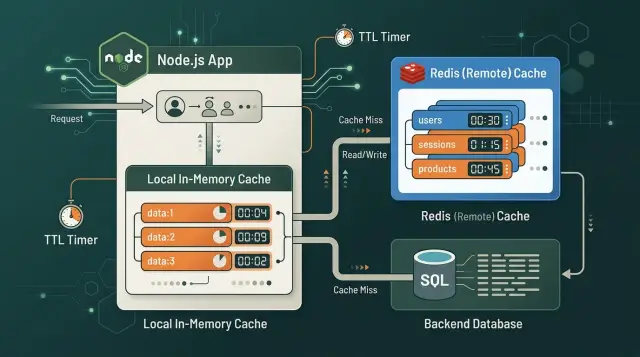
Table of Contents
Why this choice gets messy fast
Most teams looking at Node.js Redis caching libraries want to solve a simple problem. Pages feel slow, the database handles the same read again and again, or an outside API costs too much to call on every request. A cache cuts repeat work and makes response times less jumpy.
The confusion starts because "cache" can mean very different things. One library is a direct Redis client. Another hides Redis behind a small get and set API. A third stores data only inside the Node.js process. All of them can make requests faster. They also break in different ways once real traffic shows up.
A bad fit usually causes dull, expensive problems. Product data stays stale because nobody can tell where the TTL came from. Sessions disappear because the library drops and reopens connections under load. A local cache looks fine in development, then falls apart when you run three Node.js processes and each one keeps its own copy of the same record.
Benchmarks do not tell you much here. Saving a few milliseconds in a tiny test matters less than clear TTL management, predictable reconnects, and access to the Redis commands you actually need. Under normal workload, those things decide whether the cache helps or turns into another source of bugs.
Take a pricing service that caches data for 10 minutes. One process updates the price, another still serves its local copy, and users see old numbers. If the helper library makes invalidation awkward, the team starts avoiding it. Stale data builds up fast.
The choice comes down to three plain questions. Can your team debug the library quickly? Does it give you enough control over TTLs, retries, and invalidation? And how much upkeep does it add once the app runs every day, not just on a laptop?
The best option is rarely the fanciest one. It is the one that stays easy to understand when traffic rises, deploys happen, and someone has to fix a cache bug before breakfast.
The three types of tools
Most teams compare three different tools under one label: direct Redis clients, cache wrappers, and local memory stores.
Redis clients
A Redis client is the direct option. Libraries like node-redis and ioredis open connections, send commands, and expose Redis more or less as it is. That matters when you need pipelines, pub/sub, streams, Lua scripts, transactions, cluster support, or careful retry rules.
This type covers the widest range of jobs. If your app already uses Redis for sessions, queues, rate limits, or locks, a plain redis client for node.js often makes more sense than adding another layer. You keep control over commands, TTL behavior, and connection handling.
Cache wrappers
Wrappers sit one step higher. They usually offer a small API like get, set, and delete, plus extras such as JSON parsing or default TTLs. That can be useful when you want a quick cache without teaching every developer the full Redis command set.
The trade-off shows up later. A wrapper can hide features you end up needing, such as conditional writes, atomic counters, hash fields, or custom expiration rules. It feels tidy at first. Six months later, it can feel cramped.
Local memory stores
A local memory store keeps data inside the app itself. It is fast, simple, and needs almost no setup. For one process, short-lived values, and data you can recompute cheaply, an in-memory cache node.js setup can be enough.
It breaks down when you run several app instances. Each instance keeps its own copy, so invalidation gets messy fast. If all servers need to share the same cached value, Redis is usually the cleaner choice.
That is the real split: use direct clients when you need control, wrappers when convenience matters more, and local caches when shared state does not matter.
Compare connection handling first
Many Node.js Redis caching libraries look similar at first. They all read, write, and expire data. The real differences show up when Redis gets slow, disappears for a minute, or comes back halfway after a network break.
Start with the connection model. A good library keeps a small number of long-lived connections and makes that behavior obvious. If a helper quietly opens extra sockets per request, memory use climbs and failures get much harder to trace.
A few checks sort the field quickly. You want to know whether the library reuses one client per process or creates connections too often. You also want to know what happens after a dropped connection: does it retry, queue commands, or fail fast? If Redis is required for sessions, rate limits, or job coordination, the app should also have a clear way to refuse startup when Redis is unavailable.
Redis connection handling matters more than most teams expect. Some libraries retry forever with little control. That sounds safe, but it can hide outages and pile up commands your app no longer needs. Others fail quickly, which is often easier to run because the problem is obvious and recovery is cleaner.
Startup behavior is another sharp edge. If Redis sits on the login path or coordinates background jobs, letting the app boot without a ready connection can create confusing partial failures. A hard startup failure is louder, but much easier to debug.
Even if you run a single Redis node today, it is worth checking whether cluster or Sentinel support will be awkward later. Some wrappers feel pleasant in local development and then become limiting once you add failover, replicas, or topology changes. A plain client with clear options usually ages better.
One more test is simple and surprisingly useful: count how much connection state your team has to manage in app code. If you need custom retry limits, ready checks, shutdown hooks, and health reporting around the library, the helper is not really saving time.
TTL control matters more than speed
When teams compare caching libraries, raw speed gets too much attention. TTL management usually matters more.
A fixed TTL is the easiest model. You store a value for 60 seconds, 5 minutes, or an hour, and Redis removes it when time runs out. That works well for data that changes on a known schedule, like a homepage block that refreshes every few minutes.
Sliding TTL resets the timer each time someone reads the value. That fits sessions, rate limits, and temporary user state better than product prices or inventory. If users keep reading a stale value, sliding TTL can keep bad data alive longer than you meant.
Manual invalidation gives you the most control. Your app deletes or updates cached data when the source changes. It works well when the team knows every place that can change the data. If you miss one write path, stale entries stick around.
The match between data and TTL rules matters a lot. Cache stock levels for 10 minutes when orders change every few seconds, and users will see the wrong numbers. Cache profile settings for only 5 seconds, and you add Redis traffic without much benefit.
Per-item TTL matters too. Some values should live for 30 seconds, others for 6 hours. If a library makes per-item expiry awkward, that friction appears quickly in real projects.
Most teams do fine with three simple patterns: fixed TTL for predictable read-heavy data, sliding TTL for session-like state, and manual invalidation for data that must change right away.
Miss handling matters too. If a popular entry expires and 200 requests hit the app at once, they can all run the same database query. That is a cache stampede. Good tools make it easier to add single-flight loading, background refresh, stale-while-revalidate behavior, or a simple lock so one request rebuilds the value while the others wait or reuse the old one.
If a library gives you weak TTL control, you will patch around it in application code. That usually costs more than choosing a better fit at the start.
The daily cost
Speed charts are easy to compare. Day-to-day overhead is what teams actually feel.
Install effort matters more than it sounds. A client that works with one package, a short config block, and plain async calls is usually easier to live with than a pile of helpers on top of helpers. The official Redis client can feel a little bare at first, but a thin setup often stays easier to debug than a wrapper that hides connection state and retry behavior.
Extra packages add real weight. Every serializer, decorator, adapter, or helper is one more version to track and one more place for bugs to hide. A wrapper can save 20 minutes on day one and cost hours later when you need to trace where a TTL came from or why a reconnect loop started.
The hidden work usually appears in routine tasks: figuring out which layer set a TTL, reading logs that do not show reconnect attempts, mocking cache behavior in tests, and cleaning up helper code when the team changes libraries.
Debugging support separates pleasant tools from annoying ones. Good libraries make it easy to see connection events, timeouts, misses, and serialization errors. If you need custom code just to log basic cache behavior or export a few metrics, the library is already asking for more maintenance than it should.
Local testing is another good filter. If a library works with a simple local Redis container and does not force a heavy framework harness, your team will test more often. That matters because cache bugs are usually dull bugs: stale values, wrong TTLs, bad invalidation, and silent fallbacks.
Swapping later is often the most expensive part. If Redis calls sit behind a small internal cache module, replacing a library is annoying but manageable. If the whole app depends on library-specific decorators and result shapes, cleanup turns into a rewrite. Keep the cache close to the edge of your codebase and your future self will be happier.
A practical way to choose
Start with the data that hurts most when you rebuild it. If a request can recompute a value in 5 ms, caching it may add more moving parts than benefit. If it needs a database join, an outside API call, or heavy JSON shaping, that is a better first target.
The better choice usually matches your failure mode, not the longest feature list. Some teams need a tiny local cache and nothing else. Others need Redis because several app instances must read the same cached value.
Local memory works well for small lookups that change often and do not need strict sync across servers. Redis fits when many Node.js processes should see the same answer, or when you want cache data to survive an app restart. Using both can work well too: local memory for the hottest reads, Redis for shared state.
Set one TTL rule for each data type, not for each endpoint. Session data, product details, rate-limit counters, and rendered fragments should expire in different ways. Teams run into trouble when developers pick random TTL values during feature work and never clean them up.
Before you commit to a redis client for node.js or a wrapper, test the cases that fail under real traffic. Restart Redis while requests are in flight. Force one command to stall and hit a timeout. Start the app with an empty cache. Check what happens when local memory holds stale data after an update.
Add metrics before you roll the cache out widely. Track hit rate, miss rate, reconnect attempts, command latency, and evictions. Without that, a cache can look fast in local testing and still cause slow pages in production.
A realistic shared-cache example
Imagine a pricing API that pulls supplier rates, applies your margin, and returns a final price in about 250 ms. On one Node.js server, a small local cache can cut repeat requests to around 20 ms. That feels great.
It works well until you run three or four app servers behind a load balancer. Server A may have a fresh price in memory, Server B may have nothing cached, and Server C may still hold an older value. Users now get mixed response times and, sometimes, mixed prices.
Redis fixes that shared-state problem. All servers read and write the same cached value, so one request warms the cache for everyone. This matters more once traffic spreads across many instances or you scale up during busy periods.
A simple pattern often works well here. Cache each product price in Redis for about 60 seconds. Keep a tiny local cache for 5 to 10 seconds to reduce repeat Redis reads on the same server. When a price update arrives from the admin panel or supplier sync, delete the Redis key right away.
That mix gives you speed without letting stale data hang around for long. The short local TTL limits drift between servers, and the Redis invalidation keeps changes shared.
Traffic spikes make the difference obvious. Without Redis, each server misses its local cache at different times and hammers the upstream pricing source. With Redis, one server recomputes the price, stores it, and the others reuse it. You still need some stampede protection when the TTL expires, but even a basic lock cuts duplicate work a lot.
For small teams, this is usually the practical split: local cache for hot repeated reads inside one process, Redis for anything that must stay shared and predictable.
Early mistakes
Teams often add Redis and then try to cache almost everything. That usually starts well and ends with stale data, extra bugs, and a cache nobody trusts.
A product catalog, a login session, and a feature flag should not expire the same way. Prices may need a short TTL because they change often. Sessions usually need a longer life and careful refresh rules. Feature flags can break a release if one server keeps an old value for even a few minutes.
Large objects cause another early surprise. A team caches a full user profile, a search result, or a huge JSON document, and response time gets worse instead of better. Redis is fast, but the app still has to serialize the data before writing it and parse it again after reading it. In Node.js, that cost shows up quickly when objects get big or requests spike.
Silent fallbacks are another bad habit. A Redis call fails, the app falls back to the database, and the logs say almost nothing. That looks safe, but it hides real problems for days. Then the database takes the full traffic load, latency climbs, and nobody notices Redis has been unhealthy since Tuesday.
Memory limits also bite earlier than many teams expect. If you do not set clear size limits and eviction rules, Redis starts dropping values in ways that look random from the app side.
A boring starting policy is often the right one: cache only slow reads that people request often, set TTL by data type, keep payloads small, log Redis errors with enough detail to act on them, and set memory limits before traffic grows. Those rules are simple, and that is exactly why they work.
Checks before you commit
A fast demo can hide the problems that cost you weeks later. Before choosing a library, run a few basic checks:
- Make sure you can set a TTL in one obvious place and inspect the remaining TTL without digging through wrapper code.
- Stop Redis for a minute in staging and watch what the app does. It should fail in a way you understand and recover cleanly.
- Check whether you can clear one entry, clear a group of entries, and refresh data on purpose when the source changes.
- Look for numbers you can measure right away: hit rate, cache latency, memory use, and reconnect count.
Recovery is the test I trust most. Pull the Redis connection, wait 60 seconds, then bring it back. If requests pile up, logs explode, or the app keeps serving broken cache state, pick a different library or use a thinner layer around the client.
Teams that run lean operations usually prefer tools they can observe and debug without guesswork. That is a good standard to copy.
What to do next
If your app is small and runs on one or two Node.js processes, start with a local cache. It is fast, cheap, and easy to understand. If your app already uses multiple workers, background jobs, or more than one server, use a plain Redis client and manage TTLs in code so every service follows the same rules.
Growing systems usually do best with a simple Redis client plus a thin helper layer the team owns. That keeps control over connection handling, retries, and expiration rules without hiding too much behavior behind a package. Mixed workloads often need both layers: local cache for very hot reads, Redis for shared data that several processes must see.
Do not test this across the whole product. Pick one real endpoint that already causes load, measure latency and database load before caching, add one cache layer, choose a TTL that matches how often the data changes, and track hit rate, stale responses, and Redis connection count for a week. That small test tells you more than a long debate ever will.
If you want a second opinion before rolling it out further, oleg.is is a good example of the kind of practical Fractional CTO help that fits this problem. Oleg Sotnikov works with startups and small teams on lean infrastructure, AI-first engineering, and architecture decisions that need to stay simple enough to run every day.
Frequently Asked Questions
Should I start with a plain Redis client or a cache wrapper?
Start with a plain Redis client if several Node.js processes must share the same cache or if you already use Redis for sessions, queues, or rate limits. Use a wrapper only when your needs stay simple and you can live with get, set, and delete for a long time.
When is a local in-memory cache enough?
Local memory works well when one process handles the traffic, the data is cheap to rebuild, and short drift does not hurt users. Once you run multiple servers or workers, each process keeps its own copy and stale data shows up fast.
How do I choose the right TTL?
Pick a TTL by data type, not by endpoint. Start with fixed TTL for read-heavy data that changes on a rough schedule, sliding TTL for sessions, and manual invalidation for values that must change right away.
When should I use sliding TTL?
Sliding TTL fits session-like state because active users keep their data alive. Do not use it for prices, stock, or other values that must expire on time, or old data may stay around longer than you wanted.
How do I stop stale data across multiple Node.js servers?
Use Redis for the shared cache and keep any local cache very short, often just a few seconds. Then delete or refresh the Redis entry as soon as the source data changes so every app instance sees the same update.
What should my app do when Redis goes down?
Make the app fail in a way you understand. If Redis sits on login, rate limits, or job coordination, refuse startup when Redis is down; if Redis only speeds up reads, log the failure clearly and fall back without hiding the outage.
How do I prevent a cache stampede?
Let one request rebuild the value while the others wait, reuse the old value, or read the fresh value after it lands in Redis. A simple lock or single-flight helper usually cuts duplicate database work a lot.
Is it a bad idea to cache large JSON objects?
Large payloads often hurt more than they help because Node.js still has to serialize and parse them on every cache write and read. Cache smaller fragments or the final result that costs the most to compute.
What should I monitor after I add Redis caching?
Look for connection events, reconnect attempts, command latency, hit rate, miss rate, and memory use. If your library hides those numbers or makes them hard to log, daily debugging gets annoying fast.
What is the safest way to roll out caching in a Node.js app?
Test one slow endpoint first, measure latency and database load before and after, then watch the cache for a week. That small rollout shows whether your TTL, invalidation, and reconnect behavior actually work under normal traffic.


