Node.js queues vs workflow engines when durable workflows pay off
Node.js queues vs workflow engines: learn where retries, delays, and chained jobs break down, and when durable workflows save time and outages.
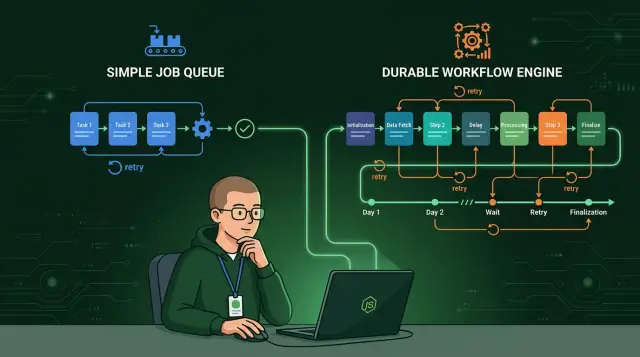
Table of Contents
Why simple jobs start to break
A simple job looks harmless at first. A user signs up, your Node.js app puts "send welcome email" on a queue, and a worker sends it a few seconds later. That setup is easy to explain, easy to ship, and often good enough for the first version.
Trouble starts when that one job turns into a chain. After signup, you may need to create a trial account, write a billing record, send the email, notify sales, and wait a day before sending a follow-up message. None of those steps sounds hard on its own. Together, they create a process, not just a background task.
The weak spot shows up when a worker stops halfway through. Imagine it creates the billing record, then crashes before sending the email. Now the user exists, the account might be half-ready, and nobody knows whether the next retry should start from the top or continue from the middle. A plain queue usually only knows that a job failed. It does not remember the full story of what already happened.
Retries make this worse. If the worker tries again from the beginning, it may create duplicate work. You can end up with two billing records, two Slack alerts, or two welcome emails. Teams often patch this with checks like "if status is already done, skip this step," but those checks spread fast and age badly.
Soon the database fills with flags such as:
- email_sent
- trial_created
- crm_synced
- followup_scheduled
- retry_count
Those flags look practical, but they split the truth across jobs, tables, and worker code. One teammate reads the queue logs. Another checks the user record. Someone else inspects a cron job that cleans up old retries. People stop trusting the system because every failure needs manual detective work.
That is the point where Node.js background jobs stop feeling simple. The code still runs in a queue, but the real problem is workflow orchestration: step order, state, retries, and recovery after crashes. Once you need those things every week, a plain job runner starts to cost more than it saves.
What a queue library does well
A queue library is a good fit when work is short, separate, and easy to retry. Most apps have plenty of tasks like that. A user uploads an image, requests a password reset, or creates an invoice, and the app can push that work to a worker instead of making the user wait.
That alone fixes a common problem in Node.js background jobs. Your web server stays fast because it hands off slow work and gets back to serving requests. The user sees a quick response, while the worker handles the job a moment later.
Queues also absorb traffic spikes well. If 10 users sign up, nothing special happens. If 10,000 users sign up after a launch or campaign, the queue buffers that burst so your app, database, and third-party APIs do not all get hit at once.
A simple queue works especially well for jobs like these:
- sending one email
- resizing one image
- generating one PDF
- syncing one record to another service
- deleting old temp files later
Retries are another strong point. If one job fails because an email provider times out or an API returns a temporary error, the worker can try again a few times. Many failures are boring and short-lived, so a small retry policy solves them without extra design work.
Delays are easy too. You can schedule a reminder for two hours from now, send a follow-up message tomorrow, or run cleanup work overnight. You do not need full workflow orchestration for that. A delayed job is often enough.
The biggest benefit is clarity. Good queue workers stay small. One job does one thing, logs the result, and exits. That makes the code easier to read, easier to test, and less annoying to debug.
In the Node.js queues vs workflow engines choice, queues usually win early. If each task can run on its own and a few retries cover most failures, a queue keeps the system simple without boxing the team into a heavy setup.
What a workflow engine adds
A workflow engine keeps track of the whole process, not just the next job. That changes how you build systems with several steps, retries, waits, and user input. In the Node.js queues vs workflow engines debate, this is often the point where the gap gets real.
With a queue, teams usually split work into separate jobs and then track state in app code, database flags, or custom tables. A workflow engine stores progress for every step in one run. If step 3 finished and step 4 failed, the system knows where it stopped and what it already did.
That helps most when a worker crashes or a deploy interrupts a process. A durable workflow execution engine can resume after a restart without replaying the whole flow or guessing what happened last. You avoid duplicate emails, repeated charges, and awkward cleanup scripts.
It also handles waiting much better. Some work does not finish in seconds. You may need to pause for a timer, a manager approval, a signed document, or an outside callback from a payment provider. A queue can do this, but teams often end up building their own timeout logic, polling jobs, and state machines around it. A workflow engine already knows how to sleep, wait, and continue later.
Branching is another big difference. Real business flows rarely move in a straight line. One customer passes a check, another needs review, and a third drops out halfway through. A workflow engine keeps those branching paths in one place, so the logic stays readable instead of spreading across handlers, cron jobs, and retry code.
A simple example makes this clear. Say a SaaS app creates an account, sends a verification email, waits up to 24 hours for the user to confirm, provisions resources, and then asks finance to review larger plans. If verification never comes, the run ends one way. If finance rejects the plan, it ends another way. If the app restarts in the middle, the workflow resumes from the last completed step.
The full run history is often the part teams appreciate most later. Support can see when each step started, paused, retried, failed, or completed. Developers can trace job retries and failures without stitching together logs from several workers. That alone can save hours when something breaks in production.
A queue helps you execute jobs. Workflow orchestration helps you manage the life of a process.
The point where queues stop being enough
A queue works well when one job does one thing and finishes fast. Resize an image, send an email, generate a PDF, done. Trouble starts when that "job" turns into a full business process with many steps, shared state, and long waits.
A common breaking point is when the flow crosses service boundaries. One step talks to Stripe, another updates your database, another calls an ERP, and another waits for a human to approve something. A queue can push each step forward, but your team has to glue the whole story together with retry rules, status tables, delayed jobs, and custom code.
Long pauses make the cracks obvious. If a customer must sign a contract tomorrow, or a warehouse system sends a callback three hours later, simple Node.js background jobs start to feel awkward. Teams often fake workflow state with extra rows in a database, cron checks, and lots of "if status = X" logic. That works for a while, then someone asks support a simple question: "where is it now?" and nobody trusts the answer.
Failures are the other turning point. If step six fails after step two already charged money and step four already reserved inventory, replaying the whole chain is dangerous. You can add idempotency checks and compensating code by hand, but that is the moment when durable workflow execution starts to pay off. The engine keeps the state, knows which step finished, and resumes from the right place.
A small example makes it clear. Say an order flow does this: charge a deposit, reserve stock, send a contract, wait for signature, then release the order to shipping. If the signature never comes, you may need to cancel the reservation and refund the deposit. That is not one job anymore. It is a process with time, money, inventory, and legal state moving at different speeds.
That is the real line in Node.js queues vs workflow engines. If work is short, isolated, and easy to retry, stay with a queue. If the flow lasts hours or days, touches several systems, and people need a reliable status at every step, a workflow engine will save a lot of painful custom code later.
How to choose for your app
The choice in Node.js queues vs workflow engines gets easier when you stop thinking about tools and map the work itself. Write the full path on paper: what starts the process, what each step does, where it stores data, and what counts as done.
Then mark every place where the flow waits. That includes waiting for a payment callback, an email provider, a human approval, a third-party API, or a scheduled delay until tomorrow morning. Waiting changes the shape of the problem. A short job can sit in a queue. A long process needs memory.
The next test is failure. If your app crashes halfway through, what happens when it comes back? Write that down step by step. If the answer is "we hope the retry fixes it," a plain queue may already be too thin.
Some steps can safely run twice. Others cannot. Sending the same welcome email twice is annoying. Charging a card twice is a real problem. Mark the steps that must never happen more than once, then ask how you will enforce that rule during retries, restarts, and deploys.
A quick checklist helps:
- If the work starts, finishes, and retries in seconds, a queue is usually enough.
- If the process waits on outside events or long timers, a workflow engine is often safer.
- If you need to see exact state after a crash, durable workflow execution starts to pay off.
- If one failed step needs compensation or careful replay, choose the tool that keeps history, not just job status.
Before you commit, test one ugly case. Kill the worker in the middle of a run. Return a timeout from a dependency. Send the same event twice. This small test tells you more than a feature list ever will.
My bias is simple: use a queue for short, independent Node.js background jobs. Use a workflow engine when the process has durable state, long waits, and strict rules around retries and failures. Small teams save a lot of pain when they make that call early, especially once the app starts touching money, customer data, or external systems.
A simple example that shows the difference
Picture a Node.js store that handles refund requests. The first step is simple: create a support ticket and send the customer a confirmation email. A queue fits that job well. If the worker stops halfway through, it can retry. If the email sends twice, you have a minor mess, not a money problem.
The flow changes when a human needs to approve the refund. Small refunds might go through at once, but larger ones may wait for a manager. That pause could last five minutes or two days. A queue can handle pieces of this, but teams often end up spreading the process across cron checks, status flags, delayed jobs, and custom retry rules. The refund no longer lives in one place.
Then add the risky step: send the refund through the payment provider and return the item to stock. Those actions cannot run twice. If the payment call times out after the provider already sent the money, a blind retry can issue a second refund. If stock goes back twice, inventory gets wrong fast.
A workflow engine handles this better because it keeps one durable record of the whole refund run. That run knows:
- who asked for the refund
- whether a manager approved it
- whether the payment step already finished
- whether stock already changed
- what should happen if the app restarts
The pause for approval is part of the same run, not a separate trick built around the queue. When the manager clicks approve, the workflow continues from the exact point where it stopped. If the Node.js worker crashes, the workflow resumes with its saved state. You do not have to rebuild the history from logs, database fields, and half-finished jobs.
That is the practical difference. A queue is great for isolated work like sending an email, resizing an image, or clearing a cache. A workflow earns its keep when one business process stretches across time, needs human input, talks to outside systems, and includes steps that must happen once. In that case, keeping the full story in one run saves a lot of painful cleanup later.
Mistakes teams make early
Teams usually get into trouble when a background job stops being one isolated task and turns into a sequence with business state attached to it. The code still looks small. The failure cases do not.
A common mistake is chaining queue jobs and passing state through ad hoc tables. Job A writes a row, Job B reads it, Job C updates another flag, and soon three places claim to be the source of truth. After a few product changes, nobody can tell whether an order is waiting, failed, or half-finished.
Keeping progress only in memory is another early trap. It works on one local process, so it feels fine. Then Node.js restarts, a container moves, or a deploy lands, and the worker forgets what already happened.
That turns simple work into guesswork. Did the app already send the email? Did it reserve inventory? Did it call the billing API? If the answer lives only in RAM, you do not really know.
Retries can create bigger problems
Retries sound harmless until money moves. A worker charges a customer, then crashes before it stores success. The queue sees a failure and runs the step again. Now the customer gets charged twice, and support has a very bad morning.
This is where job retries and failures stop being a small engineering detail. Any step that sends money, creates a shipment, or triggers a third-party action needs idempotency, timeouts, and a clear recovery rule.
Teams often patch the gaps with cron jobs that sweep for "stuck" work every minute. That can keep things alive for a while, but it also hides the real problem. The system does not know its own state, so a separate script tries to guess it later.
Cron cleanups also age badly. One slow downstream service and the cleanup job marks healthy work as stuck. One schema change and the rescue script starts skipping rows.
Recovery rules need to exist before production
Many teams skip manual recovery rules until the first messy outage. That is backwards. Someone should know, before launch, which steps can retry, which steps must stop, and when a human should step in.
A simple rule helps: if your team needs admin scripts, database edits, or cron-based rescue jobs to finish normal business flows, plain Node.js background jobs are already under strain. That is usually the point where durable workflow execution starts to pay for itself.
Quick checks before you commit
A queue is fine until work has to survive time, failure, and human delay. If your Node.js background jobs run for a few seconds, touch one system, and can safely retry, a queue library usually keeps things simple. The split in most Node.js queues vs workflow engines decisions shows up when one run can pause for hours, cross several systems, or need careful recovery after a crash.
Ask a few blunt questions before you choose:
- Does the process wait for a person, an email click, a webhook, or a slow external API? Short jobs fit a queue. Long pauses often push you into custom state tracking.
- If a worker dies halfway through, can your app recover the exact step it reached? If not, someone will rebuild that state by guesswork.
- Will a retry send the same email twice, charge twice, or create duplicate records? Once side effects matter, retries stop being a small detail.
- Do you need a readable history for each run? Logs help engineers, but support needs a clear timeline, not a pile of log lines.
- Can someone answer "Where is this customer stuck?" without opening logs or asking a developer? If they cannot, the support cost starts creeping up fast.
A simple signup flow shows the difference. Creating an account in one job is easy. But if the flow creates the account, waits for email verification, provisions a workspace, calls billing, and retries around flaky APIs, a plain queue starts collecting patches. Teams add status tables, retry flags, timeout jobs, and manual repair scripts. That code is rarely hard on day one. It gets hard six months later.
Durable workflow execution starts to pay off when the system itself remembers progress, retries the right step, and shows the full run history. That matters even more if customers or support staff need to see status without reading logs.
If you answer "yes" to three or more of those questions, a workflow engine will probably save time earlier than you think. If you answer "no" to almost all of them, keep the queue and stay simple.
What to do next
Start with one process that already causes pain. Pick something your team watches too often: billing retries, customer onboarding, document generation, or a sync with a third-party API. Write every step on one page and count each handoff between your app, the queue, outside services, and support.
That count matters. A flow with two clean steps usually stays simple. A flow with eight steps, three retries, and a manual fix is already telling you it wants stronger control.
Keep simple jobs on a queue if they stay short and isolated. Many Node.js background jobs fit that shape just fine. Sending one email, resizing an image, clearing stale data, or generating a single report does not need durable workflow execution if you can rerun the job without damage.
Move the long or fragile flows first. A workflow engine starts to pay off when a process runs for minutes or days, waits for outside events, talks to several systems, or leaves your team guessing after a crash. That is usually where the Node.js queues vs workflow engines decision becomes practical, not theoretical.
A short review can keep the scope under control:
- Map the full flow and note every retry, timeout, and manual step.
- Mark which jobs can run twice without harm and which ones cannot.
- Migrate the longest or most failure-prone flow first.
- Compare migration cost with support time, failed runs, and customer complaints.
Do not migrate everything at once. Teams often overreact after one painful outage and move every job into a heavier system. That adds work where none was needed. Keep the boring jobs on a queue. Move only the flows where state, retries, and recovery already cost real money or team time.
If you want a second opinion, Oleg Sotnikov can review your architecture as a Fractional CTO or startup advisor. He works with startups and small teams on software architecture, infrastructure, and AI-first development, so he can usually spot where a plain queue is enough and where workflow orchestration will save you from repeat failures.


