Node.js job queue libraries for email and long tasks
Node.js job queue libraries differ on retries, dashboards, and broker upkeep. Compare BullMQ, Bee-Queue, Agenda, pg-boss, and broker-first setups.
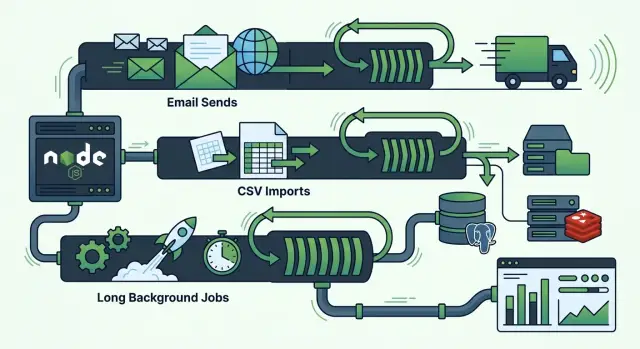
Table of Contents
Why background jobs get messy fast
A background job starts as a small fix for a slow request. You move email sending, CSV imports, or report generation out of the web request, and the app feels faster right away. The trouble starts a few weeks later, when those jobs pile up, fail in odd ways, or run twice.
Slow work and web requests do not mix well. If a user signs up and your app tries to send an email, create a PDF, and call two outside APIs before it answers, the request can time out. The user sees an error even if part of the work already happened. Now you have a worse problem than a slow page: you have a half-finished action.
Retries cause their own mess. A queue often retries failed jobs, which sounds safe until the job is not idempotent. If the worker loses its connection after sending the email but before saving success, the retry may send the same message again. Customers do not care that the queue meant well. They just see two welcome emails or two invoices.
Imports can clog the whole system. One giant CSV job can sit on a worker for minutes, sometimes longer, while smaller jobs wait behind it. That means a simple password reset email may get stuck because one customer uploaded a huge file.
Failed jobs need a clear end state. Every job should do one of these things:
- succeed and record that success
- retry with limits and delays
- stop and mark itself for review
- move to a dead-letter or failed state
Without that path, teams guess. They rerun jobs by hand, forget what already happened, and create duplicate work. That is why queue problems often look random from the outside, even when the cause is pretty ordinary.
What to compare before you pick a queue
Most Node.js job queue libraries look similar until something fails at 2 a.m. The real difference shows up after a worker crashes, a job hangs for 40 minutes, or bad input keeps retrying forever.
Start with retry behavior. A good queue should treat crashes, timeouts, and invalid data as different problems. If the process dies halfway through sending an email, retrying makes sense. If the payload is missing an email address, retries only waste time and can flood logs.
The failure view matters just as much. You want a dashboard that shows failed jobs, delayed jobs, stuck workers, and retry counts without extra digging. If your team needs three tools and a database query to answer "what broke?", that queue will get annoying fast.
The broker work is easy to ignore during setup, then it shows up every week. Count the chores before you commit:
- backups and restore steps
- cleanup for completed and failed jobs
- alerts for stalled workers and growing queues
- disk and memory growth over time
- who owns upgrades and on-call issues
Scheduling is another place where simple demos hide real limits. Check whether the queue handles cron jobs well, supports per-job delays, and lets you slow down bursts with rate limits. This matters for email sends, API-heavy imports, and report jobs that hit the same database.
Duplicate control can save you from expensive mistakes. If a user clicks "import" twice, or your app retries the same webhook, the queue should let you dedupe by job ID or some other stable value.
If your team already trusts PostgreSQL more than Redis, or already runs Redis for other work, that changes the best choice. The fastest queue to start is often not the easiest one to run for a year.
BullMQ for teams already using Redis
BullMQ makes sense when Redis is already part of your app. If you already use Redis for cache, sessions, or other fast lookups, adding a queue feels like an extension of what you have, not a whole new system.
It covers the jobs most teams need first. You can send signup emails later, retry a failed import, run repeat jobs on a schedule, and slow down calls to outside APIs with rate limits. The retry controls are especially useful for email queue retry strategy, because a temporary timeout should not turn into five angry retries in ten seconds.
A simple example helps. Say a user signs up, uploads a CSV, and asks for a report. BullMQ can put the welcome email in one queue, process the CSV in another, and push the report job to workers that have more time and memory. That split keeps the main app fast.
BullMQ is also easier to live with when you add an admin screen. Bull Board and similar tools let you check waiting, active, delayed, and failed jobs without digging through logs. When support asks why one customer never got an email, that view saves time.
The tradeoff is Redis work. BullMQ is one of the more practical Node.js job queue libraries, but it adds chores you cannot ignore:
- set retention rules so completed jobs do not pile up
- watch Redis memory and latency
- choose persistence settings carefully
- separate queue traffic from cache traffic if load grows
If your team already knows Redis, these are normal tasks. If Redis is new to you, BullMQ can still work well, but the queue is only half the job. You also need to keep Redis healthy.
Bee-Queue for small, fast job flows
Bee-Queue fits teams that want a queue without a lot of ceremony. If your app mostly pushes short jobs like signup emails, webhook follow-ups, image resizing, or a quick import step, it keeps the setup light and the worker code easy to read.
That makes it a practical choice when speed matters more than extras. A small product team can add a Redis connection, define a job, and start processing work in the background without turning the queue into its own project.
It works best for jobs that finish quickly and can retry without much risk. A failed email send or a short API sync is usually fine to run again. A two-hour report build or a job with many moving parts is where Bee-Queue starts to feel thin.
The tradeoff is built-in help. Compared with other Node.js job queue libraries, Bee-Queue gives you less for scheduling, repeatable jobs, and admin screens. If your team wants a polished dashboard for failed jobs, delayed jobs, and worker health, you will likely need extra tools or your own internal pages.
Redis is still part of the deal, and that work is real. You need to watch memory use, connection limits, persistence settings, and what happens when Redis restarts. If Redis gets slow, your queue gets slow too.
Bee-Queue is a good pick when the flow is simple and the volume is clear. For fast email sends and short task chains, it stays out of the way. Once your jobs need rich scheduling, deeper visibility, or more operational safety, a heavier queue often saves trouble later.
Agenda for apps that already live in MongoDB
Among Node.js job queue libraries, Agenda fits best when MongoDB is already part of your app. You do not need to add Redis just to send emails, run a nightly sync, or process a CSV upload in the background. For a small team, one less service often means fewer surprises.
Agenda works well for scheduled jobs and simple recurring work. If you need a welcome email five minutes after signup, a daily report at 2 a.m., or a retry for a failed import, it covers that kind of flow without much ceremony. It is a practical choice when your jobs are short, predictable, and tied closely to app data already stored in MongoDB.
Retry behavior is good enough, but it is not the main reason people pick Agenda. You can retry failed jobs and control timing, though teams often end up writing more custom logic when they want careful backoff rules or separate handling for temporary errors and hard failures. For basic email queue retry strategy, that may be fine. For heavier long running task queue needs, it can feel thin.
Agendash gives you basic visibility into what is queued, running, and failed. That helps a lot when support asks, "Did this import actually run?" Still, it feels more like a helpful window than a full operations console.
The hidden cost is MongoDB housekeeping. Agenda relies on job locking, and it needs proper indexes to stay healthy. If locks stick around too long or indexes are off, jobs can run late, run twice, or sit in the collection longer than they should. Teams that already know MongoDB usually handle this well. Teams that want a queue with less database care may prefer another tool.
pg-boss for teams that trust PostgreSQL more than Redis
pg-boss makes sense when your app already depends on PostgreSQL and you do not want another piece of infrastructure just to send emails or process imports. Instead of adding Redis, you keep queue data in the database your team already backs up, monitors, and knows how to fix.
That choice cuts down on moving parts. For many small teams, that matters more than raw speed. If your product sends welcome emails, runs nightly reports, and imports CSV files a few times a day, PostgreSQL can handle that work without making your setup much more complex.
pg-boss also gives you solid control over how jobs behave. You can set retries, delay jobs, assign priority, and limit worker concurrency. Because the jobs live in PostgreSQL, you can inspect them with normal SQL queries. That is handy when a support issue lands in your inbox and you need to answer a plain question like, "Did this import run twice or not at all?"
A simple example helps. Say a customer uploads a 50,000-row CSV. Your app stores the upload, creates a pg-boss job, and a worker processes rows in batches. If a batch fails, the job can retry with backoff instead of forcing the customer to start over.
The tradeoff is tooling around it. BullMQ usually has more polished dashboard options and a bigger ecosystem for queue admin screens. With pg-boss, you may end up building a small internal view yourself or checking job state in SQL.
If your team already trusts PostgreSQL in production, pg-boss is one of the more practical Node.js job queue libraries. It keeps the stack simpler, and that often saves more time than adding a faster queue you now have to babysit.
Broker-first setups when one queue is not enough
A Redis or database queue works well when one app owns most of the work. That starts to break when jobs need routing rules, separate consumers, and different retry behavior. Email jobs need speed. CSV imports need patience. Report generation can run for minutes and should not block anything else.
RabbitMQ makes sense when message flow matters as much as the work itself. You can route messages to different queues, let each consumer pull at its own pace, and wait for acknowledgements before removing a message. That gives teams more control when one service publishes jobs and several workers handle them. If the import worker fails, the email worker can keep moving.
SQS often fits teams that already build around AWS. You do less server babysitting, and it works well with Lambda, ECS, or long running container workers. The trade-off is less routing flexibility than RabbitMQ and more AWS-specific setup. Visibility timeouts, queue policies, and IAM rules are not hard forever, but they do take real time.
The broker dashboards help, especially when you need to inspect stuck messages or watch queue depth. Still, the hard parts sit outside the UI. Someone has to define dead-letter queues, set retry limits, choose who can publish or consume, and wire alerts before problems pile up.
This path fits teams that care more about job flow than a simple app queue. If your Node.js job queue libraries discussion keeps running into cross-service handoffs, separate worker pools, or strict delivery rules, a broker-first design is usually the cleaner choice. It asks for more setup, but it avoids the mess of forcing one app queue to act like a full messaging system.
A simple example: signup emails, CSV imports, and report jobs
Imagine a SaaS app with three background jobs that look similar at first and behave very differently once users start relying on them.
A signup email is small and time-sensitive. If the email provider times out, retry it two or three times with short delays. After that, stop and mark it failed. Sending the same welcome email six times is worse than missing one. The job record should keep the error message, provider response, and final retry count so support can see what happened fast.
A CSV import needs the opposite approach. Do not push one huge job with 50,000 rows and hope it finishes cleanly. Split the file into small row or batch jobs, then keep one parent import job above them. That keeps memory use steady, lets workers process rows in parallel, and makes restart cheap. If row 12,431 fails, you rerun one batch instead of the whole file.
A report job sits somewhere in the middle. It may run for several minutes, so users need progress updates such as queued, started, 40% done, and finished. If a worker stops halfway through, the app should let you restart the report safely without duplicate data or half-built files. Checkpoints help a lot here.
A good dashboard should answer four plain questions:
- What is waiting right now?
- What failed most often today?
- Why did each failed job stop?
- Are retries fixing the problem or just repeating it?
That last point matters more than people think. Retries can hide a bad setup for days. One dashboard, with failure reasons and retry history in one place, saves more time than a long feature list. When queues get messy, the cause is usually simple: one email job retries too much, one import is too large, or one report never tells the system where it got stuck.
How to choose a queue step by step
Most teams pick a queue too early. They start with the tool they already know, then find out that emails, imports, and long report jobs all need different rules.
Start with the work, not the library. A signup email might finish in two seconds. A product import might run for ten minutes. A billing report might need retries, progress updates, and a safe way to resume after a crash.
- Write down each job type, how often it runs, and how long it usually takes.
- Choose the backend your team can run with confidence: Redis, PostgreSQL, MongoDB, or a cloud broker.
- Test duplicate control, retry backoff, and worker shutdown before you adopt anything.
- Run one failure drill in staging before launch.
That second step matters more than people admit. If your team already watches Redis, a Redis job queue Node.js setup may feel easy to support. If your team trusts PostgreSQL backups and knows SQL well, pg-boss can be the calmer choice. MongoDB only makes sense if it is already central to the app. A cloud broker can help when several services need to share work, but it also adds another bill and another thing to monitor.
Do not stop at the happy path. Queue the same job twice and see if the system prevents duplicates. Force a job to fail three times and check the retry delay. Shut a worker down in the middle of a long task and see whether the job resumes, retries, or gets stuck. Also check what the dashboard shows when this happens. A queue that hides failures will waste hours later.
One short drill tells you a lot. If the queue survives a fake outage, a duplicate job, and a messy shutdown, it is probably a good fit.
Mistakes that create stuck jobs and surprise costs
With Node.js job queue libraries, the expensive mistakes are usually boring ones. A queue can look fine in testing, then one mail outage or one bad import turns it into a traffic jam. The pain shows up later as duplicate emails, slow workers, and a Redis or broker bill that creeps up.
Treat retries as part of the job design, not one global rule. A timeout, a 429 rate limit, and a "user not found" error need different handling. Temporary failures can retry with backoff. Permanent failures should stop early and move to a failed state that someone can review. If every error retries five times, you create extra load right when the system is already under stress.
Big payloads cause a quieter problem. Teams often put full email HTML, large CSV chunks, or report data inside the job body. Each enqueue gets heavier, each retry gets slower, and storage fills up fast. Pass a small reference instead, like a user ID, file ID, or report ID, then load the data inside the worker.
Idempotency matters most for emails and payments. If a worker sends the email, then crashes before it saves success, the retry may send the same message again. The same pattern can charge a card twice or create duplicate invoices. Use a stable idempotency key and make workers check whether they already finished that exact action.
Finished jobs can also become a hidden bill. Queues are not archives. If you keep every completed and failed job forever, dashboards get slower and Redis, PostgreSQL, or MongoDB grows for no good reason. Keep enough history for debugging, then clean old records on a schedule. A queue that deletes old success records after a few days usually stays much cheaper and easier to run.
Quick checks before you commit
A queue can look fine in a demo and still cause headaches a week later. Before you pick one, run four boring checks on a real task like a signup email, a CSV import, or a report that takes ten minutes.
Among Node.js job queue libraries, the best choice is often the one your team can debug at 2 a.m. without guessing. If the dashboard, logs, and worker behavior feel vague now, they will feel worse in production.
- Find failed jobs from the last hour in under a minute. You should see the error, retry count, payload, and when the job started. If that takes shell access and three commands, expect slow incident response.
- Make sure one job can run twice without damage. A welcome email should not send twice. An import should not create duplicate rows. A report job should overwrite or version its output in a predictable way.
- Test a clean worker shutdown during deploys. Start a long job, send the stop signal, and watch what happens. Good behavior is simple: stop taking new work, finish or safely return the current job, then exit.
- Clear old jobs on purpose. Keep enough history to debug recent failures, billing issues, or import mistakes, then remove the rest on a schedule. Unlimited retention turns into a hidden storage bill.
If a queue fails any of these checks, keep looking. Fancy features do not help much when your team cannot answer a basic question like "why did this job fail half an hour ago?"
What to do next
Pick the smallest setup that can handle your real workload. Most teams do better with one queue, one worker type, and a few job classes at first. That keeps failures easy to trace, and it stops your app from turning into a pile of half-documented background processes.
If you are still comparing Node.js job queue libraries, make the first version boring on purpose. Use the broker your team already knows, keep job payloads small, and name jobs clearly. You can split workers later when volume, latency, or isolation starts to matter.
Add a dashboard before traffic grows. A queue without visibility feels fine until the first batch stalls on a Friday night. You want to see waiting jobs, active jobs, failures, retry counts, and old jobs that never finished.
Write retry rules down for each job class instead of using one default for everything. Email, imports, and long reports fail in different ways.
- Signup email: retry a few times with short delays.
- CSV import: retry once or twice, then flag the row or file for review.
- Long report job: retry less often, but log progress and set a timeout.
That one page of retry rules will save you money and support time. It also keeps a temporary outage from turning into a flood of duplicate emails or repeated imports.
If your startup is unsure whether Redis, PostgreSQL, or a broker-first setup fits best, an outside review can save weeks of rework. Oleg Sotnikov does this as a Fractional CTO, with hands-on experience in AI-first software development, production infrastructure, and cost control. A short architecture review is often enough to spot wasted broker overhead, missing retry limits, or worker designs that will break under load.
Start small, measure queue behavior early, and only add moving parts when the current setup gives you a clear reason.


