Node.js cron vs durable jobs for chores that stay on time
Node.js cron vs durable jobs: learn when a simple scheduler is enough, when missed runs matter, and how to avoid drift in backend chores.
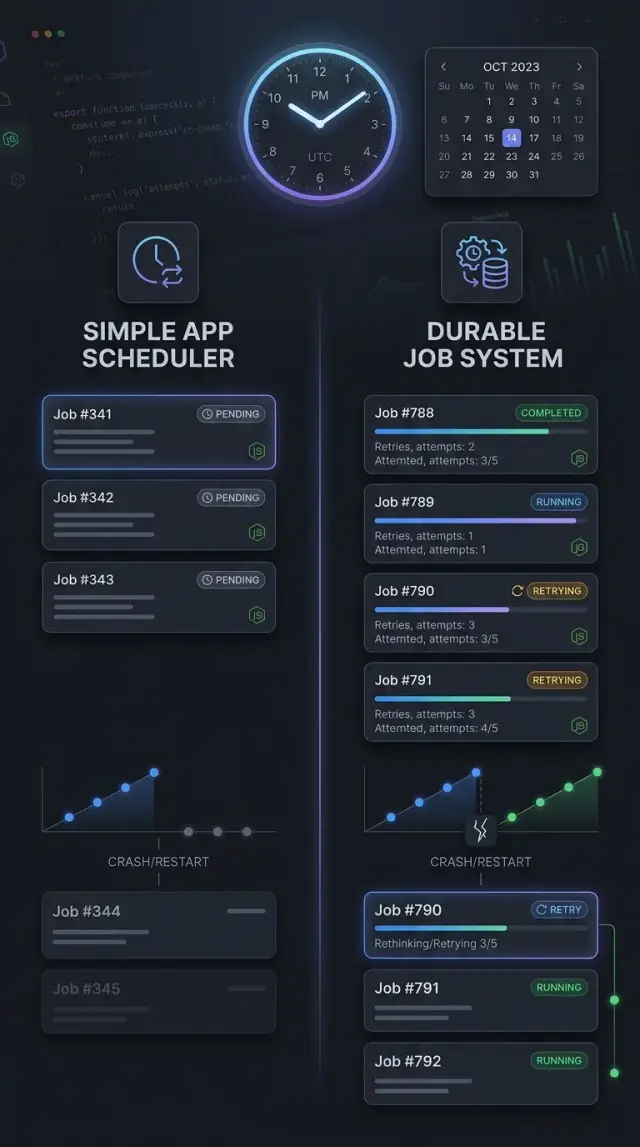
Table of Contents
Why scheduled work slips
A lot of scheduled work looks fine in development, then goes off time in production. The reason is simple: a basic scheduler only knows what the current app process knows. When that process stops, forgets, or gets busy, your timing stops being reliable too.
The first problem is app restarts. Many Node.js scheduler packages keep timers in memory. That works for chores like clearing a cache every few minutes on one server. It breaks when the app crashes, the host reboots, or a deploy replaces the process right before a planned run. The timer disappears, and no one goes back to ask, "Did we miss something?"
A second problem shows up as soon as you run more than one app instance. Two servers can read the same schedule and both fire the same task. Now one cleanup job becomes two. One invoice reminder becomes two emails. Teams often notice this only after customers complain.
Long jobs create a quieter kind of drift. Say a task should run every 5 minutes, but one run takes 8 minutes because the database slows down. The next run starts late, overlaps, or gets skipped, depending on the package and your setup. After a few hours, the clock time you planned and the clock time you get are no longer the same.
Time zones cause their own mess. A job set for 2:30 AM can move when daylight saving time starts or ends. Sometimes that time happens twice. Sometimes it does not happen at all. If your app, server, and database do not agree on time zone rules, you can chase strange bugs for days.
Deploys create another gap. A task scheduled for 12:00 might never run if you shut down one version at 11:59 and the new one comes up at 12:01. Nothing crashed. Nothing logged an error. The run just vanished.
This is the real split in Node.js cron vs durable jobs. A simple scheduler trusts that the process stays alive and on time. A durable job system keeps enough state to recover, prevent duplicates, and notice when a run should have happened but did not.
What simple schedulers handle well
A simple scheduler is fine when the job lives inside one Node.js process and failure is cheap. If your app runs on one server, starts once, and stays up most of the day, you can get a lot done without a queue, worker fleet, or separate storage.
That setup fits small chores that keep the app tidy. Think deleting temp files, pruning old sessions, refreshing a cache every few minutes, or rebuilding a small summary table overnight. If one run gets skipped because the app restarted, nothing serious breaks. The next run usually fixes it.
Most teams should start there. Packages like node-cron and node-schedule are easy to add, easy to read, and easy to remove later if your needs grow. node-cron feels natural when you already think in cron expressions. node-schedule is handy when you want date-based rules in code instead of classic cron syntax.
A simple scheduler works best for jobs like these:
- clear stale cache entries
- remove expired files or tokens
- refresh a search index snapshot
- send an internal digest that can wait until tomorrow
- recompute stats that users do not depend on in real time
The rule that keeps this simple is strict: run only one app instance. If you start two identical Node.js processes with the same scheduler code, both will try to run the same job. That is how duplicates creep in. One server, one process, one schedule is boring, but boring is good here.
This approach is also nice for early products. A startup may have one API server and a few background chores that save 10 or 20 minutes of manual work each week. You do not need a durable job system for that. You need clear timing, logs, and a quick way to see whether the job ran.
Once the work affects money, customer messages, or anything you cannot miss, simple schedulers stop feeling simple. Until then, they are often the right choice.
When durable systems do a better job
A durable job system earns its keep when missing one run creates real damage. If a task updates invoices, charges cards, sends compliance notices, or syncs stock after a sale, memory-only scheduling is too fragile. When the app restarts, a container gets replaced, or a node drops for two minutes, you need the schedule and job state to survive outside the process.
That is the main difference. A simple scheduler remembers timing in app memory. A durable system writes jobs to a database, Redis, or another shared store, so workers can pick them up even after a crash. The work does not vanish just because one server did.
Durable tools also help when timing slips. They can see that a run is late, retry after a short outage, and record whether the job finished, failed, or still waits in the queue. That history matters more than people expect. Without it, you end up guessing: did the task run twice, not run at all, or stop halfway through?
Cases where durability matters
- The task must happen once, even if you run several app instances.
- You need retries after crashes, deploys, or network hiccups.
- You want a record of late, failed, and completed runs.
- More than one worker may try to grab the same job.
- A missed run costs money, trust, or manual cleanup.
Coordination becomes a big deal as soon as you scale past one process. Suppose three Node.js workers all check for a midnight billing job. A durable queue can lock that job so one worker handles it, while the others move on. That is much safer than hoping your cron expression only fires in one place.
This matters in lean teams too. Oleg's work with AI-first operations and small production teams points to the same lesson: when a business depends on automation, the system needs to recover cleanly from restarts and short outages without human babysitting.
A good rule is simple. If the task is just cleanup and you can shrug off one missed run, a basic scheduler is usually enough. If someone will ask, "Did it run, when did it run, and can you prove it?", use a durable job system.
Packages people usually compare
Most teams start with the smallest tool that can run on a timer. That works for chores like clearing temp files or sending a minor reminder. It starts to fail when the app restarts, runs on several servers, or needs retries after an error.
node-cron is the plain option. It reads cron expressions and runs code on a repeat schedule inside your Node.js process. If the process is down at the scheduled minute, that run is gone. For housekeeping work that can slip once in a while, that tradeoff is often fine.
node-schedule is close, but it gives you more freedom for exact dates and calendar rules. If you need "next Tuesday at 9:30" or a one-time run at a specific moment, it feels nicer than node-cron. It still keeps its schedule in process memory, so restarts and deploys create the same gap.
Bree takes a different route. It runs jobs in workers, which helps when a task uses a lot of CPU or you do not want a long task to block the main app. Bree is still a scheduler first, not a full durable queue, but it gives cleaner isolation than a tiny cron library.
Agenda stores jobs in MongoDB. That changes the risk level. Jobs survive restarts, and locks help stop two app instances from picking the same work. If your team already uses MongoDB, Agenda can feel like a natural step up from a simple scheduler.
BullMQ sits closer to a queue than a classic cron package. It uses Redis and handles delayed jobs, retries, concurrency, and repeatable tasks well. If a failed email should retry three times, or you need thousands of jobs spread across workers, BullMQ is usually the safer pick.
A quick sorting rule helps:
- node-cron fits small repeat schedules in one process
- node-schedule fits date rules and one-time runs
- Bree fits scheduled jobs that need worker isolation
- Agenda fits persistent jobs when MongoDB is already in use
- BullMQ fits Redis-based queues with retries and scale
If missing one run is only annoying, a simple scheduler often works. If missing one run can lose money, confuse customers, or create manual cleanup, pick a durable job system early.
Pick a tool in five checks
The choice in Node.js cron vs durable jobs gets easier when you stop looking at package features and look at failure. A scheduler can look fine in a demo, then miss work the first time your app restarts at the wrong moment.
Ask these five questions before you install anything:
-
Start with the cost of one missed run. If a cache cleanup disappears, you can live with it. If an invoice email or renewal charge disappears, you need a system that records the job and runs it later.
-
Check how many app instances will run this code. One server can often use a basic in-process scheduler. Several servers change the picture fast, because each instance may fire the same task unless you add locking or leader election.
-
Decide how the job should fail. Some chores can just try again tomorrow. Others need retries within minutes, with backoff so a broken API does not get hammered every few seconds.
-
Estimate how long jobs run and how many you create each day. A task that finishes in two seconds every night is very different from ten thousand jobs triggered by user actions. Long or high-volume work usually needs a queue, workers, and visibility into what is stuck.
-
Pick the smallest tool that still covers the failure cases you care about. That usually means a cron package for local cleanup, reports, or low-risk reminders. It means a durable job system when money, customer messages, or external side effects are involved.
A good rule is plain: if losing one run creates support tickets, use persistence. If duplicate runs create money or trust problems, use locks, idempotency, or a queue that tracks state.
Teams often save time by choosing the boring option early. A tiny cron setup is fine when the job is truly disposable. Durable jobs earn their keep when the business notices even one gap.
A simple example: nightly billing emails
A small app often starts with one plain job: send billing reminders every night at 9:00 PM. If you run one Node.js process, a simple scheduler can do that just fine. It wakes up, finds customers with unpaid invoices, and sends the email.
At this stage, one missed reminder usually does not break the business. If the server restarts at 9:01 PM, a few customers get their reminder the next night instead. Annoying, yes. Catastrophic, no.
That changes once the app grows.
When one server becomes three
Now the app runs on three instances behind a load balancer. Each instance starts the same cron job. At 9:00 PM, all three check the same database and all three decide to send reminders. One customer can get the same message three times.
You can try to patch that with an in-memory flag or a "leader" process, but those fixes age badly. A restart clears memory. A new instance joins the cluster. A deploy happens at the wrong minute. The work still slips, or you get duplicates.
A durable job system handles this better. The scheduler creates one job per customer, and the queue stores it outside the app process. Each job has a unique ID, such as customer-4821-2026-04-12, so only one reminder goes out for that customer on that date.
What the durable version fixes
The queue also helps when the mail service has a short outage. Instead of losing the reminder, the worker can retry with rules like this:
- try again after 5 minutes
- try again after 20 minutes
- stop after 4 attempts and mark the job for review
That matters more than people think. Email providers fail in small, boring ways. A five-minute timeout, a rate limit, or a DNS issue can ruin a nightly batch if your job runs only once and forgets the result.
For a tiny app, cron is often enough. For a billing flow with more customers, more app instances, and real money attached, a durable queue gives you something cron alone does not: one send per customer, retries after short failures, and a record of what actually happened.
Mistakes that create gaps or duplicates
Most gaps and double runs come from ordinary setup choices, not from the package itself. Teams blame the scheduler, but the trouble usually starts in deployment, time handling, or job design.
A common mistake is putting the same cron entry inside every web server. If you run three Node.js instances, all three may send the same email, charge the same card, or create the same report. People often notice this only after they scale beyond one server. If you want one run, you need one active scheduler, a lock, or a durable queue that claims work once.
Time causes another mess. A job set for 2:30 AM sounds harmless until daylight saving time moves the clock. On one date, that time may not exist. On another, it may happen twice. If your users live in different regions, local server time makes things worse. Store the schedule rule and the intended time zone on purpose, then test the dates that clocks change.
Running heavy work inside the scheduler process is another easy way to miss scheduled jobs. A cron trigger should start work, not do all the work itself. If the process gets busy compressing files, sending thousands of emails, or generating invoices, later jobs can start late or die on restart. This is where the Node.js cron vs durable jobs choice matters. Small triggers work fine in a simple scheduler. Long or expensive tasks belong in workers.
Idempotency saves you when something retries. Without it, one timeout can create two invoices or write the same row twice. Give each job a unique business ID and make writes safe to repeat. Payment providers do this for a reason.
A few checks catch most of this early:
- make sure only one scheduler can claim a given run
- keep schedules in the right time zone
- move heavy work to workers or a queue
- make every write safe to retry
- alert on missed runs, not only on app crashes
That last point gets ignored a lot. Silent failure is the worst kind. If a daily job stops for three days, logs will not save you unless someone reads them. Set an alert for "job did not run by X time" and another for unusual duplicate counts.
Quick checks before you commit
Before you choose a package, break it a little. A scheduler can look fine in a demo and still fail the first time your app restarts, your database stalls, or a worker crashes halfway through a job.
Start with a restart test. Schedule something a few minutes ahead, stop the app, then bring it back. If the run disappears, that may be fine for low-stakes chores like cache cleanup. It is a bad fit for billing, reminders, reports, or anything people notice when it goes missing. That single test clears up a lot of the Node.js cron vs durable jobs confusion.
Then check how it stops double runs. If you run two app instances, can both pick up the same task? Some tools use a database lock, some use Redis, and some do nothing at all. If your app scales beyond one process, that detail matters more than the nice API.
A good tool should also show basic timing data without extra work:
- last successful run
- last failed run
- next planned run
- current status
- retry count
If you cannot see that quickly, your team will guess when something breaks. Guessing is how small scheduling bugs turn into support tickets.
Retry behavior needs a real test, not a checkbox. Make the job fail after it finishes part of the work. For example, let it send 20 billing emails, then throw an error before it marks the batch complete. On retry, the system should avoid sending the same 20 again. If it cannot do that, you need idempotent job logic or a different tool.
The last check is boring, and it saves time: can your team run it without a long handbook? A simple scheduler package is easier to live with than a full queue system you barely understand. But if missed scheduled jobs would hurt revenue or trust, easy setup should not win the argument.
Pick the simplest option that still survives restarts, blocks duplicates, shows its state, and retries safely. Anything less turns backend task scheduling into guesswork.
What to do next
Treat Node.js cron vs durable jobs as a risk decision, not a style choice. Start with the chores you already have, not the tool you want to try. A nightly cache cleanup has very different stakes than invoice emails, payroll syncs, or renewal reminders.
Write down every scheduled task and rank each one by one question: what happens if it does not run on time? For some jobs, nothing serious happens. For others, one missed run can mean lost money, duplicate charges, or support tickets the next morning.
A simple split helps:
- Put low-risk timers in one group. Think cleanup jobs, report refreshes, or temporary data pruning.
- Put must-run work in another group. Think billing, customer emails, payment retries, and compliance logs.
- Note whether each task can run twice without harm. If it cannot, you need stronger guards.
- Note whether a missed run should catch up later. If yes, a durable system usually fits better.
- Note who gets alerted when a job fails. If the answer is nobody, fix that first.
Simple Node.js scheduler packages are fine when the job is short, repeatable, and cheap to miss once. Durable job queues for Node.js make more sense when restarts, deploys, retries, and delayed catch-up matter.
Then test your real failure cases. Restart the app while a task is due. Deploy during a busy hour. Change the server clock in a safe test setup, or at least simulate time shifts around daylight saving changes. Kill the worker in the middle of a run and check whether it retries once, retries forever, or silently disappears.
If you still feel stuck, that is normal. Scheduler choices look small at first, but they shape how much cleanup you do later. A second opinion can save a week of rework. Oleg Sotnikov can review the tradeoffs as a Fractional CTO or advisor, especially if the decision affects cost, reliability, or a broader move toward AI-driven backend operations.


