Node.js vs Bun: when the split helps and when it hurts
Node.js vs Bun looks simple at first, but split runtimes can drift. Learn where teams save time, where bugs appear, and how to test the setup.
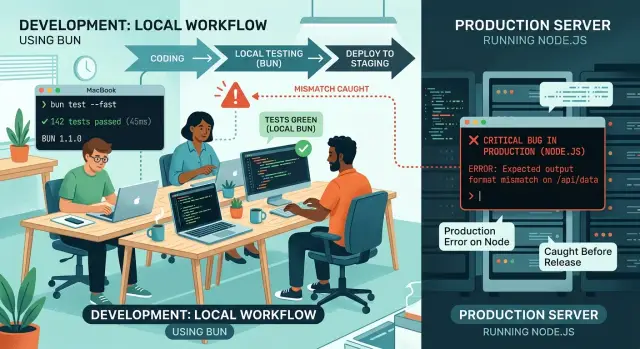
Table of Contents
Why teams split Bun and Node.js
Most teams want two different things from their tools.
On a laptop, speed matters most. Developers want installs, test runs, and small scripts to start fast and get out of the way. Bun often feels better there because everyday commands finish sooner.
Production has a different job. It needs predictable behavior, broad hosting support, and fewer surprises during deploys. Node.js still owns that ground in many companies. Cloud images, process managers, monitoring setups, and older packages often assume a Node.js production runtime, so teams keep it even if local work feels slower.
At first, that split seems harmless. If the app runs on Node.js in production, why not use Bun for installs, tests, and dev scripts? Sometimes that works well. A developer saves a few minutes a day, and those minutes add up.
Problems start when tooling stops being separate from application behavior. A local test runner, build script, or migration command can affect imports, environment variables, file watching, and package resolution. Bun and Node.js overlap a lot, but they do not match in every corner. One runtime may accept code the other rejects, or load a module in a different way.
Then the bug appears in the worst place: after the code leaves a laptop. CI fails. A container starts and crashes on boot. A background job passes local tests, then breaks under Node.js because one API, import path, or edge case behaved differently.
That is why Node.js vs Bun is really a question about boundaries. If Bun stays limited to clearly separate local tasks, the split can save time. If Bun quietly becomes part of how the app is built, tested, or prepared for release, mismatch bugs stop being rare. They become part of normal work.
What changes when the runtime changes
A runtime swap changes more than startup time. If a team uses Bun for local tooling and keeps Node.js in production, it is often running the same code through two slightly different rulebooks.
The first difference shows up before the app even starts. Bun installs packages fast, but install speed is only half the story. Lockfiles, dependency resolution, and postinstall behavior can differ from npm, pnpm, or yarn. A developer may test one dependency tree on a laptop while CI or production builds another. The app looks fine locally, then fails because one nested package version changed.
Some gaps appear in built-in APIs. Many scripts run without trouble, then one package depends on a Node.js behavior Bun only partly matches. Native addons, process flags, worker threads, and less common module helpers are usual trouble spots. You do not need a huge app for this to hurt. One code generator or one image processing package is enough.
Test tools and small CLI scripts can also disagree about files. A script may read a config file with a relative path, assume a certain working directory, or rely on a glob pattern that expands one way locally and another way in CI. A command that reads "./fixtures/sample.json" might pass on a laptop because Bun runs it from the repo root. The same command can fail under Node.js in a pipeline because the script starts in a package subfolder.
Module rules waste a lot of time. CommonJS and ESM do not behave the same, and Bun can be more forgiving in a few cases. Imports without clear file extensions, mixed default and named imports, or packages with tricky "exports" fields may pass locally and then break in Node.js with a blunt error.
A split setup can work, but only if the team treats local and production as two environments, not one. When the runtime changes, package resolution, file access, and module loading all need a quick check.
Where the split saves time
Teams usually feel the gain in the boring parts of the day. Installing packages, running small test batches, and starting local scripts often takes less time with Bun. When those jobs happen 20 or 30 times a day, even a modest speedup changes the pace of work.
The best cases are short local tasks that start, do one thing, and exit. Utility scripts fit well here. A script that renames files, seeds sample data, checks generated types, or runs a quick codegen step often feels snappier when Bun starts it. That matters more than it sounds. Slow startup makes people skip small checks until later.
Large repos can benefit too. Build tools, linters, and test runners often feel faster when the local toolchain spends less time on startup and package handling. On a big codebase, shaving 10 or 15 seconds off a common command is enough to keep someone in flow.
The real win is not benchmark bragging rights. It is tighter feedback. If a developer can test a change, spot a mistake, fix it, and rerun everything in under a minute, they usually try more ideas and clean up more code. Small regressions get caught before they pile up.
That is where the split makes sense. Keep Node.js where you need stability and exact parity with deployed code. Use Bun local tooling where faster installs and quicker command startup remove friction from daily work.
A simple example: a team keeps its API on Node.js in production, but developers use Bun to run local test commands, seed scripts, and front-end build checks. Each command only saves a few seconds. Across a week, that can mean hours back.
Where mismatch bugs start
Most Node.js vs Bun trouble starts in the boring parts, not the main app. A script works on a laptop, tests look clean, and then CI fails under Node.js with an import error, a missing env value, or a native module crash.
The most common problem is module resolution. Bun may accept an import path or package export pattern that Node.js rejects in CI. You often see this with subpath exports, file extensions, ESM and CommonJS edges, or TypeScript path aliases that exist in local tooling but not in the runtime that actually runs the code.
A tiny example can break a pipeline. A developer runs a seed script with Bun, imports src/lib/db, and everything passes. CI runs the same script with Node.js after build steps change the folder layout, and now the module cannot load.
Native packages cause especially annoying failures. A package can compile fine on a Mac laptop, then fail in a container because the binary target changed, the libc version differs, or the image is much slimmer than the local machine. The app did not change, but the environment did.
Environment handling creates quieter bugs. One tool may load .env files for you, while another expects plain shell variables. A test that passes locally can hit the wrong database, skip a feature flag, or fail only in CI because one variable never existed there.
Shell behavior drifts more than teams expect too. Quoting, glob expansion, command substitution, and script chaining can act differently across Bun, npm scripts, zsh, and a plain sh runner.
The pattern is simple: mismatch bugs start where local convenience hides production rules. If Node.js runs your app in production, every script that gates releases needs to prove it can survive there too.
How to test the split step by step
If Bun runs local scripts but Node.js runs production, treat Node.js as the final judge. Fast local tools help, but production behavior decides whether the app actually works.
Run the same unit tests and integration tests in both runtimes from the start. Use the same test data, the same env file shape, and the same startup path. When one runtime fails, you want a clean comparison, not a different setup.
- Pin a Node.js version and use it in CI and in the production image. If Node 20 is your production runtime, compare everything against that version first.
- Run every important test twice. One job uses Bun, one uses Node.js. Label the results clearly so patterns are easy to spot.
- Keep app code close to standard APIs. Put Bun-specific shortcuts in scripts and local helper tasks. Do not let Bun-specific behavior leak into server code.
- Build the production image early, on active branches, not just before release. Start the image and run a few smoke tests so you catch module, path, env, and startup issues while the change is still small.
- Track failures by runtime in test reports. Even a short note like "fails only in Node.js when loading ESM" reveals repeat problems after a week or two.
This works because mismatch bugs rarely look dramatic at first. A script passes in Bun, then Node.js breaks on a package export, a file path, or a timer edge case. If you isolate Bun to tooling, those bugs stay near the boundary instead of spreading through the app.
A small team can do this without much overhead. One CI matrix, one production image build, and one shared test suite usually catch most of the trouble. That costs far less time than learning during release week that local success did not match the Node.js production runtime.
A simple team example
A five-person SaaS team runs its app on Node.js in production because that runtime already powers its API, background jobs, and deployment pipeline. The team does not want to touch the live runtime right before a busy sales quarter, but local work feels slow enough to annoy everyone.
So it tries Bun for local tooling first. The app stays on Node.js, and only the commands that do not shape production behavior move over: linting, formatting, a few small unit tests, and local utility scripts.
That change pays off quickly. Fresh installs finish sooner, linting feels almost instant, and small test runs stop breaking concentration. For a team that runs those commands dozens of times a day, even saving 10 to 20 seconds each time adds up.
Then the first mismatch bug appears. One developer adds an import like import { readConfig } from "./config" in a helper file. Bun accepts it during local runs because it resolves the file the way the team expects. Node.js reads that setup differently in the production build, and the app fails when the server starts.
The bug is small, but the lesson is clear. Speed is nice, but mixed runtimes need firm rules.
The team fixes it in two ways. First, it requires explicit import paths that match how Node.js will load files after build. Second, it draws a hard line around where Bun can run.
After that, the split works well. Bun stays in local tooling. Node.js keeps control of the server entry point, production builds, integration tests, and anything that loads runtime config. The team does not rewrite the app, swap deployment images, or gamble on a full migration. It just uses Bun where it saves time and keeps Node.js where mistakes cost real money.
That is often the sweet spot: faster daily work, the same live runtime, and fewer surprises.
Mistakes that waste time
The biggest drag in Node.js vs Bun setups is false confidence. A team sees fast local runs in Bun and assumes the rest of the stack will behave the same way. That shortcut usually costs more time than Bun saves.
A common mistake is letting Bun-specific APIs leak into shared code. A script starts as a local helper, then someone reuses it in app code, CI, or a build step. If that code depends on Bun.file, Bun shell behavior, or Bun package resolution quirks, Node.js in production can break in ways that feel random.
Lockfiles create another slow mess. Teams keep bun.lockb and a Node lockfile and hope both stay aligned. They rarely do. One small dependency bump can change install results, test output, or generated files, and now people argue about whether the bug lives in the code or the dependency tree.
Skipping Node.js checks because Bun passed locally is a classic way to lose an afternoon. Bun is fast, so people trust it first. Node.js still needs to run the tests, build scripts, migrations, and startup path that production uses. If Node.js never gets a vote until release time, surprises pile up there.
Another bad habit is changing two things at once. If you switch runtimes and replace the build tool in the same pull request, debugging gets much harder. When the build fails, nobody knows whether the issue came from Bun, the bundler, TypeScript settings, or a plugin.
Drift usually starts in dull places: local scripts use Bun while CI runs npm, Docker installs packages differently than developers do, environment variables exist in one place and not another, or one script name points to different commands across machines.
These problems sound small. They are not. A team can lose days because Docker uses Node 20, CI uses Node 18, and local scripts run on Bun with a different install flow.
The safest approach is intentionally boring. Keep shared app code runtime-neutral, keep one source of truth for dependency versions, run Node.js checks on every branch, and change one layer at a time.
Quick checks before rollout
A split setup usually fails for ordinary reasons: one script uses a Bun-only API, CI runs a different command, or nobody writes down the boundary. Most trouble starts during setup and daily habits, long before production.
Start with the hard rule: if your app runs in production on Node.js, every production test must pass on Node.js first. Do that before you enjoy faster local scripts with Bun. If a test only passes under Bun, you do not have a speed win yet. You have a hidden compatibility problem.
A short review catches most issues. Run the full production app, test suite, and build under Node.js with no Bun involved. Review local scripts for Bun-specific APIs, package manager behavior, or shell shortcuts that Node.js users do not share. Make CI use the same commands developers run on their machines, not a separate set that nobody sees. Then ask a new developer to clone the project and start it from scratch without manual fixes.
That last check sounds basic, but it saves hours. A senior engineer can patch around missing flags or odd install steps without thinking. A new hire cannot. If setup breaks on day one, the split is already costing the team more than it saves.
CI deserves extra attention. If developers run bun test locally but CI runs a different Node.js wrapper, the team gets false confidence. The commands do not need to be identical in every case, but they should test the same behavior and the same assumptions. If local tooling is faster, good. If it changes module resolution, env loading, or script output, stop and verify it.
The written boundary matters more than most teams expect. One sentence can be enough: use Bun for install and local utility scripts, and use Node.js for the app, builds, and release checks. Teams that document that split early usually avoid the weird bugs that only show up on another laptop or in CI.
What to do next
Treat Node.js vs Bun as a practical choice, not a team identity. Start small. Move only low-risk local scripts to Bun first, such as install, lint, formatting, or a code generation task. Keep the main server, CI release job, and production runtime on Node.js until the split proves itself.
Write down a short runtime policy and keep it where the team will see it. It does not need pages of rules. A few lines usually do the job: which commands run on Bun, which stay on Node.js, which versions the team pins, and what to do when a script behaves differently on one machine.
Then measure the split for two weeks. Track install time, test time, and failure rate. If package install drops from 40 seconds to 12, that gain is real. If one runtime mismatch bug burns three developer hours, that cost is real too. You need both numbers before you decide.
Small teams often miss the hidden cost. A faster local loop feels great on day one, but support overhead shows up later. Someone loses time fixing a flaky test, a build script behaves differently in CI, or a release job starts depending on Bun-only behavior. The setup only makes sense if the time you save stays higher than the cleanup work.
If the split starts affecting infrastructure, release flow, or production architecture, a short outside review can help. Oleg Sotnikov at oleg.is does that kind of Fractional CTO work with startups and small teams, especially when they need practical help with lean infrastructure and AI-augmented engineering workflows.
If the numbers look good, keep the split and document it better. If the numbers look mixed, narrow Bun usage to one or two scripts. If the team keeps hitting mismatch bugs, end the experiment and go back to one runtime. Simpler setups usually win.
Frequently Asked Questions
Is it safe to use Bun locally and Node.js in production?
Yes, if you keep the boundary tight. Use Bun for short local tasks like installs, linting, and small test runs, and keep Node.js in charge of builds, CI release checks, and production startup.
Trouble starts when Bun shapes app behavior instead of just speeding up local work. If production runs on Node.js, Node.js needs to approve every release path.
Where does Bun save the most time?
Teams usually feel the gain in installs, small test batches, and utility scripts. Those commands run many times a day, so even a few seconds saved each time adds up.
You get the most value from tasks that start, do one job, and exit. That tighter loop helps developers catch mistakes sooner.
What usually breaks first in a split setup?
Module resolution causes a lot of early pain. A local script may import a file one way under Bun, then Node.js rejects that same path in CI or in the production build.
Env loading and working directory assumptions also trip teams. One tool may find a file or variable for you, while the other expects you to set it up yourself.
Should CI run Bun, Node.js, or both?
Run both when the split matters. Let Bun cover fast local feedback, but make Node.js the final judge because it runs your production app.
If you only run Bun in tests, you can miss release bugs until late. A small CI matrix usually catches those differences early.
Do I need both a Bun lockfile and a Node.js lockfile?
No, not unless you want extra drift. Two lockfiles often pull teams into dependency mismatches and hard-to-explain test failures.
Pick one source of truth for dependency versions. If production depends on Node.js tools, keep that install path stable and treat Bun as a local speed tool, not a second package truth.
How do I avoid import and ESM issues?
Use explicit import paths and match the rules that Node.js will enforce after build. Do not rely on Bun being more forgiving with extensions, exports, or mixed ESM and CommonJS patterns.
It also helps to run the same script under Node.js early. If Node.js fails on a path today, fix it now instead of during release week.
What should I do about native packages?
Check them in a container early, not only on a laptop. Native modules often fail because the target OS, libc, or image contents differ from local development.
When a package touches binaries, image processing, or low-level system features, test it in the same kind of environment you plan to ship.
How should I handle .env files in a split setup?
Keep env handling boring and explicit. Make local runs, CI, and production load the same variable names in the same way.
Do not assume one tool will auto-load .env files for the other. If a script needs a value, define where it comes from and test that path under Node.js too.
When should a team end the Bun and Node.js split?
Stop when the cleanup work costs more than the speed gain. If mismatch bugs keep hitting builds, migrations, or release checks, the split no longer pays for itself.
You do not need to force it. Many teams do better with one runtime and fewer surprises.
What is a good rollout plan for a small team?
Start with a narrow trial. Move low-risk local commands to Bun, keep Node.js for the app and release path, and write that rule down where the team can see it.
Then measure real numbers for a week or two. If local work gets faster and Node.js stays quiet in CI, keep going. If not, shrink the experiment or roll it back.


