Node.js backpressure handling for upload and export routes
Node.js backpressure handling keeps uploads and exports from filling RAM. Learn stream flow, temp files, and queue handoff rules that hold up.
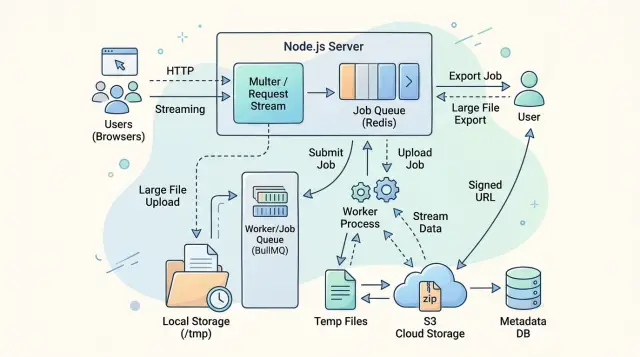
Table of Contents
What goes wrong when large requests hit one process
A single Node.js process can look fine in testing, then fall over when one large upload or export hits it at the wrong time. The trouble starts when the app reads data faster than it can write it somewhere else, like disk, object storage, a database, or the client socket.
When that happens, data piles up in memory. Buffers grow, garbage collection works harder, and response times wobble. If enough requests arrive together, RAM jumps fast and the process can slow to a crawl or crash.
Small requests hide this problem. A 200 KB image or a short JSON export finishes so quickly that extra buffering barely shows up. A 4 GB video upload or a long CSV export for 800,000 rows is different. That work lasts long enough for every mismatch in read speed, write speed, and network speed to turn into memory pressure.
Uploads and exports fail in different ways, but the pattern is the same. With uploads, the server may read the request body into memory while virus scanning, resizing, or forwarding lags behind. With exports, the app may build the whole file in RAM before sending it, even though the client downloads it much more slowly than the server creates it.
One slow client can make this worse. If your code generates rows for a CSV as fast as the database returns them, but the browser reads at a fraction of that speed, your process becomes the waiting room. Every extra chunk sits in memory until the socket can take more.
Without good Node.js backpressure handling, one heavy request can hurt unrelated traffic. Health checks start timing out. Other users wait longer. A process that looked stable under normal API calls suddenly behaves badly under file traffic.
The goal is simple: keep memory steady and keep timings boring. Large uploads should move through the process in small chunks. Large exports should leave the process in small chunks. When work cannot finish inside a normal request, the app should hand it off instead of pretending one process can absorb everything.
How backpressure works in Node.js
Backpressure is the simple idea that data can arrive faster than your code can move it somewhere else. An upload route might read bytes from a client faster than the server can write them to disk. An export route might pull rows from a database faster than the client can download the response. When that speed gap grows, memory fills up with buffered chunks.
Good Node.js backpressure handling keeps that gap under control. Every stream has a read side and a write side. The read side gets data from somewhere, like an HTTP request or a database cursor. The write side sends data somewhere, like a temp file, object storage, or the HTTP response. Trouble starts when the read side keeps going at full speed while the write side slows down.
Node gives streams a built-in way to deal with that. When a writable stream gets more data than it wants to hold, write() returns false. That is the stream saying, "stop for a moment." At that point, the readable side should pause. When the writable side catches up, it emits a drain event, and reading can resume.
If you use pipe() or pipeline(), Node usually handles that pause and resume cycle for you. That is why stream pipelines are much safer than reading a whole file into memory with buffers or collecting chunks in an array. With a proper pipeline, data moves through the process in small pieces instead of piling up.
highWaterMark controls when a stream starts pushing back. Think of it as a threshold for the internal buffer, not a magic fix. A larger value can delay the warning sign, but it can also make memory spikes bigger. Most teams should treat it as a small tuning knob, not the answer to large request handling.
A slow client makes this easy to see on export endpoints. Your code may generate CSV rows quickly, but the network socket may send them slowly. If the response stream pushes back and your code ignores it, the process keeps stacking rows in memory. If your code respects the stream, Node slows the producer down and the process stays stable.
Choosing streams, temp files, or a queue
Pick the simplest path that keeps memory flat. In practice, that means you stream when work can happen in one pass, you use a temp file when the same data must survive multiple steps, and you hand work to a queue when the HTTP request should stop owning the whole job.
Direct streaming is the best fit for uploads that move from the client to one destination without much extra work. If your app reads a file upload and writes it straight to object storage, another service, or a compressor that can slow the input down, streams usually keep RAM steady. This is the cleanest form of Node.js backpressure handling because the slow reader tells the fast writer to wait.
Temp files help when the flow stops being a simple pipe. A virus scan, file type check, thumbnail step, CSV validation, or retry after a network error often needs the same bytes more than once. Writing to disk first costs some I/O, but it is often cheaper than keeping a 500 MB buffer in memory or asking the user to upload again after step three fails.
Queues fit long exports and slow downstream work. If an export takes 40 seconds, pulls data in chunks, builds a zip, and uploads the result, the web request should not babysit that whole job. Put the job in a queue, return a job ID, and let a worker do the heavy lifting. That keeps one busy export from making every other request on the same process feel sluggish.
Simple handoff rules
Most teams do well with a few boring rules:
- Stream directly when the next destination can read at about the same speed you receive data.
- Use a temp file when the job has multiple steps, may retry, or must read the same file again.
- Use a queue when the work may outlive the request, takes more than a few seconds, or depends on a rate-limited service.
- Switch away from direct request handling when file size or export size crosses a limit your process can handle comfortably.
A small example makes the split clearer. A 20 MB image upload that goes straight to storage should stream. A 300 MB spreadsheet that needs validation, parsing, and retry after a flaky third-party call should land in a temp file first. A full account export that may run for minutes should become a queued job, even if the final file is not huge.
Set the rules before traffic grows. Size limits, time limits, and downstream speed give your app a clear handoff point. Without that line, every route starts as a simple request handler and slowly turns into a memory problem.
A safe upload flow step by step
When an upload route fails, it usually fails for a simple reason: the handler reads data faster than disk or object storage can accept it. Good Node.js backpressure handling keeps memory flat by moving bytes in small chunks, refusing bad uploads early, and deleting partial files when something breaks.
-
Check the request before you start writing. Look at auth, content-length, and the declared content type. If the route allows files up to 100 MB and the header says 2 GB, reject it at once. If type matters, inspect the first bytes too. Headers lie more often than people expect.
-
Write the body to a destination immediately. That destination might be a temp file, persistent disk, or object storage stream. Do not collect the whole upload in a Buffer just because parsing feels easier. Use
stream.pipeline()or an equivalent path that connects the request stream to the writer and lets Node manage pressure between them. -
Let the slow side control the speed. If disk writes slow down, the writable stream signals that it needs a pause. A proper pipe or pipeline respects that signal and stops pulling more data until the writer catches up. That is the difference between a stable route and a process that climbs to 2 GB of RAM under a few large uploads.
-
Clean up every failed path. If the client disconnects, if the write stream errors, or if validation fails after a few chunks, close the streams and delete the partial temp file. Half-finished files are easy to miss in testing, then quietly fill storage in production.
A good upload route also separates "accepting bytes" from "processing the file." Save first, then hand off virus scanning, image resizing, or CSV parsing to a queue if the work takes time. Oleg Sotnikov often pushes teams toward this split because it keeps one Node.js process from doing too much at once.
A small example makes it clear. A user uploads a 600 MB video over a slow connection. Your server checks the limit, streams the body to a temp file, pauses reads when disk stalls, and deletes the file if the browser tab closes halfway through. The request stays boring, which is exactly what you want.
A safe export flow step by step
Exports go bad when one request tries to build the whole file in memory before sending the first byte. A safer pattern keeps the file small in memory, puts hard limits on what one request can ask for, and moves heavy work out of the web process.
Start by shaping the request. Require clear filters, a fixed date range, and a row limit. If someone asks for "all data" across several years, do not keep that on a live request. Reject it, narrow it, or send it to a background job.
A simple rule set works well:
- Accept live exports only when the query is small enough to finish fast. For example, allow a CSV for the last 30 days with a cap such as 50,000 rows.
- Read rows in chunks or with a cursor. As each batch arrives, format it and write it to the response right away.
- Watch backpressure. If
write()returns false, stop pulling more rows until thedrainevent fires. - Move large or slow exports to a background job. Let a worker write the file to a temp file, then tell the user where to pick it up when it is ready.
That middle step matters most for Node.js backpressure handling. The database, the CSV formatter, and the HTTP response all run at different speeds. If the client downloads slowly and your code keeps reading rows anyway, memory climbs fast. When you wait for drain, the process stays calm instead of piling up buffered data.
For very large exports, keep the request short. Return a job ID, a status endpoint, or a simple "we will notify you when it is ready" message. The worker can save progress such as rows processed, current state, and file size so the UI can show something useful.
Temp files help because they give the worker a fixed place to write without holding the whole export in RAM. They also make retries easier. If the job fails halfway through, you can remove the partial file, log the error, and start again cleanly.
One last rule is easy to miss: delete old export files. Give them an expiry time, clean them up on a schedule, and cap how many export jobs one account can start at once. That keeps one busy customer from filling disk space or tying up every worker.
A realistic example
Upload under a weak connection
A customer starts uploading a 2 GB video from a train with patchy mobile data. The connection drops in speed, then recovers, then slows again. If the upload route reads faster than it can write, memory climbs and the Node.js process starts fighting with itself.
A safer route pipes the request body straight to a temp file. The stream writes chunks to disk as they arrive, and backpressure slows the read side when the disk or file system falls behind. The process stays flat in memory because it never tries to hold the whole video.
The temp file helps at the point where the request is still active and unreliable. If the user disconnects halfway through, the app deletes the partial file and moves on. If the upload finishes, the app can verify size, type, and checksum before it does any heavy work.
The queue handoff starts after that. Video scanning, thumbnail generation, and transcoding do not belong in the request cycle. The API stores the file, creates a job, and returns a clear status. The user sees steady upload progress first, then a simple "processing" state. Other requests stay fast because one large video no longer blocks the same process.
Export during a busy workday
Now a finance team member asks for six months of orders as CSV at 4:55 PM, right when other people are still using the app. This is where teams often make a bad trade. They query everything, build one giant string in memory, then try to send it in a single response.
A better flow streams rows out of the database and writes them to a temp CSV file. That temp file helps when the export is big enough to outgrow memory, but still small enough to finish quickly on one worker. The user can wait a short time, then download a finished file without hammering the app.
If the export may run for several minutes or pull millions of rows, a queue makes more sense. The app accepts the request, creates an export job, and lets a worker build the CSV outside the web process. The user sees "preparing export" instead of a frozen spinner or a timeout.
When Node.js backpressure handling works well, people notice the calm parts. Progress moves. Status messages make sense. A huge upload or export feels slower than a small one, but it does not make the rest of the product feel broken.
Mistakes that cause memory spikes
Most memory spikes come from work the server should never do in RAM. A large upload or export can stay stable when the process moves data in small chunks. It gets dangerous when code keeps whole files, whole result sets, or too many jobs in memory at once.
The first mistake is buffering the full request body before writing it anywhere. That often happens by accident through convenience middleware, custom req.on("data") collectors, or parsers that read everything before they act. One 500 MB file may look fine in testing. Five uploads at the same time can push one Node.js process into garbage collection thrash or a crash.
Another common problem is doing every heavy step inside the request path. Teams accept the upload, then unzip it, parse it, scan it, resize it, and maybe compress it again before they respond. Each step can create another copy of the same data. Memory climbs fast, and the client holds the connection open the whole time.
Exports fail in a similar way. A route queries all rows, stores them in an array, turns that array into CSV or JSON, then sends it only after the last row is ready. That means the process holds database rows, formatted output, and often compression buffers together. For big reports, that is enough to tip export endpoint memory usage from safe to ugly.
A few misses make the problem worse:
- The server ignores
abortedorcloseevents and keeps working after the user leaves. - Temp files stay on disk after failures, so retries pile up.
- The queue accepts unlimited jobs or unlimited total bytes.
- One worker takes too many large jobs at the same time.
Concurrency usually hurts more than file size. If one heavy job needs 150 MB across parsing, buffering, and database reads, six jobs can eat nearly 1 GB before you count Node.js itself. That is why queue handoff rules matter. Put a firm cap on active jobs, reject or delay overflow, and keep large work away from the web process.
Good Node.js backpressure handling is mostly discipline. Stream when you can, write to temp storage when you must, stop work when clients disconnect, and treat queue limits as protection, not as an optional extra.
Quick checks before you ship
A good Node.js backpressure handling setup stays boring under stress. If a 5 GB upload hits one process, RAM should stay close to its normal range instead of climbing with file size. That is the first check, and it catches a lot of bad upload code fast.
Run one upload test with a small file, then another with a much larger one. Watch process memory during both runs. If memory grows almost linearly with the upload size, something still buffers too much data in user space.
Slow clients cause a different class of mess. A user can start an upload, lose connection, and leave a half written temp file behind. Your app should notice the broken stream, close file handles, and delete that temp file within a clear timeout. If cleanup only happens on a happy path, disk usage will drift up all week.
Exports need the same discipline. When the database slows down, your export route should not keep pulling rows as fast as possible and piling them into memory. It should pause, reduce read speed, or hand the work to a queue. If the slowdown lasts, reject new exports or queue them instead of pretending the process can absorb infinite pressure.
A short pre-release checklist helps more than a long design doc:
- Upload a file far larger than your usual test data and confirm RAM stays mostly flat.
- Throttle the client connection and confirm the app removes abandoned temp files.
- Slow the database on purpose and confirm export jobs pause, fail fast, or queue cleanly.
- Check worker rules for maximum size, maximum runtime, and retry count.
- Open your dashboard and confirm it shows RAM, open files, queue depth, and job age.
Those worker rules matter more than teams expect. A job with no size cap can eat disk. A job with no time limit can hang forever. A retry rule with no ceiling can turn one bad export into fifty more bad exports.
Dashboards should answer simple questions in a few seconds. Is memory creeping up? Are open files rising and never dropping? Is queue depth stuck? Are some jobs much older than the rest? If you cannot answer those quickly, the first production incident will feel slower and more confusing than it needs to.
What to do next
Start with numbers, not guesses. Measure the largest upload your app accepts, the largest export people actually request, and the memory your Node.js process reaches during those moments. One afternoon with real numbers can save weeks of random fixes.
Keep the first version simple. You do not need a perfect system on day one. You need clear cutoffs that tell the app what to do when a request stays small, gets big, or turns into a job that should not run inside the request at all.
Write those rules down where the team can see them:
- Stream small and medium uploads straight to storage when the client keeps up.
- Spill bigger payloads to a temp file when memory starts to climb.
- Hand long exports to a queue when they take more than a short request should.
- Reject files or export ranges that break your limits.
- Set timeouts and cleanup rules for half-finished work.
Then test the ugly cases. A route can look fine with one fast client on a laptop and still fall apart in production. Run one slow upload, then two more. Start two large exports while an upload is still open. Watch memory, temp disk use, request time, queue depth, and cleanup after canceling requests.
A small team can do this with a short checklist. Pick three file sizes, two export sizes, and one slow network profile. Repeat the same tests after each change. If memory jumps fast or does not fall back down, stop and fix that before adding new features.
If you are working on Node.js backpressure handling, this discipline matters more than clever code. Most memory spikes come from missing limits, vague handoff rules, or tests that were too polite.
If your team wants a second set of eyes, Oleg Sotnikov can help design these flows, review Node.js architecture, and tighten production operations without piling on extra tooling. That fits best when uploads, exports, queues, and infrastructure already feel tangled and you need simple rules that hold up under load.


