Node.js auth libraries for SaaS, OAuth, and B2B SSO
Compare Node.js auth libraries for sessions, OAuth, and first B2B SSO rollout. See which package fits SaaS apps, admin tools, and tenant login.
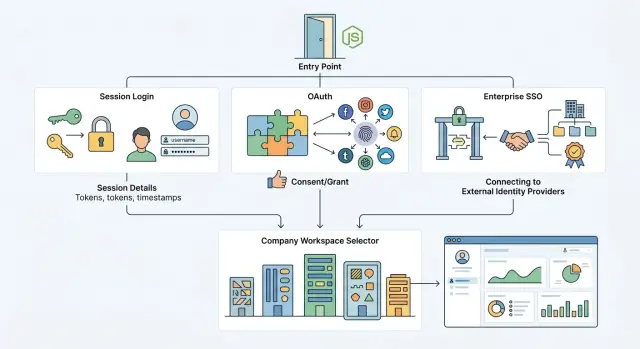
Table of Contents
Why this choice gets messy fast
Auth looks simple until product rules start piling up. A login form is part of it, but the bigger choice sits underneath: how users sign in, how you track identity, and how your app decides what each person can see.
That choice shapes the whole user experience. If you pick the wrong model, people hit odd flows like getting logged out too often, creating duplicate accounts, or landing in the wrong company workspace. Support feels it too, because login problems create tickets fast and they are rarely easy to sort out.
The data model changes with it. A basic session setup might work fine for one internal admin tool where one company owns every account. A SaaS product is different. One person may belong to two customer accounts, use Google for one app, a password for another, and company SSO for a third.
Sessions, OAuth, and SSO solve different problems, and teams often mix them up. Sessions answer, "How do we keep this user signed in after login?" OAuth answers, "How can this app let a user sign in with Google, GitHub, or another provider?" SSO answers, "How does a company control access for its staff with its own identity system?"
That difference matters when you compare Node.js auth libraries. Some packages make cookie sessions easy for dashboards and back offices. Some focus on social login. Some can handle enterprise features, but only if you add tenant rules, domain checks, and account linking logic yourself.
Internal tools usually have fewer moving parts. The team knows the users, one org owns the data, and a plain email login or company Google login may be enough. SaaS apps have more edge cases because every customer brings different rules, different domains, and different expectations about invite flows, account recovery, and who can create a workspace.
Tenant-aware login adds pressure on day one, even if you only have a few customers. You need to decide whether a user enters an email first, chooses a workspace first, or gets routed by domain. You also need rules for invites, role mapping, and what happens when the same email appears under multiple tenants.
A small mistake here spreads far. It can affect onboarding, billing, audit logs, and who can see customer data. Fixing auth later is possible, but it usually means account merges, migration scripts, and a lot of support hours.
Sessions, OAuth, and SSO in plain language
When people compare Node.js auth libraries, they often mix up three different jobs. That creates bad package choices early, then painful rewrites later.
Sessions are the simplest. A user signs in with an email and password, your app checks those details, and the browser keeps a small cookie that says, "this person is logged in." Users expect this to feel steady and boring. They sign in once, refresh the page, and stay signed in until they log out or the session expires.
OAuth is different. Your app does not check the password itself. Google, Microsoft, GitHub, or another provider does that part, then tells your app who the user is. Users expect speed here. They want one click, a familiar login screen, and no new password to remember.
SSO usually means enterprise SSO. That is where a company controls access through its identity system, often Okta or Microsoft Entra ID. Employees expect to use their work account, follow company rules like MFA, and get access that matches their role at work.
OAuth and SSO overlap, but they are not the same thing. OAuth often starts with individual choice: "I want to sign in with Google." Enterprise SSO starts with company control: "Our staff must sign in through our identity provider." That difference matters a lot in SaaS products.
A simple way to think about user expectations:
- Sessions feel local to your app.
- OAuth feels convenient.
- SSO feels company-managed.
The line where OAuth ends and enterprise SSO starts is usually workspace control. If one person picks a social login for themselves, that is OAuth. If a customer wants everyone in acme.com to sign in through one company setup, that is SSO.
For most products, launch in this order: sessions first, OAuth second, SSO third. If you run an admin tool, sessions may be enough for a while. If you run a SaaS app, adding Google or Microsoft login early usually makes sense. Add your first B2B SSO rollout when a real company account needs tenant-aware login, domain matching, and IT approval.
That order keeps scope under control and matches what most users actually ask for.
Which packages fit which product
Most Node.js auth libraries look similar on a feature list. They feel very different once you need session control, OAuth setup, and a first B2B SSO rollout for real customers.
Auth.js fits Next.js SaaS products well. It gets you common OAuth providers fast, and the app router story feels natural. The tradeoff is control. If each customer needs a different identity provider, different email domain rules, or custom workspace routing, you will write that logic yourself around the package.
Passport still makes sense for Express admin tools. It has been around for years, and it gives you many strategies without forcing a big opinion on your app. That freedom is useful, but it also means your team owns more of the boring parts: session storage, user linking, account recovery, and tenant rules.
Lucia is a good pick when you want simple, direct session auth and you do not want a large auth framework. It suits products that prefer email and password, magic links, or a small number of providers. For tenant-aware login, Lucia stays clean, but only because you build more yourself.
SuperTokens is the most ready-made option in this group. It helps when a SaaS app needs sessions, user roles, and several sign-in methods without weeks of plumbing. It saves time early. The catch is that unusual B2B SSO flows still push you into custom work, especially when each tenant has its own rules.
A custom session stack gives you the most control and the most responsibility. That path fits teams with strict security needs, unusual account models, or deep in-house backend skills. For most teams, it is easy to underestimate how much time goes into session rotation, provider edge cases, audit trails, and support issues.
Best fit by product type
For a Next.js SaaS app, Auth.js is usually the fastest start. For an Express admin tool used by one company, Passport or Lucia often feels simpler. For mixed apps with a web front end and separate APIs, SuperTokens or a carefully planned custom stack can keep auth rules in one place instead of splitting them across two systems.
Tenant support is where the gap shows. Auth.js and Passport can handle it, but you have to design tenant discovery, domain mapping, and provider selection. Lucia gives you a clean base for that. SuperTokens reduces setup work, yet tenant-specific SSO still needs careful design.
A simple scorecard
Score each package from 1 to 5 on these points:
- fit with your framework
- how much session logic your team must own
- how fast you can add OAuth providers
- how hard tenant routing will be
- how painful support will feel six months later
If you run a normal SaaS app, start with the option that removes the most boring work. If you expect enterprise customers soon, pick the one that makes tenant-aware login clear, even if setup takes a bit longer.
Tenant-aware login rules that matter
When you compare Node.js auth libraries, tenant rules often decide the fit more than OAuth support or session helpers. A SaaS app can have clean login code and still confuse people if it does not know which company account they meant to enter.
Pick one entry path first
Users need a clear way to reach the right workspace. The common patterns are simple, but each one changes your auth flow.
- Email domain lookup works when one company owns one domain and you trust that mapping.
- Subdomains work well for admin tools and B2B apps that already use company-specific URLs.
- Invite links work best early on because they carry the tenant ID and reduce guesswork.
- A workspace picker is safer when one person belongs to two or more companies.
Many teams start with domain matching and learn the hard way that it is not enough. A consultant might use the same email across several client workspaces. A holding company might own many domains. A contractor might sign in with Google, then need access to three separate tenants. If you guess the tenant from email alone, some users land in the wrong account.
Bind the session to a tenant on purpose. Store the user ID, tenant ID, role, and auth source together in the session or token. If a user switches workspaces, create a fresh tenant context instead of silently reusing the old one.
Do role checks in one place
Owner, admin, and member sound simple until your code grows. If every route checks roles in its own way, you will get edge cases fast. One screen lets an admin edit billing, another forgets to block it, and support has no idea why.
Keep role checks in shared middleware or one policy layer. Then every API route and page asks the same question: "Does this user have this role in this tenant?" That extra "in this tenant" matters. A user can be an owner in one company and only a member in another.
Domain checks and IdP mapping belong before you create the final tenant session. Domain checks can suggest a tenant. SAML or OIDC mapping should confirm which IdP belongs to which tenant. If your app allows both password login and enterprise SSO, keep a clear rule for what happens when they conflict.
These rules also shape your audit logs and support tools. Log tenant switches, failed tenant matches, role changes, and the auth method used. Support staff should see the tenant context at a glance. If they can impersonate a user for debugging, force a visible banner and log every action. That saves hours when a customer says, "I signed in, but I ended up in the wrong company."
How to ship your first B2B SSO rollout
Your first B2B SSO rollout should feel small. If it feels big, you are probably trying to support too many cases at once. Start with one pilot customer, one identity provider type, and one clear login path.
For most SaaS teams, that means one SAML or OIDC setup for a single company. Use the format your pilot already has, then make that flow work end to end before you add a second provider. Even strong Node.js auth libraries will not choose that rollout order for you.
Tenant discovery should come before visual polish. Ask for a work email, company domain, or workspace name first, then route the user to the right tenant-aware login flow. A plain screen that sends people to the correct login is better than a polished screen that leaves them guessing.
Do not remove local admin access. Keep one separate admin path outside SSO, lock it down, and give it to very few people. When a customer sends the wrong certificate or changes a claim name without warning, your team still needs a way in.
Test the full first-login path
Run the boring cases one by one, because that is where most rework starts:
- A new user signs in and lands in the correct tenant
- The app creates the user record with the expected profile fields
- Role mapping gives the right access on first login
- Existing users can sign in again without duplicate accounts
- Logout clears the app session and behaves as expected with the identity provider
Support prep matters more than most teams expect. Write short internal steps for certificate updates, domain changes, and claim errors. If a company moves from oldco.com to newco.com, your team should know exactly where to update domain matching and how to test it after the change.
One more thing: do not hide setup errors behind vague messages. Tell admins what failed. "Email claim missing" or "domain does not match this workspace" saves a lot of time.
If one pilot customer can turn SSO on, test it, and recover from a bad config without an engineer on a live call, the rollout is in good shape for customer number two.
A simple example with company workspaces
Picture a SaaS app for sales teams. Anyone can sign up with email and password, but some companies also want Google login or full SSO through their identity provider.
Mia signs up with a password using [email protected]. The app creates a personal workspace right away because no company workspace matches her domain yet. She can invite coworkers later, and one of them can still use Google without creating a separate account.
A week later, Luis joins from the same company with Google OAuth and the email [email protected]. The app checks the domain, finds the existing SmallShop workspace, and asks whether he wants to join it or create a new one. That choice matters. If you skip it, people end up in the wrong workspace and support gets dragged into account merges.
Now add a larger customer. Priya works at acme.com, where the IT team set up SSO for the Acme workspace. When she enters her work email, the app finds that acme.com belongs to an SSO workspace and sends her to the company login flow instead of showing a password form. After login, she lands in the same product area Mia and Luis use. Whatever Node.js auth libraries you choose, this part should feel identical to the user.
Inside the app, roles do the real work. The billing owner can change the plan, see invoices, and approve extra seats. A team admin can invite people, reset roles, and manage workspace settings, but should not touch billing unless you allow it. A regular member can use the product, but cannot change account-wide settings.
Most support tickets start in a few predictable spots:
- a user signs in with Google after first using a password and gets a second account
- the email domain matches more than one workspace
- a contractor has the company email domain but should not auto-join
- the billing owner leaves and nobody can update payment details
- SSO works, but role mapping puts everyone in as a member
This is why tenant-aware login needs two checks every time: who the user is, and which workspace they should enter. If either guess is wrong, the auth flow works on paper but feels broken in real use.
Mistakes that create rework
Most teams compare Node.js auth libraries too early. The package matters, but your tenant model matters first. If you do not decide whether users belong to one company, many companies, or personal accounts plus workspaces, you will wire login flows the wrong way and undo them later.
A common miss is treating Google or GitHub sign-in like enterprise SSO. Social login helps people get in fast. It does not handle the company rules that show up when a customer wants SAML, domain matching, enforced login methods, or separate access for each workspace. Teams often ship OAuth first, call it
Quick checks before launch
Auth usually looks fine in a demo. The rough parts show up on a phone with a slow connection, in an expired browser session, or when one person belongs to more than one company. Test those cases before you put real customers in front of the login screen.
Run the full flow on actual devices, not only in localhost and desktop Chrome. Use a phone, a laptop, and at least one browser with saved passwords turned on. Log in, log out, reset the password, accept an invite, and recover an account after a failed attempt. Small glitches pile up fast here. A missing redirect or stale cookie can block a user for no good reason.
Tenant behavior needs its own pass. If your app supports company workspaces, switch between two tenants with the same user and make sure the app always lands in the right place. Then test a locked account, an expired session, and a user who signs out in one tab while another tab stays open. Those are boring checks, but they catch real support tickets.
A short pre-launch pass should cover these points:
- A user can finish login and logout on mobile and desktop without losing the intended workspace.
- Password reset, invite acceptance, and account recovery send people back to a valid screen.
- Admins can see why SSO failed without opening raw logs and guessing.
- Support staff have a controlled fallback path for urgent access.
- A user in two companies can switch cleanly without mixing roles or data.
The admin side matters more than teams expect. When SSO fails, someone needs a readable reason like "email domain does not match tenant" or "IdP certificate expired." If the only answer lives in raw logs, your support team will burn time and customers will wait. A simple event view with timestamps, tenant name, identity provider, and failure reason is usually enough.
Keep one break-glass path for emergencies, but lock it down hard. Limit who can use it, log every action, and test it before launch. If you work with a Fractional CTO like Oleg, this is the kind of review that saves a week of cleanup later. It is much cheaper to catch role leaks and bad redirects now than after the first enterprise customer reports them.
What to do next
Cut the decision down to the next 12 months. Pick the simplest setup that can support your current product, the deals already in your pipeline, and the support load your team can handle. Teams waste a lot of time when they choose for a future version of the app instead of the one they need to ship now.
Write down the facts before you compare packages. You need four of them.
- the app type: internal admin tool, customer SaaS, or customer app with company workspaces
- the tenant model: one account per company, many workspaces, or mixed personal and company access
- the IdP mix: email and password, Google, Microsoft, Okta, Azure AD, or SAML from a few enterprise customers
- the security needs: MFA, audit logs, session length, admin impersonation, invite rules, and SCIM or SSO requirements
Be concrete. "We may need SAML someday" is too vague to drive a choice. "Two active sales conversations need Okta this quarter" is useful.
Then do a short review of package fit, session design, and rollout order. Keep it tight. An hour is often enough when the inputs are clear. Many Node.js auth libraries handle OAuth and sessions well, but they do not decide tenant rules for you. Your app still needs to control workspace mapping, domain checks, role changes, and who can sign into what.
A simple rollout order usually works best. Start with session auth if your product is an admin tool or a SaaS app with a normal sign in flow. Add OAuth where users expect it. Add B2B SSO only for tenants that need it now. That approach keeps the first B2B SSO rollout small and lowers rework.
If your team keeps circling, get an outside review before you commit. Oleg Sotnikov can help with a practical Fractional CTO review of auth choices, tenant logic, and rollout risk. That is often cheaper than rebuilding login after your first enterprise customer asks for something your original setup cannot handle.


