Node.js request concurrency for CPU heavy AI tasks
Node.js request concurrency gets tricky when AI work burns CPU. Learn when worker threads, queues, or a separate service fit best.
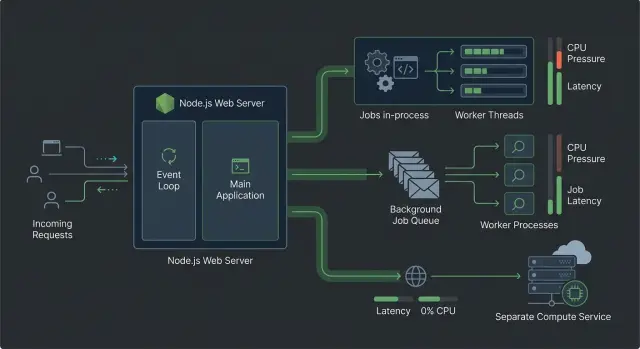
Table of Contents
What changes when AI work hits the request path
A normal Node.js API handles lots of waiting without much drama. It can pause on database reads, HTTP calls, or file uploads and still keep other requests moving. That changes when you put CPU-heavy AI work inside the request itself, like embedding generation, OCR cleanup, token counting, or local inference.
Now the request does not just wait on I/O. It spends real time on the CPU. In Node.js, that hits harder than many teams expect because the main event loop gets one turn at a time. If one request spends 300 to 500 ms chewing through text or image data, other requests wait longer too.
That is the part people miss about Node.js request concurrency. One slow request can hurt many others, even when those other requests do not touch AI at all. A user uploads a document, the server starts crunching it, and suddenly login, search, and dashboard calls feel slower across the app.
The first warning sign is usually latency, not errors. Response times jump. P95 and P99 climb fast. The app still looks "up," health checks still pass, and logs may stay quiet. Users notice the drag before your monitoring shows a clear outage.
Adding more web replicas does not fix the root issue by itself. If every replica runs the same CPU-heavy work in the request path, you spread the pressure across more processes and spend more money, but each process can still stall under load. The problem stays the same. You just have more copies of it.
This often shows up right after an AI feature ships. Everything looks fine in light testing. Then a few concurrent requests land in production, and the whole service starts to feel sticky.
Why Node.js slows down on CPU work
Node.js is very good at waiting. It can handle a lot of open requests because much of web work is I/O: reading from a database, calling another API, or waiting on disk. During that wait, Node can move on and keep the process responsive.
CPU-heavy AI work is different. Tokenization, document parsing, chunking, embedding prep, image transforms, and local inference all spend real time on the machine itself. That work can chew through a core fast, even when each step looks small on its own.
The problem is the event loop. It stays healthy when tasks finish quickly and give control back. If one request starts a 150 ms CPU burst on the main thread, other requests do not get that time back. They wait. A few overlapping jobs can turn a snappy API into slow Node.js requests.
This is why Node.js request concurrency often looks great in testing, then falls apart after an AI feature goes live. A database call that takes 200 ms usually does not block the process the whole time. A 200 ms parsing or embedding step does.
Large batches make the slowdown worse. Say one user uploads a big PDF and your app extracts text from hundreds of pages in one go. The process creates more strings, arrays, and buffers, memory climbs, and V8 has more garbage to clean up.
Then latency gets uneven. One request finishes fast, the next takes seconds, and small endpoints start feeling random. Garbage collection pauses add to the mess, especially when the server runs close to its memory limit.
If the web process does both request handling and heavy AI prep, piling on more work usually does not improve throughput. It just makes delays easier to trigger.
How to spot the real bottleneck
Most teams guess wrong at first. They see slow Node.js request concurrency and blame the database, the model API, or Node itself. The fix starts with one test where you measure latency, CPU use, memory use, and event loop lag at the same time.
If only latency goes up, you do not know much yet. If latency rises with CPU and event loop lag, local compute is likely blocking the process. If latency rises while CPU stays low, you are probably waiting on the network, disk, or another service.
Use one busy endpoint and test it under traffic that looks like real use. A single request in local dev tells you almost nothing. Twenty or fifty concurrent requests often reveal the problem fast, especially if each request also triggers tokenization, image parsing, embeddings, or another CPU-heavy step.
Capture four numbers for the same test window:
- p95 or p99 request latency
- CPU use per process
- memory growth and garbage collection spikes
- event loop lag
Those numbers tell a clearer story than average response time alone. High CPU with low memory growth points to pure compute. Rising memory with long garbage collection pauses points to allocation pressure. Low CPU with long request time usually means waiting on something outside the process.
Time the work inside the endpoint too. Split the request into network wait time and local compute time. For example, if an embeddings API call takes 900 ms but your app spends 700 ms chunking text first, the outside API is not your main problem.
User expectations matter just as much as raw timing. If the user must see the result before the page can continue, you need a fast synchronous path. If the result can arrive 10 seconds later, a queue may be the better choice even when the CPU cost looks manageable.
A simple test from Oleg Sotnikov's kind of work with lean production systems makes this obvious: upload a document, parse it, split it, and create embeddings under realistic traffic. Watch what breaks first. The first thing that bends is usually the real bottleneck.
When worker threads fit best
Worker threads work well when the request still needs a fast answer, but one part of the work burns CPU. Keep the web app as the entry point, then move the hot loop off the main thread. That lets the process keep handling other requests instead of freezing during text chunking, image prep, reranking, or a local model call.
This pattern fits jobs that are short, predictable, and tied closely to the request. If a user uploads a file and you need to split text into chunks before saving it, a worker thread is usually enough. The user gets one response, the code stays in one service, and you avoid the extra moving parts of a queue or a separate CPU service.
Worker threads help Node.js request concurrency only if you size them with care. A common mistake is to start too many workers and make the machine fight itself. Match the worker count to the CPU cores you actually have, then leave some room for the main process and the database client.
A few rules keep this setup sane:
- Send small payloads to workers. Large objects take time to copy and can wipe out the gain.
- Keep worker jobs focused. Pure CPU work does best.
- Set time limits. If a job hangs, stop it and return a clear error.
- Reuse workers through a pool when traffic is steady.
If the job needs a lot of memory, runs for many seconds, or sometimes spikes under load, worker threads start to feel tight. At that point, the web process still carries too much risk. For slow Node.js requests caused by modest CPU bursts, though, worker threads are often the simplest fix with the fewest new parts.
When a queue makes more sense
A queue works better when the user does not need the AI result in the same response. The web app can save the request, create a job, and reply right away. A worker handles the heavy task after that, so one slow job does not tie up the whole request path.
This pattern fits work that users expect to take a while:
- summaries for long documents
- scheduled reports
- batch labeling
- background embeddings
- audio or image processing
The user experience is often better, not worse. Waiting 30 to 60 seconds on one request feels broken, even if it finally succeeds. A quick response with a clear status like "queued" or "processing" feels more reliable.
Store job state in a place your app can read later. Keep a job ID, current status, start time, finish time, and error details if something fails. If the task has stages, save simple progress updates such as "uploaded", "split into chunks", and "done" so users can check where it is.
Queues also make failures less painful. If a worker crashes halfway through a report or embedding run, you can retry the job without making the user submit the whole request again. That matters more than people think, especially when uploads are large or the prompt setup is expensive.
Scaling gets simpler too. You can run a small web app for fast responses and add workers only when AI jobs pile up. That split protects Node.js request concurrency much better than pushing every CPU-heavy task into the web process.
A small team can start with one queue and one worker. If demand grows, they add more workers, not more waiting time for every visitor.
When to split CPU work into a separate service
A separate CPU service starts to make sense when request traffic and AI job volume rise together. If every new upload, chat, or search request also kicks off embeddings, OCR, reranking, or document parsing, the web app ends up doing two very different jobs. Once that happens, Node.js request concurrency stops being a tuning problem and becomes a boundary problem.
A few signs usually show up early:
- Response times jump when AI jobs pile up
- Memory use swings hard during large documents or batch runs
- AI code needs deploys more often than web routes or page changes
- You want more compute workers without adding more web servers
Crashes and memory spikes are another reason to split. A bad parser run or a hungry model library can eat RAM fast. If that code lives inside the user facing app, people feel it right away through slow pages, timeouts, and restarts. A separate service keeps that damage contained.
Deploy speed matters too. Web code and AI code rarely change on the same rhythm. A product team might adjust forms, auth, or API responses a few times a week, while the AI side changes chunking rules, model settings, or native dependencies on a different schedule. Separate services let you ship one without shaking the other.
Scaling also gets cleaner. The web layer should scale with HTTP traffic. The compute layer should scale with available cores, queue depth, and job time. That can mean two web instances and eight CPU workers, even when page traffic stays flat. If all of that sits in one Node.js process group, you waste money and make capacity harder to reason about.
Keep the first split small. One focused service is enough. For many teams, that means a single service that handles embeddings or file parsing, with a clear API and basic health checks. You do not need a big internal platform. You need one clean boundary that protects the app people actually use.
A simple way to choose the pattern
Pick the pattern by timing, not by taste. Ask one question first: does the user need the result before the page can continue?
If the answer is yes, keep the work close to the request only when each job is short and fairly predictable. A good starting point is Node.js worker threads for tasks like parsing one file, resizing one image, or generating a small batch of embeddings. The web process stays free to accept new requests while another thread handles the CPU work.
Then do rough math for peak load. If one job takes 200 ms of CPU time and 30 users can trigger it at once, that is about 6 CPU seconds of work arriving almost together. That is when slow Node.js requests start to show up, even if average traffic looks fine. Use peak numbers, not daily averages.
If the user does not need to wait, an AI job queue is usually the safer choice. The request can return fast, save the job, and update status later. This fits document indexing, long summaries, large embedding runs, and other work that may take a few seconds or more. A queue also gives you retries and better control when traffic jumps.
A separate CPU service makes more sense when isolation matters more than simplicity. Pick that route if the CPU work needs its own scaling, depends on heavy native libraries, has a different deploy cycle, or can hurt the web app when it spikes. It is also cleaner when one team owns the product API and another owns the AI pipeline.
A simple filter works well:
- User must wait, and the task is short: use worker threads.
- User can wait: use a queue.
- The work needs independent scaling or stronger isolation: split it into a separate service.
Most teams should start small. For Node.js request concurrency, worker threads are often the first step, a queue is the next one, and a separate service is worth the extra complexity only when load, risk, or team ownership make that tradeoff clear.
A realistic example: document upload and embeddings
A user uploads a 40-page PDF and expects a quick confirmation, not a browser tab that spins for 30 seconds. The best response is usually simple: "Upload received. Processing started."
The slow part often starts before any model call. PDF text extraction, cleanup, and chunking can burn a lot of CPU, especially with scanned files, messy layouts, or large documents. If your web process does all of that inside the request, slow Node.js requests spread to other users fast.
A cleaner flow looks like this:
- The web app saves the file and creates a job record.
- The upload request returns right away with a success message.
- A background worker extracts text, splits it into chunks, and creates embeddings.
- The UI shows a status screen until the document is ready for search.
This design protects Node.js request concurrency because the web app stays focused on short I/O work: uploads, auth checks, and search queries. Search requests stay fast since they do not wait behind local CPU work from somebody else's PDF.
The worker can run in the same system at first, but outside the web request path. If extraction libraries use a lot of memory or sometimes crash on bad files, moving that work into a separate process is usually the safer call. You isolate the failure and keep the main app responsive.
A status screen works better than one long hanging request. People accept "processing" when they can see progress or at least a clear state such as queued, extracting, embedding, or ready. They do not accept a page that looks stuck and then times out.
That small change in flow often does more for perceived speed than shaving a few seconds off the embedding job itself.
Mistakes that hurt concurrency
The fastest way to ruin Node.js request concurrency is to slip CPU work into the same handler that serves the user. A request comes in, your Express or Next.js route starts chunking text, resizing images, generating embeddings, or parsing a big file, and the event loop stops feeling light. One slow function can stall unrelated requests, even if your server looked fine in testing.
Worker threads help, but people often treat them like a trash chute: every heavy task goes in, no limits, no queue, no timeout. That usually creates a different mess. Threads pile up, memory climbs, and latency gets weird because the app still accepts more work than it can finish. If tasks arrive faster than they complete, you need backpressure, not more optimism.
Another common mistake is passing huge objects between threads. If you send large documents, image buffers, or giant JSON blobs back and forth, serialization and copying eat time you thought you were saving. Keep the message small. Pass IDs, file paths, or compact chunks, then let the worker load what it needs.
Scaling web pods does not fix a bad hot path either. If one CPU-heavy function blocks each pod, adding more pods mostly gives you more blocked pods. You pay more, logs get noisier, and users still wait. This catches teams that scale the web tier before they measure where time actually goes.
Cancellation gets ignored far too often. A user closes the tab, retries the upload, or moves to another page, but the server keeps chewing through the same expensive job. That wastes CPU and pushes other requests back. If the result no longer matters, stop the work or mark it stale before it reaches the expensive step.
A small rule helps: keep the web process thin, cap how much heavy work can run at once, and avoid moving big payloads around unless you have to.
Quick checks before you ship
Most concurrency problems show up under the ugliest inputs, not the average ones. A 500 KB text file may look fine in testing, then a 40 MB PDF with long OCR output blocks the process and makes unrelated requests slow.
Run a load test that matches real traffic. Use the file sizes, prompt lengths, batch sizes, and timeout settings you expect in production. If your app accepts documents, test small files, normal files, and one or two large files that sit near your limit.
A short release checklist helps more than one more round of guesswork:
- Set a hard max job size. Reject work that is too large before it reaches your CPU-heavy path.
- Measure event loop lag, queue depth, request latency, and timeout rate. If lag climbs during AI work, your web process is still doing too much.
- Test retries on purpose. Send the same job twice and make sure you do not create duplicate results or bill twice.
- Break one step in the middle. Check what happens when upload succeeds but embedding generation fails, or when a worker dies after partial progress.
- Write down who owns each worker, queue, dashboard, and alert. When something backs up at 2 a.m., vague ownership wastes time.
For Node.js request concurrency, this kind of testing is often more useful than micro-benchmarks. A fast demo can hide a bad production setup.
One rule is worth being strict about: if a job can grow without a clear ceiling, add a ceiling now. Size limits, time limits, and retry rules feel boring, but they keep one bad request from turning into a pile of slow Node.js requests.
If you only check the happy path, you are still guessing.
What to do next
Start with a simple map of every AI task your app runs. Put each one in the place that matches its behavior, not the place that feels easiest today. That is how you protect Node.js request concurrency when CPU work starts to grow.
- Keep it in the request path if it finishes fast and users need the answer right away.
- Use a worker thread if the job is CPU-heavy but still small, local, and tightly tied to one web server.
- Use a queue if users can wait, traffic arrives in bursts, or you need retries.
- Split it into a separate service if CPU work dominates, needs its own scaling rules, or pulls the web process down with it.
Then pick one endpoint, not five. Measure its current p95 latency, CPU load, memory use, and timeout rate. Change one thing, ship it, and measure again. If document upload plus embeddings is the slow path, start there instead of refactoring the whole app.
Keep the first version boring. A plain queue with one worker and clear retry rules is easier to run than a clever setup with too many moving parts. You want something your team can debug at 2 a.m. without guessing.
Watch the numbers for a few days after the change. If p95 drops but memory climbs, you still have work to do. If CPU stays flat but request latency improves, you likely moved the bottleneck out of the web process in the right way.
Some teams get stuck because the issue is no longer just code. It touches deployment, ownership, cost, and how people ship changes. If that is where you are, Oleg Sotnikov can review the tradeoffs as a Fractional CTO and help plan a safer rollout.


