Node.js version drift: how to stop deploy mismatch failures
Node.js version drift breaks builds when local, CI, and production use slightly different runtimes or tools. Learn how to pin versions cleanly.
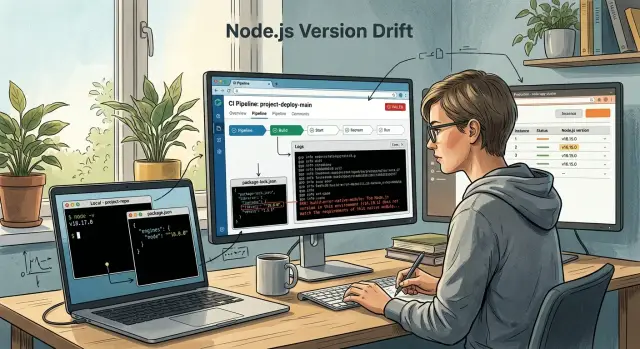
Table of Contents
What version drift looks like
Node.js version drift usually shows up as a problem that makes no sense at first. The code passed on your laptop an hour ago, but the CI job now fails with a different error, or production crashes before the app even starts. Nothing looks broken in the feature itself. The mismatch sits under the app, in the runtime or install step.
One common pattern is simple: local tests pass, CI fails. A developer uses Node 20.11, the CI image uses 20.9, and one package resolves or builds a little differently. The app code did not change much, but the environment did. That small gap is enough to turn a clean test run into a red pipeline.
The reverse happens too. CI passes because the pipeline uses the same cached setup every time, then production starts on a different Node release and dies on boot. You might see a syntax error, a missing binary, or a package that says it needs another engine version. This is the sort of bug that wastes a whole afternoon because the deploy looked normal until the process tried to start.
Lockfiles are another giveaway. You run a fresh install on a new machine, and the lockfile changes even though nobody touched dependencies. That often means the package manager version is different, or the install ran under another Node version and picked slightly different metadata, optional packages, or platform-specific artifacts. If that changed lockfile sneaks into a commit, the next build can behave differently again.
Native addons make the problem louder. Packages like bcrypt, sharp, or sqlite3 may work fine on one machine and fail on another with messages about incompatible binaries, failed rebuilds, or missing system libraries. A Mac laptop, a Linux CI runner, and a slim production container are three different worlds. If one of them built the addon against a different Node ABI or system setup, the app can install cleanly in one place and crash in another.
Most deploy mismatch failures look random only at the start. After a while, you notice the pattern: same code, different environment, different result.
Where the mismatches start
Most deploy failures blamed on "Node" do not start in production. They start when each environment quietly makes its own choices. One laptop runs Node 18, another runs 20, CI still uses an older image, and production pulls whatever a loose tag points to that day.
That is how Node.js version drift creeps in. Nobody changes the app code, but the runtime changes under it. A package that worked yesterday can fail today because one machine resolves dependencies, compiles binaries, or runs scripts a little differently.
The usual break points
A common example is simple. One developer uses nvm and stays on Node 18 because an older project needs it. Another updates to Node 20 for a newer feature. Both can install dependencies and run tests, but they do not build the exact same result.
CI often makes this worse. The pipeline may still use an old Docker image, an old setup-node value, or a cached environment nobody touched in months. The build passes there, then fails after deploy because production runs a different major or minor release.
Production can drift even faster if you use loose image tags like node:20 or node:latest. Those tags move. A rebuild next week may pull a newer patch release, a different Linux base, or a different OpenSSL setup. Small changes like that can break startup, tests, or install scripts.
Package managers add another layer. A team starts with npm, then one person switches to pnpm, or Yarn updates through Corepack without a clear plan. Lockfiles, hoisting rules, and install behavior change. The app may still look fine locally, but CI and servers now resolve packages in different ways.
Native modules are the most fragile part. Packages like sharp, bcrypt, or database drivers often depend on binaries built for a specific Node ABI, OS, and CPU type. A module compiled on macOS will not help much when Linux production needs its own binary.
If you want fewer surprise deploys, check these places first:
- the exact Node version on every laptop
- the version CI installs or the image it pulls
- the base image or runtime in production
- the exact package manager and lockfile in use
- any dependency that compiles native code
Small mismatches pile up fast. One version file is not enough if the rest of the chain ignores it.
How to pin the Node.js runtime
Pick one exact Node.js version and use it everywhere. Exact means 20.11.1, not 20, not 20.x, and not >=20. That single choice cuts most Node.js version drift problems before they reach CI or production.
The easiest setup is boring on purpose. Keep the same version in every place people and machines actually read:
- a version file such as
.nvmrcor.node-version package.jsonunderengines.node- your CI config
- your Dockerfile or hosting runtime setting
If one of those says 20.11.1 and another says 20.12.0, you have already planted a future deploy failure. Small mismatches are enough to change install results, break build scripts, or trigger odd runtime behavior.
A simple baseline looks like this:
# .nvmrc
20.11.1
{
  "engines": {
    "node": "20.11.1"
  }
}
Use the same version in CI instead of broad labels like node:20 or ubuntu-latest plus whatever Node happens to be preinstalled. Do the same in Docker. If your image starts with FROM node:20, you are still leaving room for drift. Pin the full version.
A small team example shows why this matters. A developer builds locally on 20.11.1, CI runs 20.12.2, and production uses a base image that moved to a newer patch release overnight. The app works on the laptop, fails in CI, then works again after a rebuild. That kind of bug wastes hours because nothing looks obviously broken.
Print the runtime version every time code moves between environments. Run node -v in local checks, at the start of CI jobs, and during image build logs. When a deploy fails, that one line often tells you the story in seconds.
Teams that run lean infrastructure, like the AI-first setups Oleg Sotnikov builds for clients, usually keep this rule simple: one exact version, written down once, repeated everywhere, and visible in logs.
How to pin the package manager
A repo should use one package manager, not two or three. If one developer runs npm, another runs pnpm, and CI uses Yarn, you will get different dependency trees even when the app code stays the same. That is enough to turn a normal deploy into a slow, annoying failure.
Pick one tool and make it part of the repo rules. Then commit only its lockfile. If you use npm, keep package-lock.json. If you use pnpm, keep pnpm-lock.yaml. If you use Yarn, keep yarn.lock. Delete the rest and stop them from coming back in later pull requests.
The version matters too. pnpm@8 and pnpm@9 can resolve packages differently. The same goes for Yarn and npm. Pin that version in package.json so every machine uses the same tool:
{
  "packageManager": "[email protected]"
}
Corepack makes this much easier. It ships with modern Node.js releases and can install the exact package manager version your repo asks for. That gives your laptop, CI, and production the same starting point instead of three slightly different ones.
You should also fail fast when someone uses the wrong manager. A short check in CI works well, and a preinstall guard helps on local machines. The goal is simple: stop the install before it creates a fresh lockfile with a different tool.
A few repo rules save a lot of time:
- use one package manager per repo
- keep one lockfile and delete the others
- pin the package manager version
- block installs with the wrong tool
- review lockfile changes like code changes
That last point gets ignored all the time. A lockfile rewrite is not a harmless formatting update. It can change package versions, peer dependency choices, install scripts, and platform-specific binaries. If a pull request rewrites half the lockfile, treat it as a real dependency change and test it with a clean install.
Teams that run lean infrastructure, like the AI-first setups Oleg builds for startup clients, usually get strict about this early. Small mismatches waste more time than big bugs because they break trust in the release process.
Native modules need extra care
Native modules break more often than plain JavaScript packages. They include compiled code, so they depend on more than your app version. Node version, operating system, and CPU architecture all need to match.
A package may install fine on one machine and fail on another with the same lockfile. That usually happens when one environment uses Node 18 on macOS arm64, while CI or production runs Node 20 on Linux x64. The package did not change, but the binary it needs did.
Common examples include:
- sharp
- bcrypt
- better-sqlite3
- sqlite3
- canvas
If your team uses any of these, treat them as sensitive dependencies. They are often the first place where Node.js version drift shows up.
When you change the Node runtime, rebuild native modules right away. Do not assume an old install will still work. A small version jump can change the native ABI, and then the app crashes at startup or fails during install.
Do not copy old node_modules between machines, Docker images, or CI jobs that use different runtimes. That shortcut saves a few minutes and creates hours of cleanup later. Install fresh dependencies in the target environment, or use a cache that is tied to the exact Node version, OS, and architecture.
One mistake shows up all the time: a developer installs dependencies on a MacBook, commits the lockfile, and CI builds on Linux. Then production uses a different Linux image than CI. Each step looks close enough, but native modules do not care about "close enough".
If you can choose between two packages, the safer pick is often the one with reliable prebuilt binaries for your Node version and target platforms. That does not remove all risk, but it cuts down build failures and odd runtime errors.
For teams running lean CI and production setups, this matters even more. Keep the build environment boring. Match it to production, rebuild after runtime changes, and never trust an old native binary.
A simple laptop to production example
Priya upgrades Node.js on her laptop from 18 to 20 because another project needs it. Her app still starts, tests pass, and the team moves on. On her machine, nothing looks wrong.
That is how Node.js version drift hides. Local installs often look fine because a laptop builds or downloads packages for its own setup. If the app uses a native module like sharp, the package can fetch a binary that matches Node 20 on macOS. Everything works there, so the change feels harmless.
CI tells a different story. The pipeline still uses an older setup image with Node 18, and it keeps an old package manager version from a previous cache. The lockfile stays the same, so nobody notices the gap. The build may even pass if the test path does not touch sharp.
Production makes the mismatch obvious. The deploy image starts from a different base image again, and the app tries to load sharp when it handles an image upload. Now the process fails because sharp was built for a different Node version, a different OS, or different system libraries. The app code did not change. The runtime stack did.
The team fixes the problem by pinning the whole toolchain instead of only the app dependencies:
- they set one exact Node.js version for laptops, CI, and production
- they pin the package manager version in the project
- they use one exact image tag in the build and runtime images
- they wipe old caches and rebuild dependencies inside that pinned environment
In practice, that can mean adding the same Node version to .nvmrc, CI config, and the Docker image tag, then setting packageManager in package.json. After that, they remove cached node_modules, run a clean install, and rebuild sharp in the same image that production uses.
The next deploy works because each step now uses the same assumptions. Small mismatches stop piling up. That is usually the difference between a release that feels random and one that behaves the same on a laptop, in CI, and in production.
Mistakes that keep breaking deploys
Many deploy failures come from small choices that look harmless during setup. Node.js version drift usually starts long before production, then shows up on release day when one machine builds different output than another.
One common mistake is using latest everywhere. A Docker image like node:latest, a CI step that installs the newest Node release, or a package manager that updates itself on each run can all change behavior without warning. Your app may work on Tuesday and fail on Friday with no code change worth blaming.
Another problem is partial pinning. A developer locks Node locally with .nvmrc or Volta, but CI still uses a floating version. That mismatch is enough to change dependency resolution, build output, or test results. If you pin Node, pin it in every place that runs the app: local setup, CI, Docker, and production.
Mixing package managers in one repo also causes quiet damage. If one person uses npm and another uses pnpm, you end up with different lockfiles, different install layouts, and confusing bug reports. Pick one tool and remove the signals that invite the others, including old lockfiles that should not stay in the repository.
Caching can make things worse. Teams often cache node_modules to save a few minutes, then reuse that cache after changing Node versions. That is a bad trade. Native dependencies may have been compiled for a different runtime, so the install looks fast but the app crashes later with a module error.
A few habits cause most of the pain:
- Do not use floating runtime tags in Docker or CI.
- Do not pin local tools while leaving CI on auto-update.
- Do not keep both
package-lock.jsonandpnpm-lock.yaml. - Do not reuse
node_modulescaches across Node versions. - Do not ignore
engineswarnings during install.
That last one matters more than people think. When a package says it expects Node 20 and your pipeline runs Node 18, the warning is often the only early signal you get. Treat it as a failed check, not background noise. A five minute fix there can save hours of rollback work later.
Quick checks before each release
A 30-second version check catches most bad releases. Node.js version drift usually looks small at first, then wastes an hour when CI passes and production crashes.
Run the same checks every time, even for a tiny patch release. People skip them because the app worked yesterday. That is exactly how small mismatches get into a deploy.
- Print
node -vin three places: your laptop, the CI job, and the running server or container. Do not settle for "close enough".20.11and20.12can behave differently when dependencies or build tools are picky. - Keep one package manager in the repo and one lockfile. If you see both
package-lock.jsonandpnpm-lock.yaml, someone can install with the wrong tool and get a different dependency tree. - Rebuild native modules on the target platform. A module compiled on macOS can fail inside a Linux container, even when the JavaScript code did not change.
- Make Docker and CI pull the same pinned runtime. If your Dockerfile uses one Node tag and your GitLab CI job uses another, you have already split the build into two environments.
- Read the install logs for one line most teams ignore: the package manager version. If CI says one
pnpmversion and your local shell uses another, lockfile behavior can drift.
A small example makes this obvious. A developer tests on Node 20.11 with pnpm 9, CI runs Node 20.12 with a different pnpm, and production builds a Docker image from an older base tag. The app may still start, but a native package like sharp or bcrypt can break only after deploy.
Oleg often fixes this by making the versions visible instead of assumed: print them in CI, pin them in Docker, and rebuild anything native where it will actually run. That sounds basic, but it stops a surprising number of release failures.
If one version number or one lockfile looks off, stop the release. Fix the pin first, then deploy.
What to do next
Pick one version of Node.js and one package manager version, then write them down in the repo where everyone will see them. Put them in the files your team and your tools already read, not in a wiki page that goes stale in a month.
That usually means checking the runtime version, the package manager version, and the lockfile into source control. If you have two or three different places that claim different versions, keep one source of truth and remove the rest.
Clean up matters just as much as pinning. Old version files, old lockfiles, and vague base image tags keep dragging projects back into drift. A repo that still has leftover setup from npm, Yarn, and pnpm at the same time will fail in weird ways sooner or later.
A simple cleanup pass is enough:
- delete version files you no longer use
- remove extra lockfiles and keep one
- replace floating container tags with exact versions
- update CI so it installs the same runtime and package manager every time
- add one check that fails fast when versions do not match
That last step saves a lot of time. A small CI check can compare the expected Node.js version and package manager version against what the job actually uses. If they differ, the build should stop before tests, before native modules compile, and before anyone wastes an hour reading noisy logs.
Do this in one repository first. Pick the app that breaks most often or the one your team deploys every week. Get that setup stable, write down the pattern, then copy it to the next repo. Teams usually make better progress with one clean example than with a big cleanup plan across ten services.
If your settings are spread across Dockerfiles, CI jobs, hosting configs, shell scripts, and old team habits, an outside review can save time. Oleg helps teams untangle runtime, infrastructure, and AI-first development workflows, so he can spot the conflicts fast and turn them into one setup people actually follow.
The goal is modest: the same code should run the same way on a laptop, in CI, and in production. Once that is true, deploys stop failing over tiny version mismatches.


