No-code MVP to stable product without a big team
No-code MVP to stable product means cleaning rules, assigning data ownership, and splitting services in the right order without hiring a big team too early.
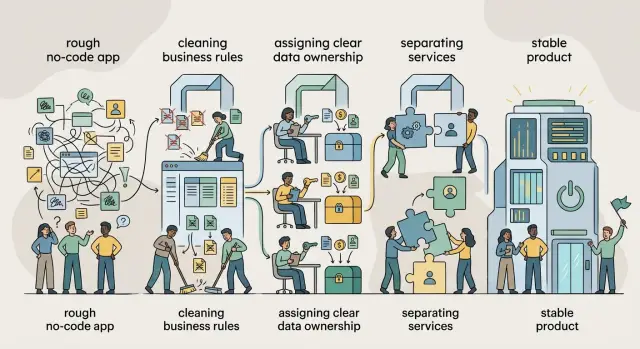
Table of Contents
Why a no-code MVP starts to break
A no code MVP feels solid early because it only has one job: prove demand. Trouble starts later, when the same quick setup has to handle refunds, edge cases, admin edits, and a growing stack of exceptions.
Early shortcuts are normal. A founder copies a rule, tweaks a filter, adds another table, and patches a workflow to get the launch out. Each change looks harmless by itself. After a few months, the app might have five places deciding who can edit an order, three fields that mean almost the same thing, and automations firing in the wrong order.
Then even small changes get risky. A new pricing rule breaks invoices. A form update hides data another screen still expects. One fix creates two more bugs because nobody knows which workflow actually decides the result.
A booking app shows the pattern well. At first, one database and a few automations are enough. Later the team adds coupons, staff permissions, rescheduling, reminders, deposits, and manual overrides. Now booking status lives in several places, and support can't explain why one customer got charged twice while another skipped payment.
Another clue is that the founder becomes the human bridge between systems. Support asks what a status means. Finance asks why totals do not match. Operations asks which automation should win. When one person has to explain the app from memory, the product has outgrown the MVP shape.
Hiring more people too early rarely fixes this. New developers or operators walk into a maze of rules with no clear owner. They move carefully, ask the same questions, and still step on each other's work. You don't get speed. You get more uncertainty.
A no code MVP becomes a stable product when the team adds structure before headcount. Clear rules, clear data ownership, and clean boundaries give the product room to grow. Without that cleanup, every feature costs more than it should and every release feels less safe.
What to fix before you hire
The jump from no code MVP to stable product gets hard for a simple reason: the app started as a fast experiment, then turned into the place where everything lives. Before you add people, clean up the parts that already confuse the product.
Start with the rules. If pricing, approvals, user access, or status changes live in three or four places, the team will keep tripping over them. A founder edits one workflow, a contractor updates a table rule, and an old automation still runs in the background. The app may still work most days, but nobody can say which rule wins.
Data problems come next. Duplicate records break trust fast. If customer status sits in the app, the CRM, and a billing tool, reports stop matching. Support sees one answer, finance sees another, and the founder starts checking exports by hand. That is more than annoying. It slows every decision because people argue about the numbers before they can argue about the fix.
Mixed jobs inside one app create another kind of drag. Many MVPs handle signup, payments, admin work, internal notes, reporting, and email steps in one place. That feels efficient early on. Later, a small change to one flow forces the team to test five unrelated ones. Releases slow down because the app has no clean edges.
The mess usually shows up in ordinary work. A support agent can't tell whether an order can be edited. A salesperson sees a customer as active while billing shows failed payment. A developer adds one form field and suddenly reminder emails stop going out. These are not isolated bugs. They are signs that ownership is unclear.
Fix the risky parts first: rules tied to money, access, or customer behavior; duplicated records that change reports or support answers; and flows that break when a small update lands somewhere else. Design polish and tool swaps can wait if they do not remove risk right away.
If you hire before this cleanup, new people spend their first weeks decoding old workarounds. A smaller team with clear rules and one trusted data source will usually move faster than a bigger team inside a messy app.
Clean up the rules first
Before you split systems or add people, sort out the rules. Most no code apps get messy because the same rule hides in forms, automations, admin screens, and email flows. One small change then turns into four edits, and one of them usually gets missed.
Start in plain language. Ignore tool names and logic blocks for a moment. Write each rule the way a teammate or support person would say it: "paid users can export", "refunds need manager approval", "send an alert if a payment fails twice". If you can't explain a rule in one sentence, it is probably doing too much.
Then group the rules by job. Billing rules belong together. Access rules belong together. Approval rules belong together. Alert rules belong together. This quick pass shows where the mess is. Billing logic often appears in checkout, invoices, account pages, and admin tools. Access logic often appears in both the app and the admin panel. When the same rule shows up in more than one place, mark it. That is where drift starts.
After that, pick one place that owns each rule. If a trial ends after 14 days, one system should decide that. Every other screen should read the result, not recreate the logic. If two places can change the same decision, your team will debug the same bug again and again.
It also helps to test the rules with a handful of real cases. Take five recent support tickets or edge cases and run them against your rule list. If the team still argues about what should happen, the rule is not clear enough yet. That sounds basic. It works.
Picture a SaaS product that gives a discount to annual plans, blocks export for overdue accounts, and asks for approval on refunds above a set amount. In many MVPs, those rules get copied into checkout pages, admin forms, and email automations. Six months later, support finds a customer who can still export data even though billing failed. The bug is not random. The rule lived in more than one place.
The goal is not a perfect policy document. The goal is that anyone on the team can answer simple questions without guessing: who can refund, who can export, when an account loses access, when an alert fires. Teams that stay lean do this work early because clean rules cut rework, lower release risk, and make every next step easier.
Decide who owns each piece of data
Trouble starts when the same customer, order, or subscription lives in three tools and each one tells a different story. The team then wastes time checking spreadsheets, fixing broken syncs, and answering simple questions by hand.
Begin with the records you cannot afford to get wrong: customer records, payment and subscription status, feature access and user permissions, orders, invoices, refunds, and any internal notes that change support or delivery. For most teams, that list is short. That is good. It means you can settle the important parts first.
After that, assign one system as the owner of each record. One place creates it, stores the original version, and decides what is true. Other tools can read it, copy it for reporting, or use it in workflows, but they should not quietly overwrite it.
A simple setup often works well. Your billing tool owns payment status. Your app database owns feature access. Your CRM owns sales notes and contact history. If two tools can edit the same field, pick one winner and stop the other from writing back.
Write the rules down and keep them plain. Edits should happen in the owner system first. Copied data should keep the original record ID. Syncs should move one way unless there is a clear reason to do something more complicated. Deletes need extra care, and copied data should never erase the source by accident.
Timestamps matter too. When data moves between systems, record when the update happened and where it came from. That makes support work much easier. Instead of saying "the sync broke somewhere," the team can see that billing updated at 10:03, the app copied the status at 10:04, and the help desk still showed the old value at 10:01.
Take a common example. A user updates their email in your app, pays through Stripe, and gets support through a help desk. If the app owns the profile, the email change starts there and then syncs out. Stripe still owns billing facts like paid, failed, or refunded. The help desk can copy the email, but support agents should not become the accidental source of truth.
This step feels boring. It saves a huge amount of future rework. When each piece of data has one home, sync bugs get easier to trace and a small team can keep the product stable without hiring too early.
Set service boundaries that match the work
The move from no code MVP to stable product gets easier when each service matches a real business job. Do not split things by tool, framework, or who built them first. Do not split them by team names either. Split them by what the business actually does every day.
Most small teams need fewer services than they think. If you create six tiny services too early, you get more deploys, more logs, more failure points, and more time spent tracing bugs between systems. Two or three clear boundaries usually beat ten neat diagrams.
A good test is simple: can you describe each service in one sentence without naming a tool? If not, the boundary is probably weak. "Handles billing state and invoices" is clear. "Runs the Node service" says nothing useful about the job.
For many products, a practical starting split is straightforward. One part owns customer profiles, account settings, permissions, and support notes. Another owns plans, invoices, payment status, and renewals. Another handles the main job your app does for users. A notification service can send emails or messages, but it should not decide billing or user access rules.
Customer data and billing data should stay separate even if they live in the same database at first. That sounds boring, but it prevents a lot of pain later. Your app can ask, "Is this account active?" The billing part should answer. It should not let the customer part rewrite invoices or payment history.
Reporting is a good example of where teams overbuild. Reports often need data from several places, but that does not mean reporting should own those records. It can read from customer, billing, and product data. It should not become the place that edits them just because someone wants a convenient admin screen.
Write down the limits for each service. Keep it short. Each one needs a note that says what data it owns, what it can change, what it can read but not edit, and which events or API calls other parts can use. A plain text file is enough. The point is not documentation for its own sake. The point is that when something breaks, the team knows where to start looking.
An order that keeps risk low
The safest path from no code MVP to stable product is intentionally a little boring. Teams get into trouble when they rewrite logic, move data, and add features at the same time. It feels fast for a week, then the bug list gets ugly.
Start by making the current product visible. You need a plain map of every screen, every automation, every table, and the handoffs between them. If a signup screen writes to three places and triggers two background actions, write that down before you touch anything. If support has a manual workaround, write that down too. Hidden manual steps often explain why the system seems to work until you try to change it.
- Pick one risky area first. Choose the part that breaks often, blocks revenue, or confuses support. Orders, payments, signup, and permissions are common starting points.
- Freeze feature work in that area. A short freeze saves time because the team stops changing the target while you move the core rules.
- Move the rules before the polish. Put the business logic in one clear place, even if the UI stays the same for now.
- Test the old and new flows side by side. Run the same input through both paths and compare the result. Small mismatches matter.
- Move one boundary at a time and keep notes. When you separate a service or reassign data ownership, record what changed, who owns it now, and what depends on it.
This order keeps failures small. If the new order flow breaks, you know where to look because you changed one boundary, not five. Support also gets a simpler story: "new checkout logic, old account area." That makes incidents less confusing for customers and less stressful for the team.
A good rule of thumb is to finish rules cleanup before you split services. After that, decide who owns each piece of data. Only then should you draw boundaries around that work. If you reverse the order, you usually move the same mess into a new codebase.
After each step, pause long enough to watch real usage. Look at support tickets, failed jobs, odd manual fixes, and billing mismatches. If the same strange case keeps coming back, the cleanup is not done yet. That pause feels slow, but it is cheaper than discovering the same mistake after three more migrations.
This is the sequence experienced CTOs use when they turn a scrappy product into something a small team can run without panic. Slow at the start often means fewer rollbacks later.
A simple example from a real product
A small booking app often begins as one no code flow. A customer fills out a form, picks a time, gets a reminder, and pays. One table stores everything: customer details, booking status, reminder flags, payment notes, and maybe a free text field for staff comments.
That setup works for an MVP. It gets messy when the business adds real rules, like buffer time between appointments, different cancellation windows for each service, deposits for some bookings but not others, or limits on how many appointments one customer can hold.
The first move is not payments. It is rules cleanup. If the team changes payment logic while booking rules are still moving every week, it will end up rebuilding the same path twice.
The team pulls booking rules into one small service or one clearly owned module. That part decides whether a slot is open, whether a reschedule is allowed, what fee applies, and what happens when a customer cancels. The form still collects requests, but it no longer decides the rules by itself. This cuts strange edge cases quickly.
Next, the team picks one customer record as the trusted version. Name, email, phone, consent, and booking history live in one place. Reminders can read that record. Payments can read it too. Nobody edits customer data in three different tables and hopes it matches later. Support also benefits because agents can answer simple questions without checking four screens.
From there, the rollout can stay simple. First keep the existing forms but move booking rules into one place. Then clean up customer records and merge duplicates. After that, make reminders read from the same customer and booking data. Move payments last, after the booking flow stops changing every week.
That order matters. Payments touch receipts, failed charges, refunds, charge disputes, and support policies. If the team moves them too early, it usually ends up wiring refunds to a booking system that still cannot say with confidence whether the appointment counted as late cancellation, staff exception, or no show.
One case makes this obvious. A customer books a massage for Friday, moves it to Saturday, then cancels two hours before the appointment. If booking rules live in one place, the app can decide the fee, update the slot, free the staff calendar, and trigger the right reminder logic. If rules, customer data, and payments live in different no code branches, someone ends up fixing it by hand and hoping the invoice matches later.
This is how a lean team stays in control. Move the busiest logic first, clean one layer at a time, and leave the product simpler after each change.
Mistakes that create extra rework
The costliest mistake is rebuilding the front end before you fix the data model. A cleaner interface feels like progress, but shaky fields and messy record relationships will force you to rebuild those screens again. Teams often lose two weeks on design polish, then lose four more when they rename fields, split records, or change permissions.
Another common mistake starts when people move rules out of a no code tool without writing them down first. If nobody lists the rules in plain language, the same rule ends up in forms, automations, and backend code with small differences. Then one customer gets approved, another gets blocked, and nobody knows which result is correct. A simple format works well: "When X happens, Y can change if Z is true."
Some teams make the opposite mistake and document everything except the real behavior. They produce neat diagrams, but nobody tests them against recent support cases or actual refunds. Documentation only helps if it matches what the product really does today.
Creating too many services too early causes a different kind of waste. A small product does not need separate services for users, billing, notifications, reporting, and admin work just because that looks neat on a diagram. More services mean more deployment steps, more failure points, and more time spent wiring systems together instead of fixing the product.
Data conflicts are even worse. If two systems can edit the same customer, invoice, or order record, drift starts fast. One tool says the order is paid, another says it is pending, and your team wastes time tracing which change came first. Pick one owner for each record, then make every other system read from it or request changes through it.
Hiring specialists too soon can lock in the wrong structure. If the shape of the product still changes every month, a bigger team often creates more handoffs, more opinions, and more code you will throw away. One experienced technical lead, or a fractional CTO, usually helps more at this stage than three narrow specialists.
You can usually spot trouble early. The team starts talking about a "rewrite" before it can explain the current rules. Two tools can change the same status field. New hires ask which system actually decides the truth. The diagrams look tidy, but small product changes still take days.
If you want a lean path from no code MVP to stable product, fix ownership and rules first. Then draw boundaries around work that already stays stable for a while.
Quick checks before each release
A release should answer five plain questions before anyone clicks deploy. If the team cannot answer them in two minutes, the product is still too tangled.
Start with ownership. Someone should be able to say who owns customer records, billing data, permissions, and event logs. If two people give different answers, bugs will bounce around and stay open longer. Data without a clear owner quickly turns into "everyone thought someone else checked it."
Then check the rules. Ask one person to explain where pricing rules, access rules, and approval rules live today. A healthy product does not scatter the same rule across forms, automations, scripts, and support workarounds. When one rule lives in three places, the fourth place becomes a late night patch.
A short release checklist keeps this honest:
- Name the owner for every data set touched by the release.
- Point to the single place where each changed rule lives.
- Change one feature in staging and see what else moves.
- Review recent support tickets for repeated pain in one area.
- Practice a rollback before you need one.
That third check exposes unexpected dependencies fast. If a small edit to onboarding breaks invoices, emails, or reporting, your boundaries are still blurry. Fix that before you add more code or more people. Hiring into a messy system only spreads the mess.
Keep release scope tight too. If a deploy changes billing rules, data sync, and the admin UI at the same time, you will have a hard time knowing what caused the problem. Small releases are easier to test, easier to explain, and much easier to undo.
Support tickets tell the truth. If the same issue keeps coming back, that area is weak by design, not by bad luck. Repeated manual fixes usually mean one rule is unclear, one data owner is missing, or one service does too much.
Rollback is the last test, and many teams skip it until a bad release lands. You want a simple answer to one question: can we undo this change in minutes, not hours? If the answer is no, the release is too large.
This is often where the move from no code MVP to stable product succeeds or fails. A small team can ship safely when each release stays boring, clear, and easy to reverse.
What to do next without a big team
When you move a no code MVP to stable product, the next step is rarely "hire more people." Most teams get more mileage from cleaning one risky area at a time. Noise can wait. A bug that breaks billing, a workflow that edits the wrong record, or a handoff between tools that nobody trusts should go first.
A simple 30 day plan works better than a big rewrite. In the first week, choose the area with the highest business risk and map the current rules. In the second, remove duplicate logic and write down who owns each record and field. In the third, separate one workflow or service boundary so changes stop spilling everywhere. In the fourth, test real cases, ship carefully, and log what still feels fragile.
This pace may feel slow. It is usually faster than adding three people who all make different assumptions about how the product works.
Keep the team small until the boundaries hold up under normal change. If one person can update pricing without breaking onboarding, and another can change onboarding without touching billing, you are getting somewhere. That is the point where extra hands help instead of creating more rework.
An outside second opinion helps when the team is stuck or too close to the mess. A good Fractional CTO will not push a grand redesign just to make the work look serious. They should help you pick the next problem, cut scope, and set an order that reduces risk. They should also keep the architecture lean enough that a small team can actually run it.
That is where Oleg Sotnikov can fit naturally. On oleg.is, his Fractional CTO work focuses on lean architecture, practical sequencing, and AI-first software operations, which is often exactly what a messy MVP needs before a bigger rebuild or a bigger payroll.
If you do only one thing next month, do this: choose the area that can hurt the business most, clean it fully, and leave a clear boundary behind. Then repeat the same pattern on the next weak spot.
Frequently Asked Questions
How can I tell my no-code MVP has outgrown its original setup?
Your MVP has outgrown its first shape when small changes keep breaking unrelated parts of the app. Another strong sign is when one person has to explain statuses, totals, or workflow results from memory because the product no longer makes those answers clear on its own.
Should I hire more people before I clean up the app?
No. Clean up the risky parts first. If you hire into a messy app, new people spend their time decoding old workarounds instead of making the product safer or faster.
What should I fix first before I scale the product?
Start with anything tied to money, access, or customer-facing behavior. Pricing rules, refunds, permissions, booking status, and duplicate records usually create the most damage when they drift.
How do I clean up business rules without overcomplicating things?
Write each rule in plain language first, like "refunds need approval" or "failed payment removes access after 14 days." Then group similar rules together and pick one place that decides each one so other parts of the app only read the result.
How do I choose the source of truth for my data?
Pick one owner for each important record. Let your billing tool own payment facts, your app own feature access, and your CRM own sales notes, then stop other tools from quietly editing the same field.
Do I need microservices to move past a no-code MVP?
Usually no. Most small products need a few clear boundaries, not a pile of tiny services. Split work by business job, such as billing, customer accounts, and the main product flow, and keep each part easy to explain in one sentence.
What is the safest order for moving from no-code to a stable product?
Map the current product first so you can see screens, automations, tables, and manual fixes. Then pick one risky area, freeze feature work there for a short time, move the rules into one place, test old and new flows side by side, and only then shift data ownership or service boundaries.
Why should I move payments later in the cleanup?
Because payments depend on rules you need to trust first. If booking, approval, or account status still changes every week, moving payments early only wires receipts, refunds, and failed charges into unstable logic.
How do I know a release is too risky?
Treat a release as too risky when the team cannot quickly answer who owns the touched data, where each changed rule lives, and how to roll back in minutes. If one deploy changes billing, sync logic, and admin screens at once, cut the scope down.
When does it make sense to bring in a Fractional CTO?
Bring in a Fractional CTO when the team feels stuck, rules keep drifting, or nobody agrees on the right order of work. A good one should reduce scope, clear up ownership, and help you leave behind simpler boundaries instead of pushing a huge rewrite.


