Nginx rate limiting vs Cloudflare rules: what to use
Nginx rate limiting vs Cloudflare rules can stop bad traffic in different ways. Learn how to choose the right layer without masking bugs or slowing support.
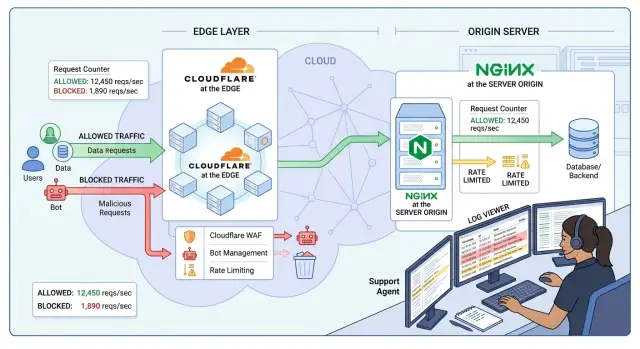
Table of Contents
Why the wrong layer causes trouble
Bad traffic does not arrive with a label. A bot surge, a launch spike, and a product bug can look almost identical in the first few minutes: more requests, more login attempts, slower pages, and angry users. If a frontend bug makes the app retry failed requests, your own users can look like attackers.
That is why the layer matters. Cloudflare sees traffic early, before it reaches your servers. Nginx sees traffic closer to the app, where you still have request paths, headers, upstream status, and timing that explain what went wrong. If you block too early, you may stop the flood and lose the clues that would have shown the app was broken.
A common failure looks like this. Users report that sign-in "just spins" or returns a generic error. Support checks the app and sees no obvious crash. Engineering sees fewer requests than expected because Cloudflare dropped many of them at the edge. The team spends an hour chasing an auth bug, even though the real trigger was a traffic rule that caught real users behind one office IP or a mobile carrier gateway.
The reverse problem is just as bad. If you rely on Nginx for everything, bad traffic can still hit your origin hard enough to bury the evidence. Logs fill up, CPU jumps, and real errors disappear into the noise. Support gets vague complaints like "checkout is broken," while the app team tries to sort actual failures from rate-limit responses.
Users do not report network layers. They say, "the site is broken." Screenshots and browser errors often look the same whether the cause is a blocked request, a timeout, or a bad release.
The goal is simple: stop obvious junk fast, and keep enough detail to spot product bugs. Pick the wrong layer for the wrong job and you can shrink the traffic problem while making the incident much harder to understand.
What Cloudflare and Nginx can actually see
Cloudflare sits in front of your server, so it sees a request before your origin spends CPU, memory, or database time on it. That makes it a strong first filter for obvious junk. It can inspect the client IP, request path, method, headers, country, bot signals, and how often the same client hits the same endpoint.
What it cannot fully know is what your app would have done with that request. Cloudflare can see the request and the response that comes back, but it usually does not know your session logic, user state, feature flags, or why an upstream service failed.
Nginx sees traffic later, after the request reaches your origin. That sounds like a weakness, and sometimes it is. Still, Nginx has a much clearer view of what happens inside your stack. It can see which upstream handled the request, whether the app timed out, whether a backend returned 429 or 500, and whether one route is slow while the rest of the site is fine.
The short version looks like this:
- Cloudflare sees patterns at the edge before your server works on the request.
- Nginx sees what the request does to your origin after it gets through.
- Both can inspect request cookies.
- Your origin usually knows what those cookies actually mean.
Cookies are where teams often get confused. Cloudflare can match on a cookie value if the browser sends it. That still does not give it the full story. Your app may know that a session is expired, a user already passed MFA, or an account belongs to a safe internal allowlist. That context lives closer to the app.
Upstream errors change the decision too. Imagine a login spike during a launch. If Cloudflare blocks first, support may only see that users got challenged or blocked. If Nginx sees the surge, you may learn something more useful: the app is fine, but the session store is slow, or one login endpoint is throwing 502s under load.
That is the practical split. Edge traffic filtering is best for broad, cheap decisions. Origin rate limiting is better when product behavior matters. If support needs to tell the difference between bad traffic and a broken login flow, Nginx usually gives a clearer answer.
Sort traffic before you write rules
Most rate-limit mistakes start with one bad assumption: all unwanted traffic behaves the same. It does not. A bot that scrapes every page, a script that retries too fast, a buggy mobile app, and a real customer who keeps refreshing a slow form can all look similar at first.
Before you touch Cloudflare or Nginx, sort traffic into a few plain groups. There are abusive bots that hammer pages, probe paths, or ignore normal browser behavior. There are noisy scripts that send too many requests because someone wrote them badly. There are broken clients that retry in loops after a timeout, token error, or bad release. Then there are real users who may burst for a short time but still need a clean path through.
That split tells you where to stop each group. Abusive bots usually belong at the edge. If Cloudflare blocks them before they hit your servers, you save origin capacity and keep logs cleaner. Noisy scripts need a closer look. If the pattern is broad and obvious, block them at the edge. If the traffic depends on app paths, user state, or auth behavior, Nginx is often the better place because it sees the request in context.
Broken clients deserve extra care. They are not always hostile. A hard block can hide a product bug and send support in the wrong direction. Start with a soft limit, clear logs, and a response your team can explain. If a new app release causes retry storms, support should be able to say, "version 4.2 is retrying too fast, and the server is slowing those requests," instead of guessing whether the CDN, API, or app failed first.
Keep the first version boring. One edge rule for obvious junk. One origin rule for sensitive endpoints like login or password reset. One short note for support that says who gets blocked, where it happens, how long it lasts, and what the user sees.
Small teams usually do better with simpler rules. Fewer moving parts make incidents easier to explain, debug, and fix.
When Cloudflare is the better first filter
Cloudflare makes more sense when you want bad traffic to stop before it burns server CPU, fills logs, or pushes your app into slowdowns that look like product bugs. If a request never reaches your origin, your team has less noise to sort through and fewer false alarms.
This works best for patterns that are easy to recognize early: noisy bot floods, repeated hits from the same network ranges, obvious country blocks, or traffic that keeps matching the same bad path and header pattern. These are edge problems first, not app problems.
Cloudflare is usually the better fit when large bursts hit many URLs at once, bots scrape public pages far faster than normal users, attackers keep coming from places you do not serve, or requests repeat the same empty or fake headers over and over.
It also helps when one spike can affect shared infrastructure. If several services sit behind the same origin, stopping bad traffic earlier is usually safer and cheaper.
The trade-off is support visibility. Edge rules can create confusion if nobody can tell why they fired. Keep them plain and narrow. Name rules by behavior, not by guesswork. "Block repeated requests to /wp-login from non-user browsers" is far better than "bot defense rule 7."
A good edge rule should let support answer three questions in under a minute: what pattern triggered it, which users or regions it can affect, and where the team can verify the match. If that takes longer, the rule is too messy.
When Nginx is the better choice
Nginx is a better place to rate limit when the rule depends on what the app is doing, not just where the request came from. If you need different limits for /login, /search, /checkout, or a private API, the origin usually gives you cleaner control.
That matters when normal traffic and bad traffic look similar at the edge. A customer who mistypes a password five times, refreshes search results, or retries checkout after a slow response can look noisy for a few seconds. Nginx can judge that traffic closer to the app path and request pattern, so you can keep public pages open while tightening the routes that actually create load or abuse.
Origin rate limiting fits login endpoints where repeated attempts should slow down quickly, search routes that bots hammer with similar queries, checkout actions where duplicate posts create support pain, and API routes that need one limit for anonymous users and another for signed-in users.
Nginx also makes more sense when support needs to compare blocked requests with app errors. If a user says, "I clicked pay twice and then got an error," your team can inspect origin logs and see the blocked request beside the application log, upstream timeout, or database error from the same moment. That cuts down the back-and-forth.
This is especially useful when the problem might be a product bug rather than abuse. Edge filters can stop the traffic, but they can also hide the pattern that caused the issue. At the origin, you can see whether Nginx blocked a burst because a bot hit the route, or because the frontend retried the same request too aggressively after a bug.
When a team runs lean, this matters even more. One place to inspect logs beats guessing across layers while users are waiting and support needs an answer.
A safe rollout order
Start by watching traffic before you block anything. Log the route, response code, request count, and a way to group visitors, such as IP, session, or API token. Watch normal peaks for a few days. Many teams think they are under attack when they really have a slow endpoint, a retry loop, or a release-day spike.
With Nginx rate limiting vs Cloudflare rules, the safest path is small and boring. Choose one route with a clear abuse pattern, such as login or password reset. Add one narrow rule there and leave the rest alone. You learn faster from one real rule than from ten guesses.
- Measure request volume, error rates, and server load first.
- Turn on one rule for one route with a threshold you can explain.
- Return a plain message such as "Too many requests. Please wait 30 seconds and try again."
- Add a short note for support with the route, threshold, expected user message, and where to check logs.
- Review false positives, 429 spikes, and support tickets before you add another rule.
That support note matters more than most teams expect. If a customer cannot log in, support needs to know whether the app is broken or a rule blocked the request. A short note can save about 20 minutes on a ticket and stop engineers from chasing the wrong bug.
Watch the first rollout closely. If CPU drops a little but login complaints jump, the rule may be catching normal behavior from office networks, mobile carriers, or password managers. Fix that first. Then widen the rules, one route at a time.
A realistic launch-day login example
A launch can fail in two very different ways, and they look almost the same at first. Users say login feels broken. Support gets screenshots. Engineers see a spike. The hard part is telling bad traffic apart from a product problem.
Picture a startup opening access to a new feature at 9:00 AM. In the first ten minutes, the login endpoint gets 12,000 requests. About 3,000 come from real people who got the launch email. The other 9,000 come from bots trying old passwords, cheap proxies, and scripts that hammer the form without loading the rest of the site.
If junk traffic makes up most of the spike, block it at the edge. Cloudflare can stop obvious garbage before it hits your server, database, or session store. That keeps the login page fast for real users and saves your team from chasing server load created by traffic you never wanted.
Now flip the example. The launch is genuinely popular, and the traffic is mostly real. A bug in the auth flow slows responses from 300 ms to 8 seconds. People tap the button again. The mobile app retries. Browsers resend requests after timeouts. Suddenly each real user creates five or six login attempts.
That is where origin limits help more. Nginx can protect the login endpoint from a retry storm while you still see the failure at the app layer. If Cloudflare blocks first, support may think an attack caused the issue when the real problem is a slow database query or a broken token check.
When complaints start, check both layers together. Look at Cloudflare events to see whether challenges or blocks jumped at the same minute reports started. Check Nginx logs for 429 responses on the login path. Compare app errors, auth latency, and slow database queries during the same window. Then ask whether reports come from one region or network, or from everyone.
That split matters. If Cloudflare blocked most of the bad requests, tune the edge rule. If Nginx and the app show rising retries from real sessions, fix the login flow first and keep the origin limit tight enough to stop a full collapse.
Mistakes that confuse users and support
The mess usually starts when a team treats all traffic the same. In the Nginx rate limiting vs Cloudflare rules decision, the wrong choice often hurts support more than attackers. A login page, a search box, an API poller, and a file upload do not behave the same way, so they should not share one threshold.
If you set one low limit for every path, normal users hit it first. Launch days make this worse. A person may refresh the login page twice, your frontend may fire a background request, and your mobile app may retry after a timeout. Suddenly the user sees a block, but support sees no clear reason.
Another common mistake is to block first and inspect later. That feels safe, but it hides the real pattern. Start by logging request rates, paths, status codes, and user agents. Watch a short stretch of real traffic before you add a hard block. You will often find that your own app creates the spike.
Retry loops cause more damage than many teams expect. A mobile app with poor network handling can send the same request five times in a few seconds. A frontend bug can do the same when it retries on every failed promise. If you ignore those loops, you may blame bad traffic when your own code is the source.
Mixed responses create another support mess. If Cloudflare challenges some requests while Nginx returns 429 for others, users report "the site is broken," and support cannot tell whether the problem came from a bot rule, an origin limit, or a client retry storm.
Keep the response consistent. If both layers handle rate limits, use the same status code where possible, similar response text, and the same request ID in logs. Then support can match a ticket to an event instead of guessing.
Checks to run before you enable rules
Small blind spots cause most of the pain. A rule can block bad traffic and still create a support mess if nobody can tell where the block happened or why.
Do a few short tests with real requests before you enable anything for all users. Send one request that should pass, one that should hit a soft limit, and one that should trigger a hard block. Then check what each system records.
- Look at origin logs after an edge block. If Cloudflare stops a request before it reaches Nginx, your app logs will stay quiet.
- Check how support sees rate limits versus product errors. A 429 from a traffic rule should not look like a broken login form or a random 500.
- Test shared IPs. One office, school, coworking space, or mobile carrier can put many real users behind one address.
- Compare edge events and origin responses side by side so the story matches.
The shared IP test matters a lot. If you rate limit by IP alone, one busy customer can lock out everyone else in the same office. Login and signup flows get hit by this all the time. A better first pass is to scope limits by path, method, account, session, or a bot signal when you have one.
Support also needs a fast way to separate traffic controls from product bugs. Use distinct status codes and clear error text. If Cloudflare returns 403 or 429, and your app also uses 429 for its own throttling, note that in your runbook and ticket macros. Otherwise, the team wastes time chasing a bug that is not there.
Last, compare counts. If Cloudflare shows 8,000 blocked requests and Nginx shows only 200 attempts, that gap should make sense. If it does not, your monitoring is too thin for safe edge traffic filtering.
What to do next
Pick an owner for each traffic problem before you add another rule. Teams run into trouble when both layers try to solve the same issue, or when nobody knows which layer blocked the request.
A practical split is simple. Put broad bot filtering, country blocks, IP reputation checks, and large traffic floods at Cloudflare. Put request patterns that depend on app behavior at Nginx or in the app itself. Keep user identity checks, account lockouts, and token abuse close to the origin. Most of all, leave enough detail in your logs so support can tell whether a bug or a rule caused the failure.
Write a short runbook and keep it boring. One page is enough. It should say who checks Cloudflare first, who checks Nginx logs, what status codes users may see, and how to disable a bad rule safely. Product should also note which launches or campaigns may change normal traffic, so engineering does not mistake success for abuse.
For this topic, the best next step is not more theory. It is a small traffic map. Follow one request from the edge to the origin, mark every place that can block it, and note who owns each step.
If your team wants a second set of eyes, Oleg Sotnikov at oleg.is reviews this kind of setup for startups and small teams as part of his Fractional CTO and infrastructure advisory work. A short review of the traffic path, Nginx configuration, and edge rules is often enough to cut support noise and make incidents easier to explain.
Frequently Asked Questions
What is the real difference between Cloudflare rules and Nginx rate limiting?
Cloudflare stops requests at the edge before your server spends CPU, memory, or database time on them. Nginx applies limits at the origin, where you can see request paths, upstream errors, and app timing. Put obvious junk at Cloudflare, and keep app-sensitive rules at Nginx.
When should I block traffic at Cloudflare first?
Start at Cloudflare when the pattern is easy to spot early. Bot floods, repeated hits to bad paths, traffic from countries you do not serve, and fake header patterns fit well there because you stop them before they touch your origin.
When is Nginx the better place for rate limiting?
Nginx works better when the route matters. If /login, /search, /checkout, or a private API need different limits, Nginx gives you more context and makes it easier to compare 429 responses with app errors and slow upstreams.
Should I use both Cloudflare and Nginx together?
Yes, but split the jobs. Let Cloudflare drop broad junk and large floods, and let Nginx protect sensitive routes that depend on app behavior. If both layers try to solve the same problem, users get mixed errors and support loses time.
Can Cloudflare use cookies for rate limits?
Cloudflare can match on cookie values that the browser sends. It still does not know what those cookies mean inside your app, such as an expired session, MFA state, or an internal allowlist. Put rules that depend on user state closer to the origin.
Why do real users get blocked by rate limits?
Shared IPs cause a lot of false positives. One office, school, coworking space, or mobile carrier can put many normal users behind one address. Retry loops, password managers, and slow pages also make real people look noisy for a few seconds.
What is the safest way to roll out rate limits?
Watch traffic before you block anything. Then pick one route with a clear abuse pattern, set one threshold you can explain, return a plain message, and review false positives before you widen the rule. Small changes teach you more than a big rule set.
What should support check first when users say login is broken?
Check the same minute across both layers. Look at Cloudflare events for sudden blocks or challenges, check Nginx logs for 429s on the route, and compare that with app errors, auth latency, and database slowdowns. That tells you whether traffic rules or the product caused the failure.
Which status code should I return for rate limits?
Use 429 Too Many Requests for throttling when you can, and keep the message similar across layers. If Cloudflare returns 403 or 429 while your app also uses 429, document that difference so support can tell a traffic rule from an app problem.
When should I ask an expert to review my setup?
Get help when both layers overlap, false positives keep rising, or your team cannot explain where a block happened. A short review of the traffic path, Nginx config, and edge rules often removes support noise fast. Oleg Sotnikov offers that kind of review through his Fractional CTO and infrastructure advisory work.


