Multi-model orchestration for text, code, and search
Multi-model orchestration works best when you split writing, coding, and search by risk, context, and review needs instead of forcing one model to do all.
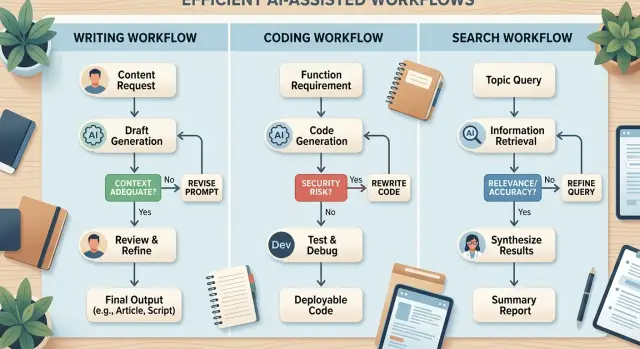
Table of Contents
What breaks when one model handles the whole flow
A single model can look good at first. It writes clean copy, answers fast, and seems good enough for everything. The trouble shows up when one workflow needs three very different jobs at once: current facts, code changes, and search across docs, logs, or old decisions.
The first failure is false confidence. A model can write a polished update for users and still miss a recent product detail, or invent one because the prompt did not include the latest facts. The answer sounds right, so people trust it too quickly. That makes the mistake more expensive than a rough draft that clearly needs work.
Code fails in a different way. The same model might refactor a file in seconds and still break tests, miss edge cases, or change behavior outside the request. Fast output makes teams feel safe when they should slow down. One clean diff can hide an hour of debugging.
Prompt size makes this worse. Teams often cram product notes, coding rules, search results, and writing instructions into one long prompt. The model starts to blur priorities. It follows the style guide and forgets the test rule. It answers the user question and skips the log evidence. The most important instruction ends up buried.
Then the repair loop starts. Someone fixes the same facts by hand. Someone reruns tests and patches the same fragile code. Someone checks the docs again because the model cited the wrong thing with a confident tone. That cleanup takes more time than most teams expect.
A small product change makes the pattern obvious. Say a team wants to update billing copy, adjust a backend rule, and confirm behavior from internal docs. One model can attempt all three, but it will usually do at least one of them badly. That is why the workflow should split work by failure mode, not by convenience.
When one model handles the whole flow, teams do not get one consistent brain. They get one set of blind spots repeated at every step.
Sort tasks by failure cost first
Start with the cost of being wrong. That one choice makes orchestration easier to design, because not every task needs the same level of care.
Low-risk work belongs in the first bucket. Think rough drafts, headline ideas, summary notes, first-pass research queries, or early code comments. If the model misses a detail, you lose a few minutes.
The next bucket covers work people will actually see or run. Production code belongs here. So do customer emails, support replies, release notes, and anything that changes the product or shapes trust. A weak answer in this bucket can create bugs, confuse users, or send the team in the wrong direction.
The highest-risk bucket is small, but it needs the most control. Billing logic, security rules, access control, legal text, compliance wording, and data handling decisions sit here. A model can help, but it should not make the final call alone.
A simple rule works well. Low risk means a wrong answer is cheap and easy to fix. Medium risk means the output reaches users or affects delivery. High risk means a mistake can cost money, expose data, or create legal trouble.
Human review should sit where mistakes get expensive. For low-risk drafting, a quick skim is enough. For production code, review the diff, the tests, and the rollback plan before anything ships. For billing, security, or legal work, the person who owns that area should check every final change.
Small teams can use this approach right away. One model drafts a spec. Another writes test ideas. A stronger coding model prepares the change. Then a person reviews the risky parts before deployment. That usually works better than asking one model to do everything, because the workflow respects failure cost instead of pretending every task is equal.
Match context needs to the right model
Start with a simple question: how much context does this task need, and what kind?
A model that writes a short status update does not need the same input as a model that must trace a bug across product rules, database tables, and old code decisions. If one model handles both jobs, it will either miss details or cost too much for routine work.
Use a model with a large context window for tasks that depend on long product memory. That includes reading a spec, comparing it with current behavior, checking past decisions, and keeping several files in mind at once. This is where teams quietly lose time. The model forgets one rule, then writes a clean answer that breaks something small and expensive.
Fresh facts are a different problem. If the answer depends on current docs, package versions, policy changes, or outside research, route that step through search or retrieval first. Those tools are better when facts may have changed. Let them gather the latest material, then pass a short summary to the next step.
Code changes need a coding model. If you want edits, diffs, test fixes, or help reading stack traces, use the model that handles code structure and tool output well. A general text model can explain a bug report just fine. It is usually worse at making the patch and checking whether the tests still pass.
Cheap models still matter. Keep small tasks small so they do not consume the same budget as risky work. Ticket summaries, commit message rewrites, acceptance criteria extraction, support request classification, and short handoff notes are good examples.
This split works well in real teams. A startup advisor or fractional CTO might set up one model to hold product and repo context, a second step to gather fresh docs, and a coding model to make the change and inspect test results. The handoff stays short. Each model does the part it handles best, and the expensive model appears only where failure costs real time or money.
Choose handoffs and review points
A workflow gets messy when every step dumps a blob of text into the next one and hopes for the best. Each step should produce one clear output: a summary, a draft, a patch, a test plan, or a short answer from search. When the output has one job, the next step knows what to do, and a person can review it fast.
Keep handoffs small. Pass only the context the next model needs to finish its task. A code step may need the ticket, the file list, and one rule it must follow. It usually does not need the whole chat, old failed drafts, and pages of search notes.
Smaller handoffs also cut cost. More context often creates more confusion, not better work. A search step can return three trusted snippets, and a coding step can use those instead of raw search output.
Short structured notes help more than long explanations. Save decisions in a format people can scan in seconds: what the step completed, which facts it used, what decision it made, what is still open, and what the next step needs. Think of it as a receipt for the workflow. When something goes wrong, you can see where the path changed without rereading every prompt.
Review points belong where failure gets expensive. Stop before a model writes to production code, sends a customer reply, or turns uncertain search results into facts. The check can stay simple: does the output match the task, use approved sources, and stay inside scope?
A lean product team might split one request this way. One model summarizes the bug report. Another searches docs and past issues. A coding model drafts the patch. The flow pauses if search cannot find a trusted source or if the patch touches files outside the approved scope. That pause usually saves more time than cleaning up a bad merge later.
Build the workflow step by step
Pick one outcome you can judge without debate. A small feature is a good start, like adding a new filter to a dashboard or changing one API response. If the goal is fuzzy, every later step gets fuzzy too, and the model starts guessing.
Then split the work by job, not by convenience. One step drafts the change and lists edge cases. Another step writes or edits code. A separate step checks facts, searches docs, or compares the output with repo rules. That is when orchestration starts to feel practical instead of decorative.
Give each step a pass rule
Each step needs one clear success rule, and it should be short enough to read in seconds.
A drafting step passes only if it names the user action, the expected result, and one edge case. A coding step passes only if tests pass and the diff stays inside the approved files. A search step passes only if it pulls the answer from an approved source such as internal docs, logs, or the codebase.
This matters because models fail in different ways. A text model may write a clean plan and still miss a hard constraint. A code model may solve the task but edit too much. A search model may return something plausible and still pull it from the wrong place.
Add retries with restraint
Retries help when they fix a known mistake. If the code step often forgets a test file, rerun that step with the error message and the file pattern. If search fails because the query is weak, rewrite the query once and try again.
Do not add loops everywhere. They hide bad prompts, burn money, and make slow workflows even slower.
Track cost, runtime, and error rate from day one. Measure each step on its own, not just the whole flow. That makes weak spots easier to see and keeps model choice grounded in real numbers.
Oleg Sotnikov often works with lean AI-first delivery, where small teams ship under tight cost and uptime limits. The same habit helps here. If one step fails often, fix that step first instead of replacing the whole workflow.
A simple example from brief to shipped change
A small SaaS team wants to add a new export option so customers can download filtered records as CSV. The request sounds simple, but it mixes product wording, code changes, test coverage, and package rules. If one model handles all of that, mistakes pile up quickly.
The team splits the job by type of work. One model writes, one checks current facts, one edits the app, and a person makes the final call.
First, a product manager drops rough notes into a writing model. The notes explain who needs the export, which screen it belongs on, what columns to include, and what should happen when there is no data. The model turns that into a short spec with plain acceptance rules.
Next, a search-focused step reads the spec and checks the export package docs, recent release notes, and any limits around encoding, file size, or browser support. It flags one useful detail: a recent package update changed the default delimiter behavior.
Then a coding model gets the short spec plus the search notes. It adds the export button, wires the backend endpoint, updates tests, and runs the suite.
After that, the coding model writes a brief change summary. It does not need to explain every file. It should tell the reviewer what changed, what passed, and what still needs a human eye.
Finally, a reviewer checks the diff, tries the export in the app, and compares the result with the original request. If the file opens cleanly and the filters work, they approve it. If the delimiter or empty-state behavior is wrong, they send it back one step instead of restarting everything.
That last part matters. The team does not bounce the task all the way back to the writing model if the code is fine and only the package setting is wrong. They fix the weak spot and move on.
This is already close to how experienced technical teams work. Oleg uses the same idea in AI-augmented development setups: give each model a narrow job, keep handoffs clear, and let a human approve the parts that can break the product for users.
Mistakes that create extra cost and bad output
Most broken AI workflows fail in plain, avoidable ways. Teams spend too much on the wrong step, trust a draft too early, or hide simple rules where the model cannot use them.
One common mistake is asking a model to guess fresh facts. If a task depends on current docs, repo state, ticket history, or live search results, fetch that context first. Otherwise the model fills the gaps with confident nonsense. A weak search step often beats a polished wrong answer.
Another costly habit is sending the whole repo into every prompt. That feels safe, but it usually hurts accuracy. Most tasks need a narrow slice: the files being changed, one nearby test, and maybe one similar pattern from the codebase. Extra context adds noise, burns tokens, and makes it easier for the model to grab the wrong detail.
Teams also lose time when they skip tests because the draft looks right. Code can read cleanly and still break a migration, miss an edge case, or change behavior in an old endpoint. If the workflow writes code, it should run checks. Even a small set catches trouble early: type checks, unit tests, linting, or a smoke test.
Prompt design causes quieter failures. Some teams bury all failure rules inside one giant system prompt: do not touch billing, ask before editing auth, never change generated files. Long prompts turn into wallpaper. Put hard rules close to the action instead. Let the router decide tool access, give the coding step local constraints, and make the review step block unsafe output.
Cost also climbs when every task goes to the most expensive model. That is often a default, not a decision. Save premium models for risky code changes, messy reasoning, or final review. Let cheaper models handle log summaries, search cleanup, or file selection.
A safer setup stays boring on purpose. Fetch facts before asking for an answer. Pass only the context a step needs. Run checks after each code change. Keep rules short and attach them to the step that uses them. Save premium models for high-risk work.
That mix usually gives better output for less money, and when it fails, the team can see where and why.
A quick check before you run it
Five short questions catch most workflow problems before they turn into wasted tokens, bad output, or a broken deploy.
Ask which step needs fresh information now. Package versions, API docs, product data, and outage status change fast. Route those steps through search or retrieval instead of hoping the model already knows the answer.
Ask which step can damage production. Schema changes, infrastructure edits, auth logic, billing rules, and customer-facing automations need human review before anything runs.
Ask whether each handoff includes only the context the next step needs. Long chat history, full logs, and extra files raise cost and often make output worse. A short brief, the right files, and one clear goal usually work better.
Ask whether every step has one clear check. A search step might need a relevance check. A code step might need tests. A writing step might need a factual review. If a step has no check, bad output can move forward unnoticed.
Ask who reviews the risky parts. Decide that before the workflow starts. If nobody owns the final look at database changes or deployment scripts, the process will drift.
A small example makes this easy to see. If one workflow searches current API rules, writes code, and drafts release notes, each part needs a different kind of control. Search needs fresh data. Code needs tests. Release notes need a quick factual pass.
Teams often skip this because the flow looks simple on paper. Then one model gets too much context, makes one wrong assumption, and the mistake travels through the whole chain. A two-minute check at the start is cheaper than a rollback, a support issue, or a confused customer.
What to do next
Pick one workflow your team already runs every week. Good candidates are small, repeated jobs such as turning a product note into a ticket, reviewing a pull request, or collecting sources before a draft. Put the full flow on paper first. If you skip that step, you usually end up fixing prompts for a process that was wrong from the start.
Write down each step in plain language. Note who does it now, what input they need, what can go wrong, and how expensive that mistake would be. That gives you a solid base, because you can separate low-risk drafting from high-risk code changes or factual checks.
A simple first pass is enough. Mark the steps that need search, code, or long context. Circle the steps where an error creates rework or customer risk. Assign a human reviewer to the risky steps. Then track time spent, reruns, and model cost after every run.
After a few runs, focus on three numbers: rework, latency, and cost. Rework tells you whether the routing is wrong. Latency shows whether too many handoffs slow the team down. Cost shows whether a stronger model earns its place or just burns budget.
Fix routing before you polish prompts. A weak handoff causes more trouble than awkward wording. If the search step misses sources, or the coding step keeps asking for context that never arrives, move the task to a better model or change what you pass between steps.
Keep the test small. Run the workflow on five to ten real tasks and compare the result with your usual process. Simple review rules work best. A person should approve production code, public claims, and anything a customer will see.
If you want an outside review, Oleg Sotnikov at oleg.is can help as a fractional CTO. He works with startups and smaller teams on AI-augmented development, infrastructure, and workflow design, and this kind of review is most useful when you already have one mapped process and a week or two of results.
Frequently Asked Questions
Why not let one model handle the whole workflow?
Because one model tends to repeat the same blind spot across every step. It may write polished text, miss a fresh fact, and then make a code change from that bad assumption. Splitting the work lets you match each job to the tool that handles it best.
How do I decide which tasks need more control?
Start with the cost of a mistake. Put rough drafts and summaries in low risk, user-facing text and production code in medium risk, and billing, security, legal, or data handling in high risk. That gives you a simple rule for where to add stronger checks and human review.
When do I need a model with more context?
Ask what the task depends on. If it needs long product memory or many files at once, use a model with a large context window. If it needs current docs or package changes, fetch those facts first instead of hoping the model knows them.
Should I run search before asking the model for an answer?
Use search first when the answer may have changed. Current docs, recent release notes, repo state, ticket history, and live incidents all fit here. Search finds the material, then the next step can work from a short, trusted summary.
What kind of model should I use for code changes?
For code edits, tests, diffs, and stack traces, pick a coding model. General text models can explain a bug report, but they often miss edge cases or change more code than you asked for. Keep the coding step narrow and make it run checks.
How much context should I pass between steps?
Keep each handoff small and specific. Pass the ticket, the files in scope, one or two rules, and any facts the next step needs. When you dump whole chats, logs, and drafts into the next prompt, cost rises and accuracy usually drops.
Where should human review happen?
Stop where a mistake gets expensive. Review before a model changes production code, sends customer-facing text, or turns uncertain search results into facts. In practice, a reviewer should check the diff, the tests, and whether the output stayed inside scope.
Do retries help, or do they just waste tokens?
Retries help when you know what failed. If a code step missed a test file, rerun it with the error and the file pattern. If search used a weak query, rewrite the query once. Do not add loops everywhere, or you will hide bad routing and waste money.
What should I measure in a multi-model workflow?
Track rework, runtime, and cost for each step. Rework shows that the routing or prompt misses something. Runtime shows where handoffs slow the flow down. Cost tells you whether an expensive model earns its place or just burns budget.
What is a good first workflow to test?
Pick one repeated task that your team already knows well. Good starters include turning notes into a ticket, checking sources before a draft, or making a small code change with tests. Map the steps, add one check to each step, and compare five to ten runs with your usual process.


