Money logic module: keep taxes and refunds out of order code
A money logic module keeps rounding, taxes, credits, and refunds in one place, so order flows stay simple and finance bugs stop spreading.
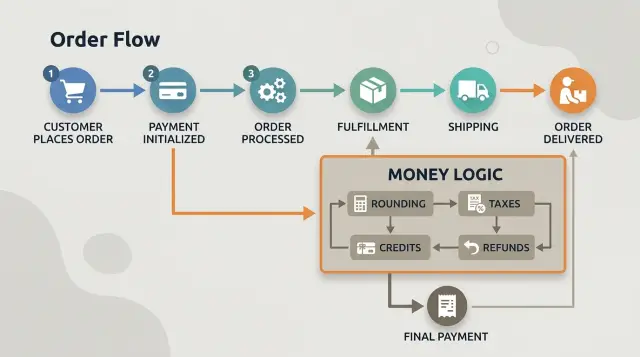
Table of Contents
Why this bug keeps coming back
Teams often start with a single order service and put everything there. It feels practical. The same code creates the cart, checks stock, picks shipping, charges the card, sends the receipt, and calculates totals.
That last job is where the trouble starts.
Order flow and money rules are different kinds of work. Order flow answers questions like:
- Did the customer click buy?
- Do we have stock?
- Should we create a shipment?
- Should we send a confirmation email?
Money rules answer something else entirely. How do you round tax in this region? Does store credit reduce the taxable amount or come after tax? If a customer gets a partial refund, which lines do you reverse first, and how do you handle the last cent?
When order code owns those decisions, totals drift over time. One developer adds a discount rule during checkout. Another patches refund math a month later. A third changes tax handling for one state or country. Each change looks small, but the logic spreads across handlers, helpers, and one-off fixes.
Then a refund bug appears, and someone patches a shared function in a hurry. The refund works. Checkout breaks. Or the cart total looks right, but the invoice and refund differ by one cent. Customers notice that fast.
This bug keeps coming back because money logic has a long memory. A small rule today affects checkout, invoices, credits, cancellations, partial refunds, and accounting exports later. If those rules live inside general order code, nobody can tell which change will break the next step.
A money module fixes that by giving every financial decision one home. Orders can still decide when to charge or refund. The money module decides how much, how to round, and which rule wins when rules collide.
That split is more than cleaner code. It gives the team one place to read, test, and change totals before finance bugs spread through the rest of the system.
What belongs in a money module
A money module should own every rule that can change an amount. If a number can move by one cent because of math, law, or store policy, keep that rule there and nowhere else.
Start with rounding. Decide when you round, how you round, and the exact step where it happens. Round unit prices, line totals, tax amounts, shipping, and final totals only at the moments you define. If one part of the app rounds per item and another rounds at the end, the totals will drift.
Taxes, credits, discounts, and refunds belong in the same place for the same reason: they affect one another. A discount might lower the taxable amount. A credit might apply before tax in one business and after tax in another. A refund might need to return item price, tax, shipping, and discount share in a fixed order.
In practice, the module usually owns rules like these:
- how prices are stored and calculated
- when taxes apply and which amount they use
- how discounts and credits reduce a balance
- how partial and full refunds split across items, tax, and shipping
- where rounding happens at each step
Keep display prices separate from stored amounts. The app can show "$19.99" to a customer, but the system should store a precise amount in a format made for calculations, such as cents. Display formatting is for people. Stored amounts are for math. Mixing those jobs creates strange bugs, especially once multiple currencies or tax rules enter the picture.
Order code should not decide money rules. It should not guess whether tax comes before a credit, whether a refund rounds up or down, or whether a discount applies to shipping. It should ask the money module for answers and save the result.
That boundary makes bugs much easier to find. If finance reports a wrong total, the team checks one place instead of chasing math across cart code, payment handlers, admin tools, and refund jobs. For teams that want cleaner billing logic, that single boundary saves a lot of time and a lot of awkward one-cent mistakes.
Put the rules in writing first
Finance bugs often start before anyone touches code. One developer rounds each line item, another rounds the final invoice, and both think they are right. A money module works much better when the team writes the rules in plain language first.
Begin with storage. Pick the smallest unit you will keep in the database and never mix it. For most currencies, that means storing integers like cents, not floating point values like 19.99. If you support currencies with different minor units, write that down too.
Then define the tax moment. Do you calculate tax when the cart updates, when the customer clicks pay, or when the invoice is created? Those choices can produce different answers once discounts, shipping, and address changes enter the picture. One written rule is better than five hidden assumptions.
A short rules page should answer five questions:
- What unit stores every amount, and how do you round?
- When is tax calculated, and do you round per line or per order?
- Do account credits expire, and what happens to leftover credit?
- How do partial refunds work, including tax and discount allocation?
- Which record gives the final total when screens disagree?
That last point saves a lot of pain. Pick one final record for totals, such as the finalized invoice or the ledger entry inside billing. Do not let the cart, payment callback, admin panel, and email template each recalculate the number their own way.
A simple case shows why this matters. A customer buys two items, uses a $10 credit, then asks for a refund on one item. If you have not written the refund rule, people will guess. One person refunds half of the paid amount. Another refunds half before tax. A third returns part of the store credit too.
Write the rule once, review it with product and finance, and keep it near the code. Boring documents prevent expensive bugs.
How to split money code from order code
First, find every place where your app changes a total. That usually means checkout, coupon handling, invoice edits, partial refunds, tax updates, and admin tools. If five parts of the code can all "fix" a price, one of them will drift.
Put the math in one place. A money module can be a package, a service, or a small library inside the same app. The form matters less than the rule: order code asks for numbers, but it does not calculate them.
A clean split often looks like this:
- Order code sends inputs such as items, prices, tax rules, credits, and refund reason.
- The module calculates totals in one pass.
- The module returns named results such as subtotal, tax, grand total, credited amount, and refund amount.
- Order code stores the result and moves the order to the next step.
- Logs and tests compare returned numbers, not hand-written math in controllers.
That return shape matters more than people expect. If the module gives back only one final number, developers will keep doing side math outside it. Return the parts. When a refund looks wrong, you want to see whether tax changed, rounding changed, or a credit got applied twice.
Keep the order layer boring. It should decide things like "customer canceled before shipment" or "payment failed." It should not decide whether tax rounds per line or on the final total. That belongs in billing logic.
Here is the split in plain terms. The order flow says, "calculate checkout for these three items in this state, with this store credit." The module returns subtotal 42.50, tax 3.19, credit used 10.00, and total due 35.69. Later, the refund flow asks the same module to calculate a partial refund for one item. The order code does not recalculate anything. It sends the facts and records the answer.
Do the move in small steps. Replace one path, keep the old result for comparison, and log any mismatch. Lean teams often do this during normal release work, one endpoint at a time. It is slower for a week or two, but much cheaper than chasing finance bugs across the whole order codebase.
A simple checkout and refund example
Say a cart has one taxable item at $19.99 and shipping at $4.00. The customer also has a $5.00 store credit. A money module should own that math from the start.
It decides how the credit affects tax, how long decimals stay unrounded, and what the customer actually pays.
The checkout
In this example, the credit reduces the item before payment. Shipping stays outside that rule, and tax applies only to the discounted item price.
- Item: $19.99
- Credit applied to item: -$5.00
- Taxable item total: $14.99
- Tax at 8.25%: $1.236675
- Shipping: $4.00
The module keeps full precision until the end. Then it adds everything and rounds the final charge once. The math is $14.99 + $1.236675 + $4.00 = $20.226675, which becomes $20.23.
That looks simple, but this is where order code often starts to drift. One part rounds tax early, another rounds the line total, and a third subtracts the credit again. A one-cent error starts there, and refunds turn it into a bigger mess.
The refund
Now the customer returns the item but keeps the shipping service. The same module can reverse only the item part because it already knows how the original charge was built.
It calculates two separate returns:
- Cash refund for the item and its tax: $16.23
- Credit restored to the customer balance: $5.00
Shipping stays at $4.00. The final state still matches the checkout math, so the customer ends up paying only for shipping.
That consistency matters more than the example itself. Checkout, refunds, customer support, reports, and accounting exports all use the same rules and the same numbers. When finance logic sits inside general order code, each path tends to patch totals in its own way. When one module owns taxes, credits, rounding, and refunds, the numbers stay boring, which is exactly what money code should do.
Mistakes that cause wrong totals
Small billing errors rarely start with one big bug. They start with tiny rule changes in several places, then one day support sees a refund that is off by 37 cents and nobody knows which number to trust.
One common mistake is rounding at different stages. If checkout rounds tax on each line item, but the final invoice rounds only once on the order total, the numbers drift. The gap looks harmless on one order. Across retries, refunds, and accounting exports, it turns into real cleanup work.
Tax rules cause the same kind of trouble. A team might store some prices as tax-inclusive and others as tax-exclusive, then forget which one a formula expects. That does not always break every order. It usually breaks only some regions, some products, or some discount combinations, which makes it harder to spot.
Refunds often go wrong when credits get treated like they never existed. Say a customer paid part of an order with store credit and the rest with a card. If the refund code sends the full item price back to the card, the customer gets too much money back. If it ignores the credit, the customer gets too little. Either way, support gets dragged in.
Data storage can make things worse fast. If your system saves "$19.99" or "EUR 19,99" as source data instead of storing plain numeric amounts plus currency, every later step becomes fragile. Parsing rules differ by locale. Formatting rules change. Source data should stay strict and boring.
Teams also create drift when they copy the same formula into checkout, back office tools, and refund scripts. One copy gets updated. Another does not. Then finance, support, and customers all see different totals for the same order.
If you notice any of these signs, your billing logic is probably still scattered around:
- checkout and admin show different totals
- refunds need manual correction
- tax bugs happen only in certain countries
- exported reports do not match the invoice
- engineers say "this path uses a slightly different formula"
Once that starts, every new promo or tax rule raises the odds of another wrong total.
A short release checklist
Money bugs slip through when teams test only the happy path and ignore the weird cents. A release should prove that totals still make sense after discounts, credits, tax changes, and refunds. This is where a separate money module starts paying for itself.
Run a few tiny examples by hand before you trust the test suite. Prices like 9.99, 10.00, and 10.01 expose rounding problems fast. Clean numbers hide them.
- Test one-cent edge cases. A cart with several low-price items can produce different results if you round each line versus the final total. Pick one rule and make sure every part of the system uses it.
- Test partial refunds after discounts. If one discount covered the full order, a refund should return only the correct share of that discount.
- Test tax changes between order time and refund time. Some systems should use the original tax snapshot. Others recalculate. Either choice can work, but the code needs one clear rule.
- Confirm credits cannot push totals below zero. Promo credit, store credit, and manual credit should stop at zero unless finance explicitly wants negative balances.
- Compare receipts, ledger entries, and support screens. The customer view and the internal view should show the same subtotal, tax, discount, credit, and refund values.
A real case makes the point. A customer buys two items, gets a discount across the order, and asks for one item back a week later after a tax rate changed. If the receipt says one number, the ledger stores another, and support sees a third, you do not have one bug. Your billing story is broken.
Save these cases as fixed release tests. A short table with expected totals beats guesswork, and it gives finance, support, and engineering one shared answer when someone asks why a refund came out to 4.98 instead of 4.99.
When edge cases start to pile up
Most billing bugs do not show up on the first happy-path checkout. They appear a month later, when one order mixes a card payment, a gift card, a promo credit, a partial refund, and a tax rule that changed last week. That is when a money module starts saving you from silent losses.
Gift cards and promo credits may look similar in the UI, but they are not the same thing. A gift card is stored money the customer can spend later. A promo credit is usually a discount you grant under your own rules. They often expire differently, get refunded differently, and land in different reports. If order code treats both as just "money off," support ends up guessing and finance stops trusting totals.
Multi-currency orders create the same kind of trouble. Teams often add a second currency after launch and assume they can convert totals wherever needed. That usually breaks refunds and reporting. Pick one source currency for the order, store the exchange rate you used, and decide whether refunds return the original charged amount or a newly converted amount. A few cents of drift on each order does not sound like much until it shows up across thousands of refunds.
Tax changes need a written rule too. If a customer bought at one tax rate and asked for a refund after the rate changed, your system should not improvise. In most cases, the order should keep a tax snapshot from the time of purchase and use that snapshot for later adjustments. That keeps invoices, refunds, and audits consistent.
Manual adjustments deserve the same care. If someone changes a total by hand, the system should record who did it, why they did it, and what type of adjustment it was. Simple reason codes such as "courtesy credit," "shipping correction," or "tax fix" save hours later.
If these questions still live in comments, support docs, or one developer's memory, edge cases have already outgrown your order code.
Next steps for a safer billing flow
Start with a plain audit. Read the current order flow from cart to refund and write down every place where the app does money math. Most teams find the same logic copied into more places than they expected.
That list gives you a risk map. If two parts of the system calculate tax or totals differently, fix that before you add new billing features. A money module helps only when one set of rules owns the math.
Start small and pick one path
Refunds are often the best first target. They touch taxes, partial amounts, credits, and edge cases, but they are usually smaller than the whole checkout flow. When refund math is wrong, support feels it fast, and customers lose trust even faster.
A practical first pass looks like this:
- Find every refund path, including admin tools and support scripts.
- List duplicated math for rounding, tax, discount reversal, and credits.
- Move that math into one place and make order code call it.
- Add tests for real cases before and after the move.
- Ship the change behind a small internal rollout if you can.
Tests matter more than the refactor itself. Before broader changes, lock in the current rules with examples that match real orders. Use amounts that usually break things: 9.99, mixed tax rates, partial refunds, store credit, and canceled line items. If one test fails after a code change, you know exactly which rule moved.
Keep the first cleanup narrow. Do not rewrite checkout, invoicing, credits, and subscriptions at once. One cleaned path gives the team a pattern they can repeat.
If the billing flow already has years of patches, a second opinion can save time. Oleg Sotnikov at oleg.is works as a Fractional CTO and startup advisor, and this kind of architecture review is part of that work. It helps when finance bugs keep coming back and the team needs a safer module boundary without stopping normal product work.
The goal is simple: one place for money rules, fewer surprises in production, and fewer refund tickets for the team to clean up.
Frequently Asked Questions
Why should money logic live outside the order service?
Because order flow and money rules solve different problems. Orders decide when to charge, ship, or cancel, while the money module decides amounts, rounding, tax, credits, and refunds.
When one service does both jobs, small fixes spread across checkout, invoices, admin tools, and refund code. That is how one-cent bugs keep returning.
What should a money module own?
A good default is to put every rule that can change an amount into the module. That includes rounding, taxes, discounts, store credit, shipping math, partial refunds, and full refunds.
If a number can move by one cent because of policy or math, keep that rule there and nowhere else.
Should I store prices as floats or formatted strings?
No. Store numeric amounts in the smallest unit your system uses, such as cents, and keep display formatting separate.
Strings and floating point values create parsing and precision problems. The app can show "$19.99" to people, but the database should keep a strict calculation format.
When should I round prices and tax?
Pick one rounding rule and use it everywhere. Decide when rounding happens, how it happens, and whether you round per line or only on the final total.
Then keep that rule in writing and in code. If checkout rounds one way and refunds round another way, totals drift fast.
How should store credit affect tax?
Write the rule before you code it. Decide whether credit reduces the taxable amount, whether it applies before or after tax, and whether shipping stays outside that rule.
Once you choose, use the same rule for checkout, invoices, and refunds. Guessing later is what creates mismatched totals.
How do I keep partial refunds accurate?
Use the same money module that built the original charge. Send it the original facts, ask for the refund result, and record the returned amounts instead of recalculating in the order layer.
That keeps item price, tax, shipping, discount share, and restored credit in sync.
What is the best first step if I want to split the code?
Start with refunds. They touch taxes, credits, discounts, and rounding, but they are usually smaller than the whole checkout path.
Move one refund path into the module, compare old and new results, and log mismatches. That gives your team a safe pattern for the next step.
Which record should count as the final total?
Choose one record as the source of truth for totals. In many systems, that is the finalized invoice or the billing ledger entry.
Do not let the cart, payment callback, admin panel, and email template each recalculate totals their own way. One final record keeps support, finance, and engineering on the same number.
How should I handle multi-currency orders and tax changes?
For multi-currency orders, store the order currency, the exchange rate you used, and the charged amounts. For tax changes, keep a tax snapshot from purchase time if your business rules need consistency later.
Without those records, refunds and reports start to disagree as rates change.
When should I ask for outside help with billing architecture?
If your team keeps patching refund bugs, support keeps fixing totals by hand, or finance stops trusting the numbers, bring in a second opinion. A short architecture review can save weeks of trial and error.
Oleg Sotnikov helps teams clean up billing boundaries, move money rules into one place, and do it without freezing normal product work.


