Monaco vs CodeMirror for in-app editors: how to choose
Monaco vs CodeMirror: compare bundle size, extension options, and editor control so you can choose the right in-app editor for your product.
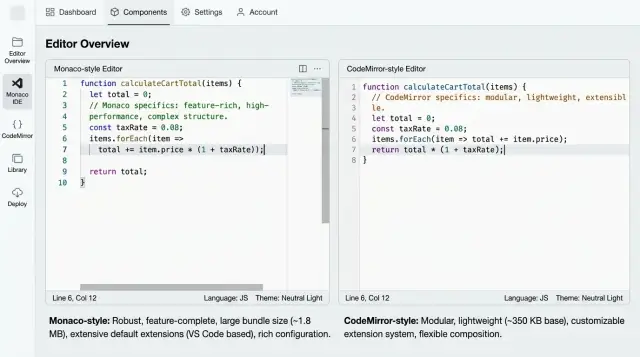
Table of Contents
Why this choice gets expensive fast
Most teams treat the editor as a box on the screen. That works for the first demo. It stops working once real users spend hours inside it.
Editor work almost always grows after launch. You start with syntax colors, line numbers, and a few shortcuts. Then users ask for search, lint messages, autocomplete, inline hints, diff views, custom commands, better mobile behavior, or AI-assisted actions. The editor stops being a small UI detail and becomes part of the product.
The cost rarely comes from setup alone. It comes from everything around it. A heavy editor bundle can make the whole app feel slow on day one. A rigid extension model can block features you planned to add later. A weak fit with your UI can force awkward workarounds that spread across the codebase.
Replacing an editor later is where teams really pay. The swap touches keyboard shortcuts, focus behavior, theming, accessibility, test coverage, docs, onboarding, and support replies. Even tiny changes create friction. Users notice when Tab behaves differently, when selection feels off, or when a familiar command disappears.
A simple example makes this clear. Say your team ships an in-app code editor for editing templates. At first, people only change a few lines. Three months later they want validation, custom tokens, snippets, and side panels with suggestions. If your editor does not bend to the product, your team starts building around its limits instead of solving user problems.
That is why Monaco vs CodeMirror is a product choice, not just an engineering preference. Start with the tasks users need to finish every day. How long do they stay in the editor? What mistakes do they make? What custom editor extensions will you need in six months? Those answers matter more than which demo looks nicer this week.
Where Monaco feels right
Monaco makes sense when users expect something close to VS Code from the start. If they write code for hours, small details matter fast: multi-cursor editing, familiar shortcuts, solid search, useful language hints, and an overall IDE feel. In Monaco vs CodeMirror, this is usually Monaco's clearest advantage.
It fits products where code editing is central, not a small extra. Think browser IDEs, API tools, SQL workspaces, internal developer tools, or AI coding products where users open large files and stay in them for long sessions. You can get to a polished baseline faster because many developers already know how this editor should behave.
Monaco is often the better fit when people care about familiar keyboard shortcuts, built-in behaviors that match developer habits, early language tooling, and solid handling for larger files. It also saves teams from spending weeks arguing over basic editor behavior.
That saved time has a price. Monaco adds more weight to the app, and setup is often more involved than teams expect. You may need to deal with workers, asset loading, language configuration, and performance tuning before the editor feels smooth in production.
That is why Monaco works best when the editor is part of your product's promise. If users will compare your in-app code editor to VS Code, starting with Monaco is often the safer call. If they only need a light place to edit snippets or small configs, Monaco can feel oversized.
A simple test helps: ask what users will complain about first. If they care about missing shortcuts, weak autocomplete, or an editor that feels unfamiliar, Monaco is probably a good fit. If your team can accept a larger bundle and a bit more setup work, you get a mature editing experience early and avoid rebuilding the basics later.
Where CodeMirror gives you more room
In Monaco vs CodeMirror, CodeMirror usually wins when the editor is part of a product, not the product itself. If you want a smaller, modular editor that fits neatly into your own UI, CodeMirror 6 gives you more freedom.
That matters when people edit more than plain code. Maybe they work with JSON, markdown, SQL snippets, a rules language, or a form that mixes text with buttons, hints, and inline controls. CodeMirror handles these cases well because you can shape the editor around the task instead of dropping in a full IDE-style experience.
It also gives you tighter control over state. You decide how commands work, what keyboard shortcuts do, when suggestions appear, and how the UI reacts to each change. If your product needs custom selections, inline warnings, read-only regions, or small widgets inside the text, CodeMirror feels flexible in a way many teams like.
Picture a SaaS product where users write automation rules with a mix of text, variables, and dropdown tokens. Monaco can feel heavy there. CodeMirror lets you build an editor that looks and behaves like the rest of the product instead of a mini desktop editor squeezed into a page.
CodeMirror is often the better choice when you need to keep editor bundle size under control, support your own text format, mix editing with product-specific UI, or control commands and state updates in detail. It is also easier to load only the pieces you actually use.
The trade-off is simple: you assemble more yourself. Monaco gives you more ready-made behavior out of the box. CodeMirror asks you to pick packages, wire extensions together, and make more product decisions early. That extra work is worth it if control matters more than fast defaults.
If your team wants to build custom editor extensions and make the editor match the product exactly, CodeMirror is often the better base. If your team wants something that feels finished on day one, CodeMirror may feel slower at first because you need to compose the experience yourself.
What bundle size changes in the real app
Bundle size is more than a score in a build report. It changes how long users wait before they can type, how smooth route changes feel, and whether the editor page feels calm or heavy.
A lot of teams check the gzip number and stop there. That misses the real cost. An in-app code editor also brings parse time, worker startup, language files, themes, and extra packages for autocomplete, linting, or search. Monaco often makes that cost obvious. CodeMirror 6 can look light at first, then grow package by package.
If you want a useful comparison, measure the moments users actually notice: the first page load when the editor route is closed, the first time they open it, the lazy-load delay when the editor mounts, the route change away and back, and how long it takes before typing feels responsive.
That last point matters more than teams expect. An editor can look loaded while workers still start in the background. Users click, type, and hit a small delay. It feels cheap, even if the pause lasts only a second.
Count every piece you ship. That includes language packages, themes, workers, search panels, linting tools, and any custom add-ons. One extra feature rarely hurts. Six small extras often do. This is where editor bundle size becomes a product decision, not just a front-end detail.
Test on an older laptop and a normal phone, not only your fast dev machine. A setup that feels instant on a modern MacBook can feel sticky on a four-year-old Windows laptop. If your customers use internal tools on average office hardware, that gap is real.
This is also where teams benefit from outside pressure to stay honest. Oleg Sotnikov often pushes startups to treat editor weight like any other UX cost: if it adds friction, it belongs in the product discussion. Sometimes the right move is lazy loading the editor. Sometimes it means shipping fewer languages on day one. Sometimes a smaller editor wins simply because users can start faster and stay focused.
How extensions and control differ
This is where Monaco vs CodeMirror stops being a design preference and starts shaping product work. Monaco feels like a full editor dropped into your app. It gives users a familiar IDE-like experience fast, but it also brings stronger opinions about how the editor should behave.
CodeMirror 6 works in smaller pieces. You add what you need, leave out the rest, and shape the editor around your product. That takes more setup early on, yet it usually gives you more freedom later.
The difference shows up quickly in the features teams touch first. Monaco feels quicker when you want classic code diagnostics and markers. CodeMirror fits better when lint rules depend on app data, custom syntax, or business logic. Monaco is great for a familiar coding flow with autocomplete, while CodeMirror often works better when suggestions come from your own commands, templates, records, or AI prompts.
The same pattern holds for commands and UI. Monaco already feels like a desktop editor. CodeMirror is easier to trim down or rewrite if users only need a small set of actions. Monaco can support custom panels and widgets, but CodeMirror often feels more natural when the editor needs inline tools, review hints, or product-specific side panels.
A simple test helps. Ask what your editor should look like a year from now. If you mostly want a solid code editing experience with known patterns, Monaco saves time. If you expect the editor to grow into a custom surface with validation, domain rules, AI actions, or mixed UI elements, CodeMirror usually gives you more room.
Teams often miss this because version one looks small. Six months later, someone asks for inline review notes, custom tokens, special paste behavior, or app-specific commands. At that point, the editor you picked starts to matter a lot.
If you want strong defaults, pick Monaco. If you want to control behavior in detail, CodeMirror is usually the better bet.
Pick one in six steps
Choosing an in-app code editor gets sticky fast. Teams often compare Monaco vs CodeMirror through feature lists and miss the simpler question: what must users actually do inside your product every day?
Start by writing down the exact actions users need in the editor. Think beyond typing code. Include autocomplete, inline errors, search, formatting, diffs, read-only views, and any custom side panels. Then mark each action as a day-one need or a later idea. That cuts a lot of wish-list noise.
Set a hard budget for load time and editor bundle size before you build anything. If the editor slows the first screen, users will feel it even if they never name the problem.
Now build, but keep it real. Do not start with a demo that only opens text and colors syntax. Use one real document, one real validation rule, and one piece of custom UI your product actually needs.
Then do the part most teams skip: build the smallest real prototype in both editors. A one-day spike often tells you more than a week of reading docs. Test shortcuts, validation, and custom UI with a few users. Watch where they pause, misclick, or fight the editor.
Choose the option that creates less rework over the next few months. If one editor needs hacks for every custom behavior, that cost keeps coming back.
A flashy demo can fool a team. The better choice is often the editor that does slightly less out of the box but fits your product cleanly. If your extension needs are modest and app size matters, CodeMirror can be easier to shape. If users expect a familiar developer tool feel from day one, Monaco may save time.
A simple product scenario
Picture a startup that adds an editor so customers can write API rules, map fields, and paste short scripts. The editor matters, but it is not the whole product. People open it to change one condition, fix one line, or test a small bit of logic, then move on.
That detail changes the choice more than teams expect. Most users are not managing full code projects with many files, complex refactoring, or deep language tools. They are editing small files, often under a few dozen lines, and they want the screen to feel fast and clear.
In that setup, custom behavior usually matters more than full IDE polish. The team may need inline warnings for business rules, special syntax for product commands, and a simple way to block invalid input before it saves. They may also want to shape the experience so non-developers do not get lost in menus, side panels, or too many suggestions.
CodeMirror 6 often fits this better. It gives the team a lot of control over how the editor behaves, and it usually keeps the bundle easier to manage. If the product only needs one focused editing surface, that trade often feels right after the first release.
Monaco starts to make more sense when users expect the editor to feel close to VS Code. That includes richer autocomplete, stronger language tooling, and a more familiar experience for engineers who live in code all day. If your product has power users writing longer scripts every day, they may notice the difference quickly.
A simple way to frame it is this: if users mostly edit short rules and snippets, one file at a time, with product-specific syntax and validation tied to business logic, the Monaco vs CodeMirror choice is usually less dramatic than it looks. In those cases, many teams do better with CodeMirror first and switch only if real users start asking for deeper IDE behavior.
Mistakes teams make early
Teams often lock this choice in after a slick demo. That is usually where the trouble starts. Week one looks great. Month six gets messy.
A common mistake is copying another product's editor just because it feels familiar. If your users mostly tweak small snippets, config files, or prompts, you may not need an editor that acts like a full IDE. An editor that feels impressive in someone else's product can feel heavy, slow, or oddly complex in yours.
Teams also judge too much from the first demo. Syntax colors, autocomplete, and a polished theme are easy to love. The harder questions show up later: how painful are upgrades, how much code will your team own, and what breaks when you add custom behavior? In a Monaco vs CodeMirror decision, those boring details usually matter more than first impressions.
Another early miss is testing only on strong developer machines. A fast laptop with lots of memory hides problems. Your users may open the editor on a budget Windows machine, an older MacBook, or a phone they use between meetings. If typing lags, scrolling jumps, or the page eats memory, people notice fast.
It also makes sense to hold back on custom features until the base editor feels solid. Teams love to add inline AI actions, custom toolbars, special commands, or complex panels right away. Then they find basic things still feel off, like selection, undo history, copy and paste, search, or mobile keyboard behavior.
A few warning signs show up early: the product demo looks smooth but real documents feel slow, the team keeps patching edge cases instead of shipping, mobile use gets pushed to "later," or internal testers like it while new users hesitate.
That last point matters more than most teams expect. If you wait too long to test with real users, you miss the small annoyances that drive editor choice. Internal teams know the shortcuts and forgive rough edges. Real users stop, get confused, and leave the field half-finished.
A simple test beats a long debate. Put both editors in front of five real users with the same task, then watch where they pause, misclick, or give up.
A short checklist before you commit
Choosing an editor too early can lock your product into months of extra work. With Monaco vs CodeMirror, the safer move is to judge the editor by the product you are building now, not by the demo that looks more impressive.
Start with user behavior. If people mostly write real code, jump between files, and expect autocomplete that feels close to VS Code, Monaco often fits. If they edit prompts, templates, queries, JSON snippets, or mixed structured text, CodeMirror usually fits better.
Decide how much editor you actually need. Some products need an IDE-style experience. Many only need a focused input area with syntax colors, search, a few shortcuts, and clear validation. Extra editor features sound nice, but they add work.
Check your bundle budget early. Editor bundle size affects first load, mobile use, and every screen where the editor appears. A few extra megabytes can turn a quick settings page into a slow one, especially if you mount more than one editor at once.
Look at the next year, not just launch day. If you expect to build many custom editor extensions, special commands, inline widgets, or domain-specific editing rules, CodeMirror 6 often gives you more control. Monaco can handle extensions too, but it nudges you toward its own way of doing things.
Be honest about support after release. Editors need updates, bug fixes, browser testing, and small UX tweaks that never stop. Pick the one your team can maintain without dread.
A simple test helps more than a long debate. Build one real screen, load the largest document you expect, and let two people use it for ten minutes. If one editor feels heavy, awkward, or hard to shape, that feeling usually gets worse after launch.
Next steps for your product
Most teams choose an editor too early. They compare feature lists, then spend weeks wiring things users never touch. A better move is smaller: define the least your editor must do to help a real person finish a real task.
Write that version down in plain language. "Users paste JSON, fix errors, and save" is clear. "We need a powerful in-app code editor" is not.
Keep the first draft tight. Decide what the user edits most often, which help they need on day one, how fast the editor should open on a normal laptop and a mid-range phone, and which actions matter enough to support with custom editor extensions.
Then build one thin prototype. Do not build a full editing framework, an extension marketplace, and three theme modes before you test the basics. Put the prototype inside a real screen from your app, load it the way production will load it, and measure actual open time, typing delay, and memory use.
That matters more than abstract debate about Monaco vs CodeMirror. A prototype shows whether editor bundle size hurts your app, whether users notice missing features, and whether your team can maintain the extension work without slowing product delivery.
Stay close to user tasks when you add features. If customers mostly edit config files, they may never need deep IDE behavior. If they write longer scripts, review diffs, or expect rich language tooling, your editor choice may shape the product itself.
That is usually the point where a second opinion helps. Oleg Sotnikov at oleg.is works with startups and small teams on product architecture, developer tooling, and AI-first workflows, and this kind of editor decision often sits right in the middle of all three.
One lean prototype, tested with real tasks, usually settles the argument fast. Pick the editor that solves today's job cleanly and still leaves room for the next feature users are already asking for.


