Module boundaries in one codebase with simpler releases
Learn how to set module boundaries in one codebase so teams keep domains separate, block bad imports, and ship together without messy releases.
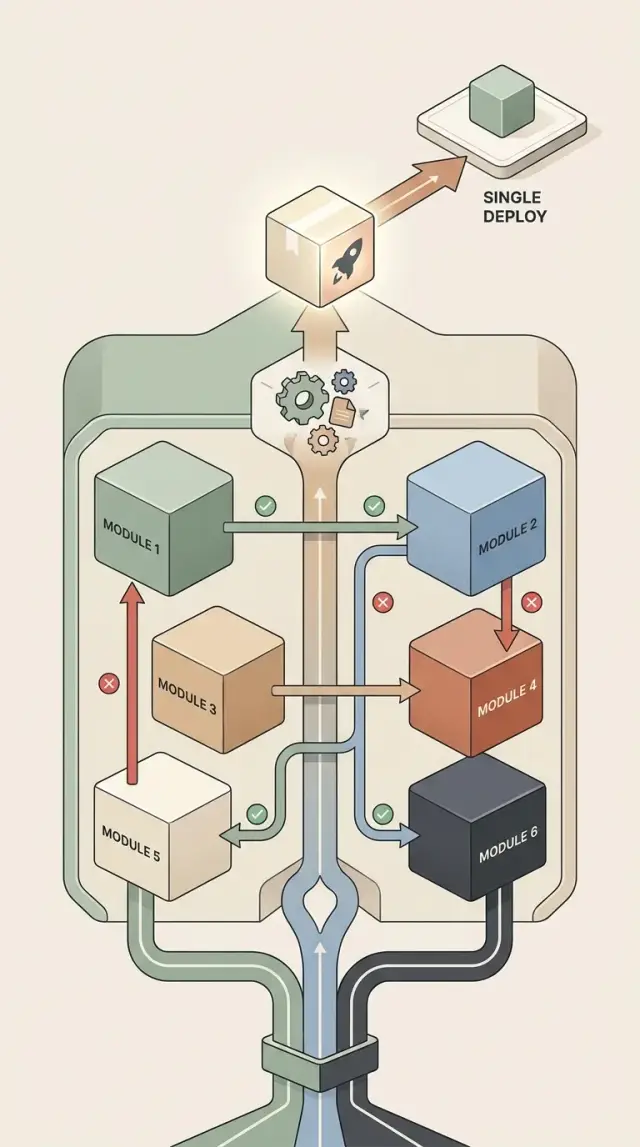
Table of Contents
Why one codebase turns messy fast
Most codebases do not fall apart because of one terrible decision. They drift there a little at a time.
For a startup or small product team, a single deploy is often the right choice early on. It keeps releases simple and avoids extra operational work. The trouble starts when deadlines get tight. People put a feature where the code already feels familiar, not where it actually belongs. Someone sees the data they need in another area, imports it, ships the change, and moves on.
That pattern repeats. Soon, business areas that should stay separate start bleeding into each other. A helper written for pricing shows up in account settings. User management logic appears in reporting. The folders may still look tidy, but the rules are already leaking.
Then the strange bugs start. A developer changes validation for one screen and a background job fails. Someone updates a shared function and an email flow breaks. The edit is small, but nobody can see everything that now depends on it.
Hidden dependencies do the real damage. A release can still look simple because there is only one deploy button. But the deploy is no longer predictable. One undocumented import or one quiet dependency on internal logic can turn a routine change into a rollback, a late-night patch, or a long round of manual testing.
Without clear module boundaries, teams pay for speed twice. They save 20 minutes by putting code in the easiest place, then lose a day tracing side effects later. At first that trade barely hurts. After a few months, the whole system feels harder to trust.
A messy monolith rarely looks messy all at once. It looks productive right up to the point where a release stops feeling safe.
What module boundaries do
Good module boundaries give each business area a clear home. When code has an obvious place to live, people stop asking, "Where should this go?" That sounds minor, but it prevents a lot of mess. Orders stay with order rules. Billing stays with billing rules. Support tools stay with support tools.
Boundaries also control who can talk to whom. One module should not reach into another module's private files just because it is convenient. It should go through a small public entry point, such as a service, interface, or function set that the other module chose to expose. That keeps internal details private, so one team can change them without breaking unrelated work.
In practice, boundaries do four things:
- They separate business rules by domain instead of by random folder names.
- They limit dependencies so one change does not spread across the app.
- They make reviews easier because a reader can see what belongs where.
- They let you keep one deploy without turning the code into a knot.
That last point matters. A single deploy can stay simple and still have discipline inside. You do not need a pile of services and network calls just to keep billing logic away from account settings. One codebase can work very well if the rules are strict and the modules stay honest.
The best boundaries feel slightly annoying at first. A developer wants to import one internal helper from another area and move on. The boundary says no. That friction helps. It forces a cleaner path and often exposes mixed responsibilities.
Small teams get the most from this. They usually want one repo, simple releases, and less operational overhead. Strict dependency rules let them keep that setup without sliding into tangled code. The result is boring in a good way: fewer surprise breakages, clearer ownership, and changes that stay local.
Start with domains, not folders
If you want clean boundaries inside one codebase, start with the business itself. Ask what jobs the software does every day. "Accounts," "billing," and "notifications" are useful module names because they match real work. "Controllers," "services," and "utils" are not. Those names describe code shape, not business responsibility.
A folder tree based on technical layers looks neat for a week, then turns into a scavenger hunt. One billing change gets spread across controllers, models, helpers, and shared code. People stop seeing where billing starts and ends. That is how a codebase becomes hard to change even when everything still lives in one repo.
Group files by the work they support. If a file exists to help billing charge a customer, it belongs in billing. If it sends account emails, it belongs in accounts or notifications, depending on who owns that behavior. Simple rule, huge payoff.
A useful test is this: if you hand a new developer the billing module, can they find the rules, data access, tests, and events for billing in one place? They should not need to jump across half the codebase to understand one customer charge.
Keep domains separate when they change for different reasons. Accounts might change because of sign-up rules. Billing might change because of invoices or tax logic. Notifications might change because someone adds SMS or new email templates. Those reasons are different, so the modules should stay separate too.
Do not make modules tiny just because you can. A codebase with 30 micro-modules often feels worse than one with eight clear ones. If two modules always change together, share the same owner, and do not have a real business boundary between them, merge them. Boundaries should reduce friction, not create ceremony.
The best module names usually sound boring. That is a good sign. They match the company's actual work, and that makes release decisions much easier.
Set strict dependency rules
A codebase stays clean only if each module knows who it can talk to. If every module can import anything, the folder structure stops mattering very quickly.
Pick allowed dependencies on purpose and write them down in plain language. Billing can read orders. Support can read orders. Orders cannot import support. The rules should match the business, not the accident of who built what first.
Each module needs a small public surface. Other modules should call a few clear functions, handlers, or events. They should not reach into private files, database helpers, or internal models. That gives you room to change the inside of a module without breaking the rest of the system.
The safest rule is also the easiest to explain: other modules may import only from the module entry point. They may not import from inner folders. If someone pulls in billing/internal/tax or support/private/macros, treat that as a real error.
A short setup is usually enough:
- Give each module one entry path.
- Keep internal code in clearly private folders.
- Add automated checks for forbidden imports.
- Fail the build or CI job when a rule breaks.
That last step matters more than most teams expect. People rarely break boundaries on purpose. They do it because a direct import feels faster when they are under pressure. If the build blocks that shortcut, the rule survives busy weeks, new hires, and rushed fixes.
You do not need heavy tooling to enforce these rules. Lint checks, package visibility rules, or a small custom script can do the job. Once the build enforces the rule every time, the boundary stops being a guideline and becomes part of how the system works.
Shared code without a junk drawer
Most codebases get a common or utils folder sooner or later. It often starts small, then turns into a hiding place for random code nobody wants to own. Once that happens, boundaries get blurry fast.
Move code into a shared area only when it is truly shared. Good shared code solves the same low-level problem for several modules and does not carry business decisions. Logging, retry logic, ID parsing, and test fixtures often fit. Discount rules, invoice state changes, and refund logic do not. Those belong inside billing or orders, even if another module wants something similar.
A simple test helps. Shared code should be used by more than one module in roughly the same way. It should avoid domain terms tied to one team or feature. It should be understandable in one sentence. If moving it changes business behavior, it probably is not shared code at all.
Generic helpers cause most of the trouble. utils.ts looks convenient, but it invites unrelated code into one drawer. Split helpers by purpose instead. Keep time helpers together, formatting together, transport code together, and test helpers separate from production code. That makes ownership obvious.
Business rules need a home, and that home should be the module that owns the outcome. If support needs to show whether an order is refundable, support should ask orders or billing for that answer. It should not copy refund rules into shared code just because it needs the same result on one screen.
Shared code also needs cleanup. Teams often wrap library calls, old internal APIs, or naming quirks, then forget why the wrapper exists. Review shared code on a schedule. Delete dead wrappers, merge duplicate helpers, and move domain logic back out when it drifts in.
If the shared area keeps growing faster than the product, take it as a warning. In a clean codebase, shared code stays small, plain, and easy to explain.
How to split an existing codebase
Splitting a live codebase works best when you do less than you want. Big rewrites look great on a diagram, then stall for months. A slower pass usually works better: draw the lines, move traffic to them, and lock them in.
Start with business areas, not technical folders. Write down what the product actually does for users: orders, billing, support, accounts, reporting, or whatever fits your app. Then map the current files to those areas, even if the answer is messy and one file touches three of them.
That map shows you where the pain is. Pick one busy area first, usually the one other parts of the code touch every day. In many apps, orders is a good starting point because so many flows pass through it.
Then create a small public surface for that area. Keep it boring. A few entry points are enough, such as createOrder, cancelOrder, or getOrderStatus. Other modules should call those functions instead of reaching into internal files.
The order matters. First list the business areas. Then mark which files belong to each area today. Choose one high-traffic area to clean up first. Add clear entry points for it. Move callers to those entry points before moving more code around.
Teams often start by shuffling files into new folders, but that only changes the shape. The real boundary appears when callers lose direct access to internals.
Once callers use the entry points, add import checks in CI. Block imports that cross the boundary the wrong way. That is the point where the boundary stops being a nice diagram and starts being enforced.
Then repeat the same process one module at a time. Do not try to clean every area in one sprint. One boundary that holds is better than five half-finished ones.
If releases need to stay simple, keep one deploy the whole time. You are changing structure, not turning the system into a fleet of services.
A simple example with orders, billing, and support
Picture a small ecommerce app that ships as one deploy. The code lives in one repository, but the team still wants clear boundaries so changes in one area do not quietly break another.
The orders module owns the purchase. When a customer clicks "Buy," orders checks the cart, prices, discounts, stock rules, and delivery options. If everything passes, it creates the order and saves its own data.
Billing has a narrower job. It charges the customer, records payment results, and handles refunds. It should not read order internals to figure out what to do. Orders should send billing only what billing needs: order ID, amount to charge, customer ID, and a payment method token.
That rule matters. If billing starts reading order tables directly, it will soon depend on order fields, discount logic, and status names. Then a harmless change in orders can break payments.
Support needs access too, but only through order entry points. A support agent may need to answer, "Has this shipped?" or "Was this canceled?" Support should ask orders for status, timeline, or customer-visible notes. It should not patch order records on its own, and it should not guess status from billing events.
A clean flow looks like this: orders creates the purchase, billing charges it, and support reads the current state through public methods. Each area has its own rules and stays in its lane.
The team still ships one deploy. That is why this approach works for many small teams. One release process, one version to test, and one rollback path if needed. Inside that single deploy, the boundaries stay firm.
Common mistakes that break boundaries
The fastest way to ruin module boundaries is to let one module reach into another module's database tables. It feels harmless at first. An orders change needs billing data, so someone writes one direct query and moves on.
A month later, billing changes its schema and orders breaks for a reason nobody expected. The boundary still exists on paper, but the code ignores it. If a module needs something, it should ask through code that module owns, not by reading or writing its tables behind its back.
Urgent work causes the next problem. A team needs one feature by Friday, so they add a shortcut around the dependency rules and promise to clean it up later. Most teams never do.
These shortcuts pile up quickly. One special import becomes five. One production exception becomes a habit in every rush release. The mess usually starts with good intentions, which is exactly why teams miss it.
Shared code can also turn into a junk drawer. A small common package for logging or date helpers is fine. Trouble starts when it absorbs billing rules, order status logic, support workflows, and half the app's utilities.
At that point, common is no longer shared code. It is a second application with no owner and no boundary. If a piece of code belongs to one domain, keep it there even if other modules need to call it.
Tests and scripts often hide dependency problems too. Production code may respect boundaries while test fixtures import anything from anywhere. Migration scripts, admin scripts, and batch jobs do the same. That still counts as coupling.
A quick review catches most of this. No module should read or write another module's tables directly. No "temporary" imports should bypass the rules. Shared packages should contain small technical helpers, not business logic. Tests and scripts should follow the same dependency rules as app code. And the module list should stay short enough that new code has an obvious home.
Too many modules create their own confusion. If every small concept becomes a separate module, people stop understanding the structure. Then they start guessing where code belongs, and those guesses turn into more leaks.
A good structure feels slightly strict, not confusing. When a developer can place a new feature without debate, the boundaries are still doing their job.
Quick checks before each release
A release gets risky when people stop noticing small boundary leaks. In a codebase with clear modules, you want the same short checks every time, even for a tiny patch. If one answer is fuzzy, pause the release and fix that first.
Before merging or deploying, make sure each module still has clear public entry points. A teammate should be able to see where other modules are allowed to call in without reading the whole folder. CI should fail on bad imports right away. If dependency rules live only in docs or in one senior engineer's head, they will drift.
Scan the changed files for private reach-ins. If orders imports a hidden billing helper because it was convenient, the boundary already got weaker. Check ownership too. Every changed file should have a clear owner. If nobody owns a file, nobody protects it when pressure goes up.
Shared code should stay small and plain. Put only low-level helpers there, such as date parsing or simple formatting, not business rules that belong to one module.
These checks are simple, but they catch a lot of release pain early. Teams often spend hours debugging broken behavior that started with one casual import across modules. A two-minute review in CI is much cheaper.
Small teams benefit the most from this habit. When the same people build, review, and ship, a few visible rules keep the release process calm. You do not need a huge governance layer. You need clear entry points, strict import checks, and changed files that still make sense after a quick read.
What to do next
Most teams should not try to fix every boundary at once. That usually turns into a cleanup project that drags on for weeks and then stalls. Pick one boundary you can enforce this month and make it real.
A good first pass starts with a plain sketch. Put every current module on one page. Draw arrows for imports, shared data, and calls across modules. The trouble usually shows up fast. One module knows too much. Shared code pulls in half the app. A release in one area forces risky testing everywhere else.
Then choose the boundary that causes the most release pain or the most cross-team confusion. Add one build rule that blocks the bad dependency. Add one review rule that rejects new cross-domain imports unless the team agrees on them.
Keep the first rule boring and strict. A simple CI check is better than a perfect policy nobody remembers. If the build fails the first time someone breaks the boundary, the rule starts doing real work.
Code review matters just as much. Reviewers should ask one direct question: "Does this change keep the dependency direction clean?" That single habit catches a lot of mess before it lands.
If your codebase already has years of overlap, an outside review can save time. Oleg Sotnikov at oleg.is works with startups and small teams as a Fractional CTO, and this kind of architecture cleanup is often where calmer releases start.
The goal is modest: one cleaner boundary, one rule in the build, and one rule in review. Do that well, and the next release usually feels much calmer.
Frequently Asked Questions
Do I need microservices to get clear module boundaries?
No. You can keep one repo and one deploy, then split the code by business area inside it. The win comes from strict boundaries and import rules, not from adding network calls and extra services.
What should I base my modules on?
Start with business jobs like orders, billing, accounts, and notifications. Skip folder names like controllers or utils, because they describe code shape, not ownership.
How many modules should I create at first?
Start with a small set that matches how the product works. If two areas always change together and one team owns both, keep them together until a real boundary appears.
How do I stop people from importing private code from another module?
Give each module one public entry path and keep the rest private. Then add a lint rule or CI check that blocks imports from inner folders, so nobody can grab internal helpers during a rush.
What actually belongs in shared code?
Share only low level helpers that stay the same across modules, like logging, retry logic, ID parsing, or test support. Keep business rules inside the module that owns the outcome, even if another area needs the same answer.
Can one module read another module’s database tables?
No. If billing owns its data, orders should ask billing through billing code, not by reaching into billing tables. Direct table access creates hidden coupling and turns small schema changes into surprise breakages.
How do I clean up an existing messy codebase without a rewrite?
Pick one busy business area first and draw a simple boundary around it. Add a few public entry points, move callers to those entry points, then enforce the rule in CI before you tidy more folders.
What should modules expose to each other?
Expose only what another module truly needs. For example, orders can send billing an order ID, amount, customer ID, and payment token, while support can read order status and timeline through order APIs.
What should I check before each release?
Check that changed files still fit their module, imports go through public entry points, and shared code stays free of business logic. If one change forces broad manual testing across unrelated areas, stop and fix that leak first.
How do I know when boundary problems are serious enough to get outside help?
You usually feel it before you can name it: small edits break distant features, reviews take longer, and people guess where new code belongs. If that keeps happening, an outside architecture review can save weeks of trial and error.


