Model routing by task type to cut AI spend for teams
Learn how model routing by task type helps teams match support, coding, extraction, and summarization work to the lowest-cost model that still works.
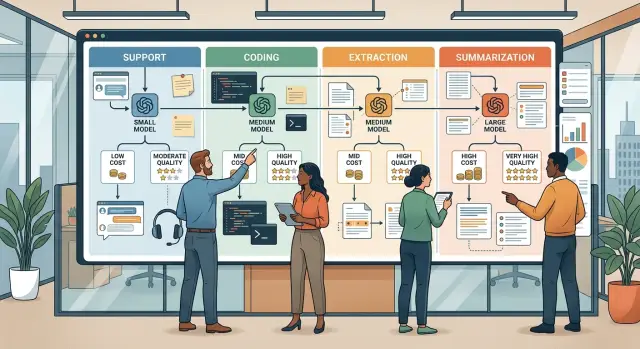
Table of Contents
Why one default model wastes money
Most teams start with one model for everything because it's easy. They plug it into support, chat, internal tools, and a few automations, then move on. That works for a while. Then the bill grows faster than the value.
The problem is simple. Different tasks need different levels of reasoning. A refund lookup, a short email rewrite, or a clean extraction job does not need the same model you would trust for a risky code change or a messy product decision. If every request goes to the strongest model, you pay top rates for routine work.
The waste shows up quickly. Simple requests burn expensive tokens. Fast jobs wait for slower responses. Teams stop testing ideas because every experiment costs more. Finance starts to see AI as a growing bill instead of a useful tool.
Support teams usually feel this first. They handle hundreds of short requests, many with clear patterns. If each one goes to the same top model, costs rise even when the answers stay basic. Extraction work has the same problem. If the job is just pulling names, dates, or order numbers from text, a premium model is often overkill.
Coding is different, but even there, not every task deserves the same treatment. Writing a regex, drafting a small unit test, and reviewing a risky migration are not the same job. Treating them like they are is where money leaks.
That is why routing by task matters. The useful question is not "Which model do we use?" It is "What does this task actually need?" Once teams make that shift, it gets much easier to pick the cheapest model that still clears the bar.
What support, coding, extraction, and summarization actually mean
Teams usually save money once they stop thinking in terms of one general AI workflow and start thinking in job types.
Support work is straightforward customer help. Someone asks why a payment failed, how to reset a password, or whether a refund is still in progress. The model does not need fresh insight. It needs to read the message, follow company rules, keep the tone calm, and know when to hand the case to a person.
Coding work carries more risk. A weak support answer might create one more ticket. A weak code answer can break a build, fail tests, slow the app, or open a security hole. That is why teams usually break coding into smaller tasks and add review steps before they trust the output.
Extraction is structured data work. The input might be messy, like emails, invoices, PDFs, chat logs, or form text. The output should be fixed and neat: customer name, order number, date, total, status. Style barely matters here. Accuracy and consistency do.
Summarization is different again. The model takes something long and makes it short without losing the point. That could mean turning a meeting transcript into action items or compressing a long support thread into a short case note. It usually needs less reasoning than coding, but it still needs judgment. The model has to decide what to keep, what to cut, and what must stay exact.
Once a team labels work this way, model choice gets easier. You are no longer hunting for one perfect default. You are matching each job to the least expensive model that still does it well.
How teams choose the cheapest model that still passes
Teams that control AI spend usually judge each model on three things: quality, speed, and cost per task. A cheap model that misses facts fails. A model that writes beautifully but takes too long for live support also fails. The best option is the cheapest one that meets the standard for that specific job.
Good teams usually start lower than they expect. They try the cheapest model that might work, then test it with real prompts before making it the default. That matters because savings only show up once you stop assuming every request needs the strongest model.
A simple evaluation process is enough for most teams:
- Define what a pass looks like for each task.
- Test with real prompts from your team, not vendor demos.
- Compare failure rate, latency, and cost together.
- Move up to a stronger model only when the cheaper one fails too often.
Real prompts change everything. A support team may care about correct refund rules, calm tone, and replies in under six seconds. A coding team may accept slower output if the code runs and fits the repository style. An extraction flow may need near-perfect field accuracy, while a summary can tolerate wording differences as long as the facts stay intact.
That is why one shared benchmark usually fails. Each workflow needs its own small test set built from real tickets, documents, and code requests.
One practical rule helps keep costs down: promote only the cases that need it. If a cheaper model passes 80 percent of requests, keep those there. Route the harder 20 percent up. That one change often cuts spend fast without lowering the quality people actually see.
How support teams route requests
Most support tickets do not need the biggest model. Password resets, shipping times, account limits, and basic how-to questions usually fit a small fast model that can answer in seconds at low cost.
The expensive route starts when a ticket can affect trust or money. Billing disputes, refund requests, contract questions, policy exceptions, or messages full of anger and unclear facts need more care. A stronger model often handles long threads better and is less likely to miss a detail buried in the message history.
This only works if every route follows the same rules. The tone, escalation rules, privacy limits, and refusal rules should stay in one shared instruction set. Then you change the model only when the task or risk level changes. Customers should not feel like they are talking to two different companies.
A simple triage pattern is often enough. Short FAQ and order status questions go to the small model. Tickets that involve billing, policy, refunds, or account access go to the stronger one. If the answer looks uncertain, the system either escalates to a person or retries with the stronger model.
Teams get the best results when they review misses every week. Look at replies that caused follow-up tickets, refunds, or manual fixes. If the cheaper model keeps failing on one pattern, move that pattern to a stronger route or tighten the prompt.
That is what good routing looks like in support. Use the cheap route when the task is clear. Pay more only when the cost of a mistake is higher than the extra tokens.
How coding work usually splits across models
Coding does not need one model for every step. Teams usually overspend when they send every coding prompt to the strongest model, even when the job is small.
A better split is simple. Use the stronger model for new code, tricky refactors, and bugs that need real reasoning. If a service fails only under load or a migration touches several parts of the app, the more capable model often earns its cost.
Use the cheaper model for narrow jobs. Good examples include writing unit tests from existing code, updating a small function, fixing a simple type error, or changing copy in UI files. These tasks still need review, but they rarely need the deepest reasoning.
Explanation requests should follow a separate path from code changes. If a developer asks, "Explain this stack trace" or "Summarize what this file does," a low-cost model is often enough because no one plans to paste the answer straight into production.
The route should depend less on who asked and more on what the model must produce.
One rule matters more than the model choice: every code output should hit checks after generation. Linters, tests, build checks, and code review catch weak answers before they reach production. That is where a lot of the real savings come from. A cheaper model becomes much more useful when the workflow around it is strict.
That same pattern shows up in real AI-first engineering setups. Oleg Sotnikov, through his Fractional CTO work at oleg.is, builds development environments with automated code review and intelligent testing. The principle is the same: generate, check, and merge only what passes.
A small team might use a strong model to fix a hard caching bug, then hand test generation and comment cleanup to a cheaper one. Same repository, same sprint, different price for different work.
How extraction and summarization break in different ways
Extraction pulls exact facts into fixed fields. Summarization compresses meaning. They sound similar, but they fail differently, so they should not share one default model.
Extraction often works well on a smaller, cheaper model, especially when the input is clean and repetitive. Invoices, order forms, and standard support logs are good examples. If the structure is predictable, a small model can pull dates, totals, names, IDs, and issue types at very low cost.
That only works when the format stays tight. Teams should validate every response against a schema and compare sample outputs with real records. If the model changes field names, skips values, or adds chatty text around the result, it failed.
Summarization is looser. A summary can use different words and still be good, which makes evaluation harder. There is often no single correct output. Instead, teams need to check a few simple things: Did it keep the facts people need? Did it leave out something important? Did it invent claims that were not in the source? Did it stay short enough for the workflow?
Document variety changes the route for both tasks. A clean form is easy to extract from. A messy email chain, scanned PDF, or long contract with odd sections often needs a stronger model. The same goes for summaries that drive real decisions, where one missed detail can create extra work later.
The metrics should match the task. For extraction, track missing fields, wrong labels, extra text, and records sent for review. For summarization, track omissions, invented details, and summaries that run too long or miss the point.
This is one of the clearest places to save money. Keep cheap models on clean field capture. Escalate only when the document is messy, the schema breaks, or the summary needs more judgment.
A simple example from a small team
A 12-person SaaS team handles about 600 support tickets a week, writes release notes every Friday, and processes 900 invoices a month. For months, they sent everything to one large model because it felt safer. The setup worked, but the bill kept climbing, and most tasks did not need that much reasoning.
They switched to routing by task. Support tickets went to a small chat model for common billing, login, and setup questions. Release notes went to a mid-range model that turned rough internal notes into clear updates. Invoices went to a small extraction model that pulled vendor name, date, total, and tax into fixed fields. A large model waited as a fallback for unclear tickets, strange invoice layouts, or missing product context.
They also set one escalation rule. If the first model showed low confidence, left fields blank, or got a thumbs-down from a person, the system retried with the larger model. The team still reviewed anything customer-facing before it went out.
After three weeks, the pattern was obvious. About 82 percent of support tickets stayed on the small model. Release notes needed the fallback only when engineers wrote vague changelog notes with almost no detail. Invoices stayed on the extraction route unless a supplier sent a messy PDF scan.
The quality bar did not drop. First reply time stayed the same. Release notes still needed one editor pass. Finance found the same error rate as before, then a slightly lower one after the team added a few invoice templates.
The bill changed fast. Because only the hard cases reached the expensive model, total spend dropped by roughly 45 percent in a month. There was nothing fancy about it. The team matched each job to the cheapest model that could do it well enough, then kept one stronger option for the cases that broke the rule.
How to set up routing without overbuilding it
Most teams do not need a complicated router on day one. They need a small test that matches real work and shows where a cheaper model is good enough.
Start by pulling a week of real prompts and sorting them into a few plain buckets: support replies, coding help, data extraction, and summaries. If one bucket has barely any volume, merge it for now or ignore it until it grows.
Next, give each bucket one pass rule. Keep it simple. A support draft must follow policy and sound calm. An extraction result must return the right fields. A summary must keep decisions and action items. Code help must compile, or at least avoid obvious bad changes.
Then run the same sample set through two or three models. You do not need a huge benchmark. Thirty to fifty examples per bucket is usually enough to spot trouble. Compare cost, speed, and error rate side by side.
After that, define one default route, one fallback, and one review owner. A small model can handle the first pass for common tickets or short summaries. If the prompt is long, messy, or risky, send it to a stronger model. Assign one person to review misses every week and adjust the route when needed.
Finally, write down the exact reasons a request should move up. Do not leave it to gut feeling. Production code changes, refund disputes, scanned documents with bad text, and summaries from long meetings with many decisions are all clear examples.
A small team can do all of this in a spreadsheet before writing any automation. That is often the smarter move. You learn where quality drops, where costs pile up, and which tasks actually deserve the expensive model.
Mistakes that push costs back up
The fastest way to waste money is to judge a model on one great demo. A lucky result tells you almost nothing about how it will behave across 500 support replies, 200 extraction jobs, or a week of coding tasks. Teams need pass rates, failure rates, retry rates, and average token use for each task.
Another common mistake is using the same quality bar for very different jobs. A support reply can be short, polite, and mostly correct. A code change needs much tighter checks. An extraction task may care only about structured accuracy. If you mix all of that together, the strongest model starts to look like the only safe option, even when it is not.
Prompt size quietly drives bills up. Retries do too. So does asking for long answers when a short one would do. Many teams stare at price per token and miss the bigger issue: weak routing logic sends a simple summary through a huge prompt, triggers two retries, and produces a thousand words nobody needed.
Risky work still needs human review, even when the model looks good in testing. Contract summaries, production code, refund decisions, and anything tied to compliance should not go straight to users or systems without a check. Skip review after a few good runs and the cleanup usually costs more than the saved tokens.
Routing rules also get stale. Models change, prices change, and your own work changes. A support flow that needed a mid-tier model three months ago may now pass on a cheaper one. A coding flow may need the opposite once the codebase gets more complex.
A light monthly review is usually enough. Re-test each route on a fixed sample. Track retries, prompt length, and output length by task. Keep separate pass rules for support, coding, extraction, and summarization. Keep human approval for work that can cause real damage. Remove routes that nobody uses or that fail too often.
Teams that do this usually spend less without lowering the bar. Teams that do not often blame model prices when the real problem is weak routing discipline.
Before you scale the setup
A routing setup can look cheap on paper and still waste money in daily use. Retries, broken formats, and slow responses erase the savings fast.
Before rolling it out to more users, test it against normal work for a full week, not a clean demo. Real traffic shows where the cheap model holds up and where it quietly creates cleanup work.
Check success rate first. If the lowest-priced model finishes the task often enough without a second pass, keep it there. If people keep rerunning the same request, it is not cheap anymore.
Check format compliance next. A model that returns the wrong JSON shape, misses fields, or adds extra text pushes work onto parsers and staff.
Then check wait time. A lower bill does not help much if support replies stall or an internal tool feels slow enough that people stop using it.
Also look at where failures bunch up. Teams often find that one task type causes most of the trouble, like long support threads, messy document extraction, or code changes with unclear context. Finally, watch prompt size. Prompts tend to grow over time as people add more rules and examples. Costs rise quietly, and nobody notices until the monthly bill jumps.
The scorecard does not need to be complicated. Track pass rate, repair rate, latency, and average tokens per request for each task type. If one route fails on two of those four measures, change it before traffic grows.
What to do next
Start small. Pick one flow that already costs too much, such as long support replies or code generation, and track it for two weeks. Measure cost per task, pass rate, and how often a person has to fix the result.
That short test usually settles the argument faster than a month of debate. Teams often find that one model handles easy work just fine, while a stronger model only needs to step in for edge cases.
Keep the rules easy to explain. If no one on the team can describe the routing logic in one minute, it is probably too messy.
Before you add more models, write down your pass bar in plain language. A support draft might pass if it is accurate, polite, and needs less than a minute of editing. An extraction task might pass only if the fields match the source text with no missing values.
A simple next move is enough: choose one expensive workflow, run the current model and one cheaper model side by side for two weeks, score outputs against a written pass bar, and route only the tasks where the cheaper model clearly passes.
Do not chase tiny savings with complicated rules. Saving a few cents is not worth extra review time, broken logic, or team confusion.
If your team needs help setting this up, Oleg Sotnikov at oleg.is works with startups and smaller businesses on AI-first development workflows, infrastructure, and practical model routing. That kind of outside review is useful when costs are rising, quality feels uneven, or nobody agrees on which model should handle which job.
The best next step is usually the boring one: test one flow, keep the rule simple, and define what "good enough" means before you expand.
Frequently Asked Questions
What is model routing by task type?
It means you do not send every request to one model. You match each job to the cheapest model that still meets your quality bar, then send harder or riskier cases to a stronger fallback.
Why does one default model usually waste money?
Because simple work ends up using expensive tokens. You also slow down fast jobs and make small experiments cost more than they should.
Which tasks usually fit a cheaper model?
Short support replies, basic rewrites, simple summaries, and clean field extraction often fit a cheaper model. Narrow coding tasks like small tests, copy edits, or simple type fixes can fit there too if your checks catch mistakes.
When should we use a stronger model instead?
Send work up when a mistake can cost money, trust, security, or a lot of cleanup. Billing disputes, refund decisions, messy documents, risky code changes, and long threads with unclear context usually need more reasoning.
How do we test if a cheaper model is good enough?
Pick 30 to 50 real examples for each task and write a plain pass rule. Then compare pass rate, speed, retries, and cost per task side by side, and keep the cheaper model only if it clears the bar often enough.
Should support teams use more than one model?
For support, route common questions like password resets or order status to a small fast model. Route billing, policy, refunds, account access, and angry or unclear tickets to a stronger model or a human.
How should we split coding tasks across models?
In coding, split the work by risk, not by job title. Use a stronger model for new code, tricky bugs, and refactors, and use a cheaper one for narrow edits, test drafts, explanations, and small fixes that your build and review process can verify.
Can small models handle extraction and summarization?
Yes, if the input stays clean and the output format stays strict. Small models often do well on invoices, forms, and short summaries, but messy scans, long contracts, and decision-heavy summaries often need a stronger route.
Do we still need human review?
Yes. Keep people in the loop for production code, refund decisions, contract summaries, compliance work, and anything user-facing that can cause real damage.
What is the simplest way to start model routing?
Start with one expensive workflow and run your current model next to one cheaper model for two weeks. Track pass rate, repair rate, latency, and token use, then keep the cheaper route only where it clearly works.