Human override for model routers on weird failure days
Human override for model routers gives operators one safe fallback: pin a provider or block a task type when failure patterns shift during the day.
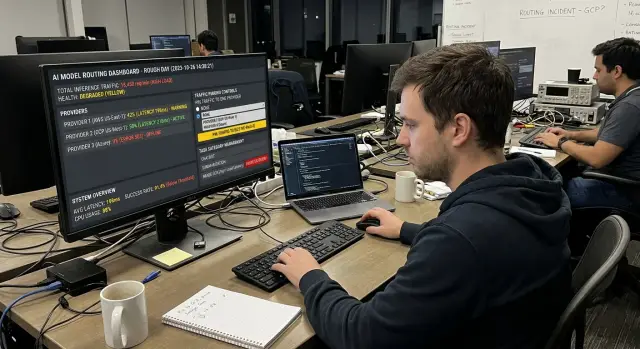
Table of Contents
What goes wrong on weird days
A model router decides which AI model gets each request. On a normal day, it follows simple rules: cost, speed, task type, or past success. That is usually enough.
Then a weird day hits. The prompt stays the same, but the output changes anyway.
That can happen for plain, messy reasons. A provider rolls out a quiet model update. A safety filter gets stricter for a few hours. Latency jumps in one region. A model starts wrapping plain text in markdown, JSON, or random labels your app never asked for. None of that shows up in the prompt, but users feel it right away.
The first signs are easy to miss if nobody is watching live traffic. Prompts that worked yesterday start getting refusals. Replies slow down, time out, or trigger retries. JSON breaks. Formatting drifts. One task gets much worse while everything else looks fine.
This is where automatic routing fails in a very human way. The router still trusts old scores, old price rules, or yesterday's success rates. It keeps sending work into the same bad path because it has not caught up yet. If a support team depends on that flow, even a short drift can create a backlog and a lot of cleanup.
Operators need one manual control for these moments, not ten settings. One clear override.
That override gives a person a fast way to pin a provider for a while or block a task class from going to a model that is acting strangely. It does not replace the router. It gives the router a seat belt for failure days. Without that control, the system can make the same wrong choice hundreds or thousands of times before the metrics look bad enough to react.
What the override should do
On a bad day, the router needs a small emergency panel, not a maze of settings. One operator should be able to pin traffic to one provider when the usual mix starts acting oddly. That action should work fast, and the scope should be clear: all traffic, one workflow, one tenant, or one region.
The same panel should let the operator block one task class for a short time. If summarization starts failing in odd ways, stop summarization. If code generation starts returning broken output, stop that class and leave safer tasks running. Short expiry times matter here. Most blocks should end on their own after 15, 30, or 60 minutes unless someone renews them.
Many teams overbuild this part. Emergency controls should stay separate from normal routing rules. The usual rules can stay smart and automatic. The override should sit above them like a temporary stoplight. When the timer ends, the router should fall back to its normal policy without anyone rewriting weights, prompts, or model scores.
A good override is obvious in a few simple ways. Everyone on call should see it on the dashboard. One action should undo it. The system should log who changed it, when they changed it, and why. The scope should be narrow enough that you can target one provider, one task class, or one tenant without touching the rest of the system.
If an operator pins a provider, everyone on call should notice it at once. Hidden overrides create a second outage because people debug the wrong thing. A bright status banner, a start time, an expiry time, and a short reason field are usually enough.
Undo matters just as much as control. Teams should not need a deploy, a config edit, or a ticket to reverse an emergency action. One click or one command is enough.
Logging is the part people skip and regret later. Keep a plain audit trail with the actor, the scope, the reason, and the result. Oleg Sotnikov often pushes teams toward this kind of control surface in AI-heavy systems: a few switches, clear ownership, and no mystery state when production gets weird.
When to pin one provider
Pin one provider when the router starts making more bad calls than good ones. If one provider stays stable while others suddenly fail, drift in tone, or break the expected output, a temporary pin can calm things down fast.
Use the pin for work people notice right away. Customer support replies, case summaries, approval notes, and any task with a strict format usually suffer first when routing gets shaky. If one model keeps the tone polite and the structure consistent, it is usually the safer choice for that task until the issue clears.
The pattern matters more than one odd result. A pin makes sense when one provider still passes review while others start missing basic checks, when retries rise because responses time out or arrive in the wrong format, when reviewers spot tone swings that would confuse customers, or when the queue grows because the router keeps choosing weak options.
Keep the pin narrow. Do not force every task to one provider if only one task class has problems. If refund emails need a calm, consistent style, pin only that workflow. Leave less sensitive work alone so the router can still balance cost and speed where it is safe to do so.
Always set an expiry time. A pin without a time limit turns into a hidden default, and that creates new problems later. Pick a short window that fits the incident, such as 30 minutes, 2 hours, or one shift. When the timer ends, review the metrics and decide again.
Write down the change while you make it. Record who set the pin, when they set it, which provider they chose, which task it covers, and why they changed it. A short note like "Pinned provider A for support replies after JSON and tone failures from provider B" is enough to help the next operator make a clean call.
When to block a task class
Block a task class when the mistake is visible to users and hard to undo. A bad summary can change the meaning of a support case. A broken extraction can store the wrong date, total, or account number. If people will notice the error before your team can catch it, stop that class first.
One strange answer is not enough. Drift is the real warning sign. Summaries may start dropping facts, coding help may suggest risky edits, or extraction may begin swapping fields. If one class goes off while others still pass checks, blocking that class is often safer than pinning every request to one provider.
This is where the override earns its keep. You do not need to shut down the whole system. You cut traffic to the failing lane and keep the rest moving.
Keep low-risk work on if your guardrails still hold. Internal tagging, draft cleanup, or background categorization can stay active when a review step still catches bad output. That gives your team some throughput instead of a full stop.
A simple rule works well: stop tasks that can create user-facing errors or corrupt records, pause any class with a clear jump in failed checks or complaints, and keep tasks running when human review or automated checks still protect users. Then recheck the block after a short fixed window.
Tell support and ops exactly what users will notice. Do not send a vague alert. Say "Ticket summaries are off for now, so agents need to read the full thread" or "Invoice extraction is paused, so uploads will process later." Clear wording cuts confusion and stops teams from guessing.
A good block should feel boring. Users may see slower handling or a temporary manual step, but they should not see wrong answers spread through your product. That trade-off is usually worth it on weird days.
How operators use it step by step
A manual override works best when the operator follows the same routine every time. Bad days create noise. A fixed process keeps people from guessing, overreacting, or leaving a risky override in place for too long.
Start with evidence from live traffic, then make the smallest change that protects users.
- Look for a repeat pattern. Alerts may show rising errors, support tickets may mention the same bad answer, or sampled logs may reveal one provider failing on the same kind of request. You do not need perfect certainty. You need enough proof that this is a real pattern.
- Run a few fresh tests. Use recent prompts that match the failing requests as closely as you can. If the same problem shows up again, note what failed: wrong format, timeout, refusal, unsafe answer, or a cost spike. Fresh tests stop you from acting on stale data.
- Pick the safer override. Pin one provider when users still need the task to work and another provider handles it well enough. Block a task class when the task itself has become risky, too unreliable, or too expensive across the available choices. If one action affects fewer users, choose that one.
- Set the override with a review time. Keep the scope narrow if you can, such as one task class, one customer group, or one region. Record who changed it, why they changed it, and when the team will check again. Thirty or sixty minutes is often enough for a first review.
- Watch the first results closely. Check error rate, latency, cost, and new tickets. If the symptoms drop fast, keep the override until the review time. If nothing improves, change course quickly instead of waiting for more damage.
Remove the override as soon as normal routing passes the same tests and live traffic stays calm for a while. Teams often forget this last step. Old emergency rules pile up, and the router gets harder to trust on the next bad day.
A simple example from a support team
At 1:10 p.m., a support team starts seeing odd reply drafts. The model that usually handles first-pass responses begins changing customer names in the text. "Jon" becomes "John," "Marta" becomes "Maria," and one company name loses a word. The replies still sound polite, which makes the bug easy to miss and risky to send.
The operator checks the last 20 drafts and finds that the pattern is new. Nothing changed in the ticket system, so the safest move is simple: pin a provider for customer replies until the shift ends. The team routes all outgoing reply drafts to the safer provider for the rest of the afternoon and stops the bad edits right away.
They do not stop every AI task. That would create more work than needed. Classification and tag suggestions keep running because those outputs still look normal.
A second problem shows up in document summaries. The router starts returning summaries with broken headings, missing bullet spacing, and chunks of copied text. Those summaries go into internal notes, so the team can live without them for a few hours. The operator uses the same override panel to block that task class while formatting is off.
Agents keep working. They answer customers with the pinned provider, and they write summary notes by hand when needed. The team loses some speed, but they avoid sending wrong names and messy records to customers.
Later that day, the operator reviews logs, compares outputs across providers, and runs a small test set with known customer names and summary templates. When the failing provider stops rewriting names and the summary format matches the expected output again, the team removes the block and unpins the temporary route.
That is what this looks like in practice. No big reset, no long outage, just one person making a narrow change when routing starts behaving strangely.
Mistakes that cause more damage
A manual override can stop a bad routing day from turning into a full outage. It can also make the mess worse if the control is hard to reach, easy to misuse, or left on too long.
One common mistake is hiding the override deep inside an admin menu. When a queue is backing up and users are already seeing errors, nobody wants to click through six screens to find the switch. Put the control where operators already watch traffic, alerts, and recent failures. If people cannot find it in seconds, they will improvise, and improvised fixes usually age badly.
Another problem is letting two people change the same rule at once. That creates rule flapping. One operator pins a provider, another removes the pin, a third adds a block, and now nobody knows which state is live. Assign one incident owner for router changes. The system should show who holds the control, record every edit, and make the current rule obvious on the main dashboard.
Broad blocks are risky too. A temporary block on summaries or tool calls can make sense during a spike in bad outputs, but those rules should expire on their own. Otherwise, a short-term fix becomes silent policy for the next three days. Set an end time by default. If someone wants to keep the block, make them extend it with a short reason.
Blind provider switches cause quiet damage. A different model may look stable, yet still be the wrong choice if it costs four times more, adds two extra seconds to each request, or fails on the exact format your workflow needs. Before you pin a provider, run a quick smoke test on real tasks from the affected queue.
Good overrides need boring safeguards: one visible place to change routing rules, one operator in control during an incident, auto-expiry for temporary blocks, a short test for cost, latency, and output fit, and an audit log that shows who changed what.
Teams that run lean operations usually keep these controls simple and hard to forget. That instinct is right. On weird days, the safest override is the one people can find, understand, and undo fast.
A quick check before and after the switch
A fast override can stop damage, but a rushed switch can spread it. Before anyone flips a rule, spend a few minutes checking what is actually broken and what still works.
Start with the task class, not the model name. If document summaries are failing but simple ticket tagging still looks normal, do not pin every request to one provider. Limit the change to the task that is going wrong.
Then pull the last good output for that task. One clean sample from an hour ago tells you more than a dashboard alone. It gives the operator a concrete reference: what the answer looked like before the failure started, how long it took, and whether the format was correct.
A short pre-switch check helps:
- Name the task that is failing and one task that still works.
- Save one recent good output and one bad output for comparison.
- Decide whether users are getting wrong answers, slow answers, or both.
- Write down who owns the change, when they will review it, and what triggers rollback.
That third point matters more than teams expect. Slow answers annoy users, but wrong answers create support work, bad decisions, or broken automations. If the router is only adding delay, you may accept a short slowdown instead of forcing a broad provider pin.
After the switch, check the same task again within a fixed window, often 15 to 30 minutes. Compare the new output with the saved good sample. Look for the plain stuff first: factual errors, missing fields, odd formatting, and queue time.
Also check whether the change moved the pain somewhere else. A blocked task class may reduce bad outputs but flood manual review. A pinned provider may fix quality but double response time for another workflow.
Small teams do this best when one person owns the override and one rollback note sits next to the rule. Oleg often works with lean AI operations, and this habit matters there: flipping the switch is only half the job. The other half is checking quickly, then undoing it just as cleanly if the fix misses the mark.
Next steps for a safer router
When the same emergency fix happens twice, stop treating it like a one-off. Write it down as a short rule your team can use the next time failure patterns shift.
A good rule is plain and boring. It says what the team saw, what they changed, who can approve it, and when to remove it. For example: if one provider starts returning bad JSON for invoice extraction, pin the backup provider for that task for two hours, then review the error rate again.
Keep each rule small. Define the trigger, the exact action, who can make the change, when the rule expires, and what to check before rollback.
That turns tribal knowledge into a repeatable habit. It also makes manual overrides much less risky, because people are not guessing under pressure.
Small logs help more than big reports. After each incident, record the date, the task that failed, the model or provider involved, the override used, and what happened next. A ten-line note is enough. After a few incidents, patterns show up fast. You may notice that one provider struggles with long context, or that one task class breaks only during rate spikes.
If overrides keep targeting the same kind of work, your router may need task-level controls. A single global switch is often too blunt. Support summaries, document parsing, coding help, and customer chat do not fail in the same way. Give operators separate controls for the tasks that actually drift, and leave the rest alone.
Sometimes an outside review helps. Oleg Sotnikov, through oleg.is, advises startups and small teams on multi-model routing, fallback rules, infrastructure, and AI-first software workflows. If your router keeps surprising the team, a short consultation can uncover control gaps before the next bad day.
The goal is not perfect routing. The goal is shorter incidents, fewer repeat mistakes, and a router your team can trust when something weird happens.
Frequently Asked Questions
Why can a model router break even when the prompt stays the same?
Because the model can change even when your prompt does not. Providers update models, filters tighten, latency jumps, and output format drifts, so the router keeps trusting old scores while users get worse results.
When should I pin one provider?
Pin one provider when one option stays stable and the router keeps picking weaker ones. This works best for user-facing tasks like support replies, summaries, or approvals where bad output creates cleanup right away.
When should I block a task class instead of pinning a provider?
Block a task class when the task itself turns risky to run, no matter which model the router picks. If summaries drop facts or extraction writes wrong fields, pause that class and let safer work continue.
How long should a manual override last?
Keep it short and give it an expiry from the start. Most teams do well with 15, 30, or 60 minutes for a first window, then they review and renew only if the problem stays.
Should I apply the override to all traffic?
No, start with the smallest scope that protects users. If only one workflow, tenant, or region has trouble, limit the override there and let normal routing handle the rest.
What should I check before I flip the switch?
First, confirm a repeat pattern in live traffic and run a few fresh tests with recent prompts. Then compare one good output with one bad one so you know whether quality, format, speed, or cost actually failed.
What should I watch right after the override?
Watch the first results within a short fixed window. Check whether errors drop, formats look right, latency stays acceptable, and the change creates new pain somewhere else like manual backlog or higher cost.
Who should control the override during an incident?
Give one on-call operator control during the incident. That person can act fast, avoid rule flapping, and leave a clear trail for everyone else.
What should the audit log include?
Log who made the change, when they made it, what scope they changed, why they changed it, and when it expires. Keep that note visible on the dashboard so nobody wastes time debugging the wrong state.
What mistakes make a weird routing day worse?
Teams get into trouble when they hide the control, leave overrides on too long, or switch providers without a quick smoke test. Broad changes also backfire when only one task class has problems, so narrow scope usually wins.


